Hello!
In our last lesson, we mastered IPv4 addressing, the logical system used at Layer 3 to route data across different networks. You learned how an IP address and its subnet mask work together to define a device's location on the internet.
Today, we're moving down to Layer 2 of the OSI model, the Data Link Layer, to explore a different kind of address. This lesson will focus on explaining what a MAC address is and its role as a unique hardware identifier.
Think of it this way: an IP address is like the postal address of an apartment building (the "where"), but a MAC address is like the specific apartment number (the "who"). For a data packet to reach its final destination computer, both addresses are essential. Understanding this interplay is critical for everything from network scanning to bypassing simple network security measures.
1. What is a MAC Address? The "Who" of the Network
A Media Access Control (MAC) address is the unique serial number assigned to a piece of network hardware, like your computer's Ethernet card or Wi-Fi adapter. It's intended to be a permanent, globally unique identifier burned into the hardware by the manufacturer.
Its primary job is to identify a specific device on a local network segment.
Let's start with a short video that provides a clear and concise definition.
MAC Addresses Explained: Networking Basics
This clip from the 'MAC Addresses Explained' video by WhiteboardDoodles will introduce the fundamental concept of a MAC address.
Watch from 00:26 to 00:53. This clip explains that a MAC address is a unique 48-bit identifier for network devices, often written in hexadecimal format.
2. The Structure of a MAC Address
As you just heard, a MAC address is a 48-bit number. For readability, we write it as 12 hexadecimal characters, often grouped in pairs separated by colons (e.g., 3C:5A:B4:89:67:12) or hyphens.
This address isn't random; it's structured. It's split into two 24-bit (3-byte) sections:
- Organizationally Unique Identifier (OUI): The first half of the address. This prefix is assigned to a specific manufacturer by the Institute of Electrical and Electronics Engineers (IEEE). Looking up the OUI can tell you if a network card was made by Intel, Cisco, Apple, etc.
- Network Interface Controller (NIC) Specific: The second half. The manufacturer assigns this part to ensure each card they produce has a unique address.
This combination of a manufacturer ID and a device-specific ID is what guarantees (in theory) that every network device in the world has a unique MAC address.
The following video from PowerCert Animated Videos explains this structure and introduces a helpful analogy to distinguish it from an IP address.
Let's look at the structure of a MAC address and a great analogy for understanding its purpose.
First, watch from 00:20 to 00:58 to see the breakdown of the OUI and manufacturer-specific parts. Then, watch from 02:41 to 03:32 to hear the excellent analogy comparing an IP address to a house's mailing address ('where') and a MAC address to the name of the person living inside ('who').
The image below provides an even more detailed breakdown, showing how specific bits in the first byte have special meanings, which we'll discuss later.
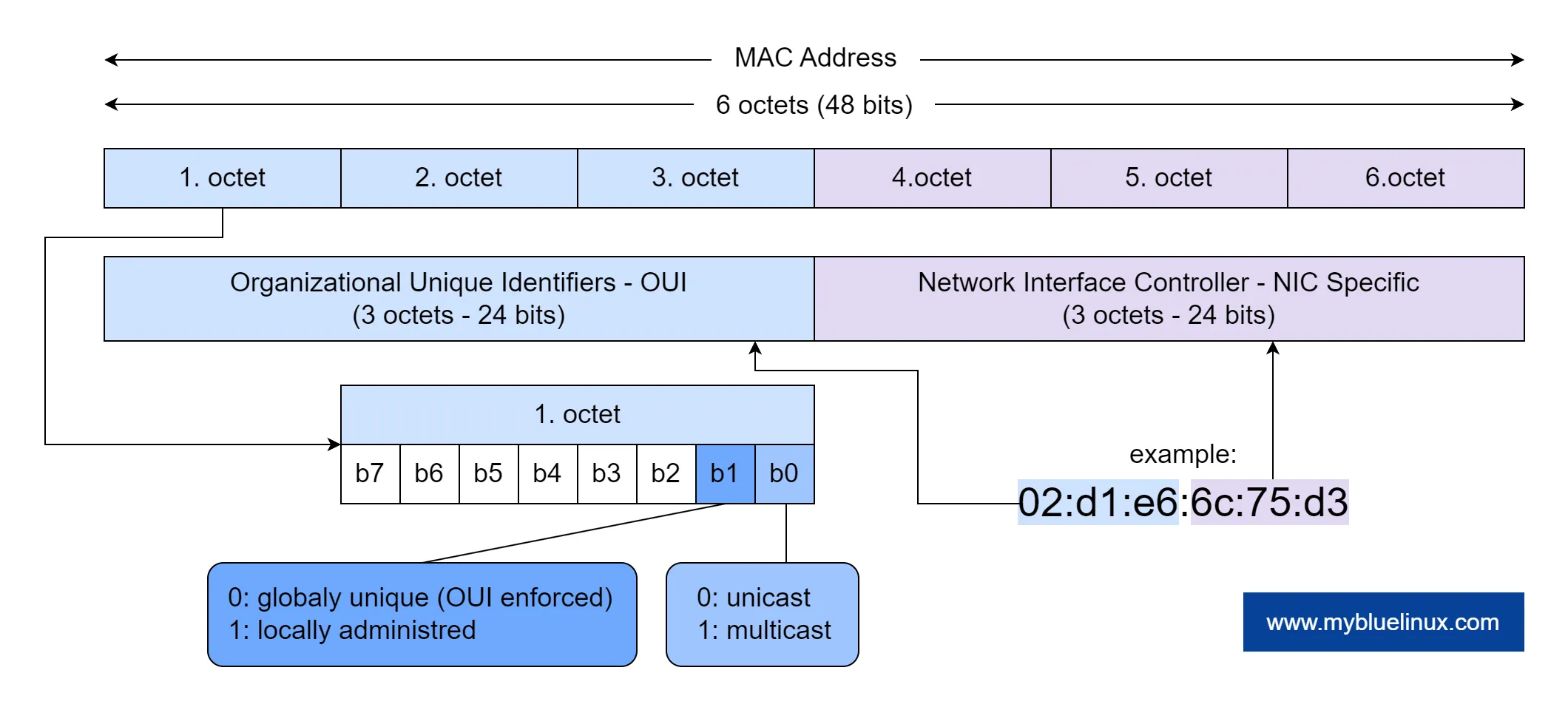
3. MAC vs. IP Address: A Tale of Two Layers
This is the most crucial concept to solidify. While both are addresses, they operate at different layers and serve different functions.
- IP Address (Layer 3 - Network): Logical, can change. Used for routing packets across different networks (the internet).
- MAC Address (Layer 2 - Data Link): Physical, permanent (mostly). Used for delivering frames to the correct device within the same local network.
When your computer sends data to a website, the IP address gets the data to the correct destination network (e.g., Google's network). Once inside that network, the MAC address is used to deliver the data to the specific server that will respond to your request.
This table provides a great side-by-side comparison.

To further reinforce this, let's read a concise summary that highlights these differences.
MAC Addresses: Importance, Functionality, and Use Cases
The following text clearly outlines the complementary roles of MAC and IP addresses.
Read the section titled 'Difference Between MAC and IP Addresses'. Focus on the four key distinctions presented in the bullet points: Scope, Purpose, Mapping, and Volatility.
4. Hands-On: Finding Your MAC Address on Linux
Now for the practical part. On your Arch Linux system, you can easily find the MAC addresses for your network hardware using the ip command.
Open your terminal and run the following command:
ip link show
You will see a list of your network interfaces. Each interface will have a link/ether entry followed by its MAC address. For example:
2: enp3s0: <BROADCAST,MULTICAST,UP,LOWER_UP> mtu 1500 qdisc fq_codel state UP mode DEFAULT group default qlen 1000
    link/ether 00:1a:2b:3c:4d:5e brd ff:ff:ff:ff:ff:ff
In this example, 00:1a:2b:3c:4d:5e is the MAC address.
Notice that you'll likely have multiple interfaces (e.g., one for wired Ethernet enp... or eth0, one for Wi-Fi wlan..., and a lo loopback interface which doesn't have a hardware MAC). Each physical network adapter has its own unique MAC address.
5. The Hacker's Perspective: MAC Spoofing
Here's where things get interesting for ethical hacking. Although a MAC address is burned into the hardware, most operating systems allow you to temporarily change it at the software level. This is called MAC spoofing.
Why would you do this?
- Bypassing Security: A common (but weak) security measure is "MAC filtering," where a Wi-Fi router is configured to only allow specific, pre-approved MAC addresses to connect. By spoofing a permitted MAC address, an attacker can bypass this filter.
- Impersonation: An attacker could impersonate a trusted device on a network, like a router or server, to intercept or manipulate traffic.
- Anonymity & Privacy: On public Wi-Fi networks, your MAC address can be logged and used to track your device's presence and movements. Modern operating systems now often use randomized MAC addresses by default on public networks to protect your privacy.
The video below discusses these security considerations and the mechanics of changing a MAC address.
MAC Addresses Explained: Networking Basics
From a security standpoint, it's crucial to understand that MAC addresses are not a foolproof identity mechanism. This segment explores their vulnerabilities and the practice of spoofing.
Watch from 03:42 to 05:37. This covers MAC address vulnerabilities like spoofing, how it's used to gain unauthorized access, and the fact that MAC addresses can be changed at the software level.
This leads to the distinction between a Universally Administered Address (UAA)—the burned-in address from the factory—and a Locally Administered Address (LAA)—an address set by software. As a user of virtual machines, you've already been working with LAAs, as hypervisors typically assign virtual MAC addresses to your VMs.
MAC Addresses: Importance, Functionality, and Use Cases
Let's formalize this idea of factory-set versus software-set addresses. This is a key concept in both virtualization and network security.
Read the subsections 'Universally Administered Addresses (UAA)' and 'Locally Administered Addresses (LAA)'. Note the explanation of how LAAs are useful in virtualization, which is directly applicable to the lab environments you build.
Conclusion
In this lesson, you've learned about the fundamental role of MAC addresses as the unique hardware identifiers for devices on a network.
Key Takeaways:
- A MAC address is a 48-bit, globally unique identifier burned into a network interface card (NIC) at Layer 2.
- It consists of an OUI that identifies the manufacturer and a NIC-specific part that identifies the device.
- The MAC address provides the "who" for data delivery within a local network, while the IP address provides the "where" for routing between networks.
- Despite being "permanent," MAC addresses can be changed in software (spoofed), which has significant implications for both security and privacy.
Next Lesson Preview:
We've now covered addressing at Layer 3 (IP) and Layer 2 (MAC). In the next lesson, we will move up to Layer 4, the Transport Layer. We'll explore the two workhorse protocols of the internet: TCP and UDP. You'll learn why one is known for reliability and the other for speed, and how they enable the applications you use every day to communicate over the network.