Hello!
In our last lesson, we explored MAC addresses, the unique hardware identifiers that operate at Layer 2 of the OSI model. We established that while an IP address (Layer 3) gets data to the correct network, the MAC address gets it to the correct device within that local network.
Today, we move up to Layer 4, the Transport Layer. This layer handles communication not just between machines, but between the specific services or processes running on them. For example, when your computer connects to a web server, the transport layer ensures that the data from your web browser goes to the web server process on the other end, and not, say, its email server process.
This lesson focuses on the two workhorse protocols of the Transport Layer. You will learn to explain the difference between TCP and UDP and provide examples of when each is used. Understanding this trade-off between reliability and speed is fundamental to network analysis, performance tuning, and identifying how different network-based attacks work.
1. The Fundamental Choice: A Formal Connection or Not?
The most significant distinction between TCP and UDP is how they initiate communication.
-
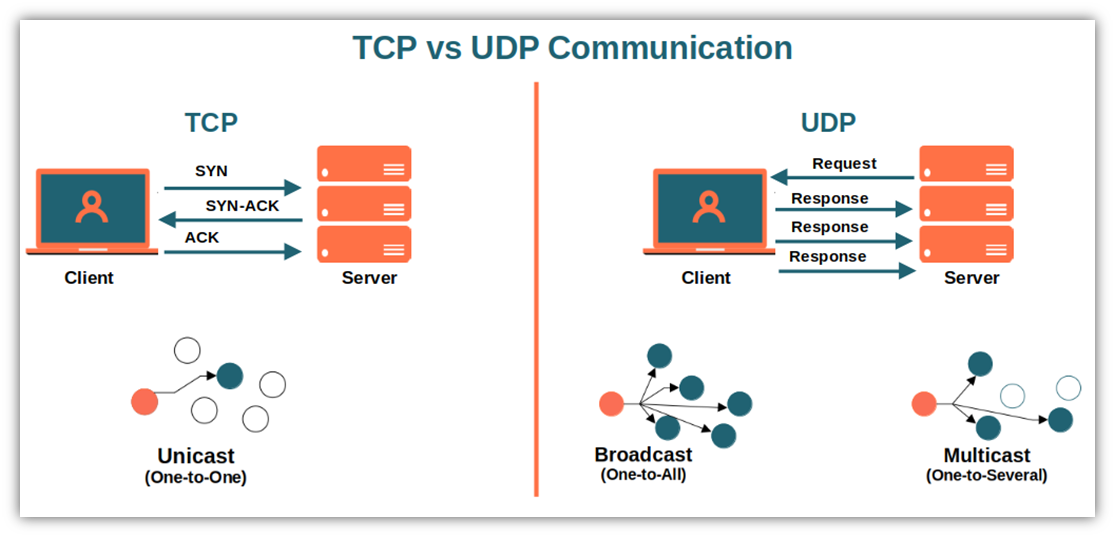
Transmission Control Protocol (TCP) is connection-oriented. Before any data is sent, TCP establishes a formal connection between the client and server through a process called a "three-way handshake." It's like making a phone call: you dial, someone answers, you both say hello, and only then do you start the actual conversation. This connection is maintained for the duration of the data transfer and then formally closed.
-
User Datagram Protocol (UDP) is connectionless. It does not establish a connection beforehand. It simply sends packets of data (called datagrams) to the destination. It’s like sending a postcard: you write it, put an address on it, and drop it in the mail. You don't know for sure if or when it arrived, and each postcard is an independent event.
The video below offers an excellent, clear explanation of this core concept.
TCP vs UDP - Explaining Facts and Debunking Myths - TCP Masterclass
Let's start with this foundational difference. This segment from Practical Networking's 'TCP vs UDP' video clearly explains what 'connection-oriented' really means.
Watch from 01:35 to 03:49. Focus on the explanation that 'connection-oriented' means there is an official start and end to the communication, unlike UDP, which just sends the data.
This image provides a great visual summary of the two communication styles. Notice the formal SYN, SYN-ACK, ACK sequence for TCP, which we'll explore in detail in the next lesson.
2. Key Differences Explored
The choice between being connection-oriented and connectionless leads to several major differences in how TCP and UDP operate. Let's break them down.
A. Reliability and Ordered Delivery
TCP is reliable. Because it establishes and maintains a connection, it includes several features to ensure data integrity:
- Acknowledgements (ACKs): The receiver sends confirmations back to the sender to say "I got packet X."
- Retransmission: If the sender doesn't receive an ACK for a packet within a certain time, it assumes the packet was lost and sends it again.
- Sequencing: TCP numbers each packet. This allows the receiver to reassemble the packets in the correct order, even if they arrive out of order due to different network paths.
UDP provides none of these features at Layer 4. It's a "best-effort" protocol. It sends the data and hopes for the best. There is no acknowledgement, no retransmission, and no sequencing handled by the protocol itself.
B. Flow and Congestion Control
TCP manages data flow. It uses a "sliding window" mechanism to ensure the sender doesn't overwhelm the receiver with data. It also has congestion control algorithms that slow down transmission if the network itself seems congested (detected by lost packets).
UDP does not have flow or congestion control. It sends data as fast as the application asks it to, regardless of whether the receiver or the network can handle it. This can lead to more dropped packets if the network path is bottlenecked.
C. Overhead
All of TCP's features require extra information to be sent with every packet. This is stored in the TCP header.
- A TCP header is 20 bytes or more.
- A UDP header is a mere 8 bytes.
This means that for the same amount of application data, a TCP packet is larger and consumes more bandwidth than a UDP packet.
The following video provides an excellent deep dive into these differences, including reliability, flow control, and header overhead.
TCP vs UDP - Explaining Facts and Debunking Myths - TCP Masterclass
The 'Practical Networking' video we started with also does a fantastic job of walking through these key dimensions of comparison.
Please watch from 03:49 to 13:33. This covers the three remaining key differences: Reliability (03:49): How TCP confirms delivery and ensures order. Flow Control (08:13): How TCP smartly adjusts its speed to fit the network. Overhead (10:36): Why TCP's features require a larger header.
The table below provides a concise summary of all these points for quick reference.

3. When to Use TCP vs. UDP
Now for the practical application: choosing the right tool for the job. The choice of protocol is made by the application developer based on the application's needs.
Use TCP When Reliability is Critical
You need every single bit of data to arrive, and in the correct order. A slight delay is acceptable to ensure correctness.
- Web Browsing (HTTP/HTTPS): You need the entire HTML file, all CSS, and all images to render a webpage correctly. A few missing packets could break the page. TCP port 443 (for HTTPS) is one of the most commonly used ports on the internet.
- Email (SMTP, IMAP, POP3): You cannot have bits of your email missing or words arriving out of order.
- File Transfers (FTP, SCP, SFTP): A corrupted file is often useless. TCP ensures the file you receive is identical to the one that was sent.
- Secure Shell (SSH): Every character you type in a remote shell must be received correctly. TCP port 22 is your gateway for secure remote administration.
Use UDP When Speed and Timeliness are Critical
You need the data to arrive as quickly as possible. A few lost packets are acceptable and are often better than waiting for a retransmission of old, now-irrelevant data.
- Online Gaming: Your position and actions need to be sent to the server immediately. Receiving an update from 200 milliseconds ago is useless and would just cause lag.
- Voice over IP (VoIP) and Video Conferencing: A momentary glitch or a few dropped pixels are preferable to the entire conversation pausing to wait for a lost packet.
- Live Video Streaming: Similar to VoIP, maintaining a continuous stream is more important than ensuring every single frame arrives perfectly.
- DNS (Domain Name System): DNS lookups need to be fast. A DNS query is a single, small request, and the response is a single, small reply. If a packet is lost, the client application can simply send the query again. DNS primarily uses UDP port 53.
For a final recap and some useful analogies, take a few minutes to read through this article.
TCP vs UDP: Differences Between TCP & UDP Protocols
This article from Avast provides a good summary and lists the advantages, disadvantages, and applications for each protocol.
Read the sections 'Which protocol is better: TCP or UDP?', 'Applications of TCP', and 'Applications of UDP'. This will reinforce the use cases we've just discussed.
4. The Hacker's Perspective & Debunking Myths
A correct and nuanced understanding is crucial in cybersecurity. Let's address some common myths.
TCP vs UDP - Explaining Facts and Debunking Myths - TCP Masterclass
Misconceptions about TCP and UDP are widespread. Let's take a moment to debunk a few key myths, which will sharpen your technical understanding.
Watch from 13:33 to 17:59. Pay close attention to the corrections for these common but incorrect statements: 'UDP is faster.' 'TCP is more secure.' (This is especially important!) 'UDP is unreliable.' 'TCP provides guaranteed delivery.'
From a penetration tester's viewpoint, this knowledge is critical:
- Scanning: A
TCP SYN scan(like with Nmap) is a classic way to check for open ports by initiating the three-way handshake. AUDP scanis slower and less reliable because UDP doesn't have to respond if a port is open. - Exploitation: When you get a reverse shell from a target machine, is that shell likely running over TCP or UDP? It's TCP, because you need a reliable, interactive command stream.
- Denial of Service: Many amplification attacks (e.g., DNS or NTP amplification) work by exploiting UDP. An attacker can send a small UDP request to a public server with a spoofed source IP (the victim's IP). Because UDP is connectionless, the server sends a large reply directly to the unsuspecting victim, flooding their network.
Conclusion
You now understand the fundamental trade-off at the heart of the internet's Transport Layer. There is no "better" protocol; there is only the right protocol for a specific application's needs.
Key Takeaways:
- TCP is connection-oriented and reliable. It provides sequencing, acknowledgements, and retransmission. It is used when data integrity is paramount (e.g., web, email, file transfer).
- UDP is connectionless and lightweight. It is fast but does not guarantee delivery or order. It is used when speed is paramount (e.g., online gaming, VoIP, DNS).
- The features of TCP come at the cost of higher overhead (larger headers) and potential delays.
- Security is not an inherent feature of either TCP or UDP at Layer 4; it is handled by protocols at other layers (like TLS/SSL or IPsec).
Next Lesson Preview:
We've mentioned the "three-way handshake" several times as the mechanism TCP uses to establish a reliable connection. In the next lesson, we will dive deep into this process, examining each of the three steps and the TCP flags (SYN, ACK) that make it all work. Understanding this handshake is essential for analyzing network traffic and understanding common port scanning techniques.