Hello! Welcome to the final lesson in our module on Linux process administration.
In our previous lessons, we've explored the lifecycle of processes: how to list them (ps), how to stop them (kill), how to move them between the foreground and background (&, fg, bg), and how to influence their priority (nice, renice). We've covered running, sleeping, and stopped states. Today, we'll investigate the strangest state a process can enter: the zombie state.
Understanding this concept is crucial for system administration and security. A zombie process is often a symptom of a deeper problem in an application. Recognizing this symptom is a key diagnostic skill.
Our learning outcome for this lesson is to define what a zombie process is and explain how it is created. By the end of this session, you'll not only know what a <defunct> process is but also understand the precise mechanism that brings it into existence.
1. What is a Zombie Process?
The term "zombie" is an excellent metaphor. A zombie process is one that has died but hasn't been properly laid to rest. It's a terminated process that still occupies an entry in the system's process table.
To understand how this happens, we need to revisit the parent-child relationship between processes. When a process (the parent) creates a new one (the child) using the fork() system call, it becomes responsible for that child.
Let's watch a short video that introduces this concept clearly.
Understanding Zombie Processes!
The video "Understanding Zombie Processes!" by Jacob Sorber provides a great analogy for the parent-child process relationship and explains the core reason why zombies are created.
Watch from the beginning to 01:55. This will cover: The parent-child process metaphor. What happens when a child process dies. The concept of "reaping" a child process and how a failure to do so creates a zombie.
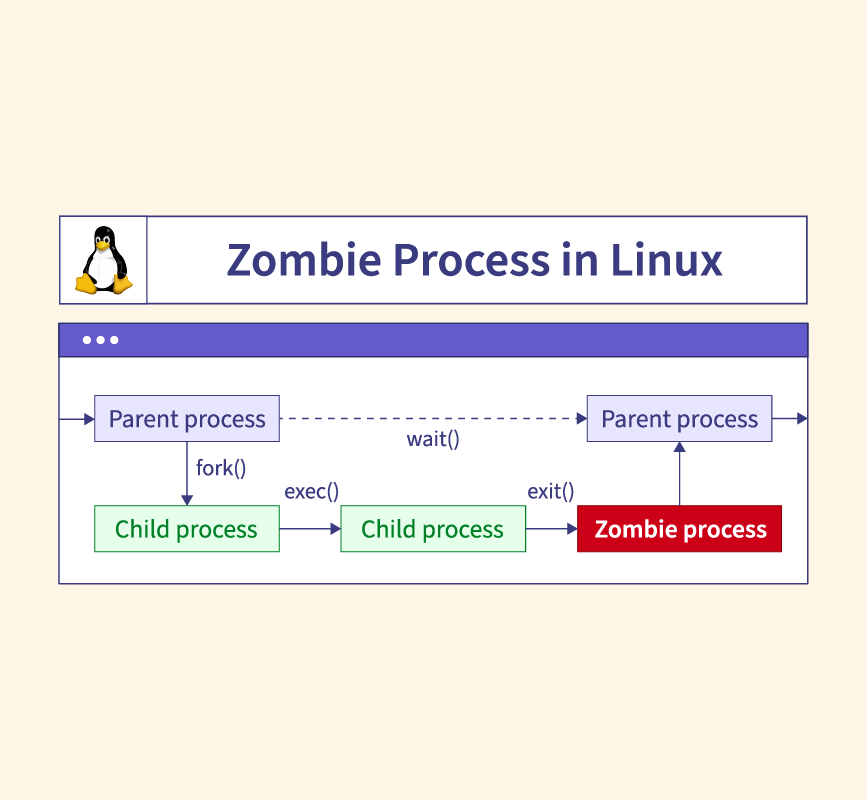
As the video explained, the key steps are:
- A child process completes its task and exits.
- The kernel frees most of the child's resources (like memory) but keeps its entry in the process table. This entry contains the child's Process ID (PID) and its exit status (e.g., whether it succeeded or failed).
- The child process is now in the zombie state.
- The kernel sends a
SIGCHLDsignal to the parent process, notifying it that its child has terminated. - The parent process is supposed to acknowledge this by making a system call, typically
wait()orwaitpid(), to read the child's exit status. This act is called reaping the child. - Once the child is reaped, the kernel can finally remove its entry from the process table.
A zombie process is created when step 5 fails to happen. The parent process, for whatever reason, never calls wait(), leaving the "dead" child lingering in the process table indefinitely.
This flowchart provides a great visual summary of this sequence.
2. How to Create and Identify a Zombie
Now that we understand the theory, let's put it into practice. We will create our own zombie process. The most direct way to do this is with a small C program where we deliberately create a "negligent" parent.
Don't worry if you aren't a C programmer. The logic directly follows the steps we just discussed.
Hands-On Lab: Raising the Dead
-
Create the C source file. Open a terminal and use a text editor like
nanoorvimto create a file namedmake_zombie.c.nano make_zombie.c -
Paste in the following code. This program forks a child. The child exits immediately, while the parent sleeps for 30 seconds instead of reaping the child.
#include <stdio.h> #include <stdlib.h> #include <sys/types.h> #include <unistd.h> int main() { pid_t child_pid = fork(); // Parent process path if (child_pid > 0) { printf("Parent process (PID %d) is sleeping.\n", getpid()); printf("The child process (PID %d) will become a zombie.\n", child_pid); // Negligent parent: goes to sleep instead of calling wait() sleep(30); printf("Parent is done sleeping and will now exit.\n"); } // Child process path else if (child_pid == 0) { printf("Child process is exiting now.\n"); exit(0); // Child terminates immediately } // Error path else { perror("fork"); exit(1); } return 0; } -
Compile the code. You'll need the
gcccompiler, which is standard on most Linux systems (including Arch).gcc -o make_zombie make_zombie.c -
Run the program in the background. We use
&so we get our terminal prompt back immediately../make_zombie & -
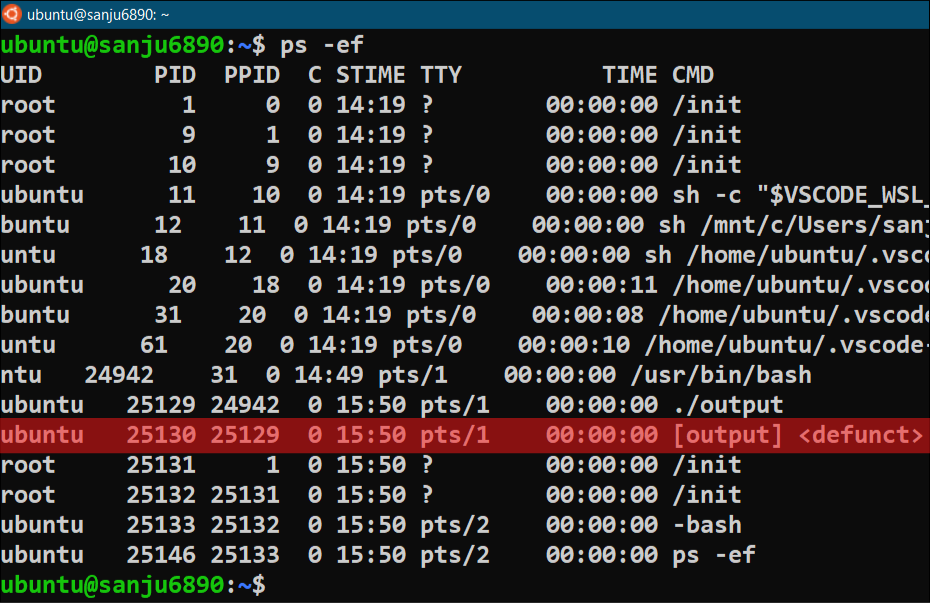
Find the zombie! The child has exited, but the parent is sleeping. The zombie now exists. Use the
pscommand to find it. TheSTATcolumn will show aZfor zombie.ps aux | grep make_zombieYou will see two entries for
make_zombie: the parent, which will be in a sleep state (S), and the child, which will be in a zombie state (Z). The child process will also be marked as<defunct>.
3. Dealing with Zombies
A common first instinct is to try to kill the zombie process. Let's see what happens.
Note the PID of the zombie process (the one with the Z state) from the ps command output. Now, try to kill it.
# Replace <ZOMBIE_PID> with the actual PID
kill <ZOMBIE_PID>
Nothing happens. Now try the ultimate signal, SIGKILL:
kill -9 <ZOMBIE_PID>
Still nothing. Why? To understand this, let's turn to a video that explains it perfectly.
Zombie Processes Explained - How to kill *defunct* programs - You Suck at Programming #035
The video "Zombie Processes Explained" from the 'You Suck at Programming' channel explains with perfect clarity why you can't kill a zombie and shows the correct way to clean it up.
Watch the segment from 03:28 to 04:34. It directly addresses the question of why kill -9 doesn't work on a zombie and demonstrates the real solution.
The video makes the crucial point: you can't kill something that's already dead. A zombie process is just an entry in the process table; it isn't running any code and doesn't consume any CPU.
The only way to get rid of a zombie is to have it reaped. Since the negligent parent won't do it, the solution is to kill the parent process.
- Find the PID of the parent
make_zombieprocess (the one in theSor sleep state). - Kill it.
# Replace <PARENT_PID> with the parent's PID kill <PARENT_PID> - Immediately run
ps aux | grep make_zombieagain. You'll see that both the parent and the zombie child have vanished.
When a parent process dies, its children (including any zombies) are "adopted" by the system's init process (PID 1). The init process's job includes periodically reaping any orphaned zombies it adopts, so killing the parent forces a cleanup.
4. Why Do Zombies Matter in Security?
A single zombie process is harmless. It uses a tiny amount of memory for its process table entry and nothing else. However, they are a significant indicator of a problem.
The real danger comes from accumulation. A poorly written server application that forks a new child for every connection but never reaps them can create thousands of zombies over time.
This can lead to resource exhaustion:
- The process table has a finite size. If it fills up with zombies, the OS will be unable to create any new processes.
- This can cause the entire system to fail or become unresponsive, leading to a Denial of Service (DoS).
From a penetration tester's perspective, discovering a service that is spawning zombie processes is a valuable piece of intelligence. It tells you that the service is likely buggy, and if you can find a way to trigger the condition that creates zombies, you might be able to launch a DoS attack against the machine. It's a symptom that points to a potentially vulnerable application.
Conclusion
In this lesson, we demystified the concept of zombie processes, completing our exploration of the process lifecycle in Linux. You now have a deep understanding of not just what they are, but the precise conditions required for their creation.
Key Takeaways:
- A zombie process is a terminated child that has not been "reaped" by its parent.
- It is created when a child process exits, but the parent process fails to call the
wait()orwaitpid()system call to read its exit status. - Zombies are identified by the
Zstate or<defunct>tag inpsoutput. - You cannot kill a zombie directly because it is already dead.
- The only way to clean up a zombie is to kill its parent process, which causes it to be reaped by
init. - While individually harmless, an accumulation of zombies can exhaust the process table and cause a Denial of Service.
Next Lesson Preview:
This lesson concludes our module on User and Process Administration. We've covered the living, the dead, and the undead of the Linux process world. Now, we'll shift our focus from what's running on the system to where data is stored. In the next module, we'll begin with storage and filesystem management, starting with a fundamental task: checking disk usage and free space using df and du.