Hello! Welcome to your next lesson.
In our last session, we established the theoretical foundation of reconnaissance, distinguishing between passive and active methods and highlighting the absolute importance of the legal and ethical line drawn by written authorization. You learned that passive recon is about gathering intelligence from a distance, without tipping off the target.
Today, we move from theory to practice. This lesson is all about getting your hands on the keyboard and using two fundamental passive reconnaissance techniques. You will learn how to gather publicly available information about a target using WHOIS and search engines. These skills are the starting point for nearly every penetration test, allowing you to build an initial profile of your target silently and effectively.
1. WHOIS: Querying the Internet's Address Book
Every registered domain name has a public record associated with it, much like a public land deed. This record contains details about who owns the domain, who their registrar is, and technical contact information. The protocol used to query this database is called WHOIS.
WHOIS is a treasure trove of information for an ethical hacker. The data it reveals can be used to:
- Identify key personnel and their email addresses (useful for later social engineering).
- Discover when a domain is set to expire, which could present an opportunity if the owner forgets to renew it.
- Determine the name servers, which can give clues about the target's hosting provider and infrastructure.
Using WHOIS and DNS Lookup for Cybersecurity Reconnaissance
To start, let's read a quick summary of what WHOIS is and the kind of data it provides. This article, 'Using WHOIS and DNS Lookup for Cybersecurity Reconnaissance', gives a great overview.
Read the first two sections, 'Understanding WHOIS' and 'Key WHOIS Data Points'. This will familiarize you with the purpose and output of a WHOIS query.
Performing a WHOIS Lookup
You can perform WHOIS lookups using online web services or, more conveniently, directly from your Kali Linux terminal.
Passive Reconnaissance - Whois Lookup Tutorial
This video from HackerSploit demonstrates both methods and explains the value of the information you can find.
Watch from 00:15 to 04:08. Pay close attention to: The explanation of what WHOIS is (0:15). The demonstration of both online tools (1:15) and the whois command-line utility (1:50). The breakdown of what information is valuable to an attacker (2:34).
WHOIS Privacy and Its Limits
As you saw in the video, many domain owners now use privacy protection services (like "WHOIS Guard") to redact their personal information from public records. This replaces their name, address, and email with the details of a proxy service.
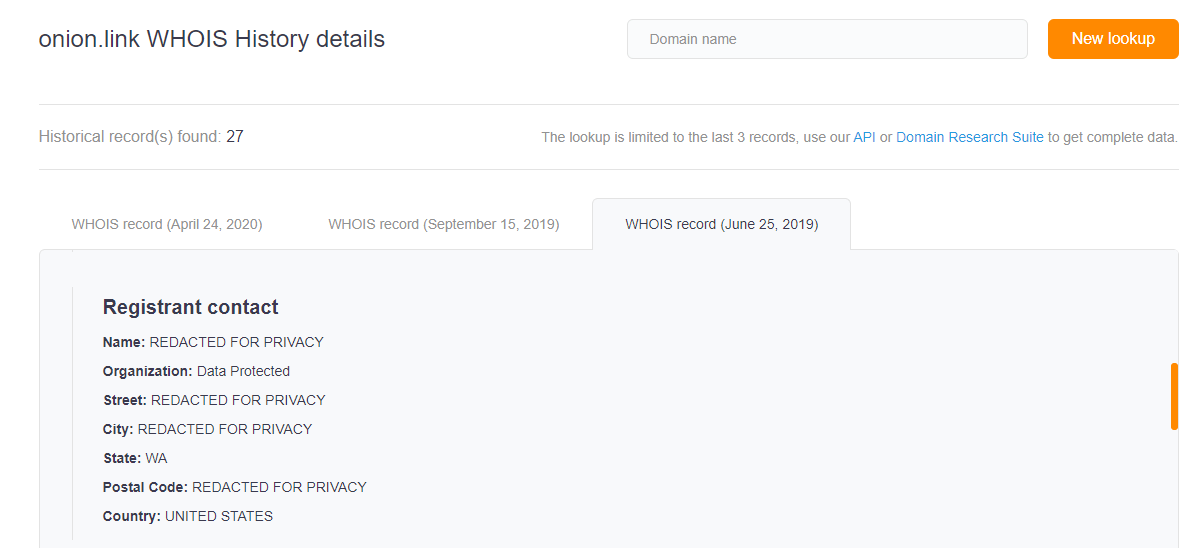
Even when information is redacted, you can still gather useful intelligence, such as the registrar, creation and expiration dates, and the name servers handling the domain's DNS.
Hands-on Lab 1: Your First WHOIS Query
Now it's time to use your Kali VM.
- Open a terminal in your Kali Linux environment.
- Choose a target domain for your passive reconnaissance. A large, public company like
tesla.comorgithub.comis a good, safe choice for this exercise. - Run the
whoiscommand on your chosen target:whois tesla.com - Examine the output. Can you identify the Registrar, the Creation Date, the Expiration Date, and the Name Servers?
- A good practice during reconnaissance is to save all your findings. Redirect the output of your command to a text file for later analysis. The HackerSploit video touched on this.
You now have a permanent record of your query in a file namedwhois tesla.com > tesla_whois.txttesla_whois.txt. You can view it withcat tesla_whois.txtorless tesla_whois.txt.
2. Google Hacking: Finding What's Hidden in Plain Sight
Search engines like Google are incredibly powerful tools for reconnaissance. They index vast amounts of the internet, sometimes including things that weren't meant to be public, like sensitive documents, login pages, and configuration files.
Google Dorking, also known as Google Hacking, is the technique of using Google's advanced search operators to find this specific, often sensitive, information.
A Critical Warning: Google Dorking itself is legal—you are simply using a public search engine. However, using the information you find to access a system or file you are not authorized to view is illegal. Always respect this boundary.
How to Gather OSINT on a Target Using Google (Google Dorking / Google Hacking Tutorial)
This tutorial from Cyber Ryan provides an excellent introduction to Google Dorking, covering the most important operators and how to combine them.
Watch the first part of the video from 00:05 to 01:40. He gives a great definition of Google Dorking and provides the essential legal and ethical warning.
Key Google Dorking Operators
The power of Google Dorking comes from combining keywords with special operators. Here are the most fundamental ones:
site:- Restricts the search to a specific website or domain.filetype:(orext:) - Restricts results to a specific file extension (e.g.,pdf,xls,log).intitle:- Searches for keywords within the title of a web page.inurl:- Searches for keywords within the URL of a web page.intext:- Searches for keywords within the body text of a web page.

Let's see how to use these operators in practice.
How to Gather OSINT on a Target Using Google (Google Dorking / Google Hacking Tutorial)
Let's continue with the Cyber Ryan video to see demonstrations of these core operators.
Please watch the following segments: Basic Operators (1:40 - 3:15): See site:, filetype:, and the @ symbol for social media. Content Operators (4:28 - 6:06): Learn about intitle:, inurl:, intext:, and how to combine them. Combining Operators (6:06 - 8:30): This is the most important part. Learn how to use AND, OR, - (NOT), parentheses (), and quotation marks "" to build complex queries.
The Google Hacking Database (GHDB)
You don't always have to invent your own dorks. A community of security researchers maintains the Google Hacking Database (GHDB), which is a collection of pre-made queries known to uncover interesting vulnerabilities and information.
How to Gather OSINT on a Target Using Google (Google Dorking / Google Hacking Tutorial)
The end of the Cyber Ryan video introduces this valuable resource.
Watch from 08:30 to 09:08 to learn about the GHDB and see examples of powerful dorks for finding things like private keys or invoices.
Exploring the GHDB on the Exploit-DB website is an excellent way to learn what's possible with Google Dorking.
Hands-on Lab 2: Your First Dorking Queries
Now, let's try some Google Dorking. You can do this from any web browser. We'll continue using tesla.com as our safe, public target.
Try to construct queries for the following challenges:
-
Find Login Portals: Search for pages on
tesla.comthat might be login portals.
Hint: Use thesite:operator combined withintitle:orinurl:and keywords like "login", "signin", or "portal".Click for a possible query
site:tesla.com intitle:"sign in" OR inurl:login -
Find Publicly Exposed Documents: Look for any potentially sensitive documents, like spreadsheets (
.xls,.xlsx) or presentations (.ppt,.pptx).
Hint: Usesite:andfiletype:. You might combine multiple filetypes withOR.Click for a possible query
site:tesla.com (filetype:xls OR filetype:xlsx OR filetype:pdf) -
Find Information about Employees: Try to find employee profiles on LinkedIn. This can be useful for identifying potential targets for phishing.
Hint: Usesite:linkedin.com/in/and search for the company name in the text.Click for a possible query
site:linkedin.com/in/ "tesla" "software engineer"
Experiment with your own dorks. See what you can find!
Conclusion
Congratulations on completing your first hands-on reconnaissance exercises! You've taken your theoretical knowledge and applied it using real-world tools and techniques.
Key Takeaways:
- The
whoiscommand is a simple but effective tool for gathering domain registration data, which provides clues about a target's infrastructure and personnel. - Google Dorking is a powerful passive recon technique that uses advanced search operators to find information that has been inadvertently indexed by search engines.
- Effective reconnaissance involves creativity and persistence. Combining different tools and techniques yields the best results.
Next Lesson Preview:
Manually running whois and crafting Google Dorks is effective, but it can be slow. In the next lesson, we'll explore tools that automate parts of this process. You'll learn how to use theHarvester, a classic reconnaissance tool that rapidly scours public sources (including search engines and PGP key servers) to gather email addresses, subdomains, and hostnames associated with a target domain.