Hello! Welcome to the first lesson of our third module, "AI-Enhanced Corporate Finance Workflow."
In our last lesson, you learned how to use Gemini in Google Docs and Slides to transform your analysis into polished reports and presentations. You mastered the final step of the analytical process: communication. Now, we'll shift our focus to the very beginning of that process: research and information gathering.
Today's lesson is designed to equip you with the skills to use AI as a research assistant to summarize industry trends, regulations, and market data from public sources like annual reports. As a finance professional, you're constantly sifting through vast amounts of public information. This lesson will show you how AI can act as a powerful force multiplier, helping you extract key insights from dense documents far more efficiently, all while respecting your company's data privacy policies by focusing exclusively on public data.
1. Analyzing Public Financial Documents with Gemini
The most direct way to leverage AI for financial research is to apply it to public corporate filings, like annual (10-K) or quarterly (10-Q) reports. Instead of spending hours reading through a 100+ page document, you can use Gemini to pinpoint the most critical information.
The article "How to Use Gemini for Financial Analysis and Stock Market Insights" provides an excellent framework for this. It highlights that LLMs are fundamentally pattern-recognition engines, a concept that maps directly onto the work of financial analysis.
How to Use Gemini for Financial Analysis and Stock Market Insights
This article provides a practical workflow for using Gemini to analyze financial documents. It offers specific, high-value prompts and crucial advice on avoiding common pitfalls.
Please read the sections "Analyzing the Boring Stuff (So You Don't Have To)" and "The 'Hallucination' Hedge". Focus on the three prompt types presented: the "Red Flag" Hunt, Sentiment Analysis, and Competitor Comparison. Pay close attention to the strategies for verifying AI-generated information.
As you read, note the core workflow:
- Upload the Document: You can upload a PDF of an annual report directly into the Gemini Pro interface.
- Ask Specific Questions: Instead of a generic "summarize this," you use targeted prompts to find what you need.
- Risk Factors:
"Analyze this 10-K. List the top 3 risk factors mentioned that are new or have been significantly updated since the last report." - Sentiment:
"Read the Q&A section of this earnings call transcript. Is the management's tone more confident or cautious regarding their 2025 outlook? Provide specific phrases to support your conclusion." - Comparison: After uploading two reports:
"Compare the R&D spending as a percentage of revenue for Company A and Company B based on these documents. Present the result in a table."
- Risk Factors:
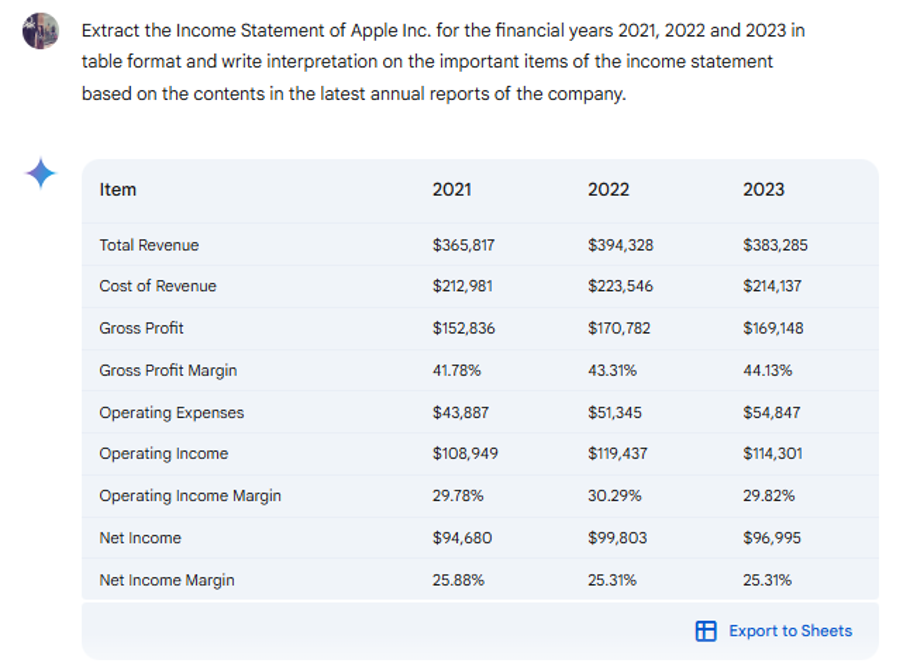
Here are a couple of examples of what this looks like in practice.

The "Hallucination" Hedge
The article's most critical point is about managing hallucinations. In finance, accuracy is non-negotiable. Always adopt a "trust but verify" mindset.
- Verify sources: If Gemini uses web access, always check the citation links.
- Check the math: LLMs are language models, not calculators. For critical calculations, it's safer to ask the AI to extract the raw numbers from the text and perform the calculation yourself or in a spreadsheet.
2. Deepening Analysis with Chain-of-Thought Prompting
Extracting data is useful, but true analysis requires connecting the dots. To guide the AI from simple extraction to more sophisticated reasoning, you can use a technique we touched on in our first module: Chain-of-Thought (CoT) prompting.
CoT prompting instructs the AI to break down a complex problem into a sequence of logical steps, mimicking how a human analyst would approach the task. This leads to more accurate, transparent, and insightful responses.
Chain-of-Thought (CoT) Prompting in AI-Powered Financial Analysis
The Corporate Finance Institute has an excellent article explaining how to apply CoT prompting specifically to financial analysis. This will help you structure your prompts for maximum analytical depth.
Please read the sections "What is Chain-of-Thought (CoT) Prompting?", "Step-by-Step: Applying CoT to Financial Statement Analysis", and "Step 5: Synthesize Findings into a Narrative". Focus on how each step in the sample prompts builds upon the last to create a comprehensive analysis.
Instead of a vague prompt like "Analyze this company's financial health," a CoT prompt provides a structured recipe for the AI to follow.
Example CoT Prompt for an Annual Report:
"Act as a senior financial analyst. Using the attached annual report, perform a step-by-step analysis of the company's performance:
- Revenue Analysis: Review revenue trends over the past three fiscal years. Identify and explain the primary drivers of any significant growth or decline.
- Profitability Analysis: Examine the trends in gross margin and net profit margin. Are there signs of improving or deteriorating profitability?
- Risk Assessment: Identify the top 3 strategic risks outlined in the 'Risk Factors' section.
- Final Synthesis: Based on the steps above, provide a concise narrative summary of the company's overall financial health, highlighting one key strength and one key weakness."
This structured approach forces the AI to move beyond surface-level summaries and perform genuine, step-by-step reasoning, making its output far more valuable for your work.
3. An Advanced Workflow: Combining Search and Analysis
Sometimes, you don't start with a specific document. You might need to research a broader industry trend, a new regulation, or the competitive landscape. For this, a powerful workflow involves combining a specialized search tool with an analysis tool.
The video below introduces an effective combination: Perplexity AI for sourcing information and Google's NotebookLM for analyzing it.
- Perplexity AI: An AI-powered search engine that provides direct answers with citations, making it excellent for finding credible reports, articles, and studies. It excels at the "where do I even start?" problem.
- NotebookLM: A research tool from Google that allows you to upload your source documents (PDFs, text files, URLs) and then ask questions only based on those sources. This creates a "closed" environment that dramatically reduces hallucinations and keeps the AI focused on your curated material.
This NotebookLM + Perplexity Workflow Will Cut Your Research Time by 50% (or More)
This video by Grace Leung demonstrates a powerful research workflow that combines Perplexity for finding sources and NotebookLM for deep, source-grounded analysis. This is highly relevant for conducting market trend research.
Watch from the beginning to 03:17. Pay close attention to the distinction between Perplexity's role (finding sources) and NotebookLM's role (analyzing a closed set of sources). Notice how the user prompts Perplexity to find reports from specific, reputable firms.
This workflow is ideal for tasks like:
- Summarizing recent changes in IFRS standards.
- Analyzing the key trends in the renewable energy sector.
- Comparing the marketing strategies of several competitors.
You use Perplexity to gather the high-quality source PDFs, and then you upload them to NotebookLM (or even Gemini Pro) for a focused, analytical conversation.
4. Practice Exercise: Analyzing the EV Industry
Let's apply these concepts to a practical research task. Your goal is to produce a brief summary of the key financial trends and risks for a major player in the Electric Vehicle (EV) industry.
-
Source the Document: Go to a search engine and find the most recent annual report (Form 10-K) for Tesla, Inc. (TSLA). Download it as a PDF. (A search for "Tesla Inc investor relations" will lead you to their SEC filings).
-
Upload to Gemini: Open Google Gemini Pro and upload the 10-K PDF you just downloaded.
-
Analyze with a CoT Prompt: Use the following Chain-of-Thought prompt. This combines the structured approach from the CFI article with the targeted "Red Flag Hunt" from our first resource.
Act as a senior corporate finance analyst. I have uploaded Tesla's most recent 10-K annual report. Please perform the following analysis step-by-step: 1. **Revenue and Profitability:** - Extract the total revenues for the last three years and present them in a markdown table. - Describe the primary drivers for the revenue trend you observe. - Extract the gross margin for the last three years. Is it increasing or decreasing? 2. **Risk Identification:** - Carefully review the "Risk Factors" section. - Identify and summarize the top 3 most significant risks related to competition and supply chain. 3. **Synthesis:** - Based on your analysis, write a one-paragraph summary of Tesla's financial position, highlighting one major strength and one significant risk. -
Review and Verify: Read through Gemini's output. Does it seem logical? Can you spot-check one of the revenue figures by searching for it in the PDF? This step is crucial for building trust in the tool's output.
This exercise simulates a real-world task: quickly getting up to speed on a company's performance and risk profile using public data, a foundational skill in finance that AI can significantly accelerate.
Conclusion
Today, you've learned how to transform AI from a general-purpose chatbot into a specialized research assistant for corporate finance. By combining direct document analysis in Gemini, structured CoT prompting, and advanced search workflows, you can compress hours of research into minutes.
Key Takeaways:
- Direct Document Analysis: You can upload public financial reports (like 10-Ks) directly to Gemini to ask specific, targeted questions about risks, performance, and strategy.
- Structured Prompting is Key: Chain-of-Thought (CoT) prompts guide the AI to perform a logical, step-by-step analysis, yielding deeper and more reliable insights than generic queries.
- The "Trust but Verify" Principle: Never blindly accept AI-generated financial data. Always treat it as a starting point and develop a habit of spot-checking critical figures and sources.
- Combine Tools for Broader Research: For industry-level trends, use a search-focused tool like Perplexity to gather high-quality sources, then use an analysis tool like NotebookLM or Gemini to synthesize them in a controlled environment.
In our next lesson, we will build on this foundation. You'll learn how to prompt an AI to generate financial analysis frameworks and checklists without sharing confidential data, moving from analyzing what already exists to creating the analytical structures for your own work.