Hello! Welcome to our new module, where we'll explore one of the most powerful and flexible features in Alteryx: macros.
In the previous module, you mastered standard and batch macros. You learned that a standard macro packages a process to be run once, while a batch macro runs that process for multiple inputs, like processing a separate file for each country or region.
Today, we move on to a completely different type of macro: the iterative macro. This lesson will focus on explaining the fundamental logic of iterative macros and exploring the specific types of problems they are designed to solve. Unlike batch macros that work through a list, iterative macros loop, running themselves over and over until a specific goal is achieved.
By the end of this lesson, you'll understand the core concept of an iterative loop in Alteryx and be able to identify business problems where an iterative macro is the perfect solution.
1. The Core Logic of an Iterative Macro
At its heart, an iterative macro is a process that repeats until a condition is met. It's Alteryx's version of a "while" loop that you might find in a programming language.
A great analogy is trying to remove a tough stain from a shirt. You wouldn't just wash it once and give up. You'd apply a stain remover, wash it, check the stain, and if it's still there, you'd repeat the process until the stain is gone. That repetition until a condition is met (stain is gone) is the essence of an iterative macro.

To make this loop work, an iterative macro has a unique structure. Every time the macro runs (one "iteration"), it evaluates a condition and splits the data into two paths:
- The Iteration Output: This contains the records that do not yet meet the condition. These records are fed back to the beginning of the macro to be processed again in the next loop.
- The Final Output (or Results Output): This contains the records that have met the condition. These records exit the loop and become the final result of the macro.
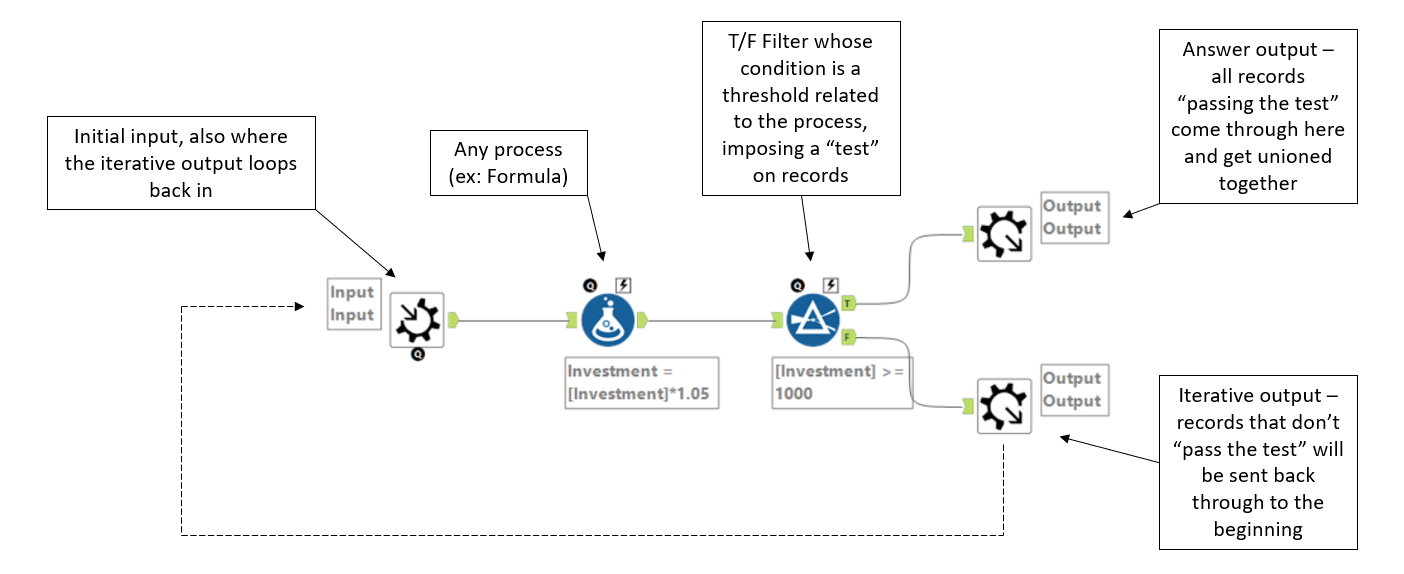
To understand this critical distinction between the two outputs, let's look at how it's explained in a practical guide.
So You Want to Build Alteryx Macros (Part 4)
The article 'So You Want to Build Alteryx Macros (Part 4)' by phData clearly distinguishes between the two types of outputs that make an iterative macro function.
Please read the section titled Iterative Macro Outputs. Focus on understanding the role of the 'Results Output' (for data that has finished processing) and the 'Iteration Output' (for data that needs to loop back through).
This looping mechanism allows you to solve problems that can't be handled in a single pass, which we'll explore next.
2. Specific Use Cases for Iterative Macros
Now that you understand the looping logic, let's look at the kinds of problems this approach is uniquely suited to solve.
Use Case 1: Goal-Seeking and Convergence
Iterative macros are perfect for situations where you need to repeat a calculation until you reach a specific target or the numbers stop changing significantly (converge).
A simple example is calculating compound interest. To find out how much an investment will be worth in 25 years, you need to calculate the interest for year 1, add it to the principal, then use that new total to calculate the interest for year 2, and so on, 25 times.
This video from The Information Lab uses the compound interest problem to demonstrate a classic 'goal-seeking' scenario for an iterative macro.
Watch from 00:31 to 01:34. Notice how the output of one year's calculation becomes the input for the next. The loop continues until the target number of years (iterations) is met.
Use Case 2: Resource Allocation
A very common business problem involves allocating a limited set of resources based on priority. Imagine a warehouse with a finite supply of items that need to be shipped to different stores, each with its own priority level.
You can't fulfill all the orders at once. You must:
- Fulfill all orders for Priority 1 stores.
- Update the remaining inventory.
- Use that remaining inventory to fulfill orders for Priority 2 stores.
- ...and so on, until inventory runs out or all orders are processed.
This step-by-step process, where the remaining inventory and unfulfilled demand from one step become the input for the next, is an ideal use case for an iterative macro.
So You Want to Build Alteryx Macros (Part 4)
The phData article we looked at earlier uses this exact resource allocation problem as its main example.
Read the section titled The Problem. This clearly lays out the inventory allocation scenario. Think about why a standard or batch macro would not be able to solve this correctly.
Use Case 3: Optimization Problems
Iterative macros are also used in advanced analytics for optimization, where the goal is to find the "best" possible solution by trying many possibilities. For example, finding the most efficient shipping route. An iterative macro could:
- Calculate the cost and time for an initial route.
- Make a small change to the route.
- Recalculate the cost and time.
- If the new route is better, keep it. If not, discard it.
- Repeat this process until no further improvements can be found.
Unlocking the Power of Macros - Alteryx Snack
The 'Alteryx Snack' newsletter gives a concise overview of using iterative macros for this kind of optimization.
Read the section 3. Iterative Macro and its Example Use Case about optimizing shipping routes. This demonstrates how repetition can lead to an optimal solution.
Other Common Use Cases
Beyond these examples, iterative macros are also essential for:
- API Pagination: When an API returns data in "pages" (e.g., 100 records at a time), an iterative macro can make the first call, get the first page, then use information from that call to request the second page, and so on, until all pages are retrieved. We will build one of these later in the course.
- Predictive Modeling: In tasks like recursive feature elimination, a model is built, the least important predictor is removed, and the model is rebuilt. This process is repeated until the model's performance is optimized.
Conclusion
In this lesson, we've focused on the "what" and "why" of iterative macros. You've learned the fundamental logic that powers them and seen the types of complex, repetitive problems they are designed to solve.
Key Takeaways:
- An iterative macro is a workflow that loops until a specific condition is met.
- The core logic involves an Iteration Output (records that loop back) and a Final Output (records that exit the loop).
- They are fundamentally different from standard macros (run once) and batch macros (run for each group of inputs).
- Key use cases include goal-seeking (compound interest), resource allocation (inventory management), optimization (finding the best route), and handling paginated data.
Now that you have a solid conceptual understanding, our next lesson will move from theory to practice. We will dive into the Alteryx interface and learn how to configure the iterative macro properties for looping, maximum iterations, and output.