Hello! Welcome to our lesson on one of the most powerful applications of iterative macros.
In our last session, you built a goal-seeking macro to calculate compound interest, learning how to use Engine.IterationNumber and configure the loop's properties. You saw how a macro can repeat a process until a condition is met.
Today, we'll apply that knowledge to a very common and practical data integration challenge: API pagination. Many APIs limit the amount of data you can retrieve in a single request. To get all the data, you must make a series of calls, "paging" through the results. This is a perfect job for an iterative macro. Our goal for this lesson is to build an iterative macro to handle API pagination by passing values between iterations. We will explore two common pagination strategies to achieve this.
1. Understanding API Pagination
When you request data from an API, it often comes back in "pages." For example, an API might hold 5,000 records but only allow you to download 100 at a time. To get all 5,000 records, you would need to make 50 separate requests. This process is called pagination.
To learn more about the concept, please read the introductory sections of the following article.
11 Steps to Create an Iterative Macro for Pagination
This Alteryx Community article, '11 Steps to Create an Iterative Macro for Pagination', starts with a great explanation of what pagination is and why you need a macro to handle it.
Please read the sections 'What is Pagination?' and 'What is an Iterative Macro?'. This will set the context for the techniques we're about to build.
APIs handle pagination in a few common ways:
- Offset-based: You specify how many records to skip (
offset) and how many to retrieve (limit). To get the second page of 100 records, you'd useoffset=100&limit=100. - Page number: Simpler, but less common for large datasets. You just ask for a specific page number, e.g.,
page=2. - Cursor/Next-Page Link: The API response includes a URL that points directly to the next page of results. This is a very common and robust method.
We will now build macros to handle the two most prevalent types: offset-based and next-page link.
2. Strategy 1: Offset-Based Pagination
This strategy is a great starting point because it uses the Engine.IterationNumber constant you are already familiar with. The core idea is to use the iteration number to calculate the offset for each API call.
The logic is as follows:
- The macro starts.
- In each iteration, a
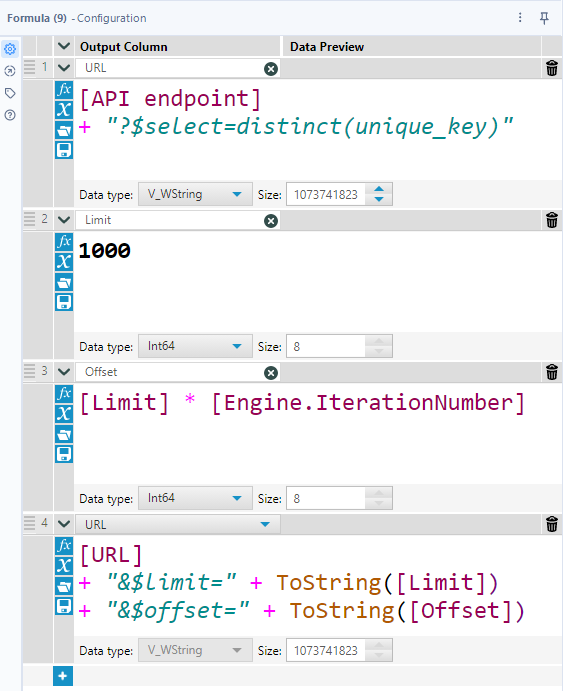
Formulatool constructs the API URL, usingEngine.IterationNumberto calculate the current offset (e.g.,offset = IterationNumber * RecordsPerPage). - A
Downloadtool calls this URL. - The downloaded data is parsed and sent to the macro's output.
- The macro automatically unions the results from every iteration.
Building the URL
The most important step is dynamically creating the URL. This is where we "pass a value" to the next iteration, by using the changing Engine.IterationNumber.
Setting the Stop Condition
How does the macro know when to stop? There are two main approaches:
-
Fixed Number of Iterations: You can find the total number of records from the API documentation (or a preliminary API call), calculate the number of pages needed, and set the "Maximum Number of Iterations" in the macro properties. This is simple but can fail if the total number of records changes.
-
Dynamic Stop Condition: A more robust method is to have the macro stop when it receives an empty page of data. You can do this by adding a
Filtertool after theJSON Parsetool. If the number of records returned is zero, you stop the process. This ensures you get all the data without making unnecessary API calls.
Let's look at a guide that walks through this entire process.
11 Steps to Create an Iterative Macro for Pagination
The article we looked at earlier provides a complete, step-by-step guide to building an offset-based pagination macro. We will focus on the key implementation steps.
Read through the following key steps to understand the workflow construction: Step 1: Build a Standard Workflow: Reinforces the best practice of testing your API call and parsing logic before turning it into a macro. Step 5: Figure out how to page through data: Shows how to find the offset and limit parameters in API documentation. Step 6: Split the flow with a stop condition: Explains how to use Engine.IterationNumber as part of your logic. Step 8: Set limit and offset values: This is the core logic, showing the Formula tool expressions needed to build the dynamic URL. Focus on how the Engine.IterationNumber is used to create a different URL in each loop.
3. Strategy 2: Next-Page URL Pagination
This method is often preferred because the API explicitly tells you where to go next. You don't have to construct the URL yourself; you just have to find it in the response, extract it, and feed it back into the loop.
This pattern perfectly matches the goal-seeking macro structure from our last lesson, where a piece of data is passed from the end of one iteration to the start of the next.
The logic is as follows:
- The macro starts with the URL for the first page.
- It downloads and parses the JSON data.
- The response is split into two streams:
- The actual data records. These are sent to the main macro output.
- The "next page" URL. This is sent to the iteration output.
- The iteration output feeds this "next page" URL back to the macro input for the next loop.
- The loop stops when the "next page" URL is null or absent in the API response.
The following resource provides an excellent walkthrough using the popular Star Wars API (SWAPI), which uses this pagination method.
How to extract data from Pagination API by using Alteryx Macro?
This guide from The Data School, 'How to extract data from Pagination API by using Alteryx Macro?', provides a clear, visual walkthrough of building a macro that uses a 'next page' URL.
Read through the main section, 'Steps to extract data from Pagination API'. The images are particularly helpful. Pay close attention to these parts: (a) and (b): How to analyze the API response to find the 'next' URL and the stop condition (when it becomes NULL). (c) and (e): The critical step of splitting the data stream and preparing the 'next' URL to be the iteration output. Notice the emphasis on making the output schema for the iteration match the input schema. (g): The final configuration in the Workflow and Interface Designer settings, which ties everything together.
A key principle highlighted in this guide is ensuring schema consistency. The field containing the "next page" URL in your iteration output must have the same name and data type as the field in your macro input that accepts the URL. This is what allows the value to be passed correctly from one loop to the next.
Conclusion
You have now learned how to tackle API pagination, a fundamental skill for advanced data integration in Alteryx. By building an iterative macro, you can automate the process of making repeated API calls to retrieve a complete dataset.
Key Takeaways:
- Iterative macros are the standard Alteryx solution for handling paginated APIs.
- In offset-based pagination, you use
Engine.IterationNumberwithin aFormulatool to dynamically construct the URL for each page. - In next-page URL pagination, you parse the link to the next page from the API response and feed it back into the loop using the Iteration Output.
- The stop condition is crucial: for offset-based methods, it's often best to check for an empty response. For next-page URL methods, the loop terminates naturally when the next link is null.
In our next lesson, we will explore how to connect multiple workflows and macros into a single, guided user experience by creating chained Analytic Apps.