Hello! Welcome to the next lesson in our journey toward the Alteryx Advanced Certification.
In our previous lessons, you've done some impressive work building iterative macros, particularly for handling complex tasks like API pagination. You've seen how to create a reusable workflow that can loop, pass data between iterations, and solve a specific, automated problem. Today, we're going to build on that idea of packaging workflows, but with a different goal in mind: creating guided, multi-step experiences for end-users.
This lesson focuses on a key concept for building sophisticated user-facing tools in Alteryx. Our learning outcome is to explain the concept of chained Analytic Apps for multi-step user workflows. We'll explore what they are, why they are necessary, and the fundamental logic behind how they work.
1. What Are Chained Analytic Apps?
An Alteryx Analytic App is a workflow that you can share with others, allowing them to run it by providing their own inputs through a simple interface, without having to see or modify the underlying workflow logic.
But what happens when you need a user's input in one step to determine the choices available in the next step? For example, imagine you want a user to first select a product category (like "Furniture") and then see a list of sub-categories that contains only items from the furniture category (like "Chairs", "Tables"). A single Analytic App cannot dynamically update its own interface based on a choice the user just made.
This is where Chained Analytic Apps come in. A chained app is not a single tool but a design pattern: it's a series of two or more Analytic Apps that run in sequence, where the output of the first app is used as the input for the second. This creates a "wizard-like" experience for the user, guiding them through a process one step at a time.
To get a clear picture of this concept, let's start with a foundational article.
This article from The Data School, 'Alteryx Chained Apps', clearly defines the primary use case for chaining apps and provides a simple, effective example.
Please read the introduction, stopping at the 'First Workflow' section. Focus on the italicized sentence that explains when you need to chain apps together.
As the article highlights, the key driver is dependency: the second question depends on the answer to the first. Chaining allows you to create this dynamic, cascading behavior.
2. The Core Logic: How Chaining Works
Chaining apps might sound complex, but the underlying principle is straightforward. It involves a three-part mechanical process: a hand-off, a pickup, and a trigger.
-
The Hand-off: The first Analytic App runs, takes the user's input, and performs a process. Crucially, it writes its output to a temporary data file (often an Alteryx Database file,
.yxdb). This output file contains the data needed for the second app. For a dependent filtering scenario, this file would contain the filtered list of options for the second app's interface. -
The Pickup: The second Analytic App is designed to look for and read this specific temporary file. It uses the data from the file to populate its own interface (e.g., a drop-down menu) or as its primary data source.
-
The Trigger: The first app is configured to automatically launch the second app upon its own successful completion. This is set up in the Interface Designer window and is what creates the seamless "chain" from the user's perspective.
The following image shows an example of a first app designed to create an output file. Notice how the Output Data tool is configured to save a file named Verification code.yxdb. The note explicitly states this is for "app 2," illustrating the hand-off.

The following resource provides a superb high-level overview of this process, including a helpful diagram of the logical sequence.
How to create a chained App in Alteryx?
This post, 'How to create a chained App in Alteryx?', offers another perspective, summarizing the core idea and the main configuration steps at a conceptual level.
Read the entire article. Pay special attention to the 'Illustration of the logical sequence' diagram and the summary of the two main configuration steps. Notice the mention of NAME and VALUE fields—this is a key requirement for dynamically populating an interface tool from a file.
3. Common Use Cases for Multi-Step Workflows
Now that you understand the concept, let's explore the types of multi-step user workflows where chained apps are the ideal solution.
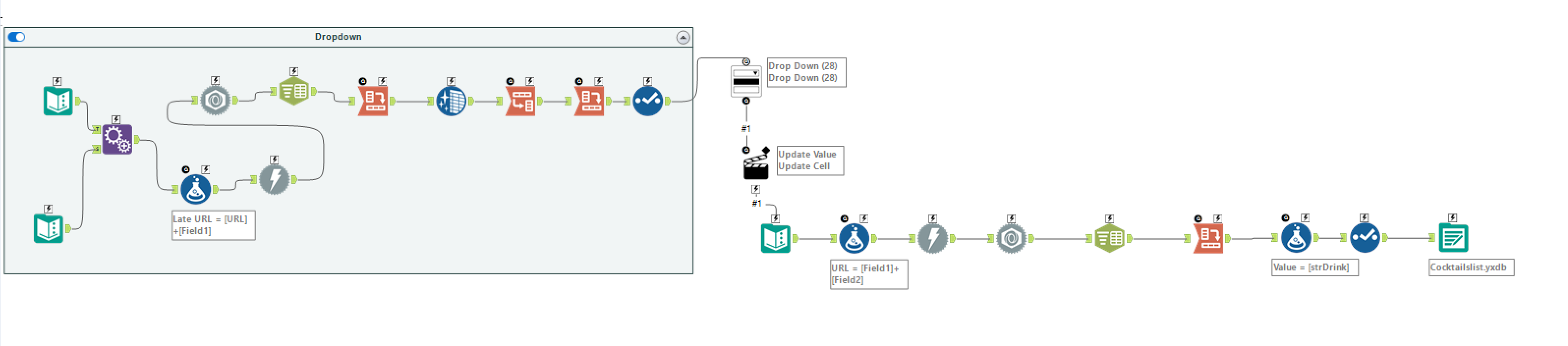
A. Dependent (Cascading) Filters
This is the most common use case, as seen in the resources.
- App 1: User selects a broad category (e.g., a Country, a Product Line, a Year).
- App 2: The interface shows a list of options filtered by the first selection (e.g., Cities within that Country, Products in that Line, Months in that Year).
- This can continue for several apps, creating a highly specific filtering "funnel" for the user.
B. Sequential Processes and Validation
Sometimes, you need to perform one task successfully before allowing the user to proceed to the next.
- App 1: Acts as a validation or setup step. For example, it might ask for a user's credentials and authenticate them against a database, or it could run a data quality check on an input file.
- App 2: The main application, which only runs if the first app succeeds. For example, after successful authentication, the user is presented with the main app to perform their analysis. The email verification workflow shown earlier is a perfect example of this pattern.
C. Simplifying Complex User Input
If an analytic app requires many different user inputs, the interface can become overwhelming. Chaining allows you to break it down into a "wizard."
- App 1: Asks for basic configuration (e.g., input files and date ranges).
- App 2: Asks for more specific parameters (e.g., which fields to analyze and what thresholds to set).
- App 3: Asks for output and reporting options.
This approach guides the user through the process logically, improving usability and reducing the chance of errors.
Conclusion
In this lesson, we've focused on the "what" and "why" behind Chained Analytic Apps. You now understand that they are a powerful pattern for creating guided, multi-step user workflows where one step depends on the previous one.
Key Takeaways:
- Chained Apps are used when a user's choice in one step must determine the options available in a subsequent step.
- The mechanism involves a sequence of apps linked together: the first app runs and writes its output to a temporary file, and then triggers the second app.
- The second app reads the temporary file to configure its interface or use as its input data.
- Common use cases include creating cascading filters, building sequential validation processes, and simplifying complex user interfaces into a wizard-like experience.
You've now established a solid conceptual foundation. In our next lesson, we will put this theory into practice and move to the "how." You will configure a workflow to chain two analytic apps together, building a functional example yourself.