Welcome to our third lesson in the Introduction to Python Programming module. In our last session, you learned how to store and label information using variables and the core data types: integers, floats, strings, and booleans. You now have the "nouns" of programming—the fundamental pieces of data. Today, we will learn how to build the "grammar" that allows our programs to make decisions and choose different paths of action.
This lesson addresses the learning outcome: Write conditional statements using if, elif, and else. We will explore how to make your programs "think" by evaluating conditions and executing specific blocks of code based on whether those conditions are true or false. This is a crucial step toward writing dynamic and intelligent programs, moving beyond simple, linear scripts.
1. The Foundation of Decisions: Conditions
Before a program can make a decision, it needs something to decide about. In programming, this "something" is called a condition. A condition is simply an expression that evaluates to one of two Boolean values we discussed in the last lesson: True or False.
To build these conditions, we use two types of operators: comparison operators and boolean operators.
Comparison Operators
Comparison operators, as their name suggests, compare two values. The result of this comparison is always a Boolean value.
| Operator | Description | Example | Result |
|---|---|---|---|
== |
Equal to | 5 == 5 |
True |
!= |
Not equal to | 5 != 10 |
True |
> |
Greater than | 10 > 5 |
True |
< |
Less than | 5 < 10 |
True |
>= |
Greater than or equal to | 5 >= 5 |
True |
<= |
Less than or equal to | 5 <= 10 |
True |
A very common mistake for beginners is to confuse the assignment operator (=) with the equality comparison operator (==).
x = 5means "assign the value 5 to the variable x."x == 5asks the question, "is the value of x equal to 5?" and evaluates toTrueorFalse.
Boolean Operators
Often, a decision depends on more than one condition. Boolean operators (and, or, not) allow us to combine multiple Boolean expressions into a single, more complex one.
expression1 and expression2: IsTrueonly if both expressions areTrue.expression1 or expression2: IsTrueif at least one of the expressions isTrue.not expression: Inverts the Boolean value of the expression (not TruebecomesFalse, andnot FalsebecomesTrue).
The book "Automate the Boring Stuff with Python" provides a very clear explanation of how these operators form the basis of flow control.
Please read the first three sections of this chapter to understand how conditions are constructed: Comparison Operators Boolean Operators Mixing Operators Focus on how these operators always produce a True or False result, which is the essential input for the conditional statements we'll learn about next.
2. Controlling the Flow: if, elif, and else
Now that we can create conditions, we can use them to control the flow of our program. This is done with a set of statements: if, elif (short for "else if"), and else.
Think of it like deciding what to carry based on the weather.

This simple chart illustrates the logic: If it's sunny, carry sunglasses. Else if it's rainy, carry an umbrella. Otherwise (for any other weather), carry a cap.
Let's see how this logic is structured in code.
Python If Elif Else Statements (Visually Explained) | #Python Course 15
This video from "Data with Baraa" offers an excellent visual walkthrough of how conditional statements work, using flowcharts that align well with your preference for understanding the underlying principles.
Please watch the following segments to get a clear mental model: Introduction to Conditional Statements: This gives a high-level overview. The 'if' statement: Understand how a single condition is checked. The 'else' statement: Learn how to create a two-way decision. The 'elif' statement: See how to chain multiple conditions together.
The if Statement: A Single Check
The if statement is the most basic control structure. It checks a condition, and if that condition is True, it executes a block of code. If the condition is False, the code block is simply skipped.
The syntax is:
if condition:
    # This code runs only if the condition is True
    # It must be indented.
    print("The condition was true.")
A Crucial Concept: Indentation
As you saw in the video, the indentation (the spaces at the beginning of the line) is not just for style in Python; it is part of the syntax. It is how Python knows which lines of code belong to the if statement's block. Any code that is indented under the if line is part of its block. Code that is not indented is not part of the block and will be executed regardless of the if condition.
In your English teaching experience, you use indentation to start a new paragraph, visually structuring the text for a human reader. In Python, indentation structures the code for the computer, telling it which statements are grouped together.
Python If Elif Else Statements (Visually Explained) | #Python Course 15
The same video has a dedicated section explaining the importance of indentation. This is a fundamental rule in Python, so it's worth focusing on.
Please watch the segment on indentation and code blocks. The comparison with other languages that use brackets helps highlight why Python's use of whitespace is so significant.
The if-else Statement: A Two-Way Path
What if you want to do one thing if a condition is true, and a different thing if it's false? That's what else is for. It provides a default path.
temperature = 15

if temperature > 25:
    print("It's hot outside.")
else:
    print("It's not hot outside.")
In this case, since temperature is 15, the if condition (15 > 25) is False. The program will skip the first print statement and execute the code inside the else block.
The if-elif-else Ladder: Multiple Choices
Sometimes you have more than two possibilities. For this, you can use elif (else if) to chain multiple checks together. Python will evaluate each condition in order from top to bottom. The very first one it finds to be True will have its code block executed, and the rest of the chain will be skipped. If none of the if or elif conditions are true, the final else block will be executed.
This structure is often called an "if-elif-else ladder".
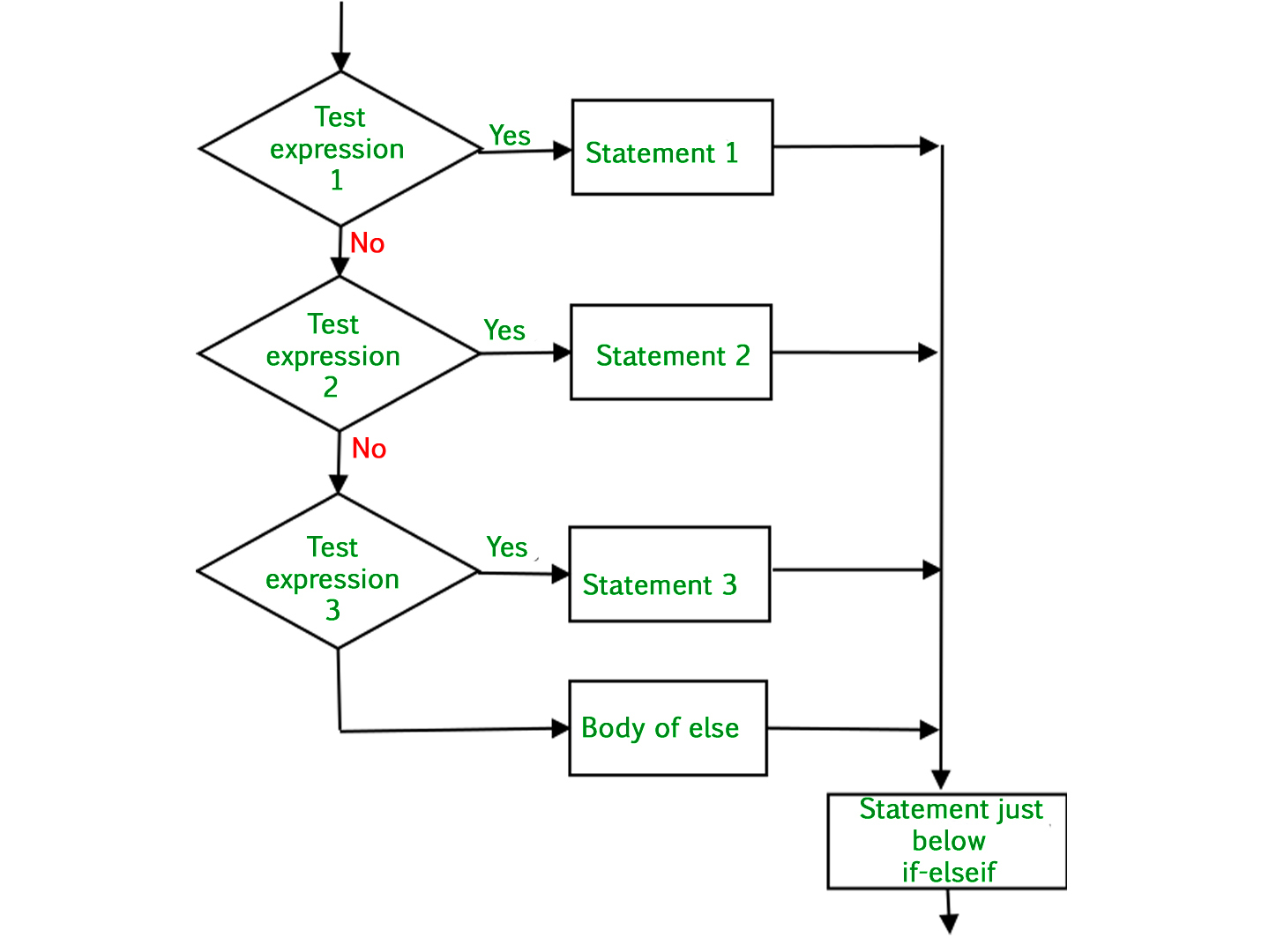
This flowchart shows the sequential nature of an if-elif-else ladder. The program tests each expression one by one, executing the corresponding statement for the first 'Yes' it encounters, and then exits the structure. If all tests are 'No', it executes the 'else' body.
Here is a classic example of grading:
score = 85

if score >= 90:
    grade = "A"
elif score >= 80:
    grade = "B"
elif score >= 70:
    grade = "C"
elif score >= 60:
    grade = "D"
else:
    grade = "F"

print(f"The score is {score}, which is a grade of {grade}.")
# Output: The score is 85, which is a grade of B.
In this example:
score >= 90(85 >= 90) isFalse.- Python moves to the next check:
score >= 80(85 >= 80) isTrue. - It sets
grade = "B"and immediately skips the rest of theelifandelseblocks.
[PDF] Chapter 11 Conditional Statements
This PDF provides a more formal, textbook-style explanation of these compound statements, which complements the visual approach of the video.
Please read Section 11.3, "Compound Conditional Statements" (pages 267-271). Pay close attention to the templates and the discussion of the show_grade() function, which is a great practical example.
Conclusion
In this lesson, you've gained a powerful new tool for your programming toolkit. You've learned how to make your programs responsive and adaptable by controlling their execution flow.
Here are the key takeaways:
- Conditional statements (
if,elif,else) allow a program to make decisions. - Decisions are based on conditions, which are expressions built with comparison operators (
==,>, etc.) and Boolean operators (and,or,not) that evaluate toTrueorFalse. - Indentation is mandatory in Python to define which code block belongs to which conditional statement.
- The
ifstatement checks a single condition. - The
if-elsestatement provides an alternative path for when theifcondition is false. - The
if-elif-elseladder allows for checking a sequence of mutually exclusive conditions.
You've now moved from simply stating facts (variables) to constructing logical arguments (conditionals). In our next lesson, we will expand our ability to handle data. Instead of just working with single values, we'll learn how to manage ordered collections of items using lists. This will open up a new world of possibilities for writing even more powerful and useful programs.