Hello! In our last lesson, we explored loops, which gave us the power to automate repetitive tasks. This was a major step, allowing our programs to process collections of data without us having to write code for each individual item. However, as our programs grow, we face a new challenge: organization and reusability. If we need to perform the same sequence of steps in multiple places, copying and pasting code is inefficient and prone to errors.
This lesson introduces a fundamental concept that solves this problem: functions. Our goal is to learn how to define functions with parameters, return values, and docstrings. Think of a function as a named, reusable recipe for a specific task. Just as a chef doesn't reinvent the recipe for a basic sauce every time they cook, a programmer writes a function once and can "call" it whenever that task needs to be performed. This makes our code more organized, easier to read, and much simpler to maintain.
1. Why Write Functions? The Principle of Abstraction
Before we dive into the syntax, it's crucial to understand the principle behind functions. In programming, this is a form of abstraction. We are taking a complex process, packaging it into a single block, and giving it a simple name. This allows us to think about our program at a higher level, focusing on what we want to do rather than the low-level details of how it's done.
As someone with a background in teaching, you're already familiar with this idea. When you create a lesson plan for "analyzing a sonnet," you don't re-explain what a "sonnet" is from scratch every single time. You have a defined concept of "sonnet" that you and your students can refer to. Functions serve a similar role in code.
To explore this idea further, let's read a short article that outlines the key advantages of using functions.
Writing Functions in Python— A Beginner's Guide
This section from an article by Jessica Miles clearly explains the motivation for writing functions. It goes beyond simple "reusability" and touches upon managing complexity and avoiding errors, which aligns with your preference for understanding the underlying principles first.
Please read the introduction and the section titled "First, why write functions?". As you read, focus on the three main benefits presented: avoiding careless errors, managing mental capacity, and creating consistent, evolving logic.
2. The Anatomy of a Python Function
Now that we understand the "why," let's look at the "how." In Python, the structure of a function is defined by a few key components.
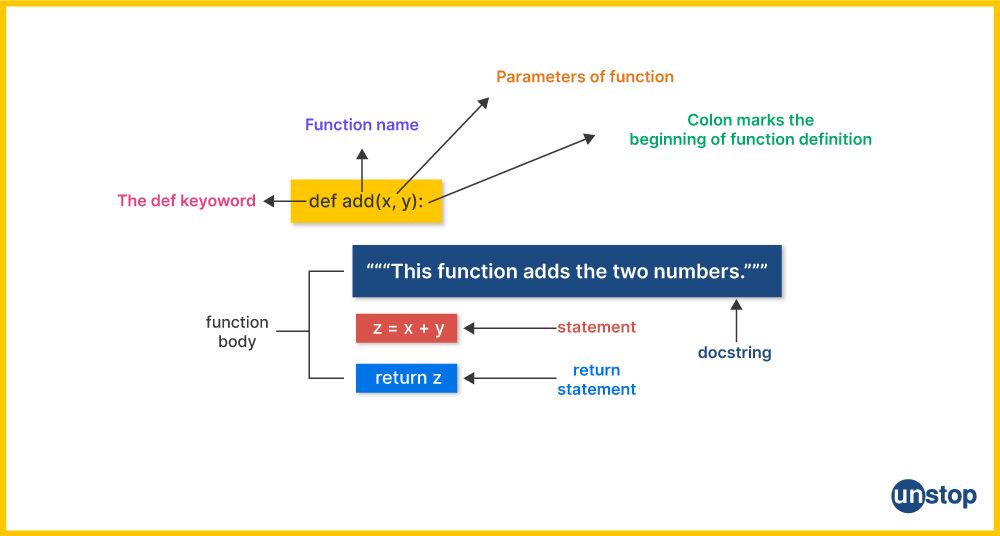
Let's dissect this structure:
defkeyword: This signals the start of a function definition.- Function Name: You choose a name that describes what the function does (e.g.,
calculate_area,send_email). The convention is to use lowercase words separated by underscores. - Parentheses
(): These hold the function's parameters, which are the inputs the function needs. If a function doesn't need any inputs, the parentheses are left empty. - Colon
:: This marks the end of the function header and indicates that an indented block of code (the function body) will follow. - Function Body: This is an indented block of one or more lines of code that contains the instructions for the task the function performs.
- (Optional) Docstring: A string enclosed in triple quotes (
"""...""") right after the header. It explains what the function does. - (Optional)
returnstatement: This keyword sends a value back from the function to the code that called it.
The video below offers a great visual walkthrough of this syntax and the execution process.
Python Functions: Visually Explained
This video does an excellent job of visually tracing how Python defines and calls a function, which will help build a strong mental model.
Please watch these two parts: The function header and body: This covers the basic syntax of defining a function. Calling a function and passing arguments: Pay close attention to how the narrator explains that Python first "memorizes" the function definition, and then executes it when it's "called." Notice the distinction made between parameters (the names in the header) and arguments (the actual values passed in).
3. Parameters: Passing Information In
As you saw, a function becomes truly useful when it can operate on different data. We achieve this by using parameters.
- A parameter is a variable name listed in the function's definition. It acts as a placeholder for an input value.
- An argument is the actual value that is sent to the function when it is called.
Let's make this concrete. Here is a simple function without any parameters:
def say_hello():
    print("Hello, world!")


# We call the function by its name followed by empty parentheses
say_hello()
This is fine, but it always does the exact same thing. Let's add a parameter to make it more flexible:
def say_hello_to(name): # 'name' is the parameter
    print(f"Hello, {name}!")


# Now we call the function and provide an argument
say_hello_to("Alice")   # "Alice" is the argument
say_hello_to("Bob")     # "Bob" is the argument
When say_hello_to("Alice") is executed, Python assigns the argument "Alice" to the parameter name inside the function.
Default Parameters
Sometimes, you want a parameter to be optional. If the caller doesn't provide an argument for it, a default value should be used. We can do this by assigning a value to the parameter in the function definition.
def create_greeting(name, greeting="Hello"): # 'greeting' has a default value
    message = f"{greeting}, {name}!"
    print(message)


# Calling without the optional argument
create_greeting("Charlie") # Uses the default "Hello"


# Calling with the optional argument
create_greeting("David", "Goodbye") # Overrides the default
Important: Required parameters (those without default values) must always be listed before optional (default) parameters in the function definition.
4. Return Values: Getting Results Out
So far, our functions have only printed results to the console. This is limiting. Often, we want a function to compute a value that we can then use elsewhere in our program—store it in a variable, pass it to another function, etc. To do this, we use the return statement.
When a return statement is executed, the function immediately stops and sends the specified value back to where it was called. The function call itself is effectively replaced by this return value.
Python Functions: Visually Explained
This next segment of the "Visually Explained" video provides an excellent rationale for using return. It introduces the important concepts of "single responsibility" and "local namespace" (the idea that variables created inside a function are temporary and disappear when the function ends).
Please watch from the explanation of the return statement. Notice how the returned value is "captured" in a variable in the main program.
Let's rewrite our greeting function to use return:
def create_greeting(name, greeting="Hello"):
    message = f"{greeting}, {name}!"
    return message # The function now returns the string


# Call the function and capture the result in a variable
formal_greeting = create_greeting("Dr. Evans")
casual_greeting = create_greeting("Sam", "Hey")

print(formal_greeting)
print(casual_greeting.upper()) # We can now use string methods on the returned value!
By using return, we've separated the task of creating the greeting from the task of displaying it. This makes our function more modular and powerful.
5. Docstrings: Documenting Your Code
Now that you can write a function, how do you ensure that you—or someone else—will understand what it does a week, a month, or a year from now? The answer is a docstring (documentation string).
A docstring is a string literal that occurs as the very first statement in a function's body. It's enclosed in triple quotes and explains the function's purpose.
Writing Functions in Python— A Beginner's Guide
Let's return to the article by Jessica Miles to learn about proper documentation. As a writer and teacher, you'll appreciate the value of clear, built-in instructions.
Read section 7, "Add a docstring (even just a basic one)". Pay attention to the recommended components: a summary, a description of the parameters, and a description of the return value.
Here's our final create_greeting function, complete with a proper docstring:
def create_greeting(name, greeting="Hello"):
    """
    Generates a personalized greeting string.

    Parameters:
        name (str): The name of the person to greet.
        greeting (str): The greeting word to use. Defaults to "Hello".

    Returns:
        str: A formatted greeting string.
    """
    message = f"{greeting}, {name}!"
    return message


# You can even access the docstring using Python's built-in help() function!
help(create_greeting)
Writing good docstrings is a hallmark of a professional programmer. It makes your code understandable, maintainable, and easier for others to use.
Conclusion
In this lesson, we've moved from writing simple scripts to creating modular, reusable blocks of code. Functions are the building blocks of any significant program, and mastering them is a critical step on your journey.
Here are the key takeaways:
- Functions package code into named, reusable units to perform a specific task, promoting organization and abstraction.
- You define a function using the
defkeyword, followed by a name, parentheses for parameters, and a colon. The function's code is indented in its body. - Parameters are placeholders in the function definition that receive data, while arguments are the actual values passed in during a function call.
- The
returnstatement sends a value back from the function, allowing its result to be used in other parts of your program. - Docstrings (
"""...""") are essential for documenting what your function does, what inputs it expects, and what it returns.
Now that we can build more complex logic with loops and functions, the chances of making mistakes increase. In our next lesson, we will focus on a crucial practical skill: how to read Python error messages and use a debugger to trace simple programs, which will help you find and fix bugs efficiently.