Hello! Welcome to the fifth lesson in our introduction to Python. In our last session, we took a big step by learning about lists, which allow us to store and manage ordered collections of data. We saw how to create lists, access their items using indexing, and modify them with methods like append() and remove().
So far, however, if we wanted to perform an action on every item in a list, we'd have to access each one manually. This is tedious and doesn't scale. This lesson addresses that very problem by introducing a cornerstone of programming: loops. Our goal is to learn how to implement 'for' and 'while' loops to iterate over sequences and ranges.
Loops are control structures that allow us to automate repetition. Instead of writing the same code over and over, we can tell the computer to repeat a block of code for us. This is how we can process every email in an inbox, every pixel in an image, or every student's grade in a list. We will explore Python's two main types of loops: the for loop, used for iterating a known number of times, and the while loop, used for repeating actions until a certain condition is met.
1. The for Loop: Iterating Through a Sequence
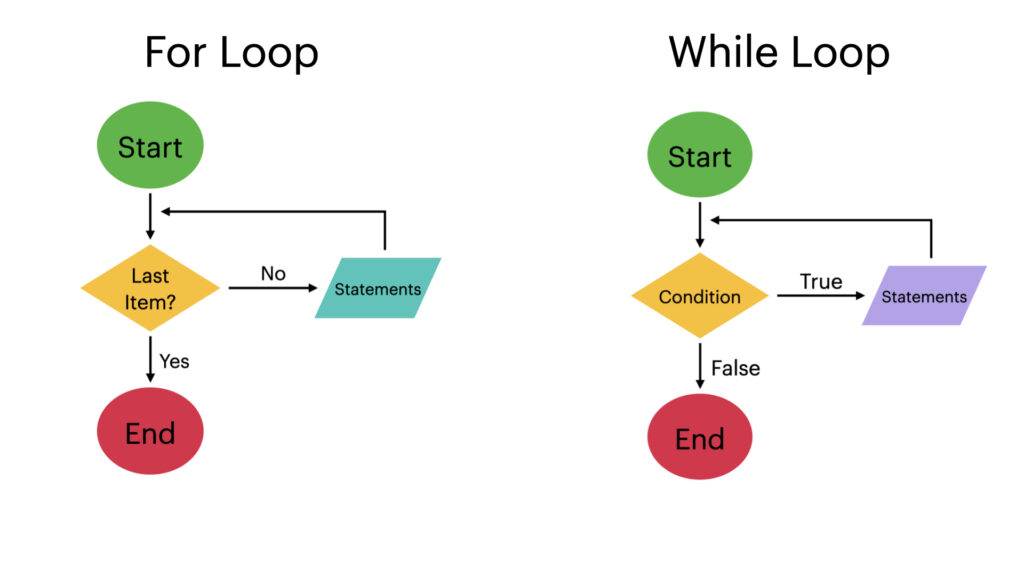
The most common type of loop you'll encounter is the for loop. It is designed for what we call definite iteration—that is, looping through a collection of items where the number of items is known beforehand. Think of it as going through a checklist: you perform a task for each item on the list until you reach the end.
The core idea is to take a sequence (like a list or a string) and execute a block of code once for each element in that sequence.
Python Loops (Visually Explained) | For, While, Break, Continue, Else
To build a solid mental model of how loops work, let's start with a visual explanation from the "Data with Baraa" channel. This video does an excellent job of sketching out the underlying logic, which aligns with your preference for understanding principles first.
Please watch these two sections: What are loops?: This will give you the high-level concept of why loops are essential for avoiding repetitive code. For loops explained: Pay close attention to the flowchart visualization and the explanation of the "iterator." This shows how Python keeps track of its position in the sequence.
Syntax and Basic Usage
As you saw in the video, the syntax for a for loop is both readable and elegant. It follows this structure:
for variable_name in sequence:


    # Code to be executed for each item
    # This block must be indented
Let's break this down:
for: The keyword that starts the loop.variable_name: A temporary variable that holds the current item from the sequence in each iteration. You choose this name. A common convention is to use a singular noun (e.g.,fruit) if the sequence is a plural noun (e.g.,fruits).in: The keyword that separates the variable from the sequence.sequence: The collection of items to iterate over, such as a list or a string.:: The colon marks the end of the loop header.- Indented block: The code that runs for each item. Indentation is how Python knows this code belongs inside the loop.
Here's a practical example using a list, which you're already familiar with:
fruits = ["apple", "banana", "cherry"]

for fruit in fruits:
    print(f"Current fruit: {fruit}")

print("Loop finished!")
When you run this code, Python does the following:
- In the first iteration,
fruitis assigned the value"apple", andCurrent fruit: appleis printed. - In the second iteration,
fruitis assigned the value"banana", andCurrent fruit: bananais printed. - In the third iteration,
fruitis assigned the value"cherry", andCurrent fruit: cherryis printed. - After the last item, the loop finishes, and the final line,
Loop finished!, is printed.
Iterating with range()
What if you don't have a list, but you just want to repeat an action a specific number of times? For this, Python provides the range() function. It generates a sequence of numbers that you can loop over.
Python Tutorial for Beginners 7: Loops and Iterations - For/While Loops
Corey Schafer's tutorial provides a very clear and concise demonstration of the range() function.
Watch the segment on the range function to see how to generate sequences of numbers for your loops. Notice how range(10) produces numbers from 0 to 9, and how you can specify a start and end value.
The range() function can be used in a few ways:
range(stop): Generates numbers from 0 up to (but not including)stop.range(start, stop): Generates numbers fromstartup to (but not including)stop.
Here's how you can use it to run a loop 5 times:
# Prints numbers 0, 1, 2, 3, 4
for i in range(5):
    print(f"Repeating action, round {i}")
The variable i (short for index) is commonly used when the number itself is what matters.
2. The while Loop: Iterating Based on a Condition
While for loops are for iterating over a known sequence, we sometimes need to loop an unknown number of times. We might want to repeat an action while a certain condition remains true. This is where the while loop, or indefinite iteration, comes in.
A while loop will continue to execute as long as its condition evaluates to True.
Syntax and Structure
The syntax is simple:
while condition:


    # Code to execute as long as condition is True
    # This block must be indented
A while loop typically requires three parts to function correctly and avoid running forever:
- Initialization: A variable used in the condition must be initialized before the loop starts.
- Condition: The expression that is checked before each iteration. If it's
True, the loop runs. IfFalse, the loop stops. - Update: Inside the loop, something must happen to eventually make the condition
False. This is usually an update to the variable from the initialization step.
Let's look at a classic counter example:
# 1. Initialization
count = 0


# 2. Condition
while count < 3:
    print(f"Count is: {count}")


    # 3. Update
    count = count + 1  # or count += 1

print("While loop finished!")
This loop will print the count for 0, 1, and 2. When count becomes 3, the condition 3 < 3 is False, and the loop terminates.
The Danger of Infinite Loops
What would happen if we forgot the count = count + 1 line? The value of count would always be 0, the condition count < 3 would always be true, and the loop would run forever! This is called an infinite loop.
If you accidentally run code with an infinite loop, you can usually stop it by pressing Ctrl+C in your terminal.
Python Tutorial for Beginners 7: Loops and Iterations - For/While Loops
Let's watch Corey Schafer's explanation of the while loop. He clearly explains the structure and the importance of the update step to avoid infinite loops.
Please watch from the introduction to while loops. Pay close attention to how the x variable is incremented inside the loop to ensure the condition eventually becomes false.
3. Controlling Your Loops: break and continue
Sometimes you don't want a loop to run to completion. You might want to exit early or skip a specific iteration. Python provides two statements for this: break and continue.
break: Immediately terminates the entire loop. The program continues with the first statement after the loop.continue: Immediately stops the current iteration and jumps to the beginning of the next one.
Python Loops (Visually Explained) | For, While, Break, Continue, Else
The "Data with Baraa" video has another excellent visual segment that distinguishes these two crucial statements. The flowcharts he draws make the difference in behavior very clear.
Watch the section explaining break and continue. Notice how break creates an "emergency exit" from the loop, while continue just shortcuts back to the top for the next round.
Example: Using break
break is useful when you're searching for something and can stop as soon as you find it.
numbers = [1, 5, -3, 8, 2]

for num in numbers:
    if num < 0:
        print("Negative number found. Stopping.")
        break  # Exit the loop immediately
    print(f"Processing number: {num}")
Output:
Processing number: 1
Processing number: 5
Negative number found. Stopping.
The loop stops as soon as it encounters -3 and never processes 8 or 2.
Example: Using continue
continue is useful for skipping over values you don't want to process.
numbers = [1, 5, -3, 8, 2]

for num in numbers:
    if num < 0:
        print("Skipping a negative number.")
        continue  # Skip to the next iteration
    print(f"Processing number: {num}")
Output:
Processing number: 1
Processing number: 5
Skipping a negative number.
Processing number: 8
Processing number: 2
The loop skips the processing step for -3 but continues on to process 8 and 2.
4. Choosing the Right Loop
Now that you know both loops, how do you decide which one to use?
Python Loops (Visually Explained) | For, While, Break, Continue, Else
This final clip from "Data with Baraa" provides a perfect summary comparing the two loop types.
Watch the direct comparison of for vs while loops. This will help solidify when to choose one over the other.
Here's the rule of thumb:
- Use a
forloop when you know how many times you need to iterate—for example, when looping over all items in a list, all characters in a string, or a fixed number of times usingrange(). Think: "For each item in this collection..." - Use a
whileloop when you need to loop based on a condition that can change, and you don't know when it will become false. Common use cases include waiting for user input, processing data from a stream, or retrying an operation until it succeeds. Think: "While this condition is still true..."

Conclusion
In this lesson, we've unlocked one of the most powerful capabilities in programming: automation through iteration. You now have the tools to make your programs perform repetitive tasks efficiently.
Here are the key takeaways:
- Loops allow you to execute a block of code multiple times.
forloops are used for definite iteration over a known sequence (like a list, string, orrange).whileloops are used for indefinite iteration, running as long as a condition isTrue. Be mindful of the three components (initialization, condition, update) to avoid infinite loops.- The
breakstatement exits a loop entirely, while thecontinuestatement skips the current iteration and proceeds to the next.
In our previous lessons, we learned about variables, conditionals, and lists. Now, with loops, your ability to write programs that can process data and perform complex logic has grown immensely.
In our next lesson, we will learn how to organize our code into reusable blocks called functions. This will allow us to take the logic we've built inside our loops and package it up so we can call on it whenever we need it, making our code even more powerful and organized.