Hello! Welcome back to our module on "SQL for Data Interrogation."
In our last lesson, you learned how to sort your query results with ORDER BY and focus on the most important records using LIMIT. This is perfect for creating ranked lists, like the top 10 most recent user actions. However, a huge part of business analysis is about understanding the big picture—seeing trends and calculating key metrics, not just looking at individual rows.
Today, we move from viewing rows to summarizing them. This lesson covers how to apply aggregate functions (COUNT, SUM, AVG) with the GROUP BY clause to summarize data. This is one of the most powerful and fundamental skills in SQL for any analyst. It’s how you will answer critical business questions like:
- "How many users signed up from each country?"
- "What is the total revenue generated by each advertising campaign?"
- "What is the average session duration for mobile vs. desktop users?"
By the end of this lesson, you'll be able to transform raw, detailed data into high-level, actionable insights for your stakeholders.
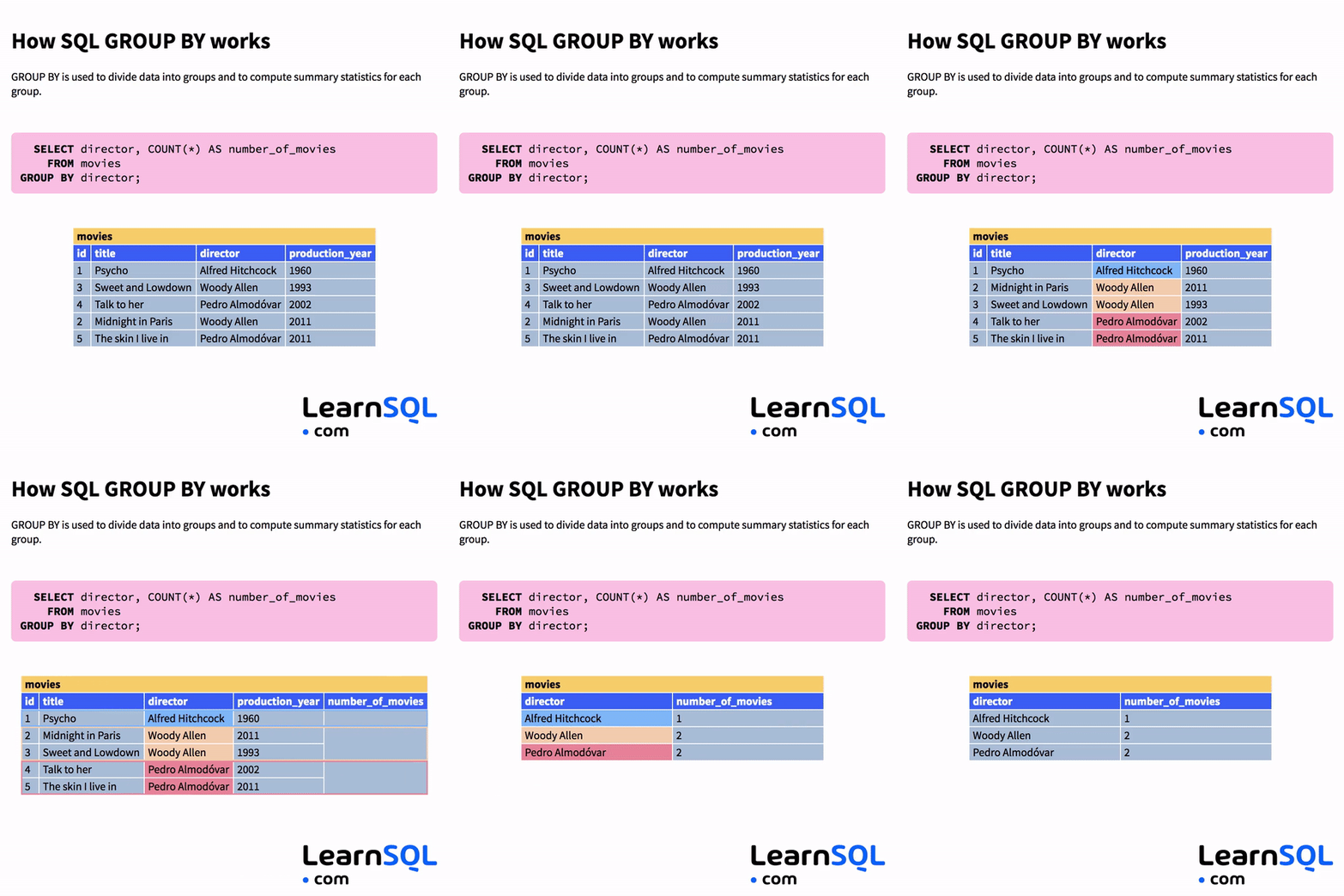
From Individual Rows to Summarized Groups
Aggregate functions are SQL functions that operate on a set of rows and return a single, summary value. The most common ones you'll use are:
COUNT(): Counts the number of rows.SUM(): Calculates the sum of a numeric column.AVG(): Calculates the average of a numeric column.MIN(): Finds the minimum value in a column.MAX(): Finds the maximum value in a column.
When used alone, an aggregate function summarizes the entire table. For example, SELECT COUNT(*) FROM users; would tell you the total number of users. But their real power comes from combining them with the GROUP BY clause.
Understanding Aggregate Functions and GROUP BY
Let's start by getting a solid conceptual understanding of what aggregate functions are and how they set the stage for grouping.
Master the SQL SELECT statement part 06: Aggregate Functions, GROUP BY and HAVING clauses
This video from Michael Fudge provides a clear introduction to aggregate functions. Pay close attention to how he describes them as "reducer" functions that collapse many rows into a single summary row.
Watch the segment from 00:53 to 03:50. This will give you a solid foundation on what COUNT, MIN, MAX, and AVG do when applied to a whole table.
As you saw, aggregates provide a high-level summary. Now, let's see how GROUP BY allows us to create more granular summaries.
SQL GROUP BY: Complete Guide with Interactive Examples
This guide from Beekeeper Studio offers a great textual explanation of how GROUP BY works with aggregate functions. It will serve as a good reference for the core syntax.
Read the sections 'What is GROUP BY?', 'Basic GROUP BY with COUNT', and 'Common Aggregate Functions with GROUP BY'. Focus on the basic syntax and the examples provided for COUNT, SUM, and AVG.
The Golden Rule of GROUP BY
There's a critical rule you must follow: Any column in your SELECT statement that is not inside an aggregate function must be listed in the GROUP BY clause.
For example, this query will fail:
-- This query is INVALID
SELECT
  category, -- Not an aggregate
  SUM(sales)
FROM products
GROUP BY ...; -- 'category' is not in GROUP BY, so what should the DB show?
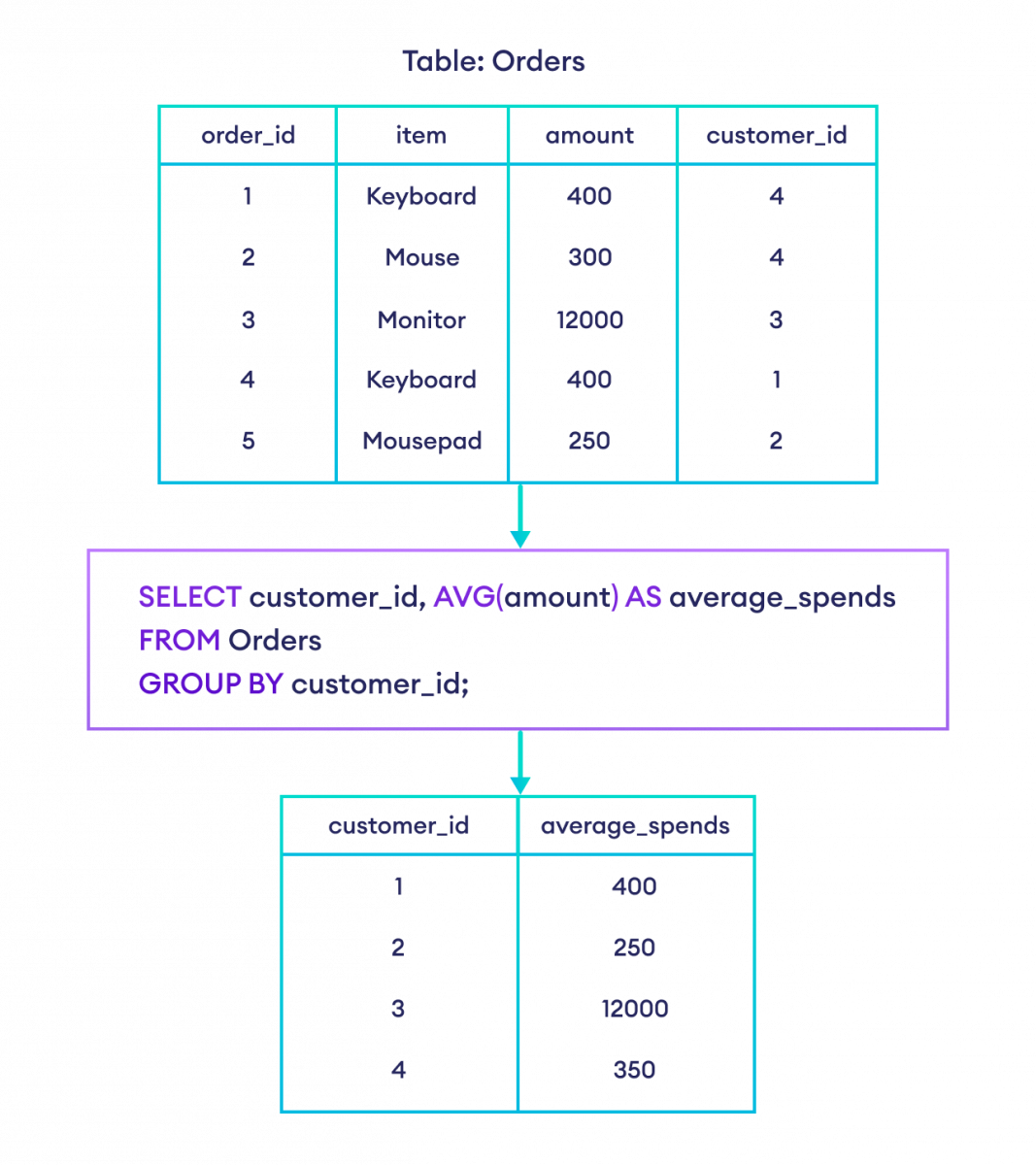
The database doesn't know which category name to display alongside the total sales if you don't group by it. By adding GROUP BY category, you tell the database to calculate a separate SUM(sales) for each unique category.
Let's watch a short clip that explains this rule very clearly.
Master the SQL SELECT statement part 06: Aggregate Functions, GROUP BY and HAVING clauses
We'll return to Michael Fudge's video, as he gives an excellent explanation for why this rule exists. Understanding the logic will help you avoid common errors.
Watch from 09:02 to 12:45. Notice the error he gets when he forgets to include the column in the GROUP BY clause and how he explains the logic behind it.
Practical Application: Analyzing Ad Campaign Performance
Let's apply these concepts to your interest in AdTech. Imagine we have a table called campaign_events with the following columns: event_id, campaign_id, event_type ('impression', 'click', 'conversion'), cost, and event_date.
Business Question 1: How many total events has each campaign generated?
To answer this, we need to count the rows for each campaign_id.
SELECT
  campaign_id,
  COUNT(*) AS number_of_events
FROM campaign_events
GROUP BY
  campaign_id
ORDER BY
  number_of_events DESC; -- Sorting to see top performers first!
This gives us a simple but powerful report showing which campaigns are driving the most activity.
Business Question 2: What is the total cost and average cost per event for each campaign?
Here we'll use SUM() and AVG().
SELECT
  campaign_id,
  SUM(cost) AS total_cost,
  AVG(cost) AS average_cost_per_event
FROM campaign_events
GROUP BY
  campaign_id
ORDER BY
  total_cost DESC;
Now a marketing manager can see not only which campaigns cost the most in total but also their cost efficiency.
Test your understanding!
You have a table user_signups with columns user_id, signup_date, country, and source (e.g., 'Google', 'Facebook', 'Direct').
Your Task: Write a query to find the total number of users who signed up from each source. The result should show the source and the count of users.
Show answer
SELECT
  source,
  COUNT(user_id) AS number_of_users -- COUNT(user_id) or COUNT(*) works here
FROM user_signups
GROUP BY
  source;
Grouping by Multiple Columns
Your analysis can get even more detailed. What if you want to know the total cost per campaign, broken down by event type? To do this, you can group by more than one column.
When you group by multiple columns, the database creates a unique group for each combination of values.
Business Question 3: What is the total cost for each event type within each campaign?
SELECT
  campaign_id,
  event_type,
  SUM(cost) AS total_cost
FROM campaign_events
GROUP BY
  campaign_id,
  event_type
ORDER BY
  campaign_id,
  total_cost DESC;
The result would look something like this:
| campaign_id | event_type | total_cost |
|---|---|---|
| 101 | impression | 50.25 |
| 101 | click | 150.75 |
| 101 | conversion | 300.00 |
| 102 | impression | 75.50 |
| 102 | click | 250.00 |
| ... | ... | ... |
This level of detail is extremely valuable for a BA. You can now see exactly where the budget is going within each campaign, which might lead to insights like, "Campaign 101 has a high cost for clicks but few conversions, while Campaign 102 has a lower click cost and better conversion performance."
Let's watch a final video demonstrating these aggregate functions and multi-column grouping in action.
GROUP BY with Aggregate functions in SQL statement
This video from 'SQL with Manoj' provides extensive, practical examples of using all the major aggregate functions (COUNT, SUM, MIN, MAX, AVG) with GROUP BY.
Watch the following three segments to see how these concepts come together: COUNT with single and multiple columns (02:12 - 06:42): See how to get counts per department, and then per department and gender. MIN, MAX, AVG (08:42 - 14:15): Observe how to calculate multiple salary statistics for different groups like job title and gender. SUM (18:13 - 21:05): Understand how to calculate total budget allocations per department.
Conclusion
Fantastic work! You've just learned one of the most important concepts in SQL for data analysis. The ability to aggregate and group data is what separates basic data retrieval from true business intelligence. You are now equipped to take large, raw datasets and summarize them into reports that answer fundamental business questions.
Key Takeaways:
- Aggregate functions like
COUNT(),SUM(), andAVG()perform a calculation on a set of rows and return a single summary value. - The
GROUP BYclause is used to create subgroups of data based on one or more columns, so you can apply aggregate functions to each subgroup. - Remember the golden rule: Any column in your
SELECTlist that is not an aggregate function must be in yourGROUP BYclause. - You can group by multiple columns to create more detailed, hierarchical summaries.
- The logical order of query execution is:
FROM->WHERE->GROUP BY->SELECT->ORDER BY->LIMIT. This means filtering happens before grouping, and sorting happens after.
Preview of the Next Lesson:
We now know how to create summarized groups. But what if we want to filter these groups themselves? For instance, how would we find only the campaigns that have a total cost greater than $1,000? The WHERE clause filters individual rows before grouping, so it can't help us here. In the next lesson, we will learn about the HAVING clause, which is designed specifically to filter data after it has been grouped.