Hello! Welcome back to our journey through "SQL for Data Interrogation."
In our last lesson, you mastered one of the most powerful tools for a Business Analyst: using GROUP BY with aggregate functions like COUNT(), SUM(), and AVG(). You learned how to take raw, row-level data and summarize it into meaningful groups, like calculating the total cost per advertising campaign.
But what if you want to focus only on the most significant groups? For example, how would you find only the campaigns that have a total cost greater than $1,000? Or identify user sources that brought in more than 500 new users? The WHERE clause can't help here, because it filters individual rows before they are grouped.
This lesson introduces the final piece of the puzzle for filtering: the HAVING clause. You will learn how to filter your data based on the results of your aggregate functions. This is a crucial skill for honing in on the most important trends and exceptions in your data, which is essential for creating focused, actionable reports for stakeholders.
The Problem: Filtering on an Aggregate Value
As we just discussed, the WHERE clause is executed before the GROUP BY clause. This means that when WHERE is doing its work, the aggregated values (like SUM(cost) for a whole group) haven't been calculated yet. Trying to use an aggregate function in a WHERE clause will result in an error.
Let's see this in action.
Intermediate SQL Tutorial | Having Clause
This video from Alex The Analyst clearly demonstrates the problem. Watch how a standard query fails when an aggregate function is placed in the WHERE clause, and listen to the explanation of the error message.
Watch the segment from the beginning until 01:29. This sets the stage perfectly for why the HAVING clause is necessary.
The Solution: The HAVING Clause
The HAVING clause was designed specifically to solve this problem. It is used to filter groups after the aggregations have been performed.
The logical order of execution for a query that includes HAVING is:
FROM: Gets the table.WHERE: Filters individual rows.GROUP BY: Groups the remaining rows.HAVING: Filters the groups based on an aggregate condition.SELECT: Selects the final columns.ORDER BY: Sorts the final result.
Because HAVING operates on the grouped data, you can use aggregate functions like COUNT(), SUM(), and AVG() in its conditions.
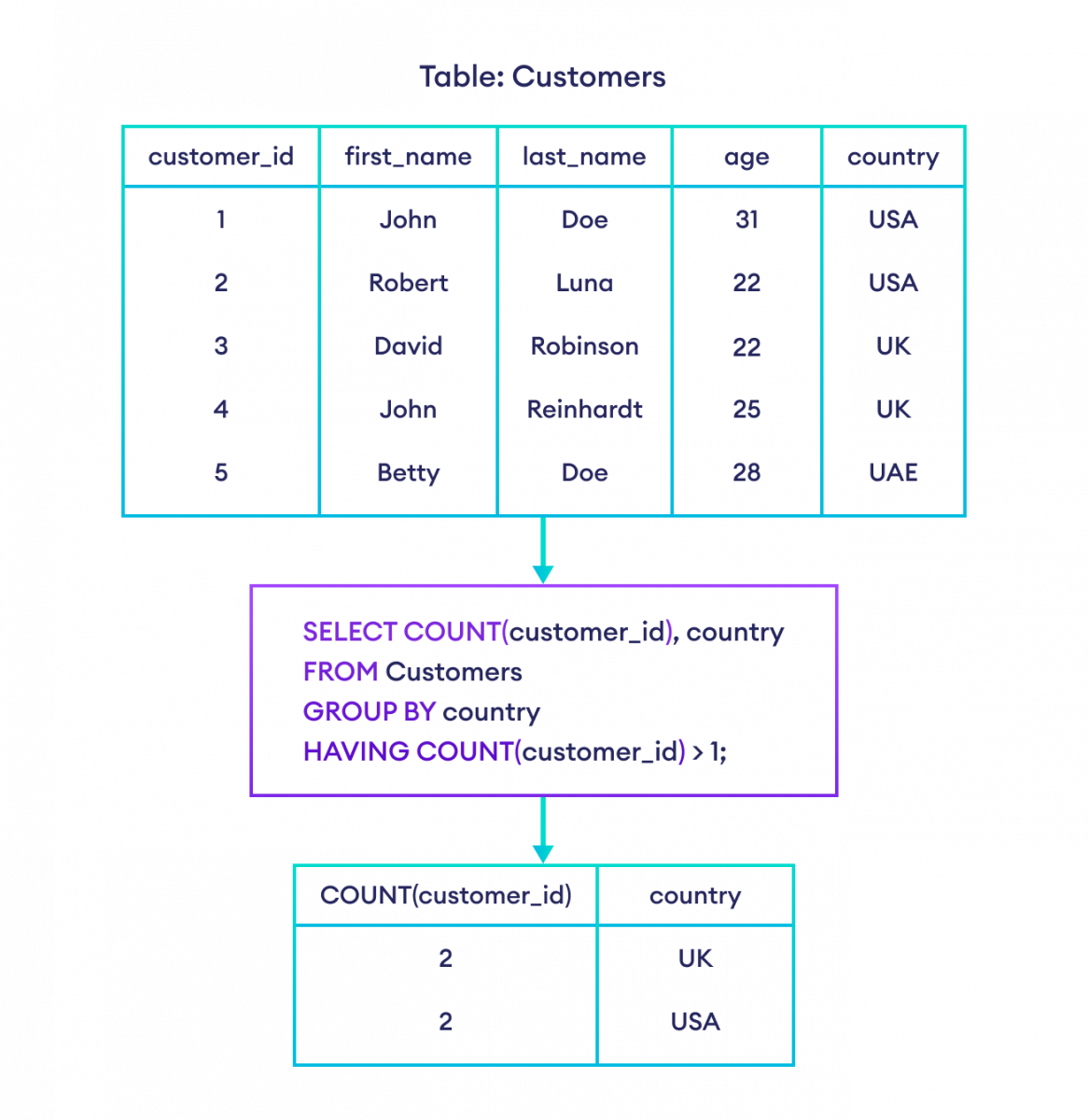
Now, let's see the correct way to write the query from the previous video.
Intermediate SQL Tutorial | Having Clause
Continuing with the video from Alex The Analyst, let's see how HAVING solves the problem. Pay close attention to the syntax and, crucially, the placement of the HAVING clause after GROUP BY.
Watch from 01:29 to 03:18. The video shows two clear examples using HAVING with both COUNT() and AVG().
WHERE vs. HAVING: The Definitive Guide
The most common point of confusion for new SQL users is when to use WHERE and when to use HAVING. The following reading provides an excellent breakdown.
SQL HAVING Clause: A Tutorial for Beginners
This tutorial from learnsql.com is a great resource. We will focus on the parts that explain the purpose of HAVING and compare it directly to WHERE.
Please read the first two main sections of the article: Start at the top and read through 'The HAVING Clause' section for a good summary. Continue to the next section and read the part that compares WHERE and HAVING, right down to the summary bullet points before 'Example Queries with HAVING'. Focus on understanding the rule for when to use each clause.
To summarize the key distinction:
- Use
WHEREto filter individual rows based on column values. This happens before aggregation. (e.g.,WHERE region = 'USA') - Use
HAVINGto filter entire groups based on aggregate function results. This happens after aggregation. (e.g.,HAVING SUM(sales) > 10000)
You can, and often will, use both in the same query. For example, in an AdTech context:
SELECT
  campaign_id,
  SUM(cost) AS total_campaign_cost
FROM campaign_events
WHERE
  event_date >= '2023-01-01' -- Filters individual events to only include this year's data
GROUP BY
  campaign_id
HAVING
  SUM(cost) > 5000; -- Filters groups to show only high-spend campaigns
This query first selects only the events from 2023, then groups them by campaign, and finally keeps only those campaigns whose total cost in 2023 exceeded $5000.
Test your understanding!
For each scenario, decide whether you would use WHERE or HAVING to apply the filter.
- Find all campaigns that ran in the 'EMEA' region.
- Find all campaigns that generated more than 100 conversions.
- Find all user acquisition sources with an average cost per acquisition (CPA) below $5.
- Find all click events that occurred on a mobile device.
Show answer
WHERE. You are filtering individual rows based on the value in theregioncolumn (WHERE region = 'EMEA').HAVING. You need to first count the conversions for each campaign (GROUP BY campaign_id,COUNT(event_type)), and then filter those groups (HAVING COUNT(...) > 100).HAVING. You need to calculate the average cost for each source (GROUP BY source,AVG(cost)), and then filter those groups (HAVING AVG(cost) < 5).WHERE. You are filtering individual rows based on the value in thedevice_typecolumn (WHERE device_type = 'mobile').
Practical Application: Identifying High-Value Customers
Let's bring this into a realistic business analysis scenario that aligns with your goal of preparing for job interviews. A common task for a BA is to analyze customer data to identify valuable segments.
Imagine you're in a mock interview. You're given two tables, user_sessions and attributions, and asked to identify "high-value users," defined as those with a total Customer Lifetime Value (CLV) over $100. This requires joining tables (which we'll cover next), but the critical step is filtering the aggregated SUM(purchase_value).
Data Science SQL Mock Interview - Analyze Marketing Channels
This video from Exponent features a mock data science interview that perfectly demonstrates this scenario. The interviewee first calculates the CLV for each user using GROUP BY and then uses HAVING to filter for the high-value users.
Watch the segment from 06:02 to 09:55. Notice how he first builds the query to get the CLV for all users and then adds the HAVING clause to answer the specific business question.
This is a fantastic example of how HAVING is used in practice to segment data and answer specific, high-impact business questions.
For more practice, the learnsql.com article you looked at earlier contains several excellent, real-world exercises. I encourage you to review them to solidify your understanding.
SQL HAVING Clause: A Tutorial for Beginners
Let's return to the 'SQL HAVING Clause' tutorial. This time, focus on the practical examples. Reading through these will help you see the repeating pattern of GROUP BY followed by HAVING.
Read through the five examples in the section 'Example Queries with HAVING'. For each one, pay attention to: The business question being asked. How GROUP BY is used to create the summary. How HAVING is used to filter that summary to answer the question.
For Your Interview Prep
Since your goal is to transition to a BA role and pass interviews, it's worth noting that questions involving HAVING are very common. They test your understanding of aggregation and your ability to distinguish between row-level and group-level filtering.
The website Interview Query, which is dedicated to technical interview questions, includes many scenarios that require HAVING. For example, a beginner-level question asks to "Identify users with fewer than 3 orders OR total spend under $500." This requires a HAVING clause with COUNT and SUM connected by an OR. You can see this as question 17 in the "Beginner Level" section of the resource linked in the footnote.^[1]
^[1] You can find this and other examples in the resource SQL Scenario Based Interview Questions and Answers... (resource_id LINK).
Conclusion
Great job today! You've added a critical and powerful tool to your SQL toolkit. The HAVING clause elevates your queries from simple summarization to sophisticated, targeted analysis. You are no longer just reporting what's there; you are now able to filter those summaries to highlight the most important insights for your stakeholders.
Key Takeaways:
- The
HAVINGclause is used to filter query results based on aggregate functions. - It is processed after the
GROUP BYclause, so it operates on grouped data. - The
WHEREclause filters individual rows before grouping, whileHAVINGfilters entire groups after grouping. - The standard order of clauses is:
SELECT,FROM,WHERE,GROUP BY,HAVING,ORDER BY. Memorizing this order will help you avoid syntax errors.
Preview of the Next Lesson:
So far, all our queries have been on a single table. However, in any real-world business, data is strategically separated into multiple tables to stay organized (e.g., a table for customers, another for orders, and another for products). In our next lesson, we will cover one of the most fundamental concepts in relational databases: writing queries using INNER JOIN to combine data from multiple tables. This will open up a new world of analytical possibilities.