Hello! Welcome back to our module on "SQL for Data Interrogation."
In our last lesson, you learned the fundamentals of retrieving data with SELECT and FROM, and how to filter that data precisely using the WHERE clause. This gave you the power to pull specific records from a table. However, the results you get are not returned in any guaranteed order. For a Business Analyst, presenting data in a logical sequence is crucial, whether you're ranking top performers or reviewing the most recent activities.
Today, we'll build on your filtering skills to organize and refine your query results. Our goal is to learn how to sort and limit query results using ORDER BY and LIMIT. By the end of this lesson, you'll be able to arrange your data meaningfully and retrieve just the information you need, like the top 10 best-performing ad campaigns or the 5 most recent customer support tickets.
Let's start with a quick visual overview of today's topics.

Sorting Your Results with ORDER BY
The ORDER BY clause allows you to sort the rows in your result set based on the values in one or more columns. By default, SQL sorts data in ascending order (A to Z, 0 to 9). This is often useful, but more frequently, you'll want to see the highest values first, such as the most expensive products or the most recent dates.
Let's dive into the syntax and see how to control the sort direction.
SQL ORDER BY | Sort Data In SQL Tutorial
This article from DataLemur provides a clear, concise explanation of the ORDER BY clause. It will introduce you to the fundamental syntax for sorting in both ascending and descending order.
Please read the sections 'How SQL ORDER BY Works' and 'Descending Sort Order In SQL'. Pay attention to the ASC (ascending) and DESC (descending) keywords.
As you've just read, the syntax is straightforward:
- To sort in ascending order:
ORDER BY column_name ASC(or justORDER BY column_name, sinceASCis the default). - To sort in descending order:
ORDER BY column_name DESC.
The ORDER BY clause is almost always the last clause in a single-table query.
Single-Column and Multi-Column Sorting in Action
Now, let's watch a video that provides a visual and practical demonstration of how this works, including the powerful technique of "nested sorting" (sorting by more than one column).
SQL SELECT Queries (Visually Explained) for Beginners | All Essential Clauses | #SQL Course 4
This video from 'Data with Baraa' visually explains how the database sorts your data. The first part covers sorting by a single column, and the second part demonstrates how to apply a secondary sort order, which is a very common business requirement.
Watch the segment from 00:16:02 to 00:25:11. Focus on: How DESC changes the order to show the highest values first. The logic of multi-column sorting: the database sorts by the first column, and then sorts rows with the same value in the first column by the second column.
Let's apply this to an AdTech scenario. Imagine you have a table campaign_performance and you want to see which campaigns have the highest Click-Through Rate (CTR).
SELECT
  campaign_name,
  ctr,
  status
FROM campaign_performance
ORDER BY
  ctr DESC;
This query gives you a ranked list of campaigns from best to worst CTR.
Now, what if you wanted to see that same ranking, but grouped by status? For that, you'd use multi-column sorting:
SELECT
  campaign_name,
  ctr,
  status
FROM campaign_performance
ORDER BY
  status ASC, -- First, group by status (e.g., 'Active', 'Ended', 'Paused')
  ctr DESC;   -- Then, within each status group, sort by CTR descending
This produces a much more organized report, making it easier for stakeholders to see the top performers within each status group.
Test your understanding!
You have a table named user_activity with columns user_id, last_login_date, and country.
Your Task: Write a query to retrieve all users. The results should be sorted first by country in alphabetical order (A-Z). Within each country, the users who logged in most recently should appear first.
Show answer
SELECT
  user_id,
  last_login_date,
  country
FROM user_activity
ORDER BY
  country ASC,         -- Sorts by country alphabetically (A-Z)
  last_login_date DESC; -- For users in the same country, sorts by date from newest to oldest
Limiting the Number of Results
Often, you don't need to see every single row. You might only be interested in the "Top 5" or "Bottom 10" records. The LIMIT clause is used for exactly this purpose. It restricts the number of rows returned by your query.
The real power of LIMIT is realized when you combine it with ORDER BY. This combination allows you to answer common business questions like:
- "What are our top 10 selling products?"
- "Which 5 ad campaigns have the lowest cost-per-click?"
- "Who are the 3 most recently signed-up customers?"
Let's see this in practice.
SQL SELECT Queries (Visually Explained) for Beginners | All Essential Clauses | #SQL Course 4
We'll return to the 'Data with Baraa' video to see how to limit results. The narrator uses the TOP keyword, which is specific to SQL Server. In many other databases (like PostgreSQL and MySQL, which are very common), we use the LIMIT keyword at the end of the query. The concept is identical, so focus on the logic of combining ordering with row restriction.
Watch the segment from 00:44:30 to 00:49:45. Notice how ordering the data first is essential to getting a meaningful 'top N' result.
So, to find the 5 campaigns with the highest CTR, you would combine ORDER BY and LIMIT like this:
SELECT
  campaign_name,
  ctr
FROM campaign_performance
ORDER BY
  ctr DESC -- Sort from highest to lowest CTR
LIMIT 5;     -- Only return the top 5 rows from the sorted result
The LIMIT clause is placed at the very end of the query.
The Logical Order of SQL Operations
You've now learned SELECT, FROM, WHERE, ORDER BY, and LIMIT. A common point of confusion for beginners is the order in which the database actually executes these clauses. It's not the same order in which you write them!
Understanding this "logical processing order" is crucial for writing correct and efficient queries.
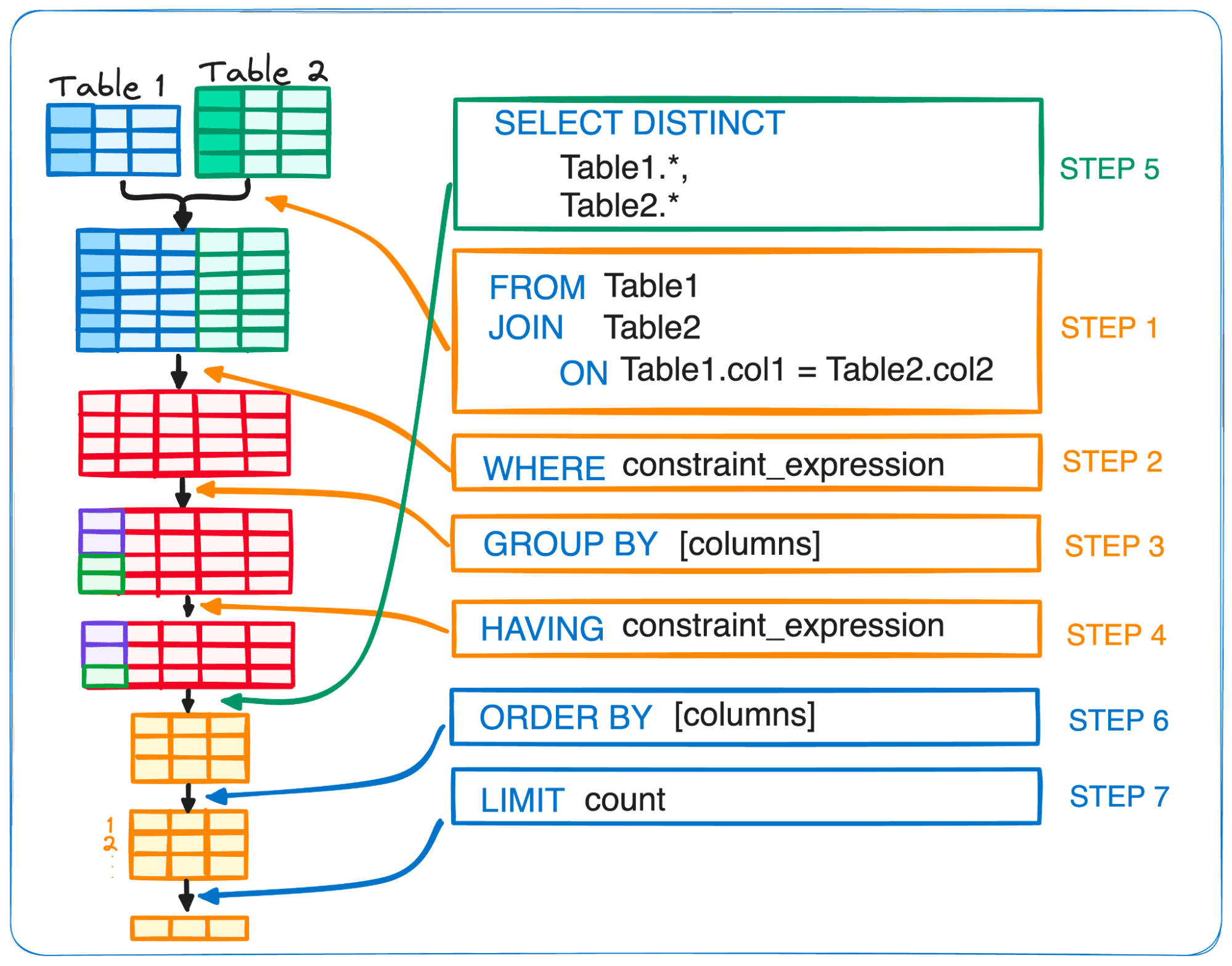
Here is the simplified logical order for the clauses we've learned so far:
FROM: The database first identifies the table to work with.WHERE: It then filters the rows based on your conditions. Only rows that match theWHEREclause proceed to the next step.SELECT: The specified columns are selected from the filtered rows.ORDER BY: The resulting set of rows is then sorted.LIMIT: Finally, the database discards all rows except for the number you specified in theLIMITclause.
Why does this matter? It explains why, for example, you can ORDER BY a column that you didn't even SELECT (as long as it's in the FROM table). The sorting happens on the data before the final columns are presented. More importantly, it confirms that the LIMIT is applied to the sorted data, which is exactly what we need to find top performers.
Conclusion
Excellent work! You now have the tools to not only retrieve specific data but also to present it in a clean, organized, and focused manner. This is a fundamental skill for generating reports and performing quick analyses.
Key Takeaways:
- The
ORDER BYclause sorts your query results. UseASCfor ascending order (the default) andDESCfor descending order. - You can sort by multiple columns to create more structured, "nested" reports.
- The
LIMITclause restricts the number of rows in your final result set. - Combining
ORDER BYwithLIMITis the standard way to find "top N" or "bottom N" records. - SQL clauses are processed in a specific logical order, which is different from the order in which you write them. Sorting and limiting happen near the end of this process.
Preview of the Next Lesson:
So far, we've been working with individual rows. However, a huge part of business analysis is about seeing the bigger picture through summarized data. In our next lesson, we will cover aggregate functions (COUNT, SUM, AVG) and the GROUP BY clause. This will enable you to calculate key business metrics like the total number of users per country, the average ad spend per campaign, or the total revenue per product category.