Hello! Welcome to the final lesson in our module on SQL for Data Interrogation.
In our last few lessons, we mastered JOINs, which are used to combine data from multiple tables horizontally. By matching keys, we could add new columns to our result set, allowing us to ask complex questions like "which campaigns had clicks?" or "which users have never placed an order?".
Today, we're going to learn a different way to combine data: vertically. Imagine you have performance data from different sources (like Google Ads and Facebook Ads) in separate tables, or customer lists from different months. You don't want to add columns; you want to stack these lists on top of each other to create one master list. This is where SQL's set operators, UNION and UNION ALL, come in.
By the end of this lesson, you will be able to combine the results of multiple queries into a single, unified dataset, a crucial skill for consolidating reports and performing analysis across different segments or time periods.
Joins vs. Set Operators: Horizontal vs. Vertical
Before we dive into the syntax, it's essential to solidify the conceptual difference between JOINs and set operators like UNION.
JOINs add columns from other tables, making the result set wider.UNIONappends rows from other queries, making the result set longer.
To get a clear visual explanation of this fundamental difference, let's start with a short video.
SQL SET Operators (Visually Explained) | UNION, UNION ALL, EXCEPT, INTERSECT | #SQL Course 11
The video 'SQL SET Operators (Visually Explained)' by Data with Baraa provides a fantastic visual breakdown of combining columns with JOINs versus combining rows with set operators.
Watch the first 3 minutes and 40 seconds of the video. Focus on the clear distinction made between combining columns (horizontally) and combining rows (vertically).
Introducing UNION and UNION ALL
Now that we understand we're stacking rows, let's meet our two main tools for the job.
UNION: Combines the result sets of two or moreSELECTstatements and returns only distinct (unique) rows.UNION ALL: Combines the result sets of two or moreSELECTstatements and returns all rows, including duplicates.
Because UNION has to do the extra work of checking for and removing duplicates, it is generally slower than UNION ALL. The rule of thumb is: if you know there are no duplicates or if you intentionally want to keep them, use UNION ALL for better performance.
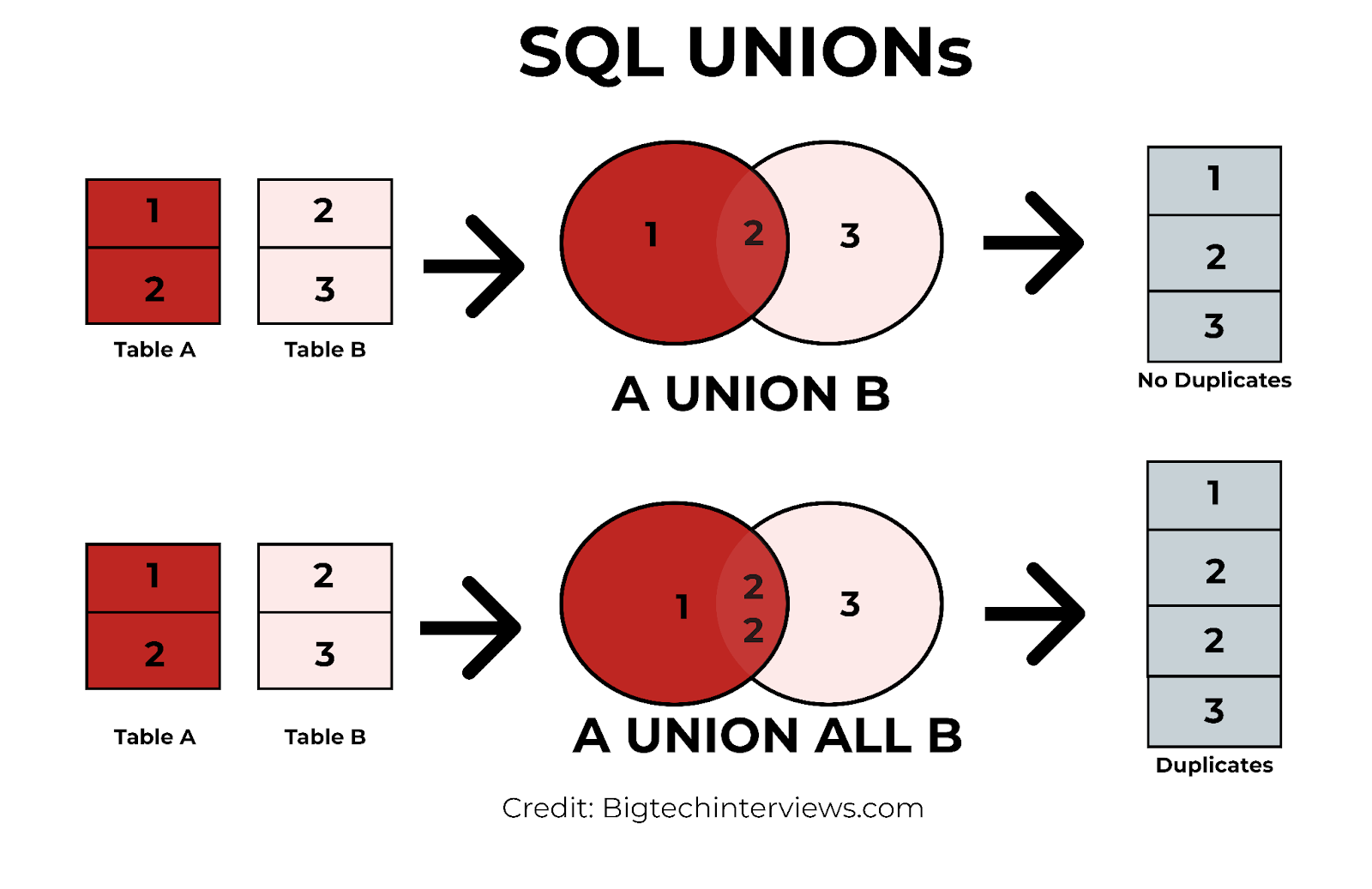
The Rules of the Road
You can't just UNION any two queries together. SQL enforces strict rules to ensure the resulting table is coherent.
- Same Number of Columns: Each
SELECTstatement within theUNIONmust have the same number of columns. - Compatible Data Types: The data types of the columns in corresponding positions in each
SELECTstatement must be compatible (e.g., you can't stack a column of dates on top of a column of text). - Same Column Order: The columns must be in the same logical order in each
SELECTstatement. - Column Names from the First Query: The final result set will use the column names (or aliases) from the first
SELECTstatement. ORDER BYat the End: You can only have oneORDER BYclause, and it must come at the very end of the entire query, sorting the final combined result.
This next video provides a fantastic, detailed walkthrough of these crucial rules. Getting these right is key to avoiding errors and ensuring your data is accurate.
SQL SET Operators (Visually Explained) | UNION, UNION ALL, EXCEPT, INTERSECT | #SQL Course 11
Let's continue with the 'SQL SET Operators' video from Data with Baraa. This section provides a thorough explanation and demonstration of each of the rules for using set operators.
Watch from 03:40 to 15:27. This is a longer segment, but it's vital. Pay close attention to the examples that break each rule and the resulting errors. This will help you debug your own queries later. Focus on: How the ORDER BY clause is used. What happens when column counts or data types don't match. Why the column order is critical. How column aliases are determined by the first query.
An AdTech Use Case: Consolidating Campaign Data
Let's apply this to a scenario relevant to your background in AdTech. Imagine you are a Business Analyst tasked with creating a single performance report for campaigns running on both Facebook Ads and Google Ads. The data lives in two separate tables (facebook_ads and google_ads) and the columns don't have the exact same names (e.g., spent vs. investment).
This is a perfect use case for UNION. You can't JOIN these tables because there's no common key, but you can stack their performance data vertically.
Union Data with UNION and UNION ALL
The article 'Union Data with UNION and UNION ALL' by Connor Phillips walks through this exact AdTech scenario. It's a great practical example of how to handle real-world data consolidation.
Read the first three sections: the introduction, the table definitions ('Facebook Ad Data' and 'Google Ads Data'), and the 'Union' section. Notice how column aliases (AS) are used in the SELECT statements to create a consistent, clean final table.
Now, let's see the practical difference between UNION and UNION ALL using the data from the article. The google_ads table contains a duplicate row.
Union Data with UNION and UNION ALL
Continuing with the same article, let's examine the section that directly compares the output of the two operators.
Read the section 'UNION vs UNION ALL'. Compare the 'UNION ALL Result Set' (8 records) with the 'UNION Result Set' (7 records). You'll see that UNION has automatically removed the duplicate row from the Google Ads data.
Advanced Technique: Labeling Segmented Data
A powerful technique for a BA is to not only combine different datasets but also to label where each row came from. You can do this by adding a static text column to each SELECT statement in your UNION.
For example, you could combine a list of highly profitable customers with a list of newly acquired customers, adding a column that labels each person as either 'High Value' or 'New'. This creates a single, actionable list for a marketing team.
This video demonstrates a similar idea, identifying employees who are "old" or "highly paid".
Unions in MySQL | Intermediate MySQL
The video 'Unions in MySQL' by Alex The Analyst shows a great practical use case for creating labeled segments and combining them into a single list for review.
Watch from 02:53 to 07:01. Pay attention to how a new column is created in each SELECT statement (e.g., 'old man' as Label). This is a simple but extremely effective way to add context to your combined data.
Test your understanding!
You have two tables: Q1_leads and Q2_leads.
Q1_leads
email |
source |
|---|---|
anna@example.com |
webinar |
ben@example.com |
ad |
charlie@example.com |
webinar |
Q2_leads
email |
source |
|---|---|
ben@example.com |
ebook |
diana@example.com |
webinar |
- Write a query to produce a single, unique list of all email addresses that were leads in either Q1 or Q2.
- Your marketing manager wants to know the total number of lead generation events across both quarters. An individual who was a lead in both Q1 and Q2 should be counted twice. Which operator would you use, and why?
Show answer
-
To get a unique list of all leads, you would use
UNION. It automatically removes the duplicateben@example.com.SELECT email FROM Q1_leads UNION SELECT email FROM Q2_leads;Result:
anna@example.comben@example.comcharlie@example.comdiana@example.com
-
To count total lead generation events, you would use
UNION ALL. This operator keeps all records, including duplicates.ben@example.comappears twice, which correctly reflects that he was generated as a lead in two separate quarters. You could then useCOUNT(*)on this result. UsingUNION ALLpreserves the raw event count without de-duplication.
Conclusion
Congratulations on completing the "SQL for Data Interrogation" module! You've moved from basic SELECT statements to powerful techniques for combining data both horizontally (JOIN) and vertically (UNION). This is a huge step in your journey to becoming a data-savvy Business Analyst.
Key Takeaways:
UNIONandUNION ALLstack rows from multiple queries vertically.- The main difference is duplicate handling:
UNIONremoves duplicates (distinct), whileUNION ALLkeeps them. UNION ALLis faster because it doesn't perform the de-duplication step.- You must follow the rules: same number of columns, compatible data types, and same order.
- This is an essential tool for consolidating data from different sources, time periods, or business segments into a single report.
Preview of the Next Lesson:
We've built a strong foundation. In our next module, "Advanced SQL for Business Analytics," we'll start exploring ways to make our queries even more powerful and sophisticated. Our first topic will be Subqueries. A subquery is a query nested inside another query. This technique will allow you to perform multi-step logic in a single command, such as filtering a list of customers based on their aggregate purchasing behavior, or comparing an individual record against a group average.