Hello! Welcome to the first lesson in our new module, "Advanced SQL for Business Analytics."
In the previous module, we built a strong foundation, learning how to select, filter, aggregate, and combine data from multiple tables using JOINs and UNION. You now have a powerful toolkit for extracting information from databases.
This lesson takes your skills to the next level by introducing subqueries. A subquery, or inner query, is a query that is nested inside another SQL query. This powerful technique allows you to solve complex problems by breaking them down into logical steps, all within a single command. For example, you can find all campaigns performing better than the account average, or identify users who have taken one action but not another—tasks that are common in business analysis and frequently appear in job interviews.
By the end of this lesson, you will be ableto write subqueries in the SELECT and WHERE clauses to solve complex, multi-step analytical problems.
What is a Subquery?
At its core, a subquery is a SELECT statement that runs first and returns a result that is then used by the main, or "outer," query. Think of it as answering a preliminary question to help you answer your main question.
For instance, to find "campaigns with a cost higher than the average," you first need to answer the preliminary question: "What is the average cost?" A subquery handles that for you automatically.
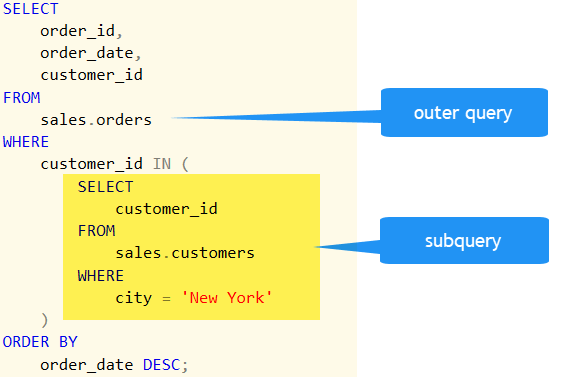
This image shows the basic structure. The inner query (the subquery) executes first to get a list of customer_ids, and the outer query uses that list to filter the orders table.
Let's start with a quick video to solidify the concept.
The video 'When to Use a Subquery in SQL' by Database Star provides an excellent introduction to what subqueries are and, more importantly, why we use them.
Watch the first 1 minute and 46 seconds of this video. Focus on the core reason for using a subquery: when the results of one query need to be used in another query.
Using Subqueries in the WHERE Clause
The most common use of a subquery is to filter data in the WHERE clause. This is incredibly useful for comparing a record to an aggregated value (like an average) or for filtering based on a list of values from another table.
1. Filtering with a Single Value Result
Let's tackle a classic business analysis question: "Which campaigns are underperforming?" A common way to define this is by finding campaigns with a Cost Per Click (CPC) that is higher than the average CPC across all campaigns.
You can't write WHERE cpc > AVG(cpc) directly in SQL. You need to find the average first, and then use that value for comparison. A subquery does this in one elegant step.
The following video demonstrates this exact logic, breaking it down into simple, manageable steps. While the example uses product prices, the concept is identical to our AdTech scenario.
Let's continue with the 'When to Use a Subquery in SQL' video. This section provides a clear, step-by-step walkthrough of finding products with a price greater than the average.
Watch from 1:46 to 5:03. Pay close attention to how the problem is broken down: first, write the query to find the average, then write the outer query, and finally, embed the first query as a subquery. This is a great problem-solving pattern to adopt.
2. Filtering with a List of Values (IN and NOT IN)
Subqueries are also powerful when they return a list of values. You can then use the IN operator to find records in your main query that match any value in that list.
A common AdTech scenario is finding all the users who have clicked an ad and then analyzing their subsequent behavior. The subquery can generate the list of clicking users.
Conversely, NOT IN is invaluable for finding users who have not performed a certain action, which is crucial for identifying churn risks or untapped user segments. This directly relates to your interview preparation, as questions like "Find users who were active but did not make a purchase" are very common.
This next video uses simple, clear examples to demonstrate subqueries with the IN and NOT IN operators.
The video 'MySQL: SUBQUERIES' by Bro Code gives a practical demonstration of using subqueries with the IN and NOT IN operators.
Watch from 03:44 to 06:30. Notice how the subquery first creates a list of customer IDs from the transactions table, and the outer query then uses this list to find the names of those customers in the customers table.
Test your understanding!
You have a campaigns table and a conversions table.
campaigns
campaign_id |
campaign_name |
|---|---|
| 101 | Summer Sale |
| 102 | Back to School |
| 103 | Winter Clearance |
conversions
conversion_id |
campaign_id |
revenue |
|---|---|---|
| 1 | 101 | 50 |
| 2 | 101 | 75 |
| 3 | 103 | 120 |
Write a SQL query to find the names of all campaigns that have not recorded any conversions.
Show answer
You would use a subquery with the NOT IN operator.
SELECT campaign_name
FROM campaigns
WHERE campaign_id NOT IN (SELECT DISTINCT campaign_id FROM conversions);
Explanation:
- The subquery
SELECT DISTINCT campaign_id FROM conversionsruns first and produces a list of campaign IDs that have conversions:(101, 103). - The outer query then becomes
SELECT campaign_name FROM campaigns WHERE campaign_id NOT IN (101, 103);. - This returns the
campaign_nameforcampaign_id102, which is 'Back to School'.
Using Subqueries in the SELECT Clause
While less common than in the WHERE clause, subqueries in the SELECT clause are useful for adding a calculated value to each row of your result set. This is often used to compare an individual row's value against an overall aggregate.
For example, a report might show each campaign's CPC and, in the next column, the average CPC for all campaigns. This immediately shows which campaigns are above or below the average benchmark.
This video demonstrates exactly this kind of comparison.
Let's return to the Bro Code video, which has a great example of a subquery in the SELECT clause.
Watch from 00:22 to 02:30. Focus on how the subquery (SELECT AVG(hourly_pay) FROM employees) is treated as a single column in the final output, appearing on every row for easy comparison.
Practice for the Real World
Your goal is to be job-ready, and subqueries are a staple of BA technical interviews. The questions are often framed as business scenarios. Let's look at a few practical exercises.
SQL Exercises, Practice, Solution - SUBQUERIES
The website w3resource offers a fantastic set of exercises to practice your new skills. These problems mimic the kind of logic you'll need on the job.
Try to solve exercises 4 and 12 on your own. They are excellent practice for what we've learned: Exercise 4: 'Display Orders Exceeding Average Value on 10-Oct-2012'. This requires a subquery in the WHERE clause that filters by date and calculates an average. Exercise 12: 'Display Orders with Amount Above Average Order Value'. This is the classic 'find values greater than the average' problem. After you've tried, you can click the link on the page to see the solution.
The resource "SQL Scenario Based Interview Questions" is also an excellent one to bookmark. It lists many common interview problems, like question #3 ("Select the 2nd highest salary in the engineering department") and question #7 under the Intermediate section ("Identify which products have prices greater than their own average transaction total"), which are often solved using subqueries.
Conclusion
You've now learned one of the most versatile tools in SQL. Subqueries allow you to build more sophisticated logic and answer deeper business questions in a single, efficient query.
Key Takeaways:
- A subquery is a
SELECTstatement nested inside another query. - Subqueries in the
WHEREclause are perfect for filtering data based on dynamic conditions, such as comparing to an aggregate (AVG,MAX) or checking for membership in a list (IN,NOT IN). - Subqueries in the
SELECTclause are useful for adding a benchmark or a calculated metric to every row in your result set for easy comparison. - Thinking in terms of subqueries—breaking a complex problem into a main question and a preliminary question—is a critical skill for any data-focused analyst.
Preview of the Next Lesson:
Now that we can dynamically filter our data with subqueries, what's next? In our next lesson, we will learn about CASE statements. This will allow us to implement conditional logic inside our SELECT clause to create new, customized columns. For example, we could use a CASE statement to label campaigns as 'High Performer', 'Average', or 'Low Performer' based on their metrics, making our reports even more insightful for stakeholders.