Hello! Welcome back to our course on Business Analysis.
In our last lesson, we explored INNER JOIN, a powerful tool for combining data from tables where matching records exist in both. We saw how this is essential for answering business questions that span multiple datasets, like calculating click-through rates by joining campaigns, ads, and events tables.
However, INNER JOIN has a limitation: it only shows you what matches. What if you need to see what doesn't match? For example, as an analyst, you might be asked: "Which of our newly launched products have zero sales so far?" or "List all our registered users and their last login date, even if they've never logged in." An INNER JOIN would exclude the very products and users you're interested in.
This lesson introduces the solution. We will master the LEFT JOIN, which allows you to keep all records from a primary ("left") table and see where matches exist—or don't exist—in a secondary ("right") table. This is a fundamental skill for tasks like gap analysis, customer segmentation, and performance monitoring.
From INNER JOIN to LEFT JOIN: The Core Idea
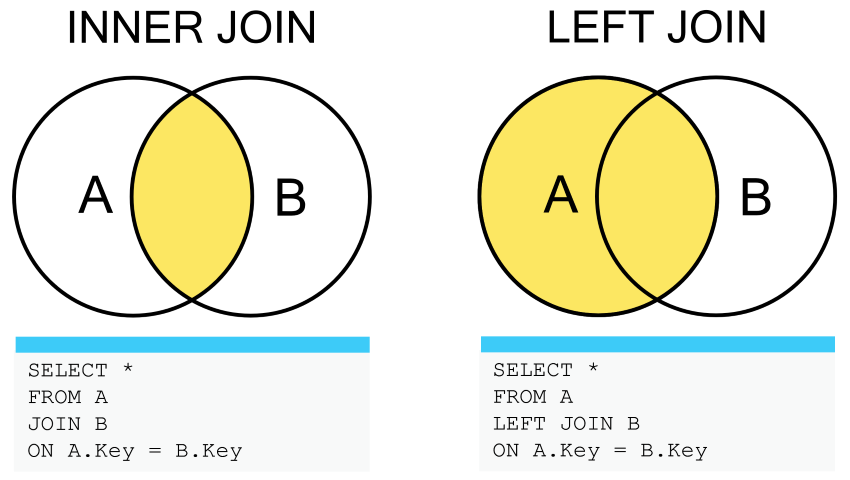
Let's start by visually comparing INNER JOIN with LEFT JOIN. The INNER JOIN finds the intersection, while the LEFT JOIN takes everything from the left table plus any matches from the right.
When a row from the left table has no match in the right table, the columns from the right table are filled with NULL values. NULL is SQL's way of representing "no value" or "missing information."
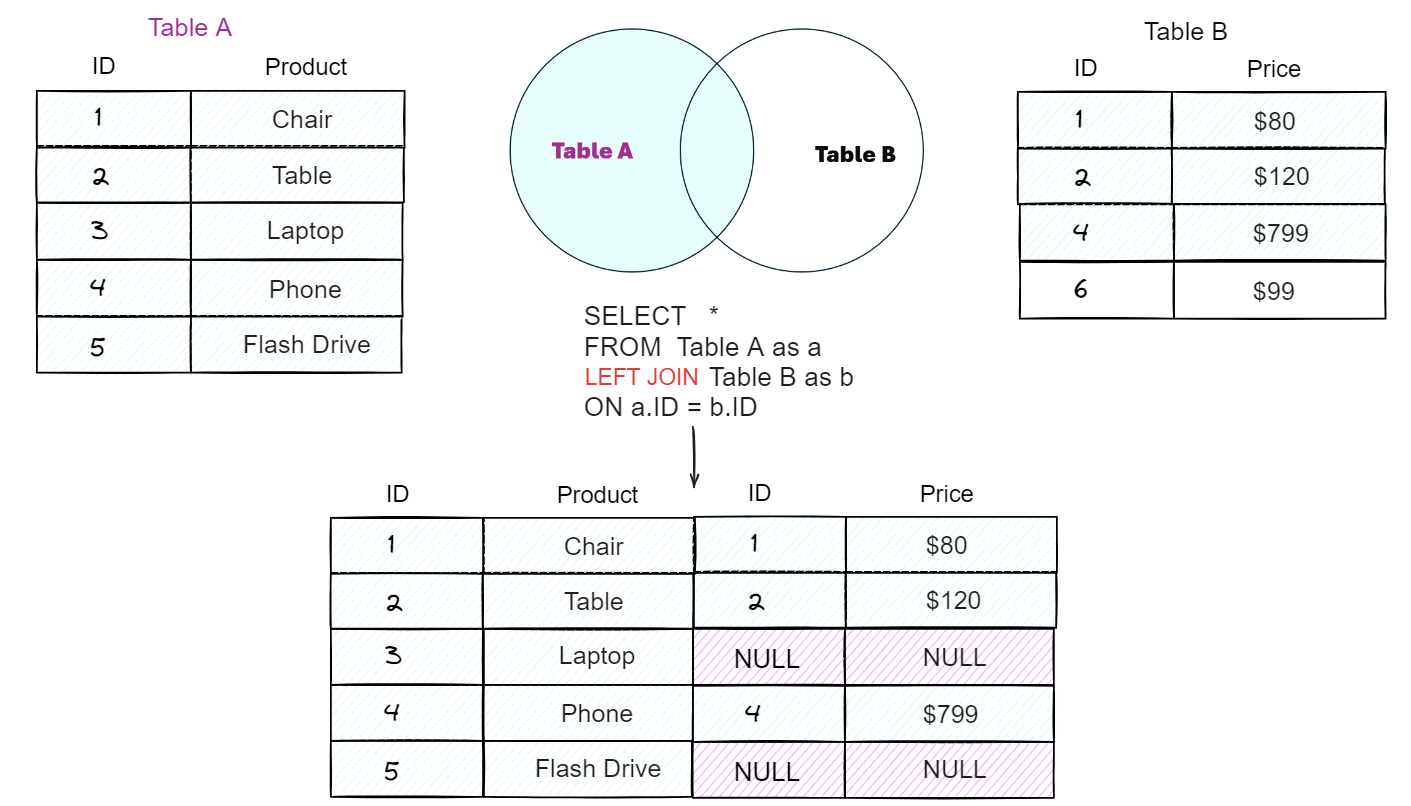
The syntax is very similar to INNER JOIN, you just replace INNER with LEFT. It's also common to see LEFT OUTER JOIN; they mean the exact same thing.
SELECT ... FROM left_table LEFT JOIN right_table ON left_table.key = right_table.key;
Let's watch a video that walks through this concept with a clear business scenario.
SQL JOINS Tutorial for beginners | Practice SQL Queries using JOINS - Part 1
The video 'SQL JOINS Tutorial for beginners' by techTFQ provides an excellent explanation of why and when you would use a LEFT JOIN. It starts with an INNER JOIN query and then modifies it to answer a new business request: 'fetch ALL the employees, even those without a matching department.'
Watch the segment from 13:50 to 19:59. Pay close attention to: The business reason for switching from an INNER JOIN to a LEFT JOIN. The concept of the 'left' table taking priority. How the query result includes employees with a NULL department name and why.
As the video explains, a LEFT JOIN essentially performs two steps:
- It finds all the matching records, just like an
INNER JOIN. - It then goes back to the left table and adds in any rows that were left out, populating the columns from the right table with
NULL.
Common Use Case: Finding What's Missing (Anti-Join)
One of the most powerful applications of LEFT JOIN for a business analyst is to find records in one table that have no corresponding entry in another. This is often called an anti-join.
The pattern is simple and elegant:
- Perform a
LEFT JOINfrom the table that has all the records you want to check (e.g.,customers). - Join it to the table that may or may not have matches (e.g.,
orders). - Filter the results with a
WHEREclause to find the rows where the key from the right table isNULL.
SELECT c.customer_name FROM customers c LEFT JOIN orders o ON c.customer_id = o.customer_id WHERE o.customer_id IS NULL;
This query would return a list of all customers who have never placed an order. Let's see this in action.
SQL Joins - Beginner to PRO Masterclass with 10 Examples
The video 'SQL Joins - Beginner to PRO Masterclass' by Chandoo demonstrates this exact technique to answer the business question: 'Which products haven't been sold at all?'
First, watch from 12:50 to 16:27 to understand the initial LEFT JOIN that shows all products and their associated shipments (or lack thereof). Then, watch from 17:24 to 19:12 to see how a WHERE ... IS NULL clause is added to isolate only the products that have never been shipped.
Test your understanding!
You have two tables: campaigns and clicks.
campaigns table:
campaign_id |
campaign_name |
|---|---|
| c1 | Summer Sale |
| c2 | Back to School |
| c3 | New Year Promo |
clicks table:
click_id |
campaign_id |
|---|---|
| 1001 | c1 |
| 1002 | c1 |
| 1003 | c2 |
Write a SQL query to find the names of all campaigns that have received zero clicks.
Show answer
Here is the correct query using the anti-join pattern:
SELECT
  camp.campaign_name
FROM
  campaigns AS camp
LEFT JOIN
  clicks AS cl ON camp.campaign_id = cl.campaign_id
WHERE
  cl.campaign_id IS NULL;
Result:
campaign_name |
|---|
| New Year Promo |
This works because the LEFT JOIN ensures the 'New Year Promo' is in the intermediate result. For that row, cl.campaign_id would be NULL, so the WHERE clause selects it.
An AdTech Application: Analyzing Impressions and Clicks
Let's bring this into your domain of AdTech. A core task is calculating the Click-Through Rate (CTR), which is (Total Clicks / Total Impressions) * 100.
To calculate this, you must join your impressions data with your clicks data. What kind of join should you use? If you use an INNER JOIN, you will only get records for impressions that were actually clicked. All the impressions that received zero clicks would be lost, making your denominator (Total Impressions) incorrect.
The correct approach is to use a LEFT JOIN with impressions as the left table. This ensures every single ad impression is counted, whether it led to a click or not.
Real-Time Performance Monitoring with Flink SQL: AdTech Use Case
The article 'Real-Time Performance Monitoring with Flink SQL' from the Ververica blog demonstrates exactly this scenario. It shows how to join a stream of impression data with a stream of click data to calculate CTR.
Read the section titled 'Calculating Click-Through Rate (CTR)'. Focus on the first SQL query that creates the impressions_with_clicks_raw VIEW. Notice the use of LEFT OUTER JOIN to connect impressions i to clicks c. Understand why this choice is critical for correctly calculating CTR.
This example, though it uses streaming SQL, follows the exact same logic you would use in a standard database. It correctly presupposes that not every impression will have a corresponding click, making LEFT JOIN the only appropriate choice.
A Common Pitfall: Filtering LEFT JOINs Incorrectly
There is a subtle but critical trap that many analysts fall into when working with LEFT JOIN. The placement of your filter conditions (WHERE clause vs. ON clause) can drastically change your results.
- A filter in the
WHEREclause is applied after the join is complete. - A filter in the
ONclause is applied before the join, as part of the matching condition for the right table.
If you put a filter on the right table in the WHERE clause, you will implicitly turn your LEFT JOIN into an INNER JOIN. Why? Because the WHERE clause will filter out all the rows where the right-table columns are NULL, which are the very rows the LEFT JOIN was designed to keep!
Let's see a demonstration.
SQL Joins - Beginner to PRO Masterclass with 10 Examples
Continuing with the Chandoo video, this next segment addresses a complex question: 'Did we ship all our products on a specific date?' This highlights the importance of filter placement.
Watch the segment from 19:23 to 23:03. Observe what happens when the date filter is in the WHERE clause versus when it's moved into the ON clause. This is a crucial concept for writing correct and predictable queries.
For further reinforcement, the article "Top 20 SQL JOINs Interview Questions" also describes this exact issue.
Top 20 SQL JOINs Interview Questions and Answers (2023)
This article from Dataquest explicitly calls out this common mistake.
Read Question 15: 'Discuss a common pitfall with using JOIN'. The second half of the answer shows a concrete example of how a LEFT JOIN is transformed into an INNER JOIN by an incorrect WHERE clause.
The key takeaway: If you want to filter the right table without losing any records from the left table, put the condition in the ON clause.
Conclusion
You have now added a crucial tool to your SQL toolkit. While INNER JOIN is for finding commonalities, LEFT JOIN is for understanding the complete picture, including the gaps and mismatches. As a Business Analyst, identifying these gaps is often where you provide the most value.
Key Takeaways:
LEFT JOINreturns all rows from the left table and the matched rows from the right table.- If there is no match, the columns from the right table will contain
NULLvalues. - A common and powerful pattern is
LEFT JOIN ... WHERE right_table.key IS NULLto find records in one table that are missing from another (an "anti-join"). - Be very careful with filter placement. A condition on the right table in the
WHEREclause will effectively convert yourLEFT JOINto anINNER JOIN. Move such conditions to theONclause to preserve all left-table records.
Preview of the Next Lesson:
So far, JOINs have helped us combine tables horizontally by adding more columns to our results. But what if you need to combine results vertically? For example, if you have two separate tables of "Q1 Customers" and "Q2 Customers" and you want a single, consolidated list. For this, we need a different kind of operator. In the next lesson, we will cover UNION and UNION ALL, which allow you to stack result sets on top of each other.