Hello! Welcome back to our module on Python Fundamentals for Analysts.
In our last lesson, you learned the building blocks of Python: how to use variables to store data, the fundamental data types like numbers and strings, and how to use operators to perform calculations. You wrote your first script to calculate some key AdTech metrics, which was a great start!
So far, our scripts have run in a straight line from top to bottom. But what if you need to apply a business rule, like categorizing a user based on their activity? Or what if you need to perform the same calculation for thousands of ad campaigns? This is where program flow control comes in.
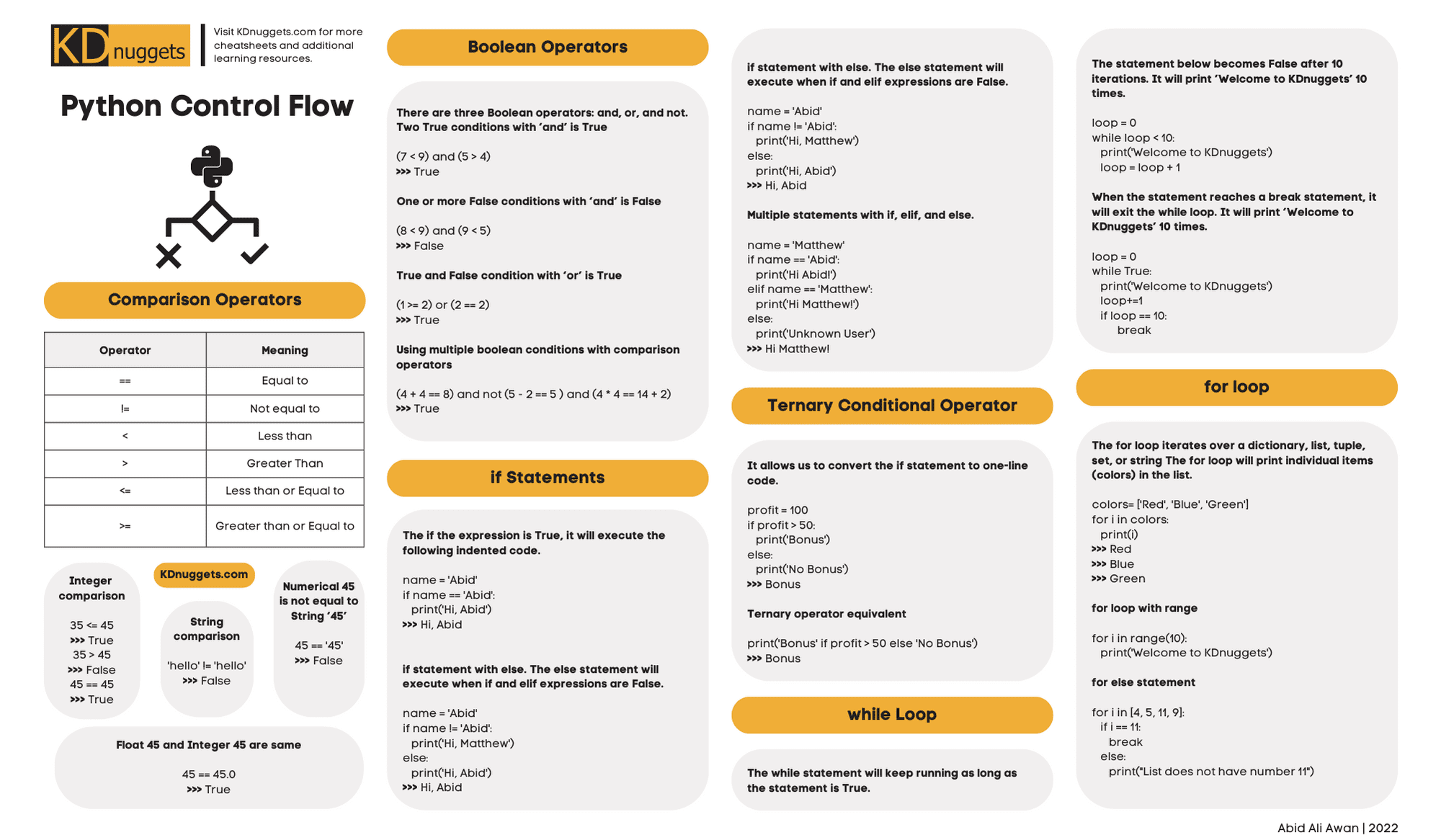
This lesson focuses on the learning outcome: Control program flow using conditional statements (if/elif/else) and loops (for/while). We'll cover two of the most important concepts in programming:
- Conditional Statements: Making decisions in your code.
- Loops: Repeating actions automatically.
Mastering these will allow you to write much more powerful and efficient scripts to automate business analysis tasks.
1. Making Decisions with Conditional Statements
In your work as a manager, you constantly make decisions based on rules: "If the project is over budget, then we need to re-evaluate scope. Otherwise, we continue as planned." Conditional statements in Python allow you to embed this kind of logic directly into your code.
The core conditional statements are if, elif (short for "else if"), and else.
To understand how they work, let's watch a video that visually explains this decision-making process.
Python If Elif Else Statements (Visually Explained) | #Python Course 15
The video 'Python If Elif Else Statements' by Data with Baraa provides excellent visual flowcharts to help you understand how Python evaluates conditions and chooses which code block to run.
Please watch the following segments: Introduction to Conditionals (00:00 - 01:01): Understands the basic concept of a checkpoint in your code. The if Statement (01:01 - 04:13): Learn the basic structure of a single condition. The else Statement (10:18 - 14:20): See how to provide an alternative path when the if condition is false. The elif Statement (14:20 - 19:40): Learn how to check multiple conditions in a sequence.
Indentation: A Critical Rule in Python
As you saw in the video, a crucial concept related to conditional statements is indentation. Unlike many other programming languages that use brackets {}, Python uses whitespace (spaces or tabs) to define which lines of code belong to a specific if, elif, or else block.
Python If Elif Else Statements (Visually Explained) | #Python Course 15
Let's watch one more segment from the same video that focuses specifically on indentation. Getting this right is non-negotiable in Python.
Watch the segment from 05:11 to 07:45. It explains why indentation is part of Python's syntax and how to think about code blocks.
The standard is to use four spaces for each level of indentation. Most code editors, including VS Code, can be configured to do this automatically when you press the Tab key.
A Practical Example: Classifying Ad Campaign Performance
Let's apply this to a scenario you might encounter. Imagine you want to quickly classify the performance of an ad campaign based on its Click-Through Rate (CTR).
Here are the business rules:
- CTR above 2.0% is "Excellent".
- CTR between 0.5% and 2.0% is "Good".
- Anything else is "Needs Improvement".
Here's how you'd write that in Python:
campaign_ctr = 1.2  # Let's say this is our campaign's CTR

if campaign_ctr > 2.0:
    performance_label = "Excellent"
elif campaign_ctr > 0.5:
    performance_label = "Good"
else:
    performance_label = "Needs Improvement"

print(f"The campaign performance is: {performance_label}")

# What would happen if campaign_ctr was 3.5? Or 0.2?
Notice how the if/elif/else structure perfectly mirrors the business rules. Python checks the conditions from top to bottom and executes the code inside the first block that evaluates to True.
This is a very common task for a Business Analyst—translating business logic into formal rules that a system can execute.
2. Repeating Actions with Loops
Now, what if you have data for 50 campaigns? You wouldn't want to copy and paste the code block above 50 times. Loops allow you to execute the same block of code repeatedly.
The two main types of loops in Python are for loops and while loops.

The for loop: Iterating over a Sequence
A for loop is used when you have a collection of items (like a list of numbers or strings) and you want to do something for each item. This is extremely common in data analysis.
Python Loops (Visually Explained) | For, While, Break, Continue, Else
The video 'Python Loops' from the same creator visually explains how for loops work with different types of sequences.
Watch these two segments: For Loop Explanation (01:28 - 06:02): This explains the syntax and the concept of an 'iterator' that goes through each item. Looping Examples (06:12 - 14:40): See how to use for loops with lists, strings, and the very useful range() function for generating numbers.
Let's combine loops and conditionals to automate our campaign classification.
Python If, Else, and For Loops with Examples
The article 'Python If, Else, and For Loops with Examples' from the Corporate Finance Institute provides a great, business-oriented example of this combination. We'll look at how they use a for loop to classify multiple customers.
Read the sections 'Automating Tasks Using For Loops' and 'Classifying Sales Transactions by Value'. Notice how a for loop iterates through a list of values, and the if/elif/else block is applied to each one.
Inspired by that example, here's how we can classify all our campaigns at once:
# A list of CTRs from different campaigns
campaign_ctrs = [1.2, 3.5, 0.4, 0.9, 2.1, 0.2]

print("--- Campaign Performance Report ---")

# Loop through each ctr in the list
for ctr in campaign_ctrs:
    # Apply the same classification logic as before
    if ctr > 2.0:
        performance_label = "Excellent"
    elif ctr > 0.5:
        performance_label = "Good"
    else:
        performance_label = "Needs Improvement"

    print(f"CTR: {ctr}% -> Performance: {performance_label}")

print("--- End of Report ---")
This is the power of automation! With just a few lines of code, you can process an arbitrarily large list of data.
The while loop: Repeating While a Condition is True
A while loop is used when you want to repeat a block of code as long as a certain condition remains true. You don't necessarily know how many times it will run beforehand.
Python Loops (Visually Explained) | For, While, Break, Continue, Else
Let's return to the 'Python Loops' video to understand while loops.
Watch the segment from 01:16:21 to 01:24:41. Pay close attention to the three essential parts of a while loop: initialization (setting a starting value), the condition (the check), and the update (changing the value to eventually stop the loop).
A classic business use case for a while loop is processing a task queue. For example, you might write a script that checks for new user sign-up events and processes them.
new_signups_in_queue = 5  # Initialize a counter

while new_signups_in_queue > 0:
    print(f"Processing a new sign-up. {new_signups_in_queue - 1} remaining.")
    # Here, you would have code to process the signup...

    # Update the counter to avoid an infinite loop!
    new_signups_in_queue = new_signups_in_queue - 1

print("Queue is empty. All sign-ups processed.")
Loop Control with break and continue
Sometimes you need to alter the flow of a loop.
break: Exits the loop immediately.continue: Skips the rest of the current iteration and moves to the next one.
Imagine in our campaign analysis, we encounter a data error (e.g., a CTR of -1). We don't want to process it, but we also don't want to stop the whole report. We can use continue.
campaign_ctrs = [1.2, 3.5, -1.0, 0.9] # -1.0 is a data error

for ctr in campaign_ctrs:
    if ctr < 0:
        print(f"Invalid CTR found ({ctr}). Skipping.")
        continue  # Skip to the next item in the list

    # The classification logic only runs for valid CTRs
    if ctr > 2.0:
        performance_label = "Excellent"
    # ... and so on ...
    else:
        performance_label = "Valid but low"

    print(f"CTR: {ctr}% -> Performance: {performance_label}")
3. Practice Your Skills
Theory is one thing, but as you requested, "learning by doing" is key. Here are a few exercises to solidify your understanding. Try to solve them yourself before looking at the solution.
This webpage has a great set of exercises. We'll try a few that are relevant to today's lesson.
Python Basic Exercise for Beginners
The following exercises from pynative.com will test your ability to combine loops and conditional statements to solve practical problems.
Work through the following exercises on the page. Try to write the code yourself first, then check your answer against the provided solution. Exercise 1: Calculate the multiplication and sum of two numbers. This is a great warm-up for if/else logic. Exercise 6: Display numbers divisible by 5. This combines a for loop with a conditional if statement. Exercise 10: Merge two lists using the following condition. This is a more advanced challenge that requires iterating through multiple lists and applying different conditions.
Test your understanding!
Imagine you are analyzing ad spend data from a campaign. You have a list of daily spend amounts. You want to write a Python script that calculates the total spend but stops counting as soon as it encounters a day with zero spend (which might indicate the campaign ended or a data tracking issue).
Which loop control statement (break or continue) would be most appropriate to use inside your for loop, and why?
Show answer
The break statement would be the most appropriate.
Reasoning: The requirement is to stop the calculation entirely once a zero-spend day is found. A break statement will terminate the loop, preventing any further daily spends from being added to the total. A continue statement would only skip the zero-spend day and then keep adding the amounts from the following days, which is not what was asked.
Conclusion
Fantastic! You've just learned how to control the flow of your Python programs. This is a massive step up from writing simple, linear scripts.
Key Takeaways:
- Conditional statements (
if,elif,else) allow your code to make decisions and execute different logic based on specific conditions. forloops are your go-to tool for iterating over a sequence of items, like a list of sales transactions or user IDs.whileloops are used to repeat code as long as a condition is true, which is useful for tasks that don't have a predetermined number of repetitions.- Indentation is how Python structures code blocks; it is not optional and must be consistent.
breakandcontinuegive you fine-grained control over the behavior of your loops.
Preview of the Next Lesson:
In our examples today, we manually created lists like campaign_ctrs = [1.2, 3.5, ...]. In the real world, you'll be working with large amounts of data. To do that effectively, you need to understand how Python stores collections of data. In the next lesson, we will dive into the core data structures you'll use every day as a BA: lists, tuples, and dictionaries.