Hello! Welcome back to our journey into Python for Business Analysts.
In the last lesson, we learned how to control the flow of our programs using conditional statements (if/elif/else) and loops (for/while). You saw how we could use a for loop to iterate through a manually created list of campaign Click-Through Rates (CTRs). That campaign_ctrs list was an example of a data structure, a way of organizing and storing data.
This lesson builds directly on that foundation. To perform any meaningful analysis, you need to manage collections of data efficiently. Your goal is to become a Business Analyst, and a huge part of that job is taking raw data—from databases, spreadsheets, or APIs—and structuring it for analysis and reporting.
Today, we'll explore Python's core data structures, which are the fundamental tools for this task. Our learning outcome is to: Work with core data structures: lists, tuples, and dictionaries.
We'll cover:
- Lists: Ordered, flexible collections, just like the one we used for CTRs.
- Tuples: Ordered, unchangeable collections, used when data integrity is critical.
- Dictionaries: Unordered collections of key-value pairs, perfect for representing records like a user profile or campaign details.
- Sets: A brief look at how to handle unique items.
Let's begin by looking at where these structures fit in the Python ecosystem.
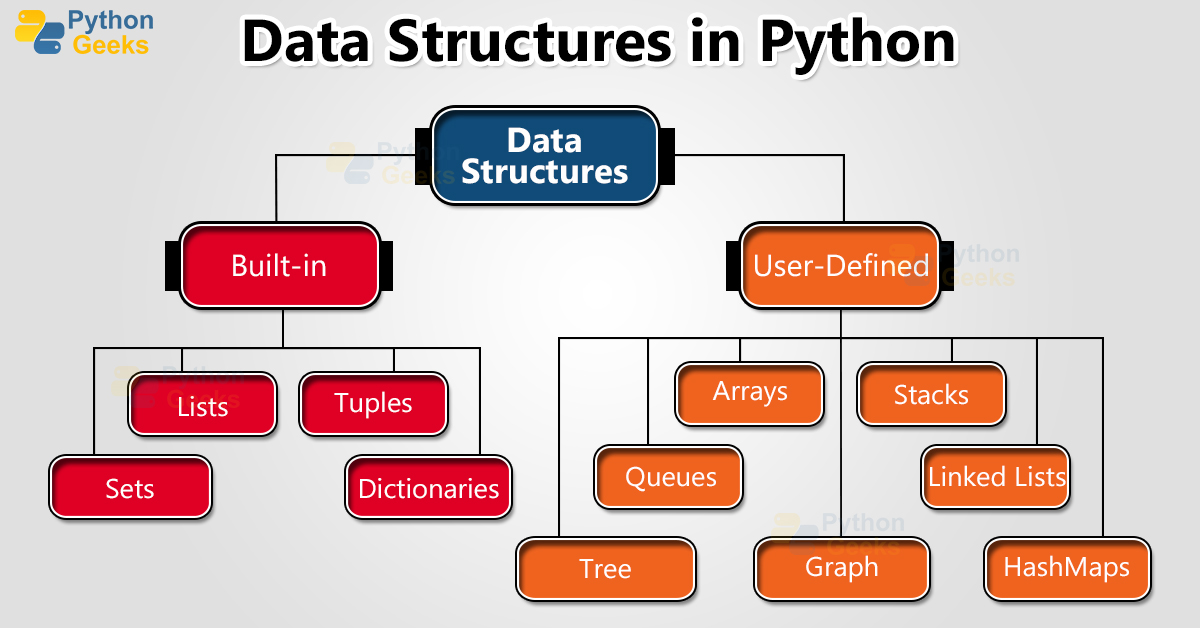
1. Lists: The Workhorse of Data Collections
A list is an ordered, mutable (changeable) collection of items. This is your most frequently used data structure for holding sequences of data.
In the previous lesson, we created a list like this: campaign_ctrs = [1.2, 3.5, 0.4]. Let's now dive deep into how to work with them.
Python Tutorial for Beginners 4: Lists, Tuples, and Sets
The video 'Python Tutorial for Beginners 4: Lists, Tuples, and Sets' by Corey Schafer is an excellent, comprehensive guide. We will watch it in segments to master list operations.
Please watch the following two segments: Creating, Indexing, and Slicing Lists (00:00 - 05:09): This covers the basics of creating a list and accessing its elements, either one-by-one or in ranges. Modifying Lists (05:09 - 10:02): This shows you how to add and remove items using methods like .append(), .insert(), and .pop().
A Practical Example: Managing Ad Campaigns
Let's apply these concepts to a business scenario. Imagine you're managing a list of active ad campaigns for a client.
# A list of campaign IDs (as strings)
active_campaigns = ['SummerSale_2024', 'BackToSchool_2024', 'HolidayPromo_Q4']

# A new campaign is launched
active_campaigns.append('NewYear_2025')
print(f"After adding a campaign: {active_campaigns}")

# The 'BackToSchool' campaign is over and needs to be removed
active_campaigns.remove('BackToSchool_2024')
print(f"After removing a campaign: {active_campaigns}")

# You want to access the first campaign in the list
first_campaign = active_campaigns[0]
print(f"The first campaign is: {first_campaign}")
Sorting and Looping
Once you have data in a list, you often need to sort it or iterate through it to perform an action on each item. This connects directly to what we learned about for loops.
Python Tutorial for Beginners 4: Lists, Tuples, and Sets
Let's continue with Corey Schafer's video to learn about sorting and iterating.
Watch these next two segments: Sorting and Reversing (10:02 - 14:46): Learn how to sort lists in-place with .sort() and create a new sorted list with the sorted() function. Finding and Looping (14:46 - 18:01): See how to find an item's index and, importantly, how to use for loops to process each item in a list.
Here's how you might combine these ideas. Let's say you have a list of daily ad spend and you want to find the total, min, and max spend.
daily_spend = [250.75, 310.50, 198.00, 450.25, 290.00]

total_spend = sum(daily_spend)
min_spend = min(daily_spend)
max_spend = max(daily_spend)

print(f"Total spend: ${total_spend:.2f}")
print(f"Lowest daily spend: ${min_spend:.2f}")
print(f"Highest daily spend: ${max_spend:.2f}")

# You can also loop through to generate a report
print("\n--- Daily Spend Report ---")
for day, spend in enumerate(daily_spend):
    print(f"Day {day + 1}: ${spend:.2f}")
Test your understanding!
You have a list of user engagement scores: scores = [7, 8, 10, 5, 9].
- Add a new score of
6to the end of the list. - Remove the score
5. - Sort the list in descending order (highest to lowest).
- Print the final sorted list.
What does the final list look like?
Show answer
scores = [7, 8, 10, 5, 9]

# 1. Add a new score
scores.append(6)  # scores is now [7, 8, 10, 5, 9, 6]

# 2. Remove a score
scores.remove(5)  # scores is now [7, 8, 10, 9, 6]

# 3. Sort in descending order
scores.sort(reverse=True)

# 4. Print the final list
print(scores)
The final list will be: [10, 9, 8, 7, 6]
2. Tuples: The Immutable Collection
Tuples are very similar to lists—they are also ordered collections. However, there is one critical difference: tuples are immutable, meaning they cannot be changed after they are created. You create them with parentheses () instead of square brackets [].
Python Tutorial for Beginners 4: Lists, Tuples, and Sets
The next segment of Corey Schafer's video explains this key difference between lists and tuples and why it matters.
Watch the segment from 19:51 to 23:30. Pay close attention to the error that occurs when you try to change an element in a tuple.
So, when would you use a tuple instead of a list?
- Data Integrity: When you have data that should not change, like the RGB color code
(255, 0, 0)for red, or the geographic coordinates(40.7128, -74.0060)for New York City. - Performance: Tuples can be slightly more memory-efficient and faster than lists.
- Dictionary Keys: As we'll see next, you can use tuples as keys in a dictionary, but you cannot use lists.

3. Dictionaries: Storing Data with Key-Value Pairs
A dictionary is an unordered (in Python versions before 3.7) collection of key-value pairs. Think of it like a real-world dictionary: you look up a unique word (the key) to find its definition (the value). Dictionaries are created with curly braces {}.
This structure is incredibly useful for a BA because it allows you to represent a single object with many named attributes. For example, instead of separate variables for a user's ID, country, and status, you can group them into one dictionary.
Python Tutorial for Beginners 5: Dictionaries - Working with Key-Value Pairs
Corey Schafer's next video in the series is dedicated to dictionaries. It's the best way to understand how to work with this powerful data structure.
Please watch the following segments: Introduction and Creation (00:00 - 01:32): Understand the key-value concept and how to create a dictionary. Accessing Values (01:32 - 04:07): Learn the difference between using [] and the .get() method to retrieve values, which is important for handling missing data gracefully. Adding, Updating, and Deleting (04:07 - 07:09): See how to modify a dictionary. Looping Through Dictionaries (07:09 - 09:00): Learn how to iterate over keys, values, or both using the .items() method.
A Practical Example: Representing User Data
Let's model a user from your AdTech platform using a dictionary.
user_profile = {
    'user_id': 'xyz-987',
    'country': 'USA',
    'total_spend': 150.50,
    'last_seen_days_ago': 5
}

# Accessing data
print(f"User {user_profile['user_id']} is from {user_profile['country']}.")

# Using .get() for a key that might not exist
# This avoids an error and returns 'not provided' instead
subscription_tier = user_profile.get('tier', 'not provided')
print(f"Subscription Tier: {subscription_tier}")

# Updating the user's spend
user_profile['total_spend'] += 25.00
print(f"User's new total spend: {user_profile['total_spend']}")

# Adding a new key-value pair
user_profile['is_active'] = True

# Looping through to display all profile information
print("\n--- Full User Profile ---")
for key, value in user_profile.items():
    print(f"{key}: {value}")
4. Application: Structuring Data for Analysis
Now let's see how these structures are combined in a real-world analytical task. Imagine you need to generate synthetic data for customer segmentation analysis. You have to define the statistical properties (like average age and income) for several customer segments.
How would you store this configuration data in your script? A nested dictionary is a perfect solution.
Customer Segmentation with Marketing Data using Python
The article 'Customer Segmentation with Marketing Data using Python' provides an excellent, real-world example of using lists and dictionaries to organize complex parameters for an analysis.
Please read the section 'Defining Segment Data'. You don't need to understand all the code, but focus on how the author structures the data: Notice segment_means: a dictionary where keys are segment names and values are lists of numbers. Then, look at the final segment_statistics structure. This is a nested dictionary. The outer dictionary's keys are segment names ('suburb_mix', 'urban_hip', etc.), and each value is another dictionary containing keys like 'size', 'age', and 'income'. Think about why the second structure is more robust and less error-prone for an analyst.
The segment_statistics dictionary is a great example of professional-level data structuring. It's self-describing—you access income with ['income'] instead of remembering it's the 3rd item in a list (index 2). As a BA writing scripts for analysis, adopting this clear, explicit style is a key skill that makes your work more reliable and easier for others to understand.
5. A Brief Look at Sets
Before we conclude, there's one more built-in data structure to know: the set. A set is an unordered collection with no duplicate elements.
Python Tutorial for Beginners 4: Lists, Tuples, and Sets
Let's watch one last segment from the first video to quickly understand sets.
Watch the segments from 23:30 to 27:18. Focus on the two main use cases presented: Removing duplicates from a list. Membership testing (checking if an item is in a collection) and set operations like intersection and union.
For a BA, the most common use of a set is to find unique items.
AdTech Example: Imagine you have a log file of every ad impression, with the user_id for each impression. How do you find the number of unique users reached?
# A list of user IDs from impression logs (with duplicates)
impression_log = ['user1', 'user2', 'user1', 'user3', 'user2', 'user1']

# Convert the list to a set to get unique users
unique_users = set(impression_log)

print(f"Raw impressions: {len(impression_log)}")
print(f"Unique users reached: {len(unique_users)}")
print(f"The unique users are: {unique_users}")
Conclusion
Great work! You've just covered the fundamental ways Python stores and organizes collections of data. Mastering these is non-negotiable for anyone working with data in Python.
Key Takeaways:
- Lists
[]: Your go-to for an ordered sequence of items that you might need to change (add, remove, sort). - Tuples
(): Use these for ordered sequences of items that should not change, ensuring data integrity. - Dictionaries
{}: The best choice for storing a single record with named fields (key-value pairs), like a user profile or a product's attributes. - Sets
set(): The perfect tool when you need to work with unique items or check for membership efficiently.
Choosing the right data structure for the task at hand is a hallmark of an effective programmer and analyst.
Preview of the Next Lesson:
So far, we've been writing our code in one long script. If you wanted to calculate the average spend for three different lists of campaigns, you'd have to copy and paste your code three times. This is inefficient and error-prone. In our next lesson, we will learn how to create reusable code blocks called functions, allowing you to write cleaner, more modular, and more powerful analytical scripts.