Last lesson, you split each regular mortgage payment into interest and principal and carried the remaining balance into the next month. This lesson uses that same calculation to compare two paths from a common starting balance: making only the scheduled payment, or adding money directly to principal while keeping the scheduled payment unchanged. You will use an amortization calculator to measure the difference in remaining interest and payoff date.
Why an extra payment changes later months
An extra principal payment does not erase interest already charged. It lowers the balance on which future interest is calculated. Return to the previous lesson’s example: after month 4, the balance was $118,790.97, the fixed annual rate was 6%, and the regular principal-and-interest payment was $900.
Month 5 interest is $118,790.97 multiplied by , rounded to $593.95. The regular payment therefore repays $306.05 of principal. Without an extra payment, the ending balance is $118,484.92. With an additional $200 applied to principal alongside that payment, it is $118,284.92 instead.
The next month reveals the benefit. Interest on the baseline balance is $592.42; interest on the balance after the extra payment is $591.42. That first $200 saves $1 of interest in the following month. Because the regular $900 payment stays the same, $1 more of it can then reduce principal in the extra-payment path. Repeating this difference across the remaining schedule produces the eventual interest saving and earlier payoff.
For a simplified monthly schedule, the balance after a payment is:
where is the unchanged scheduled principal-and-interest payment and is that month’s optional extra principal. The final payment is only what is needed to clear the balance; a calculator should not charge a full after the debt is already paid.
Run a fair calculator comparison
TransUnion’s Amortization Calculator provides an extra-monthly-payment field alongside its balance graph and amortization breakdown. Its instructions explain how to add extra payments and where to find total interest and the projected payoff date.
Read TransUnion’s calculator instructions before using the interactive tool. Focus on which inputs describe the loan and which field adds an optional payment; they must not be confused.
At the top of the page, locate the loan inputs and “Optional: Make extra payments.” Read the input area, then locate the “Amortization Balance Over Time” and “Amortization Schedule Breakdown” output panels immediately below it. Farther down, read “Steps to calculate your payment,” then “Advanced options,” especially “How to Enter Extra Payments” and “Calculator output.” In that guidance, follow the extra-payment instructions.
Allow about 15 minutes to run and inspect two versions of one illustrative loan in the calculator. Use a $300,000 loan, a 30-year term, a fixed 4% annual rate, and the same start month in both versions. This is a hypothetical new loan, so its displayed total interest is also its interest remaining at the starting point.
- Baseline: Leave every extra-payment field at zero. Record the calculated regular monthly principal-and-interest payment , total interest , and projected payoff date .
- Extra-principal path: Enter $200 in “Additional amount to monthly payment.” Leave the loan amount, rate, original term, and start month alone. Record total interest and payoff date . The household now pays in ordinary months, but remains the original scheduled payment; the extra $200 is optional principal repayment.
- Calculate the differences: Subtract the two interest figures and count the months between the two payoff dates.
If an output labeled “monthly payment” changes after you add the $200, check whether that label now shows the total amount being sent rather than a revised contractual payment. The baseline is the reference for this lesson. Changing the loan term to force an earlier payoff would be a different comparison.
Read the results as savings, not as extra cash received
The supplied mortgage-payoff illustration shows the results for a different loan scenario: a displayed scheduled principal-and-interest payment of $1,770, an additional $200 of principal each month, $255,842 in interest with those extras, and $101,283 in interest saved. It reports a payoff in April 2049, 7 years and 3 months earlier than the standard schedule.
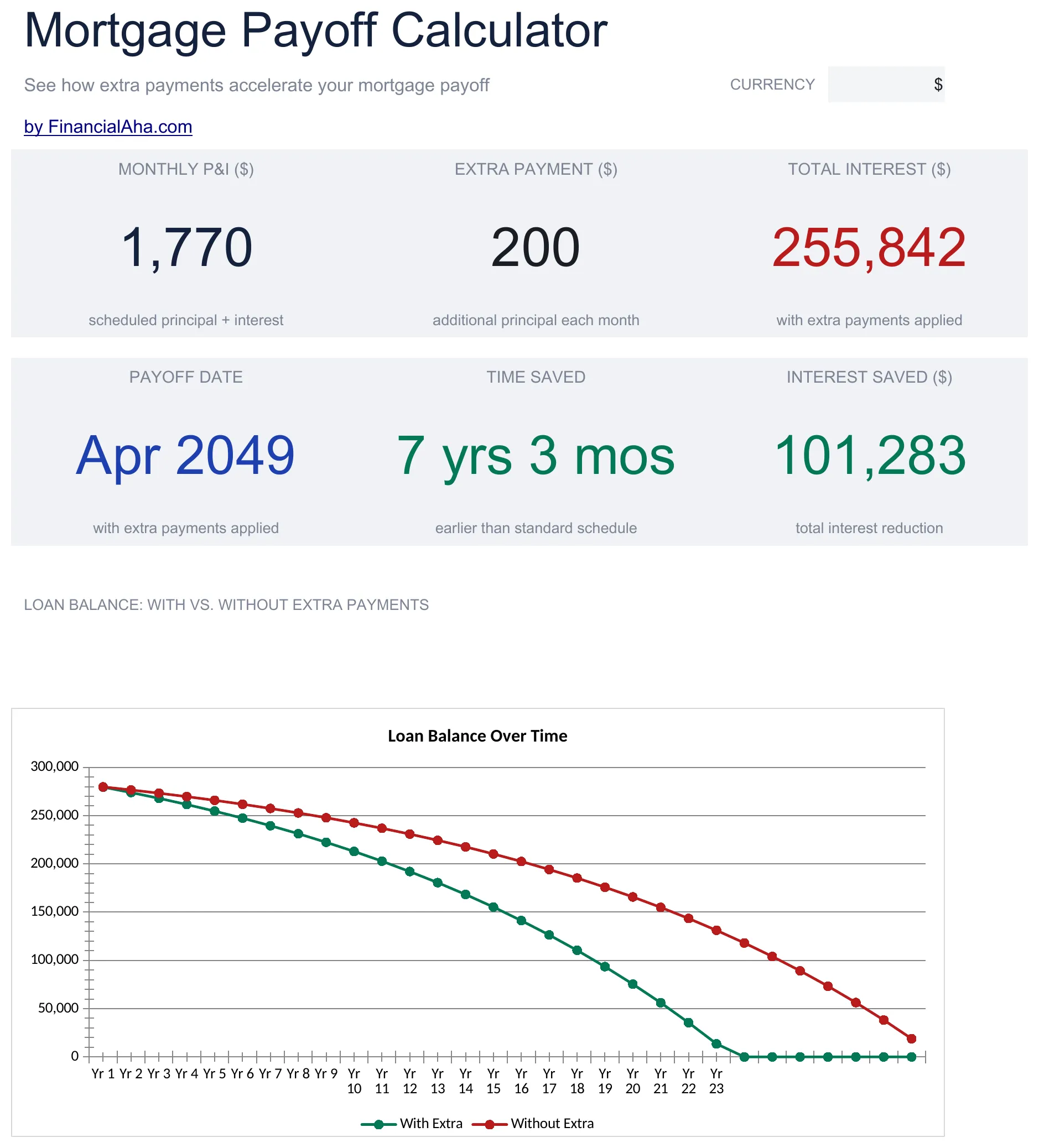
The baseline interest is not shown directly, but the reported savings let us calculate it:
The date change is 7 years and 3 months, or 87 months. Counting forward 87 months from April 2049 implies a standard-schedule payoff around July 2056, subject to the calculator’s date convention. The green balance line reaches zero earlier than the red one, illustrating the same result visually.
Do not multiply $1,770 by 87 and call the result “interest saved.” Those eliminated months would have contained both principal and interest, and the extra-payment path requires additional cash along the way. For two paths that repay the same opening principal, the difference between their total loan payments is the difference in interest, assuming no other charges. Comparing the calculator’s two interest totals captures that distinction.
The illustration does not show every input needed to reconstruct its loan, such as its opening balance and rate. Use its displayed figures as a worked example of reading and calculating from outputs, not as expected results for the $300,000 calculator run above.
Keep the starting point consistent
For a mortgage already in progress, “remaining interest saved” means interest avoided from the comparison date onward. Interest paid in earlier years is identical in both paths and cannot be recovered by prepaying now. Both calculator runs must start from the same outstanding balance on the same date, with the same rate and scheduled payment.
There is a practical limitation: a calculator that accepts only loan amount, rate, and term may calculate a new scheduled payment. Entering today’s balance as though it were a new loan can therefore produce a payment different from your actual contractual payment. Before treating its savings estimate as applying to an existing mortgage, check that the baseline payment matches the real scheduled principal-and-interest amount and that the modeled extra money reduces principal. Estimates can also vary with payment dates, rounding, or a lender’s interest-accrual method.
This lesson measures loan interest and payoff time, not whether prepaying is the best overall use of cash. It does not subtract possible fees or account for taxes, liquidity, or investment alternatives.
What to retain
Compare two schedules from the same starting loan position. Keep the regular payment fixed, add optional principal only in the second schedule, then subtract their remaining interest totals and compare their payoff months. An extra payment saves interest by reducing future balances; its full dollar amount is not itself an interest saving.
The next lesson examines mortgage terms that can affect how extra money is applied, whether fees arise, and when a required monthly payment actually changes.