Hello! Welcome back to our course on Finite State Machines.
In our last lesson, we took a major step in organizing our code by creating a dedicated transitionTo function. This function neatly encapsulates the logic for moving between states: calling the OnExit callback of the old state, updating the current state, and calling the OnEnter callback of the new one.
However, our transitionTo function has a critical vulnerability: it trusts any instruction it's given. It will attempt to transition to any state, even if that transition makes no logical sense in our FSM's design. This lesson will fix that.
Our learning outcome is to add validation to the transition function to ensure a requested transition is permissible from the current state. This will make our FSMs more robust, preventing bugs and enforcing the rules we've designed.
1. Why Transitions Need Rules
A Finite State Machine isn't just a collection of states; it's also the set of defined pathways between them. A state diagram's arrows don't just show possibilities; they also define limitations. Any transition not represented by an arrow is implicitly forbidden.
Consider this FSM for an NPC.

According to this diagram, it's impossible for an NPC to go from the Idle / Guard state directly to the Attack state. It must first spot a player. Likewise, an NPC in an Attack state that has killed the player should return to its post, not magically jump to a Patrol waypoint in a different area.
Our code must enforce these rules. If we allow illegal transitions, we could end up with an NPC stuck in an animation, trying to attack a non-existent target, or simply behaving erratically. By adding validation, we make our FSM foolproof and ensure it behaves exactly as designed.
2. Defining Permissible Transitions
So, how do we represent these rules in our code? The most straightforward way is to explicitly list which transitions are allowed from each state. This is often called a "whitelist" approach.
For our table-driven FSM, this information is already present in our states table!
-- From our previous lesson
states = {
    Locked = {
        transitions = {
            Coin = "Unlocked"
        },
        -- ...
    },
    Unlocked = {
        transitions = {
            Push = "Locked"
        },
        -- ...
    }
}
In the Locked state, the transitions table specifies that the only possible target state is "Unlocked". In the Unlocked state, the only target is "Locked". This table, which we previously used to map events to new states, also serves as our list of permissible transitions.
Our validation logic will be simple: before executing a transition, we will check if the requested new state exists as a value anywhere inside the current state's transitions table.
Help Me Learn Finite State Machines For Guard AI In Heat Signature
This idea of defining valid 'next states' is a common pattern. In the comments on the following blog post about FSMs, a developer named Adam suggests this very structure.
Scroll down to the comments section and find the one by 'Adam'. He proposes that each state object should contain a list of NextStates it can transition to. Our approach of checking the values in the transitions table achieves the exact same goal.
3. Hands-On: Implementing Validation
Let's modify the transitionTo function from our last lesson to include this validation check.
We'll use the same turnstile script. The only part that will change is the transitionTo function, plus a few new test cases to prove our validation works.
Here is the updated script. Pay close attention to the new validation block at the start of transitionTo.
local RunService = game:GetService("RunService")

local states = {
    Locked = {
        transitions = {
            Coin = "Unlocked"
        },
        OnEnter = function()
            print("▶️ ENTER: Locked. The turnstile is now locked.")
        end,
        OnExit = function()
            print("◀️ EXIT: Locked. Leaving the locked state.")
        end,
        -- OnUpdate can be omitted for this example
    },
    Unlocked = {
        transitions = {
            Push = "Locked"
        },
        OnEnter = function()
            print("▶️ ENTER: Unlocked. You may now push the turnstile.")
        end,
        OnExit = function()
            print("◀️ EXIT: Unlocked. Leaving the unlocked state.")
        end,
        -- OnUpdate can be omitted for this example
    }
}

local currentStateName = "Locked"

-- MODIFIED: The transition function now validates the requested state
function transitionTo(newStateName)
    -- 1. VALIDATION STEP
    local isAllowed = false
    local currentStateData = states[currentStateName]

    -- Check if the requested 'newStateName' is a valid destination
    -- from the current state's transition table.
    if currentStateData and currentStateData.transitions then
        for event, targetState in pairs(currentStateData.transitions) do
            if targetState == newStateName then
                isAllowed = true
                break
            end
        end
    end

    if not isAllowed then
        print("❌ INVALID TRANSITION: Cannot move from '" .. currentStateName .. "' to '" .. newStateName .. "'.")
        return -- Stop execution if the transition is not allowed
    end

    -- 2. TRANSITION LOGIC (from previous lesson)
    print("TRANSITIONING: " .. currentStateName .. " -> " .. newStateName)

    -- Call OnExit for the state we are LEAVING
    if currentStateData and currentStateData.OnExit then
        currentStateData.OnExit()
    end

    -- Update the state name
    currentStateName = newStateName

    -- Call OnEnter for the state we are ENTERING
    local newStateData = states[currentStateName]
    if newStateData and newStateData.OnEnter then
        newStateData.OnEnter()
    end
end

function handleEvent(event)
    print("-------------------------")
    print("EVENT received: " .. event)

    local currentStateData = states[currentStateName]
    local nextStateName = currentStateData.transitions[event]

    if nextStateName then
        transitionTo(nextStateName)
    else
        print("No transition found for event '" .. event .. "' in state '" .. currentStateName .. "'.")
    end
end

-- Initializing the FSM
print("FSM Initializing... ")
local initialStateData = states[currentStateName]
if initialStateData.OnEnter then
    initialStateData.OnEnter()
end


-- Simulate events to test the validation
wait(2)
-- This is an attempt to force an ILLEGAL transition directly.
-- The turnstile can't go from Locked to Locked. Our validation should catch this.
print("Attempting an illegal direct transition...")
transitionTo("Locked")
wait(2)

-- This is a legal event-based transition. It should work.
handleEvent("Coin")
wait(2)

-- This is another legal transition.
handleEvent("Push")
Analysis of the Change
When you run this script, look at the output for the "illegal direct transition" test. You should see:❌ INVALID TRANSITION: Cannot move from 'Locked' to 'Locked'.
The function immediately stops, and no OnExit or OnEnter calls are made. This is our validation at work! The handleEvent calls continue to work as before because they only ever request legal transitions defined in the transitions table.
Our transitionTo function is now robust. It's the single, safe gateway for all state changes, whether triggered by an event (handleEvent) or forced directly by another part of your game's logic (like a timer ending).
4. A Preview of Dynamic Validation: Guard Conditions
Our current validation is static—it only depends on the fixed structure of the FSM. But what if a transition should only be allowed under certain dynamic conditions?
- An NPC can only transition to
Attackif the player is within a certain range. - A player can only transition to
Reloadif they have reserve ammunition. - A user can only transition to
LoggedInif their password attempt count is less than 3.
These checks are called guard conditions. They are extra logic, usually a function that returns true or false, that must pass for a transition to be allowed.
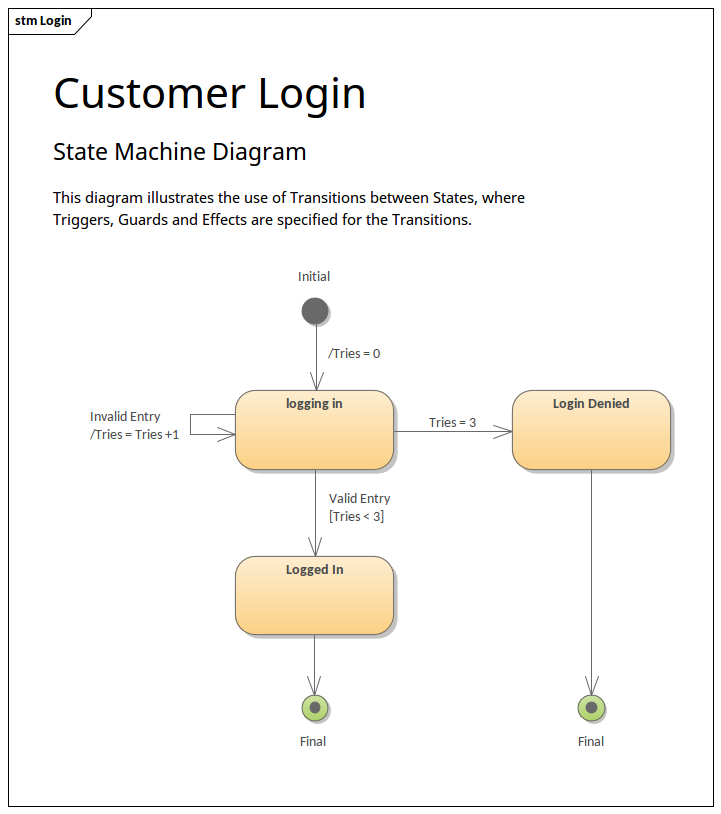
This is a more advanced topic that we will fully implement later in the course. For now, it's useful to see how it adds another layer of control.
State Machines Can Make Your Roblox Game Better!
The video 'State Machines Can Make Your Roblox Game Better!' shows a great practical example of guard conditions for a gun FSM.
Watch the section from 08:59 to 10:03. The presenter explains that to enter the 'shoot' state, the FSM checks dynamic conditions like if we're alive and we're not reloading. This is a perfect example of a guard condition in action.
Conclusion
You've now made your FSM significantly more reliable by adding a crucial validation layer. By enforcing the rules of your FSM's design, you prevent bugs and ensure predictable behavior.
Key Takeaways:
- State diagrams define both the states and the only permissible transitions between them.
- Validating transitions within the FSM prevents illegal state changes and makes the system more robust.
- A simple and effective validation method is to check if a requested transition is listed in the current state's configuration (a "whitelist" approach).
- Our
transitionTofunction is now the single, secure entry point for all state changes.
In the next lesson, we'll formalize something we've been doing all along: debugging. We will learn how to test and debug an FSM by printing state transitions to the output console in a structured way, which is essential for troubleshooting more complex machines.