Welcome back! In our previous lesson, we got our hands dirty writing basic HTML and saw how different tags structure a webpage's content. We briefly mentioned that when a browser reads your HTML file, it builds an internal representation of it. Today, we'll dive deep into what that representation is: the Document Object Model, or DOM.
This lesson is crucial because the DOM is the very thing that web frameworks like Leptos are designed to manipulate. When your Leptos app changes what's on the screen, it's doing so by making precise changes to this DOM. By understanding what the DOM is and how it's structured, you'll gain a fundamental insight into how modern web applications function under the hood. Our goal is to explain the DOM as a tree representation of a web page, setting the stage for understanding how we can style and add interactivity to it later.
From HTML Text to a Data Structure
When a browser receives an HTML file from a server, it doesn't work with that raw text directly. Instead, it performs a critical step called parsing. It reads the HTML tags and their nested relationships and converts them into a structured, in-memory model. This model is the DOM.
As someone with experience in Rust and Python, you can think of the DOM as a specific kind of tree data structure. Each part of the HTML document—an element, a piece of text, even a comment—becomes a node in this tree.
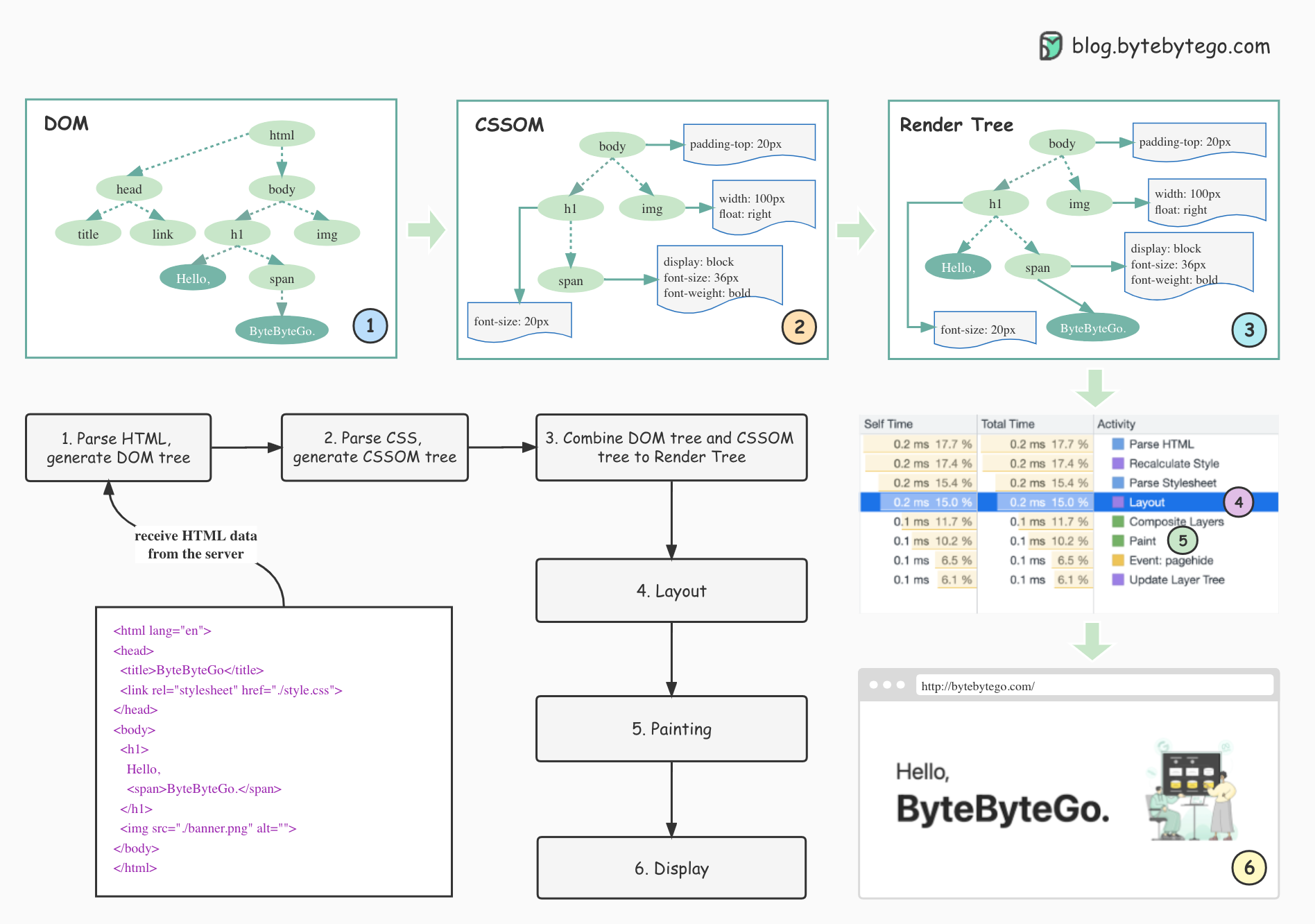
The nesting of HTML elements creates a natural parent-child hierarchy in the tree. The <html> element is the root of the tree. The <head> and <body> elements are its children. The <body> element might then have children like an <h1> and a <p>, and so on.

Nodes: The Building Blocks of the DOM
The DOM tree isn't just made of elements. It's composed of different types of nodes, but two are particularly important for now: element nodes and text nodes.
Let's read a short but very clear explanation from the excellent resource javascript.info. It does a great job of breaking down how a simple HTML document is transformed into a tree of nodes.
This article explains the core concept of the DOM tree, distinguishing between element nodes and text nodes. It uses a clear diagram to illustrate the relationship between HTML code and the resulting DOM structure.
First, read the brief introduction to get the main idea. Then, carefully study the section An example of the DOM. Pay close attention to the diagram and the explanation of how tags become element nodes and the text within them becomes text nodes. Also, note how whitespace (spaces and newlines) can also form text nodes.
As the article highlights, everything in the HTML source has a place in the DOM. This includes not just your <h1> and <p> tags, but the actual text content inside them. This distinction is vital: an <h1> element node can contain a child text node.
The DOM as a Programmable Interface (API)
The DOM is more than just a static representation; it's a live, interactive Application Programming Interface (API). The browser exposes the DOM so that it can be read and modified by scripting languages. This is what makes web pages dynamic.
Historically and most commonly, JavaScript is the language used to manipulate the DOM. When you use Leptos, your Rust code is compiled into WebAssembly (WASM), which then works alongside JavaScript "glue" code to interact with and update this same DOM. So, even though you're writing Rust, the target of your operations is still the DOM.
The primary entry point for interacting with the DOM is a global object called document. Let's get a formal definition of the DOM and see how the document object fits in.
What is the Document Object Model? DOM for Beginners
This freeCodeCamp article provides a concise definition of the DOM and explains the role of the document object as the gateway to interacting with the page's content.
Read the section The DOM Explained. It reinforces the concept of the DOM as a tree of objects. Next, read the section The Document Object. This clarifies that while a window object exists, the document object is our main entry point for everything inside the <body> tag.
To see this concept in action, the following video provides a quick, practical demonstration of how a script can use the DOM API to access information from an HTML/XML document.
What is DOM | Document Object Model | Beginner Tutorial
This video shows how the DOM allows a language like JavaScript to access and retrieve specific elements from the document tree.
Watch the segment from accessing elements. The example uses getElementsByTagName, a function that queries the DOM tree to find nodes. This illustrates the "programmable" nature of the DOM.
Exploring the DOM with Developer Tools
The best way to solidify your understanding of the DOM is to see it for yourself. Every modern web browser includes a powerful set of developer tools that let you inspect the live DOM of any webpage.
This is a fundamental skill for any web developer. You'll constantly use these tools to debug your HTML structure, check your CSS styles, and understand how your Leptos components are being rendered.
The javascript.info article we looked at earlier has a fantastic guide on how to do this.
This part of the article will guide you through using your browser's built-in tools and also explains an important browser behavior called "autocorrection".
First, read the section on Autocorrection. This explains that the DOM you see in the developer tools is the browser's corrected version of the HTML, which is a useful thing to know. Then, follow the instructions in the section See it for yourself. Open any webpage (even this one!), right-click on an element, and choose "Inspect". You will see the DOM tree in the 'Elements' panel. Try expanding and collapsing the nodes to explore the structure.
As you explore the Elements panel, notice how hovering over an element in the DOM tree highlights the corresponding part of the rendered webpage. This direct link between the code structure and the visual output is what makes the developer tools so powerful.
Conclusion
In this lesson, we demystified the process that turns a simple text file of HTML into a live, structured web page. You now understand that the browser doesn't just "display" HTML; it first parses it into a logical tree structure called the Document Object Model.
Key Takeaways:
- The Document Object Model (DOM) is the browser's internal, object-based representation of an HTML document.
- The DOM is structured as a tree of nodes, where HTML tags become element nodes and their content becomes text nodes.
- This tree structure mirrors the nesting of your HTML elements.
- The DOM is not static; it's a live API that can be accessed and modified, with the
documentobject serving as the main entry point. - All web frameworks, including Leptos, perform their magic by creating and updating this DOM tree.
- You can directly inspect the live DOM of any page using your browser's developer tools.
Next Up:
Now that we have a solid mental model of the page's structure as a tree, our next step is to learn how to apply styles to it. In the upcoming lesson, we will introduce CSS (Cascading Style Sheets) and explore how selectors work. You'll see that CSS selectors are essentially patterns used to target specific nodes in the DOM tree, allowing us to control their appearance, from color and font size to layout and positioning.