Hello! Welcome back to our C++ ray tracing journey.
In our last lesson, we successfully implemented a hit_sphere function that could tell us if a ray intersected a sphere. This gave us our first rendered 3D object—a fantastic milestone! However, a simple true or false isn't enough to build a realistic renderer. To handle shading, reflections, and multiple objects, we need to know precisely where the intersection occurs.
Today, we will upgrade our intersection logic to calculate the nearest valid intersection point ('t' value) along a ray. This t value, the parameter from our ray equation , represents the distance along the ray to the hit point. Finding the correct t is a cornerstone of ray tracing, and mastering it will move us much closer to your goal of understanding how production renderers work.
From "If" to "Where": Solving the Quadratic Equation
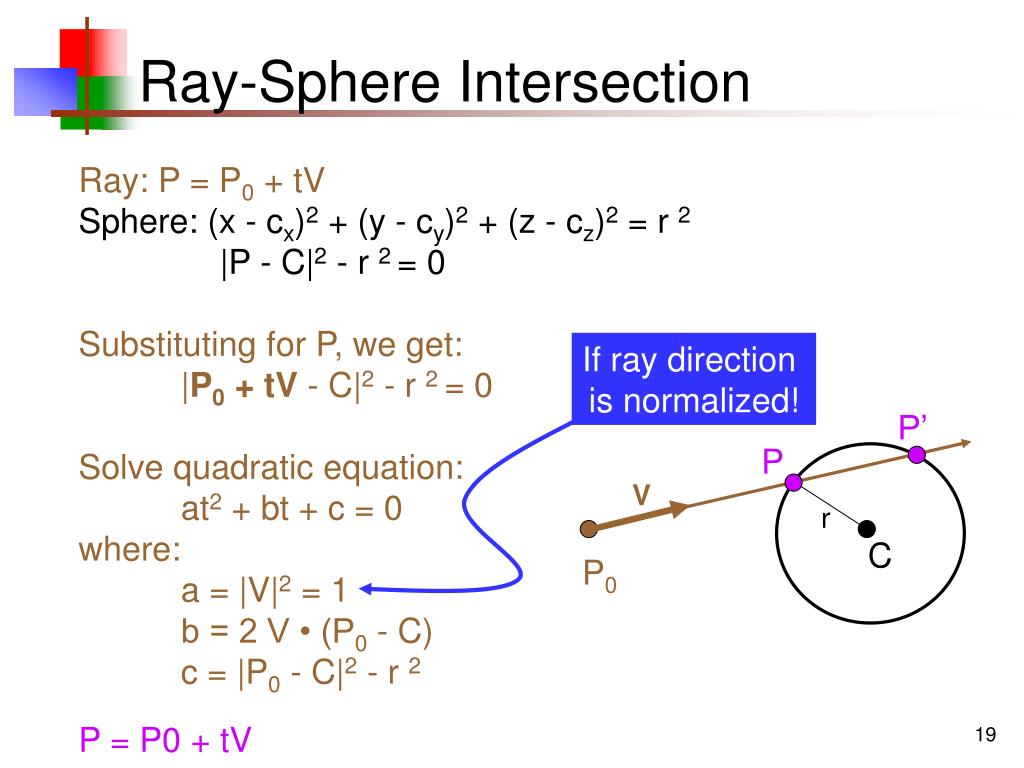
Let's recall the quadratic equation we derived:
This is a standard quadratic equation of the form . Last time, we only checked the discriminant () to see if real solutions existed. Now, we need to actually find those solutions using the quadratic formula:
The "plus-minus" (±) indicates that there can be two solutions for , which makes sense geometrically: a ray can enter a sphere at one point and exit at another. Our task is to find these values and determine which one represents the intersection we care about.
To see the full mathematical derivation and how the quadratic formula is applied in this context, the following video provides an excellent and clear explanation.
Rays and Spheres: The MATH! // Ray Tracing series
This video from The Cherno's series walks through the entire process of substituting the ray equation into the sphere equation, forming the quadratic equation, and using the quadratic formula to solve for the 't' values.
Watch from 19:54 to 34:03. The first part (up to 28:16) shows the algebraic expansion and arrangement into a quadratic equation. The second, more crucial part (from 28:16 onwards) applies the quadratic formula, explains the role of the discriminant, and calculates the two 't' values representing the hit distances.
Finding the Nearest Valid Hit
After solving the quadratic equation, we get two roots, let's call them and . Now we face a new question: which one is the correct one to use?
In ray tracing, we are typically interested in the first surface that a ray hits. This corresponds to the smallest, positive t value.
Consider these scenarios:
- Two positive roots: The ray enters and exits the sphere. We want the smaller
tvalue (the entry point). - One positive and one negative root: The ray's origin is inside the sphere. The negative root represents a hit "behind" the camera, so we take the positive root (the exit point).
- Two negative roots: Both intersection points are behind the ray's origin. We can ignore these hits.
Therefore, our logic must be to find the smallest root that is greater than zero. To handle floating point inaccuracies and prepare for more advanced techniques, we'll define a valid interval for t, such as [t_min, t_max]. For primary rays, this might be [0.001, infinity]. We look for the smallest root within this interval.
The implementation in Ray Tracing in One Weekend handles this perfectly. Let's see how they modify the sphere class to incorporate this logic.
The sphere::hit method in 'Ray Tracing in One Weekend' contains a robust implementation for finding the nearest valid root. It checks both roots against a valid 't' interval.
Please read section 6, which introduces the sphere class. Focus on the hit method's implementation. Pay close attention to the logic after the discriminant check, where it calculates the root and checks if it's within the valid range (ray_tmin and ray_tmax). Notice how it first tests the smaller root (h - sqrtd) / a and then, if that fails, tests the larger one (h + sqrtd) / a.
Based on this logic, we will refactor our hit_sphere function. Instead of returning a bool, it will now return the t value of the nearest hit, or a negative number to indicate a miss.
A simplified version of the core logic looks like this:
// This function will eventually become part of a 'sphere' class
// It returns the 't' value of the hit, or -1.0 if there is no valid hit.
double hit_sphere(const point3& center, double radius, const ray& r) {
    vec3 oc = r.origin() - center;
    auto a = r.direction().length_squared();
    auto half_b = dot(oc, r.direction());
    auto c = oc.length_squared() - radius*radius;

    auto discriminant = half_b*half_b - a*c;
    if (discriminant < 0) {
        return -1.0;
    }

    auto sqrtd = sqrt(discriminant);

    // Find the nearest root that lies in the acceptable range.
    auto root = (-half_b - sqrtd) / a;
    // For now, let's consider any t > 0 as valid.
    if (root <= 0) {
        root = (-half_b + sqrtd) / a;
        if (root <= 0)
            return -1.0; // Both roots are non-positive
    }

    return root;
}
Note: This C++ code is adapted from the textbook's derivation. The book uses oc = center - r.origin(), while I've used oc = r.origin() - center. This just flips the sign of half_b, but the final root calculations are equivalent.
The Importance of "Closest" in a Full Scene
Why is finding the nearest t so important? Imagine your scene has more than one object. A single ray might pass through multiple objects. For the final image, you only want to see the one closest to the camera.
This is the core of how a ray tracer resolves visibility. You test a ray against every object in the scene, and for each intersection, you record the t value. The intersection that yields the smallest positive t is the winner—it's the surface that gets rendered for that pixel.
The following video explains this concept clearly. While we won't implement the full multi-object system until Module 5, understanding this principle now clarifies why we are so focused on finding the nearest t.
Rendering Multiple Objects // Ray Tracing series
This short clip explains the core logic for handling multiple objects: trace against all, and pick the hit with the smallest 't' value.
Watch from 1:37 to 3:38. The video explains that when a ray hits multiple spheres, you must determine which is closest by comparing their 't' values. It introduces the idea of tracking the closest_t (or hit_distance) and updating it whenever a closer hit is found.
Test your understanding!
Suppose your camera ray's origin is inside a glass sphere. When you solve the quadratic equation for the intersection, what can you say about the signs of the two t values you will get? Which of the two intersections should you use to determine what the camera "sees"?
Show answer
You will get one negative t value and one positive t value. The negative t represents the intersection point on the sphere's surface behind the ray's origin. The positive t represents the intersection point in front of the ray's origin. To render what the camera sees, you should use the positive t value, as this corresponds to the point where the ray exits the sphere in the direction you are looking.
Conclusion
You've now taken a critical step from simple hit detection to quantitative intersection analysis. This is the foundation upon which shading, texturing, and complex scene rendering are built.
Key Takeaways:
- The quadratic formula provides two roots () corresponding to the two potential intersection points of a ray and a sphere.
- The "correct" intersection for a primary ray is the one with the smallest positive
tvalue, as this is the first surface the ray encounters. - We can implement this logic by checking both roots and selecting the smallest one that falls within a valid range (e.g.,
t > 0). - This principle of finding the "nearest
t" is how ray tracers solve visibility when multiple objects are present in a scene.
Next Steps
In the next lesson, we'll finally put our t value to work. Now that we know the distance to the intersection, we can calculate the actual 3D point of intersection using P = O + t*d. With the hit point, we can then compute the surface normal vector at that point. The surface normal is the key to implementing realistic lighting and shading.