Introduction
Hello! In our previous lesson, we compared using spreadsheets versus a Point of Sale (POS) system for inventory tracking. We concluded that for a beauty mini-market with its wide variety of products and shades, starting with a POS system is the most strategic and scalable approach.
Now, we need to address a fundamental question: what information do we actually put into that system? Whether you use a simple spreadsheet or a sophisticated POS, the data must be organized in a consistent, logical way. Disorganized data leads to tracking errors, ordering mistakes, and ultimately, lost sales.
This lesson is designed to help you define a structured format for product information including SKUs, descriptions, and supplier details for inventory management. We will create a clear blueprint for all your product data. This structure will be the backbone of your entire inventory system, ensuring accuracy and efficiency from the day you open your doors.
1. The Anatomy of Product Information
Before we start creating codes and formats, let's look at the big picture. For a retail business, especially one dealing with products that have expiration dates and come from various suppliers, a comprehensive data structure is key.
Take a look at the following template. It might seem complex at first, but it shows all the different pieces of information that work together to give you full control over your inventory.
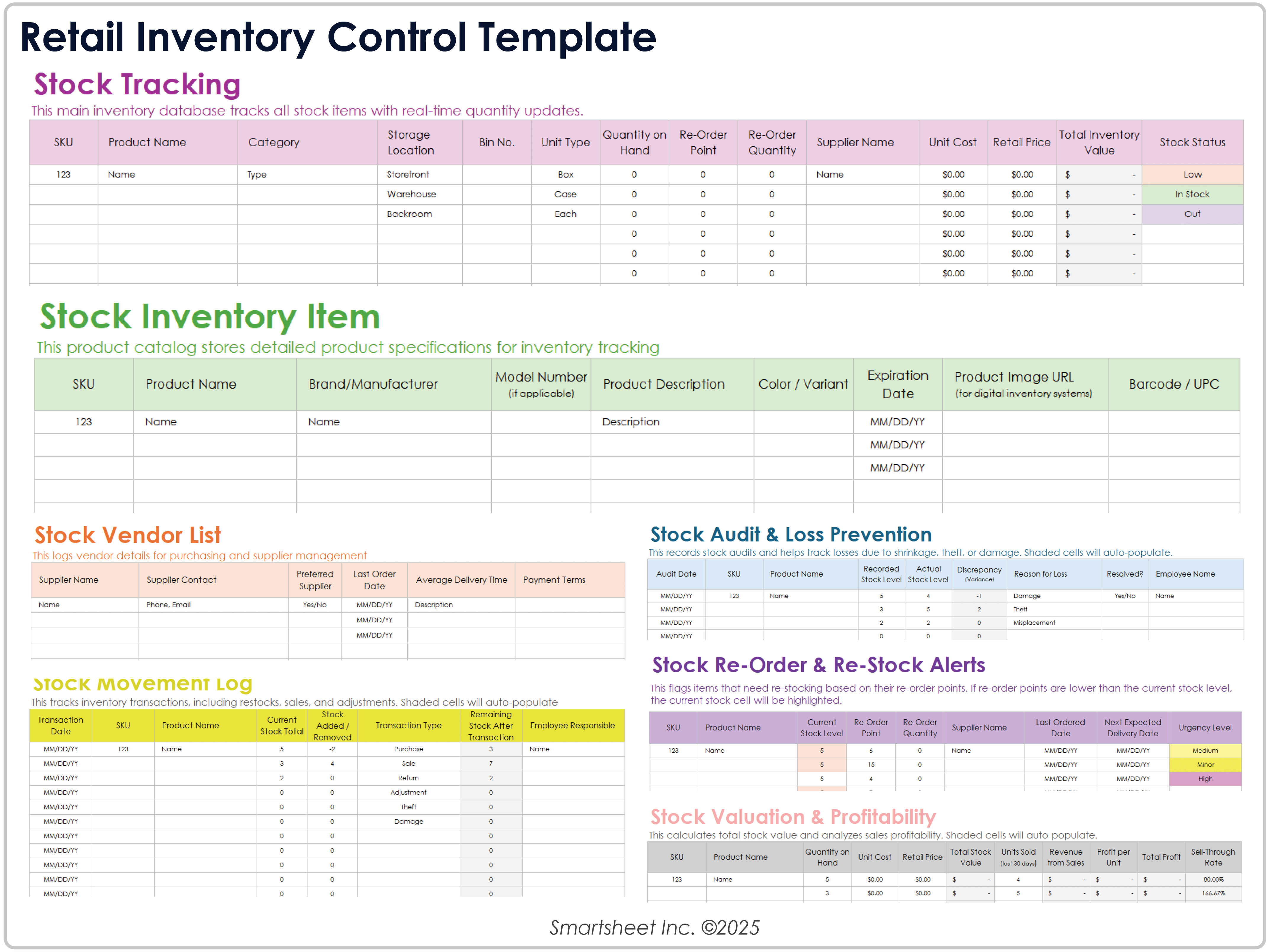
As you can see, a complete product record includes:
- Product Identifiers: Unique codes to distinguish each item (e.g., SKUs, barcodes).
- Product Details: Descriptive information like name, category, brand, and variants (color, size).
- Supplier Information: Who you buy the product from, their item code, and your cost.
- Inventory & Financials: Stock levels, reorder points, and pricing.
Today, we'll focus on creating the core structure for the first three: identifiers, details, and supplier information.
2. The Heart of the System: Stock Keeping Units (SKUs)
The most important unique identifier you will create is the Stock Keeping Unit (SKU). Unlike a UPC barcode, which is universal and set by the manufacturer, a SKU is an internal code created by you, for you. Its purpose is to help you and your staff instantly identify and track products based on their unique characteristics.
Your digital marketing background gives you experience with using unique IDs for tracking campaigns or users; SKUs serve a similar purpose for physical products.
What Is a Stock Keeping Unit (SKU)? Complete 2026 Guide
To start, let's get a clear definition of what a Stock Keeping Unit (SKU) is and why it's so critical for internal inventory management. This guide from Shopify provides an excellent overview and distinguishes it from other common product codes.
Please read the sections 'What is a stock keeping unit (SKU)?' and 'SKU vs. other product identifiers'. This will clarify what a SKU is for and how it differs from the UPC barcode you see on products.
How to Design a SKU System
A good SKU system isn't random; it's a logical code that tells a story. Creating a solid framework now will save you immense trouble as your product range grows.
What Is a Stock Keeping Unit (SKU)? Complete 2026 Guide
Now for the practical part: how do you design a SKU system that works for your store? This same Shopify article lays out a clear, 5-step framework and provides best practices that are essential to follow.
Read the sections 'How to create SKUs: a 5-step framework', 'SKU best practices and common formats', 'Common SKU mistakes to avoid', and 'SKU examples by business type'. Pay special attention to the 'Multibrand retail business SKU' example, as it's directly relevant to your plan to sell products from various brands.
Applying the Framework to Your Beauty Store
Let's synthesize what you've read and create a practical SKU structure for a typical beauty product. The key is to order the attributes from general to specific.
A good format for a multi-brand beauty store could be:
[BRAND]-[CATEGORY]-[PRODUCT LINE]-[VARIANT]
Let's use a real-world example: The Ordinary's Niacinamide 10% + Zinc 1% serum in a 30ml bottle.
- BRAND: A 2-3 letter code for the brand. Let's use
ORDfor The Ordinary. - CATEGORY: A code for the product type. Let's use
SERfor Serum. - PRODUCT LINE: A code for the specific product. Let's use
NIAfor Niacinamide. - VARIANT: A code for the size. Let's use
30for 30ml.
Putting it all together, the SKU would be: ORD-SER-NIA-30
If the same serum also came in a 60ml bottle, its SKU would be ORD-SER-NIA-60. This system makes it immediately clear what the product is just by reading the SKU, and it ensures every single product variation has its own unique identifier.
3. Defining the Complete Product Record
Now that we have our core identifier (the SKU), let's build the complete structured format. This format will serve as your template for adding any new product into your inventory system.
This is a simpler, more focused version of the large template we saw earlier, perfect for getting started.
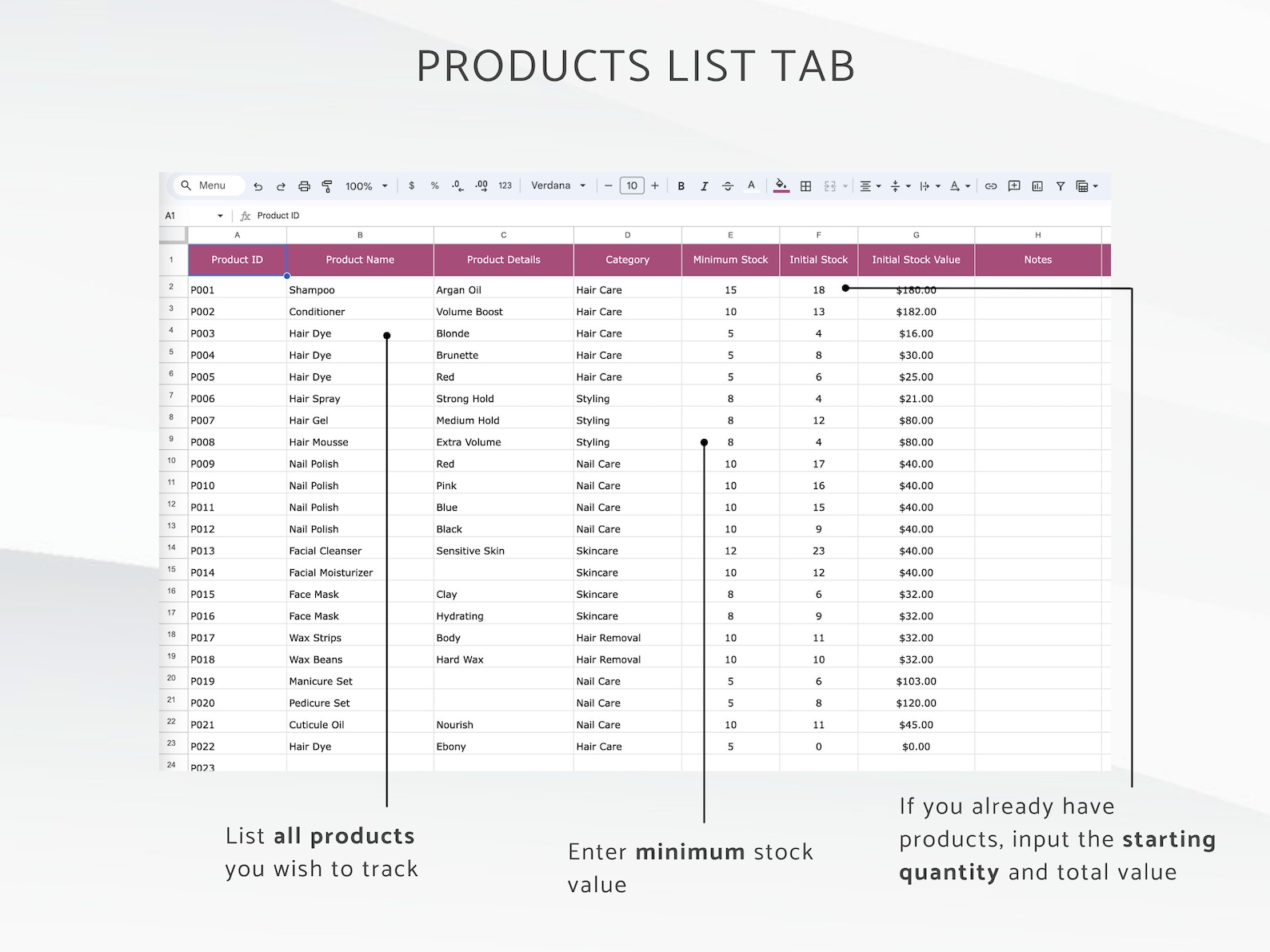
Here is a comprehensive template tailored for your beauty mini-market. This is the "structured format" you'll use.
| Field Name | Example | Purpose / Notes |
|---|---|---|
| SKU | ORD-SER-NIA-30 | Primary Key. The unique internal identifier we just designed. |
| Product Name | The Ordinary Niacinamide 10% + Zinc 1% | The full, official product name. |
| Description | 30ml | Key details for differentiation, like size, volume, or shade name. |
| Category | Skincare > Serums & Treatments | A hierarchical category for organization and sales reporting. |
| Brand | The Ordinary | The brand name of the product. |
| Supplier Name | BeautyDistro Inc. | The name of the supplier you order this product from. |
| Supplier Product Code | DECIEM-456 | The supplier's own code for this item. This is critical for accurate reordering. |
| Cost Price | $4.50 | The price you pay the supplier per unit (your cost of goods). |
| Retail Price | $7.50 | The price you sell it for to customers. (We'll cover pricing strategy later). |
| Expiration Tracking | Yes | A simple "Yes/No" flag. Essential for cosmetics to manage shelf life. |
This table is your blueprint. Every time you decide to stock a new product, you will gather this information and enter it into your inventory system according to this structure.
4. From Data to Action: Barcodes and the POS
So, why is all this upfront work so important? Because this structured data is what enables the smooth, automated checkout process in a modern retail store.
Once this information is in your POS system, the system can generate a unique barcode for each SKU. You'll print these as labels and stick them on the products. When a customer comes to the counter, you scan the barcode, and the POS system instantly pulls up the correct product, price, and automatically deducts one unit from your inventory count.
✨HOW TO MAKE BARCODES FOR YOUR SMALL BUSINESS! POS INVENTORY DIY✨ | Fauna Rose
To see how this all comes together in practice, let's watch a short clip. This small business owner demonstrates her checkout process. This seamless experience is only possible because she did the foundational work of structuring her product data with SKUs and barcodes.
Watch from 23:30 to 24:54. Notice how she scans the barcode, and the product instantly appears on her POS screen, ready for payment. This is the real-world payoff for the data structuring we've discussed today.
This automation eliminates manual errors at checkout and ensures your inventory levels are always accurate, which is the cornerstone of effective inventory management.
Conclusion
In this lesson, we have moved from the conceptual to the practical, designing the data foundation for your store's inventory. You now have a clear, actionable template for organizing all your product information.
Key Takeaways:
- A structured format for product information is essential for accurate and efficient inventory management.
- A logical SKU system is the heart of this structure. For a multi-brand beauty store, a format like
[BRAND]-[CATEGORY]-[PRODUCT LINE]-[VARIANT]is scalable and informative. - A complete product record includes the SKU, detailed descriptions, category, and crucial supplier information like their specific product code and your cost.
- This structured data is what enables the use of POS systems and barcodes to automate sales and inventory tracking, which is the standard for modern retail.
Preview of the Next Lesson:
Now that we have a blueprint for our product data, our next lesson will be very hands-on. We will perform the initial setup of an inventory tracking system using a sample set of products. You'll take the structure we defined today and apply it to a small list of beauty items, getting your first real feel for how the system works.