Hello! In our last lesson, we explored ES6 modules, a powerful feature for organizing your code across different files. We're continuing our journey through modern JavaScript by looking at another ES6 enhancement that makes your functions cleaner and more resilient.
Today's learning outcome is to use default parameter values in function definitions. This feature helps prevent common errors and makes your functions more predictable by providing sensible fallbacks when arguments are missing. As someone building full-stack applications, writing robust functions that don't easily break is a critical skill.
1. The Problem: Missing Arguments
Before ES6, if you called a function without providing a value for one of its parameters, that parameter would be assigned the value undefined inside the function. This could often lead to unexpected results, like NaN (Not a Number) from a mathematical operation, or an error when trying to access a property of an undefined value.
First, let's refresh our understanding of the difference between parameters and arguments and see how missing arguments can cause problems.
Understanding Default Parameters in JavaScript | DigitalOcean
This section from an article by DigitalOcean provides a clear definition of parameters vs. arguments and demonstrates the NaN issue when an argument is missing.
Read the section 'Arguments and Parameters'. It provides a simple cube function example that clearly illustrates what happens when a function is called without the required argument.
2. The Solution: ES6 Default Parameters
To solve this problem, developers used to write manual checks inside the function body, often using an if statement or the logical OR operator (||) to assign a default value. While this works, it adds boilerplate code.
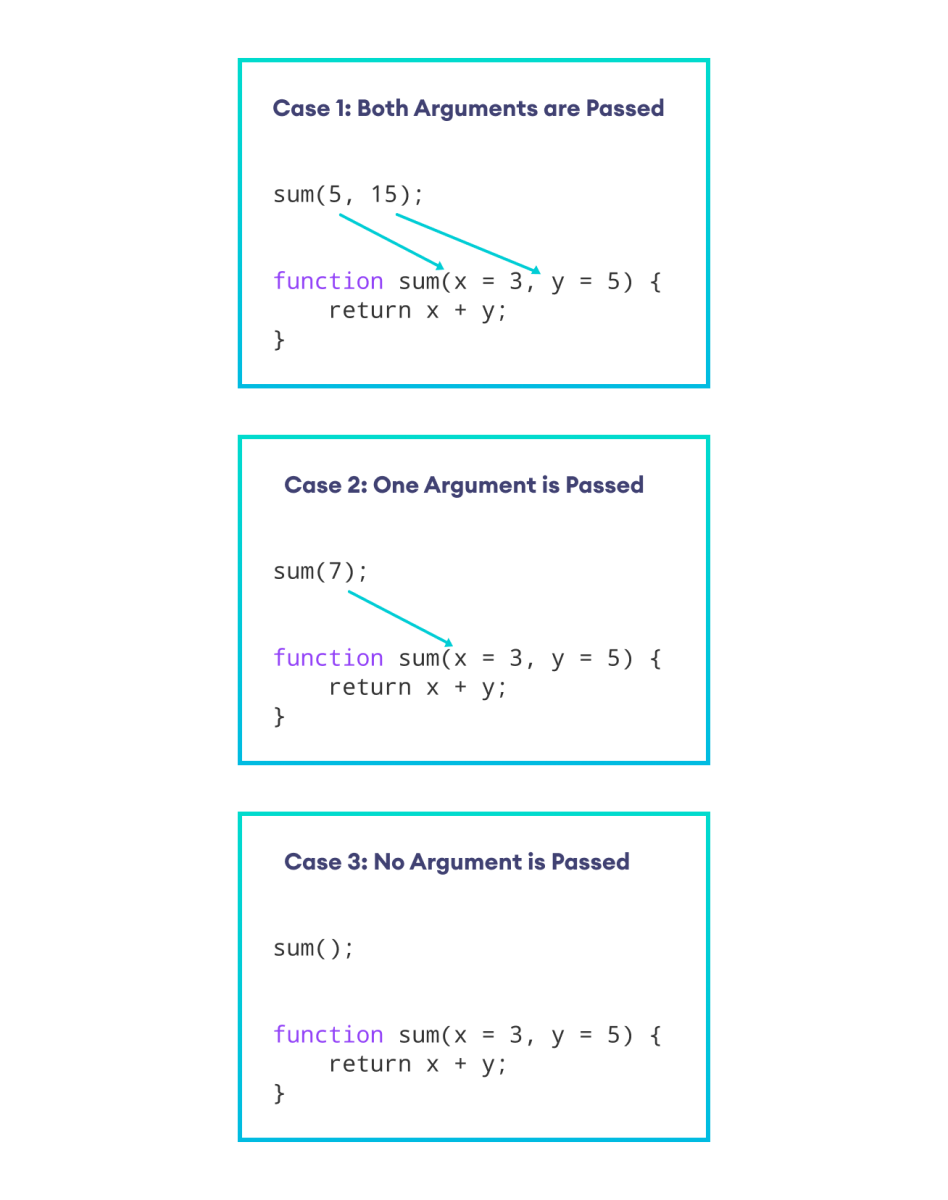
ES6 introduced a much cleaner, more declarative syntax to achieve the same result directly in the function's signature.

Now, let's see this new syntax in action.
ES6 and Typescript Tutorial - 12- Default Function Parameters
This short video from Codevolution demonstrates the basic syntax for setting a default parameter and how it behaves when a function is called with and without an argument.
Watch from 00:50 to 01:50. Notice how the default value is assigned using the = operator right in the function definition.
As you saw, the syntax is simple and intuitive:
// A function with a default parameter
function greet(name = 'Guest') {
  console.log(`Hello, ${name}!`);
}

greet('Alex'); // Output: Hello, Alex!
greet();       // Output: Hello, Guest!
This simple change makes the function's behavior more explicit and prevents errors from undefined values.
3. Key Rules and Best Practices
While the basic syntax is straightforward, there are a few important rules to understand to use default parameters effectively.
Rule 1: Defaults Apply to undefined Only
A default value is only applied if a parameter is truly missing (so it's undefined) or if undefined is passed explicitly as the argument. It will not be applied for other "falsy" values like null, 0, an empty string "", or false.
This is a key difference from the old || trick, which would incorrectly override any falsy value.
Default parameters - JavaScript - MDN Web Docs
The MDN Web Docs provide the definitive explanation for this behavior. Pay close attention to the examples with undefined versus other falsy values.
Read the section titled 'Passing undefined vs. other falsy values'. This is a common source of confusion, and understanding this distinction is crucial.
Here is a quick summary of the behavior:
function test(num = 1) {
  console.log(num);
}

test();          // -> 1 (argument is undefined)
test(undefined); // -> 1 (undefined is explicitly passed)
test(null);      // -> null (null is not undefined)
test(5);         // -> 5
test("");        // -> "" (empty string is not undefined)
Rule 2: Order Matters
For readability and ease of use, it is a best practice to place parameters with default values at the end of the parameter list.
If you put a default parameter before a regular parameter, you cannot simply omit it when calling the function. You would have to explicitly pass undefined to get the default behavior, which can make function calls look awkward.
// Good practice: defaults at the end
function createBooking(flight, passengers = 1) {
  console.log(`Booking flight ${flight} for ${passengers} passenger(s).`);
}
createBooking('LH123'); // Clean and readable

// Bad practice: default at the start
function createBookingAwkward(passengers = 1, flight) {
  console.log(`Booking flight ${flight} for ${passengers} passenger(s).`);
}
// To book a flight for 1 passenger, you must do this:
createBookingAwkward(undefined, 'LH123'); // Awkward and less clear
Rule 3: Defaults Can Use Earlier Parameters
A default value isn't limited to a static value. It can be calculated using the values of parameters that appear earlier (to its left) in the function signature.
Javascript Default Parameters ES6 ES2015 tutorial
This brief clip shows a practical example where one default parameter's value depends on a previous parameter.
Watch from 04:46 to 05:22. Notice how the parameter b can be set to equal a by default.
This allows for creating more dynamic and intelligent function defaults:
function calculateBill(total, taxRate = 0.07, tipRate = 0.20) {
  const tax = total * taxRate;
  const tip = total * tipRate;
  return total + tax + tip;
}

// Or, you could make the tip dependent on the total
function calculateBillWithDependentTip(total, tip = total * 0.2) {
    return total + tip;
}

console.log(calculateBillWithDependentTip(100)); // -> 120 (tip defaults to 20)
console.log(calculateBillWithDependentTip(100, 15)); // -> 115 (tip is explicitly set to 15)
4. Putting It into Practice
Let's refactor a simple function to use default parameters. Imagine you're building a function for an e-commerce site that creates a user profile.
Your Task:
Modify the createUser function below so that:
- The
roleparameter defaults to'customer'. - The
isActiveparameter defaults totrue.
// Refactor this function
function createUser(username, email, role, isActive) {
  return {
    username: username,
    email: email,
    role: role,
    isActive: isActive,
    createdAt: new Date()
  };
}

// After your changes, these function calls should work as described:

// const newUser = createUser('jdoe', 'j.doe@example.com');
// console.log(newUser);
// Expected output: { username: 'jdoe', email: 'j.doe@example.com', role: 'customer', isActive: true, ... }

// const adminUser = createUser('admin', 'admin@system.com', 'admin', true);
// console.log(adminUser);
// Expected output: { username: 'admin', email: 'admin@system.com', role: 'admin', isActive: true, ... }
Take a moment to think about how you would change the function signature before revealing the solution.
Click to see the solution
function createUser(username, email, role = 'customer', isActive = true) {
  return {
    username: username,
    email: email,
    role: role,
    isActive: isActive,
    createdAt: new Date()
  };
}
Conclusion
You've now added another essential ES6 feature to your toolkit. Default parameters make your code more robust, self-documenting, and less prone to errors caused by missing arguments.
Key Takeaways:
- Clean Syntax: Assign default values directly in the function signature with
=. undefinedis the Trigger: Default values are only used when an argument is missing (undefined) or explicitlyundefined. They are not used for other falsy values likenullor"".- Order is Important: Place parameters with default values at the end of the list for cleaner function calls.
- Dynamic Defaults: A default value can be an expression that references earlier parameters.
In our next lesson, we will explore template literals, another ES6 feature that dramatically improves the way you work with strings in JavaScript.