Hello! In our last session, you mastered the art of similarity search, learning how to query our vector store to find document chunks that are semantically related to a user's question. This is a powerful capability, but it often isn't enough for building a robust, production-grade application. What if you need to find information that is not only related but also relevant to a very specific context?
This lesson addresses that exact challenge. You will learn how to apply metadata filters during retrieval to dramatically narrow down and improve the precision of your search results. This moves us beyond finding what's merely related to pinpointing what is contextually relevant, a critical step in building sophisticated RAG systems.
The Limits of Pure Similarity
Imagine a corporate knowledge base containing documents from HR, Engineering, and Finance. A user asks, "What is our policy on remote work?" A pure similarity search might return:
- The current, active remote work policy (Correct!).
- An outdated draft of the policy from three years ago.
- A blog post from the engineering team discussing their remote work tooling.
- A financial report mentioning costs associated with remote work stipends.
While all of these are semantically related to "remote work," only the first one is the correct answer. The others are noise. Metadata is the tool we use to cut through this noise.
In a vector database, each vector embedding can be stored alongside a structured "payload" of metadata. This is analogous to having columns in a traditional database table that describe a record.

By filtering on this metadata, we can add logical constraints to our semantic search.
How to Implement Metadata Filtering
This article from OneUptime provides an excellent introduction to why metadata filtering is so crucial.
First, read the brief introduction right below the title, from the quote down to the end of the paragraph. Then, jump to the section "1. Why Metadata Filtering Matters" and read the vacation policy example. It perfectly illustrates the problem we are solving.
Pre-filtering vs. Post-filtering: An Engineering Trade-off
From a system design perspective, there are two primary ways to combine metadata filtering with vector search. Understanding this trade-off is key to building efficient systems.
- Pre-filtering (Filter-Then-Search): The database first selects all the vectors that match the metadata filter. Then, it performs the similarity search only within this smaller, pre-filtered set of candidates.
- Post-filtering (Search-Then-Filter): The database first performs the similarity search across the entire collection to find the top N most similar vectors. Then, it filters this small result set to remove any that don't match the metadata criteria.
The diagram below illustrates the pre-filtering approach, which is common in modern vector databases.
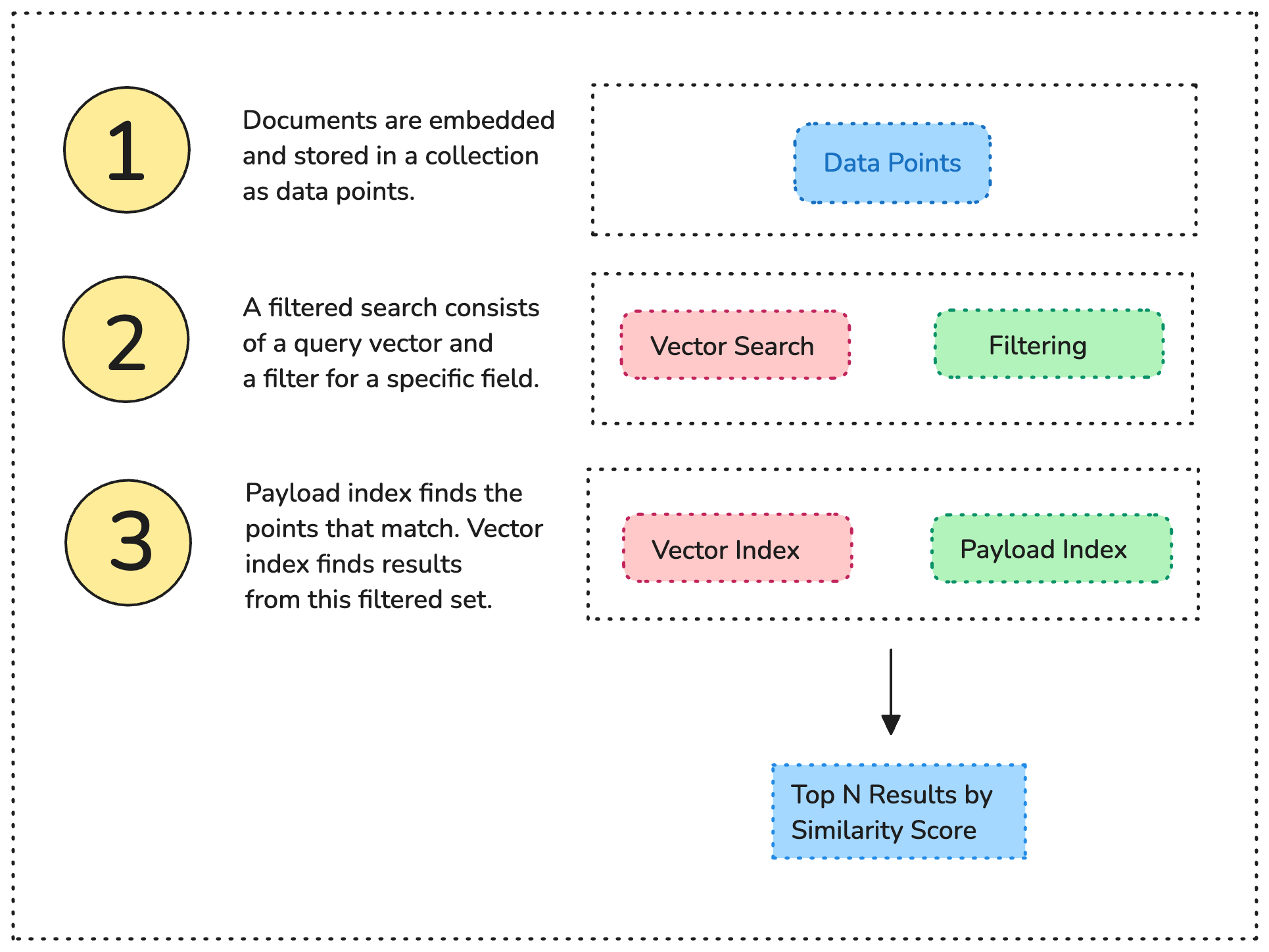
The choice between these strategies involves a classic engineering trade-off between speed and accuracy.
How to Implement Metadata Filtering
The "Core Concepts and Architecture" section of the OneUptime article explains these trade-offs clearly.
Focus on the subsection Pre-filtering vs Post-filtering. Pay attention to the pros and cons of each method. Most production systems use a hybrid approach, choosing the best strategy based on the query.
- Pre-filtering is highly efficient when your filter is very selective (e.g.,
tenant_id = 'user_123'), because the vector search is performed on a much smaller number of items. However, it risks missing a globally perfect semantic match if that match was excluded by the initial filter. - Post-filtering guarantees that you are considering the absolute most semantically similar vectors, but it can be slow (as you search all data) and may return fewer results than you asked for if the top results are filtered out.
For our purposes with ChromaDB, it handles these mechanics internally. We just need to know how to specify the filter.
Applying Filters in ChromaDB
In the previous lesson, you used collection.query() to perform a similarity search. To add a filter, you simply include the where parameter.
ChromaDB uses a filter syntax that is heavily inspired by MongoDB. If you've worked with NoSQL databases, this may look familiar. You construct a dictionary that specifies the conditions your documents' metadata must meet.
# A simple equality filter
# Returns only documents where the metadata 'source' is 'document_A.pdf'
results = collection.query(
    query_texts=["What is the main topic?"],
    n_results=5,
    where={"source": "document_A.pdf"}
)
The article from CodeSignal Learn provides a concise walkthrough of how to build this where clause.
Metadata-Based Filtering in RAG Systems
This lesson gives a practical, code-focused introduction to filtering in ChromaDB.
Read from the beginning, starting with the explanation of metadata's role. Pay close attention to the code example and the explanation of the where clause and the $in operator. Finally, read the conclusion section that discusses the practical example output.
Building Complex Filters
Real-world applications often require more than a single condition. You can build complex filters by combining operators. LINK has a comprehensive table of these operators. For ChromaDB, the most common are:
| Operator | Description | Example |
|---|---|---|
$eq |
Equals | {"year": {"$eq": 2024}} |
$ne |
Not Equals | {"status": {"$ne": "archived"}} |
$gt, $gte |
Greater Than, Greater Than or Equal | {"version": {"$gte": 3}} |
$lt, $lte |
Less Than, Less Than or Equal | {"word_count": {"$lt": 500}} |
$in |
Value is in a list | {"department": {"$in": ["HR", "Legal"]}} |
$nin |
Value is not in a list | {"category": {"$nin": ["internal", "draft"]}} |
You can also combine these conditions using logical operators $and and $or. This allows you to express complex business rules directly in your query.
# Find active documents that are either public HR policies OR internal engineering guides.
complex_filter = {
    "$and": [
        {"status": {"$eq": "active"}},
        {"$or": [
            { "$and": [
                {"document_type": {"$eq": "policy"}},
                {"department": {"$eq": "HR"}}
            ]},
            { "$and": [
                {"document_type": {"$eq": "guide"}},
                {"department": {"$eq": "Engineering"}}
            ]}
        ]}
    ]
}

results = collection.query(
    query_texts=["How do I get a promotion?"],
    n_results=3,
    where=complex_filter
)
This ability to nest conditions is powerful and is a pattern you'll be familiar with from writing complex SQL queries or API logic.
Use Case: Self-Querying Retrieval
So far, we've assumed that we, the developers, are manually constructing these filter dictionaries. But what if we could use a large language model to do it for us? This is the core idea behind Self-Querying Retrieval.
In this advanced pattern, a user's natural language query (e.g., "I'm looking for a fruity wine from Italy that's rated above 95") is first sent to an LLM. The LLM's task is to parse this query and generate both:
- A structured metadata filter:
{"country": "Italy", "rating": {"$gt": 95}} - The semantic search query:
"fruity wine"
The vector store then executes this combined query. This approach elegantly merges the power of semantic search for ambiguous concepts ("fruity") with the precision of structured filtering for factual data (country, rating).
The following video provides an excellent demonstration of this concept.
Advanced RAG 01 - Self Querying Retrieval
Sam Witteveen's video on Self-Querying Retrieval is a fantastic look at a more advanced RAG architecture.
First, watch the introduction here to understand the core problem: you shouldn't use semantic search for things that can be looked up with a structured filter. Next, jump to the examples section starting at this timestamp. Notice how queries like "wines from Italy" or "rating above 97" are automatically translated into the correct filter structure by the LLM before the search happens. Finally, watch the short summary here, which recaps how this technique allows you to build much more effective RAG systems.
Conclusion
In this lesson, you've added a critical tool to your RAG toolkit. By moving from simple similarity search to precise, filtered retrieval, you can build applications that are more accurate, efficient, and robust.
Here are the main takeaways:
- From Related to Relevant: Metadata filtering is the key to narrowing search from semantically similar documents to contextually correct ones.
- Filter-then-Search: Modern vector stores typically use a pre-filtering strategy to efficiently search within a subset of data that matches your criteria.
- ChromaDB's
whereClause: You can apply filters in ChromaDB by passing a dictionary of conditions to thewhereparameter in thequery()method. - Complex Logic: You can combine multiple conditions using operators like
$eq,$in,$gte, and logical combiners like$andand$orto express sophisticated business rules. - Advanced Applications: This technique is the foundation for powerful patterns like multi-tenancy, access control, and self-querying retrieval.
We have now covered how to populate a vector store, how to perform similarity search, and how to refine that search with filters. But how do vector stores perform these searches over millions or billions of vectors in milliseconds? A brute-force comparison is computationally infeasible.
In our next and final lesson of this module, we will explore the answer by describing the purpose of Approximate Nearest Neighbor (ANN) search algorithms—the "magic" that makes vector search fast and scalable.