Hello! Welcome back to our series on Apache Kafka.
In our last lesson, we got our hands dirty by implementing a Kafka producer and consumer in Spring Boot. We focused on the crucial topic of offset management, learning how to use manual acknowledgments to build reliable, "at-least-once" consumers. However, our messages were just simple strings.
Real-world distributed systems communicate using complex, structured data. What happens when the structure of that data needs to change—for example, when a new feature requires adding a field to an event? This is a fundamental challenge in microservice architectures, and a topic frequently explored in senior engineering interviews.
Today, we'll tackle this exact problem. Your learning outcome is to explain the role of a schema registry and implement event versioning with Avro for schema evolution. We will learn how to manage data contracts between services to ensure that your event-driven system can evolve gracefully without breaking.
1. The Problem: Drifting Schemas in a Distributed World
Imagine you have a PaymentProducer service that sends PaymentEvent messages to a Kafka topic. Several other services, like FraudDetector and LedgerService, consume these events.
What happens if the PaymentProducer team needs to add a new currency field to the PaymentEvent and deploys their change?
- Kafka itself won't complain. To Kafka, a message is just an array of bytes.
- The
FraudDetectorandLedgerService, however, expect the old message format. When they try to deserialize the new message format, they will likely fail with aDeserializationException, causing a production incident.
This is the core problem: how do you enforce a data contract between decoupled services and manage changes to that contract over time without causing system-wide failures?
2. The Solution: A Centralized Schema Registry
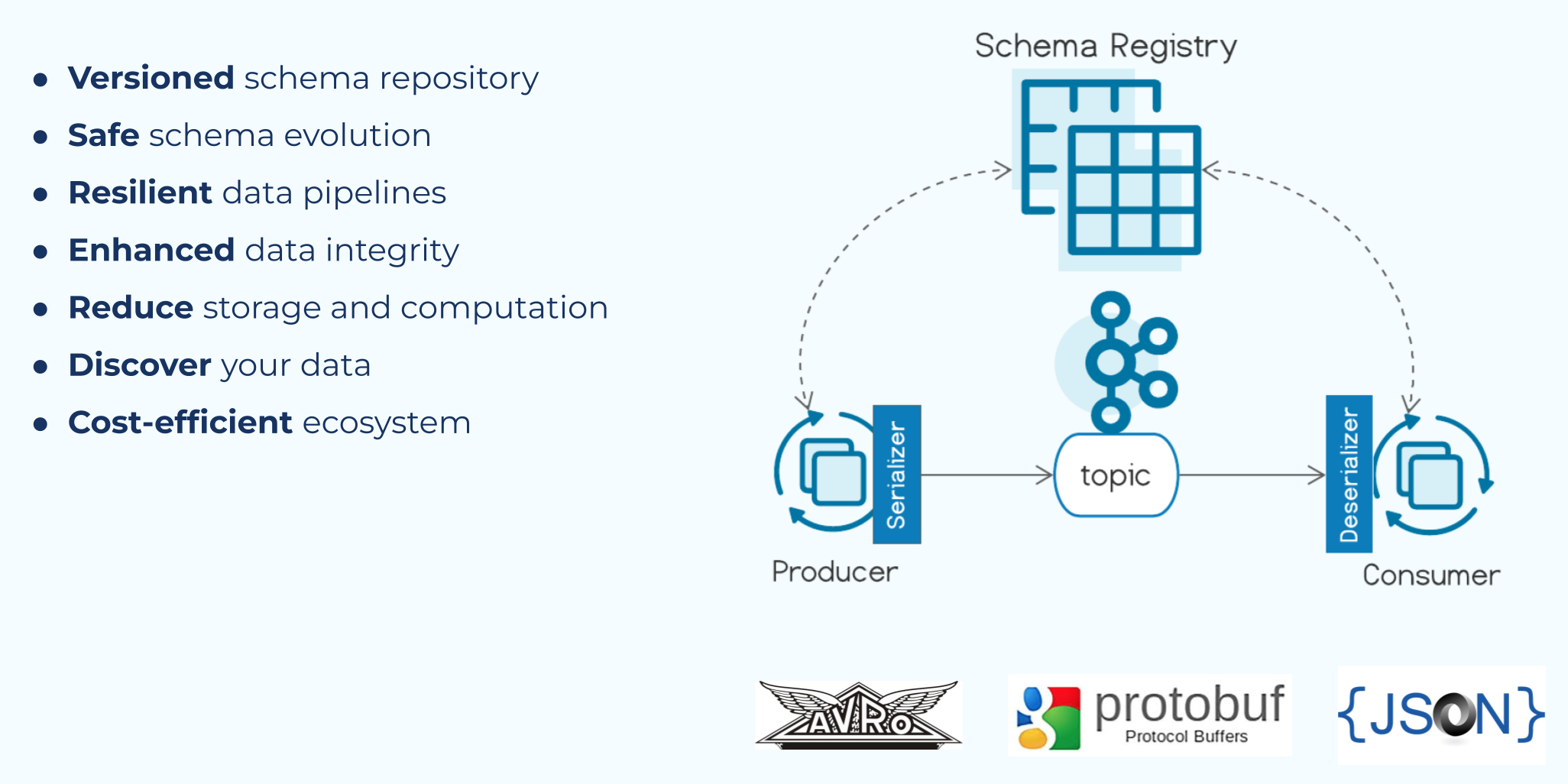
A Schema Registry is a centralized service that acts as a single source of truth for your message schemas. It's a standalone server that your producers and consumers talk to, separate from the Kafka brokers. Its main responsibilities are:
- Storing Schemas: It maintains a versioned history of all schemas for each Kafka topic.
- Enforcing Compatibility: It checks new schema versions against pre-configured compatibility rules to prevent breaking changes.
- Providing Schemas for (De)serialization: It allows clients to fetch schemas by a unique ID.
Kafka schema registry—Tutorial & best practices
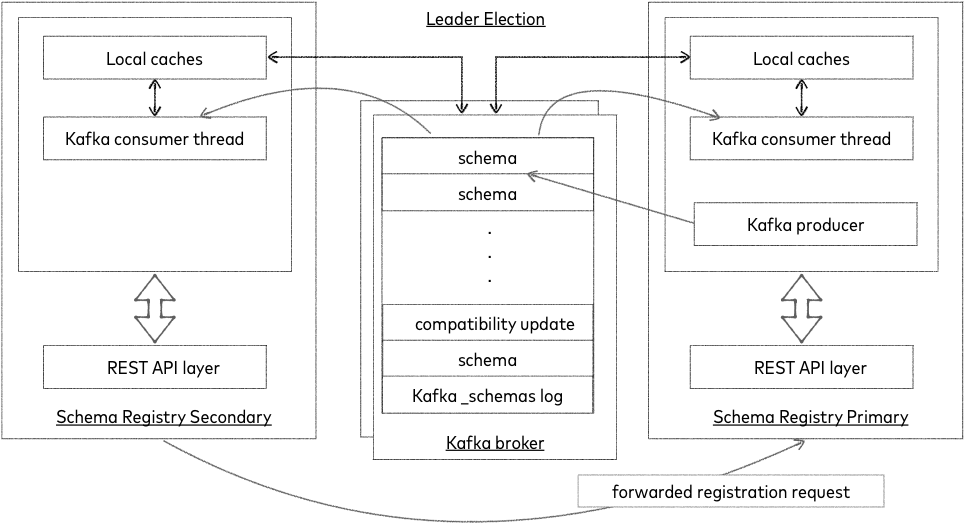
To understand the mechanics, let's read a high-level overview of how the Schema Registry works. This guide from Redpanda provides an excellent explanation.
Read the sections 'Kafka schema registry' and 'How Kafka schema registry works'. Focus on understanding the problem it solves and the high-level interaction between the producer, consumer, and the registry.
As the article explains, the workflow is as follows:
- Producer: When sending a message, the producer first checks if the message's schema is registered. If it is, it retrieves the schema's unique ID. It then serializes the message and prepends the schema ID to the payload before sending it to Kafka.
- Consumer: When receiving a message, the consumer reads the schema ID from the payload. It queries the Schema Registry for the schema associated with that ID (caching it locally for performance). It then uses that specific schema to deserialize the message payload.
This process ensures that the consumer always has the correct schema to read any given message, regardless of when that message was produced.
3. Choosing a Serialization Format: Avro
The Schema Registry supports several data serialization formats, most commonly Avro, Protobuf, and JSON Schema. While each has its place, Avro is the de facto standard in the Kafka ecosystem and the one we'll focus on.
Kafka schema registry—Tutorial & best practices
The 'Kafka schema registry—Tutorial & best practices' article also provides a great comparison of the main serialization formats.
Read the section 'Choosing a serialization format for Kafka schema registry'. Pay attention to the characteristics of Avro, particularly its support for dynamic typing and schema evolution, which make it ideal for our use case.
In summary, Avro is often preferred because:
- Rich Schema Definition: Schemas are defined in a clear, JSON-based format (
.avscfiles). - Compact Payload: It produces a compact binary format, unlike JSON.
- Strong Evolution Support: Its design explicitly supports evolving schemas with clear compatibility rules.
- Excellent Java Integration: It has robust tooling, including a Maven plugin for auto-generating Java classes from schemas.
4. Implementing Schema Evolution with Avro and Spring Boot
Now, let's put theory into practice. We'll outline the steps to use Avro and a Schema Registry in a Spring Boot application.
Step 1: Define the Avro Schema
You start by defining your event's structure in an .avsc file, typically placed in src/main/resources/avro/.
TransactionEventV1.avsc
{
  "namespace": "com.example.kafka.avro.model",
  "type": "record",
  "name": "TransactionEvent",
  "fields": [
    { "name": "id", "type": "string" },
    { "name": "amount", "type": "double" },
    { "name": "timestamp", "type": "long", "logicalType": "timestamp-millis" }
  ]
}
Step 2: Generate Java Classes
You use a build plugin (avro-maven-plugin or a Gradle equivalent) to automatically generate a TransactionEvent.java POJO from this schema file during your build process.
Implementing a basic Kafka Producer and Consumer using ... Avro Schema
The following article, 'Implementing a basic Kafka Producer and Consumer using ... Avro Schema', shows the necessary Maven dependencies and plugin configuration to make this happen.
Review the pom.xml configuration in this article. You don't need to copy it verbatim, but understand the roles of the avro dependency, the kafka-avro-serializer, and especially the avro-maven-plugin which handles the code generation.
Step 3: Configure Your Application
Next, you need to configure your producer and consumer to use the Avro serializer/deserializer and point them to your Schema Registry instance.
Implementing a basic Kafka Producer and Consumer using ... Avro Schema
The same article provides a clear example of the necessary application.properties.
Examine the 'Spring Kafka producer properties' and 'Spring Kafka consumer properties'. The most important properties to note are value-serializer, value-deserializer, and schema.registry.url.
Here are the key properties for application.yml:
spring:
  kafka:
    producer:
      value-serializer: io.confluent.kafka.serializers.KafkaAvroSerializer
    consumer:
      value-deserializer: io.confluent.kafka.serializers.KafkaAvroDeserializer
      properties:
        specific.avro.reader: true # Deserialize to specific generated classes
    properties:
      schema.registry.url: http://localhost:8081 # URL of your Schema Registry
      # auto.register.schemas: true # Convenient for dev, but often false in prod
Your producer can now send TransactionEvent objects, and your consumer can receive them just like we did with Strings in the last lesson.
Step 4: Evolve the Schema with Compatibility Rules
This is the most critical part. Let's say we need to add a new customerId to our TransactionEvent. If we just add the field, we risk breaking consumers. To do this safely, we leverage schema compatibility.
The most common and important type is BACKWARD compatibility.
Backward Compatibility: Consumers using the new schema can read data produced with the old schema. This is the default setting in most schema registries.
To make a change backward compatible, you must follow one simple rule:
- You can add a new field, but it must have a default value.
- You can delete a field, but it must have been optional (had a default value) in the old schema.
Let's evolve our schema to V2:
TransactionEventV2.avsc
{
  "namespace": "com.example.kafka.avro.model",
  "type": "record",
  "name": "TransactionEvent",
  "fields": [
    { "name": "id", "type": "string" },
    { "name": "amount", "type": "double" },
    { "name": "timestamp", "type": "long", "logicalType": "timestamp-millis" },
    { "name": "customerId", "type": ["null", "string"], "default": null }
  ]
}
Notice the new customerId field. Its type is a union of ["null", "string"] and it has "default": null. This makes the field optional.
When a producer with this V2 schema registers it, the Schema Registry checks if it's backward compatible with V1. It is, so the registration succeeds.
Now, consider the consumers:
- A new consumer (using V2 schema) reads an old message (V1). The
customerIdfield is missing in the data, so the Avro deserializer populates it with thedefaultvalue (null). No error occurs. - An old consumer (using V1 schema) reads a new message (V2). The Avro deserializer simply ignores the extra
customerIdfield that it doesn't recognize. No error occurs.
This allows you to update producers and consumers independently without coordinating a "big bang" deployment.
Test your understanding!
An interviewer asks: "Your team manages an OrderPlaced event. You need to remove a field called legacySystemId which is no longer used. How do you manage this change in a live system using Avro and a Schema Registry to ensure zero downtime or errors for consuming services?"
Show answer
This requires a two-step process to maintain backward compatibility and ensure a safe rollout.
-
Step 1: Make the field optional.
- First, I would update the Avro schema to make the
legacySystemIdfield optional by giving it a default value (e.g.,default: null). - I would deploy the producer with this new schema (let's call it V2). The Schema Registry would register it.
- At this point, old consumers (on V1) can still read new messages (they'll just ignore the default value metadata), and new consumers (on V2) can read old messages (the field will be populated with
null). I would also update all consumer services to use this V2 schema and deploy them.
- First, I would update the Avro schema to make the
-
Step 2: Remove the field.
- Once I have confirmed that all active consumer services have been upgraded to the V2 schema (where the field is optional), I can proceed with the removal.
- I would create a new schema version (V3) where the
legacySystemIdfield is completely removed. - I would deploy the producer with this V3 schema. Because the field was optional in the previous version (V2), this change is backward compatible. All consumers (now on V2) will be able to read V3 messages; they will just see the
legacySystemIdfield asnull(its default value).
This phased approach ensures that at no point does a producer send data that an active consumer cannot safely read, guaranteeing a smooth and error-free evolution of the data contract.
Conclusion
You've now learned one of the most important concepts for building robust, large-scale, event-driven systems. Managing data contracts is essential for the long-term health and maintainability of a microservices architecture.
Key Takeaways:
- Schema Registry acts as a central "source of truth" for data contracts, preventing schema drift between producers and consumers.
- Avro is a powerful serialization format optimized for schema evolution.
- The producer sends a schema ID with each message, and the consumer uses this ID to fetch the correct schema for deserialization.
- Backward compatibility is the most common evolution strategy, allowing you to add optional fields (with defaults) without breaking existing consumers. This enables independent deployments of services.
Preview of the Next Lesson:
We've ensured our data format is robust. But what about the order in which data is processed? In our next lesson, we will solve message ordering challenges in Kafka using appropriate partitioning strategies. You'll learn how Kafka guarantees order within a partition and how to design your producers to ensure that related events (e.g., all events for a single customer) are always processed in the correct sequence.