Hello! Welcome back to our deep dive into Apache Kafka.
In our last lesson, we focused on the structure of our data, learning how to use a Schema Registry and Avro to manage evolving data contracts between services. This ensures that producers and consumers can always understand the content of the messages they exchange.
However, in many systems, the sequence of events is just as critical as their content. Imagine processing a CreateOrder event before the CreateCustomer event—the system would fail. These ordering challenges are a classic topic in system design and microservice interviews.
Today, we'll address this head-on. Your learning outcome is to solve message ordering challenges in Kafka using appropriate partitioning strategies. We will explore Kafka's fundamental ordering guarantees and learn how to use message keys to ensure related events are always processed in the correct sequence.
1. Kafka's Fundamental Ordering Guarantee
The first and most important rule to understand about Kafka is this:
Kafka only guarantees message order within a single topic partition.
There is no built-in guarantee of order across all partitions of a topic. This is a deliberate design trade-off. To achieve massive scalability and high throughput, Kafka parallelizes work by allowing different consumers in a group to read from different partitions simultaneously. Enforcing a global order across all partitions would create a major bottleneck, defeating the purpose of a distributed log.
-
When messages have no key: If a producer sends messages without specifying a key, Kafka's default behavior (since version 2.4) is to use a "sticky" partitioning strategy. It will send a batch of messages to one partition and then switch to another partition for the next batch. This improves batching efficiency but offers no ordering guarantees for related messages. An older strategy was simple round-robin, which also provides no order.
-
The consequence: If you send events for the same customer (
customer-123-event-A,customer-123-event-B) without a key, they could land on different partitions and be processed out of order by parallel consumers.
2. The Solution: Partitioning with Message Keys
To solve the ordering problem, you must ensure that all related messages are processed sequentially by a single consumer. In Kafka, you achieve this by forcing all related messages onto the same partition.
This is done by sending messages with a message key.
A message key can be a string, integer, or even a complex object. It serves to identify a group of messages that must be processed in order. For example, customerId, orderId, or deviceId are all common choices for keys.
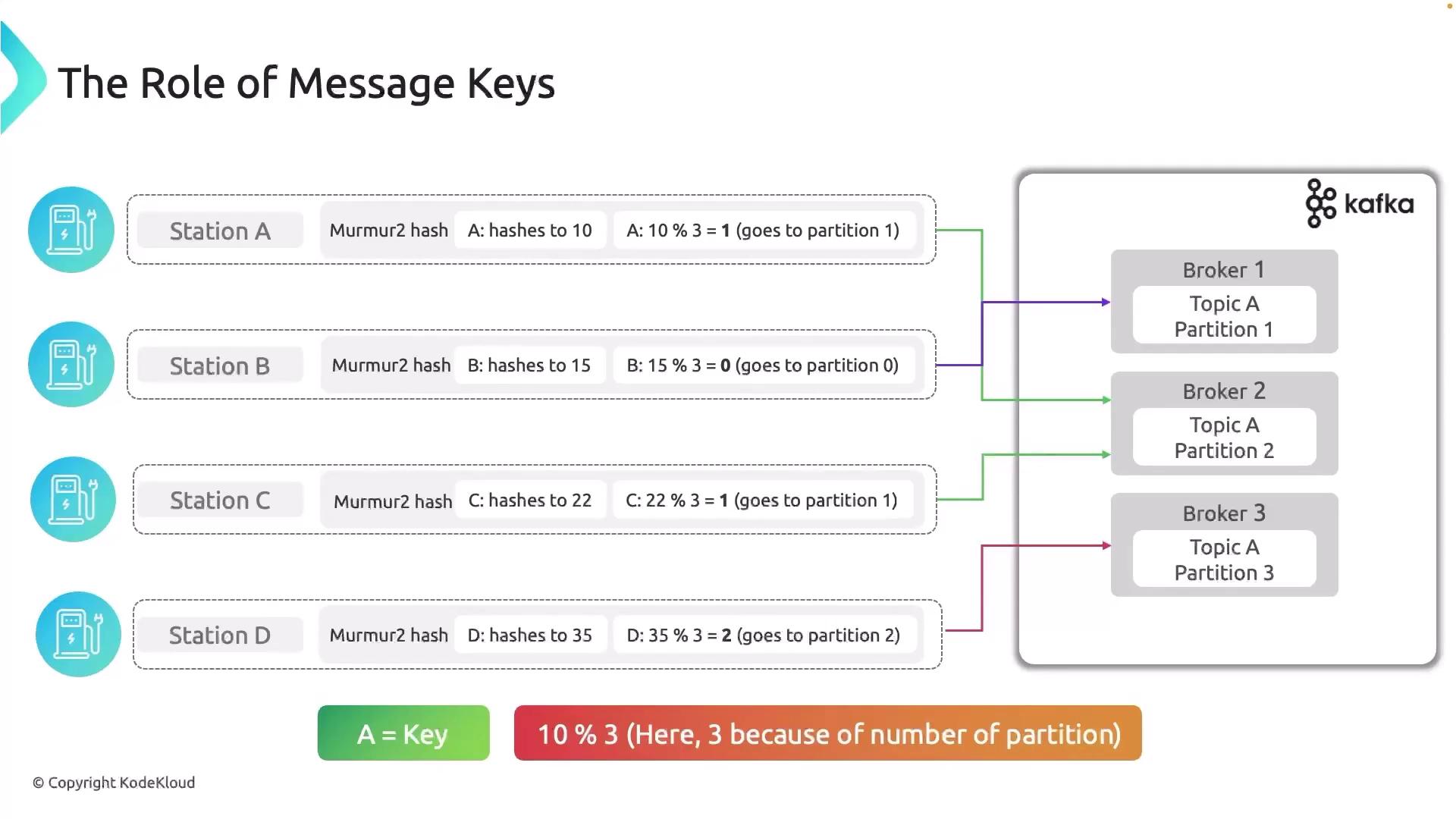
When you produce a message with a key, the producer doesn't pick a partition randomly. Instead, it uses a deterministic algorithm:
- It calculates a hash of the message key.
- It applies a modulo operation with the total number of partitions in the topic.
The formula is: target_partition = hash(key) % number_of_partitions
This guarantees that all messages with the same key will always be routed to the same partition. Since Kafka guarantees order within a partition, you have effectively guaranteed order for all messages sharing that key.
Kafka Keys, Partitions and Message Ordering
Let's read a more detailed explanation of this mechanism. The following article from Lydtech Consulting provides a clear, practical overview of how keys and partitions work together to provide ordering.
Read the sections titled 'Introduction', 'Topic Partitions', 'Message Keys', and 'Message Ordering'. Focus on the visual contrast between sending messages without a key versus with a key. Pay close attention to how using a key ensures all color-coded (related) messages land on the same partition.

Implementing with Spring Kafka
In a Spring Boot application using spring-kafka, sending a message with a key is straightforward. The KafkaTemplate's send method is overloaded to accept a key.
// Assuming 'kafkaTemplate' is injected and 'orderEvent' is your payload object.
// The order ID will be used as the key.
String orderId = orderEvent.getOrderId();

kafkaTemplate.send("orders-topic", orderId, orderEvent);
By simply providing the orderId as the second argument, you instruct Kafka to use it as the partition key.
3. Interview Focus: Choosing the Right Partition Key & Handling "Hot Partitions"
In a senior-level interview, you won't just be asked how to ensure order. You'll be given a scenario and asked to design the partitioning strategy, including defending your choice of key and explaining how you'd handle potential problems.
The most common problem is uneven data distribution, which leads to hot partitions (also known as data skew). If your partition key doesn't have a high cardinality (i.e., many unique values) or if some key values appear far more frequently than others, you'll end up with one partition receiving a disproportionate amount of traffic. This negates Kafka's scalability, as the consumer for that hot partition becomes a bottleneck while other consumers sit idle.
Kafka Deep Dive for System Design Interviews
This is a critical concept for system design interviews. Let's read a section from an article that frames this problem perfectly and discusses common solutions.
Read the section starting with 'Partitioning Strategy' and ending just before 'Fault Tolerance and Durability'. Pay special attention to the 'Ad Click Aggregator' example and the strategies listed for handling hot partitions.
As the article describes, let's analyze the ad-click scenario:
- System: An ad-click aggregation service.
- Requirement: Process clicks for ads. Ordering isn't strictly required for all clicks, but high traffic must be managed.
- Naive Key Choice:
adId. - The Problem: A viral ad for a new Nike shoe is launched. Suddenly, millions of clicks with the same
adIdflood the system. They all hash to the same partition. That partition becomes "hot," its consumer is overwhelmed, and processing lags significantly.
Here are the strategies to mitigate this, which you should be prepared to discuss in an interview:
-
Use a Composite Key: This is often the best solution. Instead of just
adId, create a key that combines it with another, high-cardinality attribute. For example:adId + ":" + userIdadId + ":" + user_geo_region
This distributes the clicks for the single viraladIdacross multiple partitions based on the user or region, spreading the load. The trade-off is that if you need to aggregate all clicks for that ad, your consumer logic is now more complex as it has to process data from multiple partitions.
-
Key Salting: If you don't have a good second attribute, you can add a random "salt" to the key.
adId + ":" + random_number_between_1_and_10
This would distribute the clicks for the viral ad across 10 partitions. This is effective for distribution but, like the composite key, complicates downstream processing.
Test your understanding!
You are designing an event-driven system for a food delivery app. One of the key event streams is for real-time location updates from delivery partners (DriverLocationUpdated). The front-end service needs to consume these events to show the driver's icon moving on a map for the customer. All location updates for a single, active order must be processed strictly in order.
What would you choose as your partition key? Justify your choice and discuss one potential risk or trade-off.
Show answer
Partition Key Choice: The best choice for the partition key would be the orderId.
Justification:
- Guarantees Ordering: The primary requirement is that all location updates for a single order are processed sequentially. Using
orderIdas the key ensures that all events for that order (driver-accepted,picked-up,location-update-1,location-update-2,delivered) are routed to the same partition. This allows the consumer to process them in the correct sequence, resulting in a smooth animation on the customer's map. - Good Distribution (during peak hours): During busy times, there will be many concurrent, active orders. Since each active order has a unique
orderId, the messages should be well-distributed across all available partitions, allowing the system to scale effectively.
Potential Risk / Trade-off:
The main risk is the "hot driver" or "hot restaurant" problem, which is a variation of the hot partition issue. Imagine a single driver who is extremely efficient and handles many consecutive short-distance orders. Or, a very popular restaurant that generates a burst of orders simultaneously.
If we had chosen driverId or restaurantId as the key, all events related to that entity would go to one partition, creating a temporary hot spot. By choosing orderId, we largely avoid this. However, the trade-off is that if you ever need to process all events for a specific driver in order (e.g., for an analytics job calculating their total driving time), you can't rely on Kafka's ordering guarantee for that purpose, as their events are spread across partitions based on orderId. You would need to handle that re-ordering in your analytics service.
4. Advanced Considerations and Pitfalls
For a senior-level discussion, you should also be aware of situations that can break your ordering guarantees, even when you're using keys correctly.
-
Changing the Partition Count: If you add partitions to a topic, the
number_of_partitionsin thehash(key) % number_of_partitionsformula changes. A key that used to map to partition 2 might now map to partition 7. This breaks the ordering guarantee between messages sent before the change and messages sent after. Ordering is still guaranteed for all new messages, but not in relation to the old ones. This is a critical consideration for stateful applications that rely on long-term event history. -
Producer Retries: By default, Kafka producers are configured to be idempotent and will retry sending a message if an error occurs. With
max.in.flight.requests.per.connectionset to a value up to 5, the modern Kafka producer guarantees that retried messages will not be written out of order on the broker. However, if you were to disable idempotence (enable.idempotence=false) and allow more than one in-flight request, a retry scenario could break ordering. For example, batch 2 could succeed while batch 1 (for the same partition) fails, gets retried, and is written after batch 2. It's crucial to rely on the default idempotent producer settings to prevent this.
Conclusion
You now have a solid framework for understanding and implementing message ordering in Kafka, a topic that is fundamental to building reliable distributed systems.
Key Takeaways:
- Kafka's primary ordering guarantee is per-partition.
- To enforce order for related events, you must produce them with the same message key.
- The producer uses the formula
hash(key) % num_partitionsto deterministically route keyed messages. - The choice of a partition key is a critical design decision. A poor choice can lead to hot partitions, creating performance bottlenecks.
- In interviews, be prepared to discuss strategies for handling hot partitions, such as using composite keys.
- Be aware that actions like increasing the partition count can affect ordering guarantees between old and new data.
Preview of the Next Lesson:
We've figured out how to get the right messages to the right place in the right order. But what happens if a consumer reads a message, processes it, and then crashes before it can tell Kafka it's done? In our next lesson, we will explore Kafka's message delivery semantics: at-most-once, at-least-once, and exactly-once. We'll learn how to configure our producers and consumers to achieve the level of reliability our application requires.