Hello! Welcome to the next lesson in our Kubernetes module.
In our previous session, we successfully exposed our Spring Boot application to both internal and external traffic using Kubernetes Service objects. While our application is now running and reachable, its configuration is still hardcoded in the Deployment manifest. This approach is inflexible and insecure, violating the "Config" principle of the Twelve-Factor App methodology, which states that configuration should be strictly separated from code.
Today, we'll fix that. This lesson is dedicated to the learning outcome: Manage application configuration in Kubernetes using ConfigMaps and Secrets. We will explore Kubernetes-native objects designed specifically for this purpose, allowing you to externalize your application's configuration and handle sensitive data securely. This is a fundamental skill for building production-ready applications on Kubernetes and a common topic in senior engineering interviews.
1. The Core Idea: Decoupling Configuration
In a typical Spring Boot application, you manage configuration in application.properties or application.yml files, often using profiles for different environments (dev, staging, prod). When moving to Kubernetes, the goal is to externalize this configuration from the container image itself. This allows the same image to be deployed across multiple environments, each with its own specific configuration.
Kubernetes provides two primary objects for this:
- ConfigMaps: Used to store non-sensitive configuration data as key-value pairs. Think of things like logging levels, feature flags, or external service URLs.
- Secrets: Designed specifically for sensitive data like database passwords, API keys, and TLS certificates. The data is stored Base64-encoded, and Kubernetes provides stricter access controls around
Secrets.
It's crucial to understand that Base64 encoding is not encryption. It's an encoding scheme to ensure the data can be safely transmitted. The security of Secrets comes from Kubernetes' Role-Based Access Control (RBAC) and the potential for encryption-at-rest within the cluster's data store (etcd).

To understand the internal mechanics and security considerations in more detail, the following article provides an excellent deep-dive.
The Mechanics of Spring Boot Integration with Kubernetes
The article 'The Mechanics of Spring Boot Integration with Kubernetes' explains how ConfigMaps and Secrets work under the hood.
Read the sections 'How ConfigMaps Work in Kubernetes' and 'Secrets for Managing Sensitive Data'. Focus on how they are stored in etcd, the difference in data handling (plaintext vs. Base64), and the two main ways they can be injected into a Pod (as mounted volumes or environment variables).
2. The Native Way: Injecting Configuration as Environment Variables
One of the most common methods for consuming ConfigMaps and Secrets is by injecting their values as environment variables directly into your application's container. Spring Boot automatically picks up environment variables and makes them available in the Environment, overriding properties from application.properties.
This approach is straightforward and doesn't require any changes to your application code. Let's see how it works in a practical scenario involving a database connection.
Kubernetes Tutorial | ConfigMap & Secrets Implementation in Spring Boot CRUD Example | JavaTechie
The video 'ConfigMap & Secrets Implementation in Spring Boot' by Java Techie provides a clear, step-by-step demonstration of this process.
Watch the video from the beginning to 10:48. The instructor will walk you through: The 'Why': Why hardcoding configuration is bad (0:00 - 2:05). Creating a ConfigMap: For non-sensitive data like DB host and name (2:05 - 4:16). Creating a Secret: For sensitive DB username and password, including how to Base64 encode them (4:16 - 5:58). Modifying the Deployment: Updating the manifest to reference the ConfigMap and Secret using configMapKeyRef and secretKeyRef (5:58 - 10:48). Pay close attention to the YAML syntax for referencing keys from these external objects.
As demonstrated in the video, the process involves three key steps:
- Define a
ConfigMapYAML for non-sensitive key-value pairs. - Define a
SecretYAML for sensitive data, ensuring values are Base64 encoded. You can do this easily withecho -n 'your-password' | base64. - Update your
Deploymentmanifest to populate environment variables from these resources.
Here's a condensed example of what the env section in your Deployment would look like:
# In your Deployment manifest's container spec
env:
  - name: SPRING_DATASOURCE_URL
    valueFrom:
      configMapKeyRef:
        name: db-config  # Name of your ConfigMap
        key: database_url # Key within the ConfigMap
  - name: SPRING_DATASOURCE_USERNAME
    valueFrom:
      secretKeyRef:
        name: db-secret   # Name of your Secret
        key: username    # Key within the Secret
  - name: SPRING_DATASOURCE_PASSWORD
    valueFrom:
      secretKeyRef:
        name: db-secret
        key: password
This method is powerful because it's language-agnostic and aligns perfectly with Kubernetes' declarative nature. However, it has one major limitation: environment variables are static. If you update the ConfigMap or Secret, the changes will not be reflected in running Pods. You would need to trigger a restart of the Pods to pick up the new values.
3. Alternative: Mounting Configuration as a Volume
Another popular method is to mount a ConfigMap as a file or directory inside the container. This is particularly useful when you want to provide a complete application.properties file to your Spring Boot application.
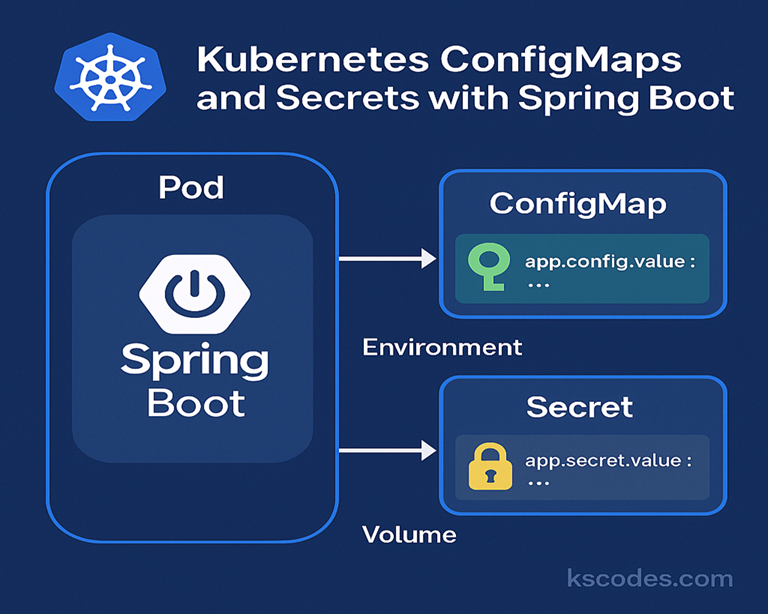
The key advantage of the volume mount approach is that the mounted files are updated automatically when the ConfigMap is changed. The application still needs a way to reload the configuration, but the underlying mechanism for delivering the change is already in place.
Production Considerations for Spring on Kubernetes
The article 'Production Considerations for Spring on Kubernetes' provides a great example of mounting an application.properties file from a ConfigMap.
Read the section starting with 'For external configuration, you can fairly easily create a ConfigMap...'. It shows the kubectl command to create a ConfigMap from a file and the volumeMounts YAML needed in your Deployment.
As the article shows, you would:
- Create a
ConfigMapfrom yourapplication.propertiesfile:
kubectl create configmap my-spring-config --from-file=application.properties - Mount it into your Pod using
volumesandvolumeMountsin theDeploymentmanifest.
While the file updates automatically, a standard Spring Boot application won't reload its configuration just because a file changed. To apply the changes, you would typically trigger a zero-downtime rolling restart:kubectl rollout restart deployment/your-deployment-name
This brings us to a more advanced, Spring-aware solution.
4. Dynamic Reloading with Spring Cloud Kubernetes
What if you could update a configuration property and have your running Spring Boot application reload it without restarting the Pod? This is possible with Spring Cloud Kubernetes.
This library integrates your Spring Boot application more deeply with the Kubernetes API, enabling features like dynamic configuration reloading.
Spring Cloud Kubernetes | ConfigMaps | Config Server in Kubernetes | Tech Primers
The video 'Spring Cloud Kubernetes | ConfigMaps' from Tech Primers demonstrates how to enable dynamic configuration reloading.
This video shows the end-to-end process. Focus on these key parts: Dependencies: Adding spring-cloud-starter-kubernetes-config (2:32 - 4:10). Bootstrap Config: Using bootstrap.yml to tell Spring which ConfigMap to use on startup (13:06 - 15:05). The Refresh: Seeing how to update the ConfigMap and trigger a refresh using the /actuator/refresh endpoint without a Pod restart (17:40 - 19:23). Security Note: The brief but important mention of RBAC requirements at the end (19:23 - 20:13).
The key takeaways from this advanced approach are:
- You add a specific Spring Cloud Kubernetes dependency to your project.
- You configure a
bootstrap.ymlfile to enable the config integration and point to yourConfigMap. - You enable the
/actuator/refreshendpoint. - When the
ConfigMapis updated, you can send aPOSTrequest to/actuator/refresh, and beans annotated with@ConfigurationPropertiesor@RefreshScopewill be re-initialized with the new values.
This gives you fine-grained control to update configuration on-the-fly, which is extremely powerful for managing applications in production.
Test your understanding! (Interview Question)
You are tasked with changing the logging level of a critical, high-traffic Spring Boot microservice running in Kubernetes from INFO to DEBUG to troubleshoot a production issue. You must do this without causing any service downtime. Describe two distinct methods to achieve this, and discuss the pros and cons of each.
Show answer
This is an excellent question that tests practical knowledge of Kubernetes operations and Spring Boot integration.
Method 1: Native Kubernetes with Rolling Restart
- Action: The logging level is stored in a
ConfigMap(e.g., in a keylogging.level.org.springframework=INFO). You would update theConfigMapto set the value toDEBUG(kubectl apply -f updated-configmap.yaml). Then, you trigger a rolling restart of the deployment:kubectl rollout restart deployment/my-service. - Pros:
- Simple and reliable. It's a standard, well-understood Kubernetes workflow.
- Requires no special dependencies in the application, making it language-agnostic.
- Cons:
- It's a "heavy" operation. Even though a rolling update provides zero downtime by replacing Pods one by one, it still involves terminating old Pods and starting new ones. This consumes resources and can be slow for complex applications.
Method 2: Spring Cloud Kubernetes with Dynamic Refresh
- Action: Assuming the service includes the
spring-cloud-kubernetes-configstarter and has the/actuator/refreshendpoint enabled. You would first update theConfigMapas before. Then, instead of restarting the Pods, you would send an emptyPOSTrequest to the/actuator/refreshendpoint of each service instance. - Pros:
- Extremely fast and lightweight. The change is applied within the running JVM without restarting the Pod or container.
- Less disruptive to the service and the cluster.
- Cons:
- Requires a specific dependency (
spring-cloud-kubernetes-config) and initial setup in the application (bootstrap.yml). - The application's service account needs RBAC permissions to "watch"
ConfigMapsfrom the Kubernetes API server, which adds a layer of security and infrastructure complexity.
- Requires a specific dependency (
A strong candidate would be able to articulate both methods, demonstrating a grasp of both fundamental Kubernetes principles and advanced, framework-specific integrations.
Conclusion
You have now mastered a critical aspect of running applications on Kubernetes: externalized and secure configuration management. This practice is essential for building scalable, maintainable, and secure microservices.
Key Takeaways:
- Decouple Configuration: Always separate configuration from your application image using
ConfigMapsandSecrets. - Use the Right Tool: Use
ConfigMapsfor general configuration andSecretsfor sensitive data like passwords and tokens. - Know Your Injection Methods: You can inject configuration as environment variables (simple, static) or as mounted volumes (enables dynamic updates).
- Embrace Dynamic Reloading: For production-grade applications, leverage libraries like Spring Cloud Kubernetes to enable hot-reloading of configuration without restarting Pods, minimizing disruption.
Preview of the Next Lesson:
Our application is now deployed, exposed, and properly configured. But how does Kubernetes know if our application is actually healthy and ready to receive traffic? In the next lesson, "Implement liveness and readiness probes for a Spring Boot application to improve service reliability," we will explore how to configure health checks that allow Kubernetes to automatically manage our application's lifecycle, restarting failed instances and routing traffic away from unready ones.