Hello! Let's get started with your next lesson.
In our last session, we focused on using LinkedIn to translate an Ideal Customer Profile (ICP) into a list of actual people—your potential prospects. You now know how to identify who you should be talking to. But a name and a title are just the beginning.
Today, we'll bridge the gap between identifying a prospect and being able to reach out to them. Your goal is to learn how to find accurate prospect contact information (email and phone) using common research techniques. This is a fundamental, hands-on skill that every Sales Development Representative (SDR) uses daily. Knowing these methods will not only prepare you for the job but also give you practical skills to discuss in your interviews.
We'll cover a range of techniques, from manual "detective work" that leverages your research skills to the professional tools that sales teams use to work at scale.
The SDR's Toolkit: A Hierarchy of Techniques
Finding contact information is often a process of elimination, starting with the quickest and cheapest methods before moving to more advanced ones. We'll follow that same practical workflow.
1. The Manual Approach: Low-Tech, High-Impact
Before you even consider a specialized tool, there are several effective manual techniques. These are free and rely on clever searching and observation.
A. The Obvious First Step: LinkedIn
Sometimes, the information is right in front of you. While it's becoming less common, prospects occasionally list their contact details directly on their profile.
How to Get Phone Numbers For Cold Calling - 9 Ways
The article 'How to Get Phone Numbers For Cold Calling' provides a great checklist of methods. Let's start with the most direct one.
Please read section #2, 'Manually on LinkedIn.' It shows you exactly where to click on a prospect's profile to find their contact info if they've chosen to share it.
B. "Google Fu": Advanced Search Operators
If LinkedIn comes up empty, your next stop should be Google. By using special commands called "search operators," you can tell Google to search in very specific ways, which is incredibly powerful for finding information that isn't immediately obvious.

To learn more about this technique, let's turn to a guide that explains the process.
How to Find Any Business Email Address (My Personal ...
The article 'How to Find Any Business Email Address' has a great section on using these manual search techniques, which the author calls 'Google Fu'.
Read the subsection titled 'Uncovering Clues with Google Fu.' It provides several search operator examples you can use to hunt for emails hidden on company websites, like in blog posts or press releases.
C. The Educated Guess: Cracking the Email Pattern
Most companies use a standardized format for their email addresses (e.g., firstname.lastname@company.com). If you can find just one person's email address at a company, you've likely found the pattern for everyone.
The same article, "How to Find Any Business Email Address," explains this method perfectly.
How to Find Any Business Email Address (My Personal ...
Let's revisit the same resource to learn about making an educated guess.
Focus on the section 'The Art of the Educated Guess.' It lists the most common email formats and, crucially, warns against 'spraying and praying'—sending emails to every possible combination. This is a critical point for maintaining your professionalism and avoiding spam filters.
Test your understanding!
You're trying to find the email for a prospect named Priya Sharma, who is the VP of Marketing at a company called "Innovatech" (website: innovatech.com). You find her colleague, John Doe, mentioned in a press release with the email j.doe@innovatech.com.
What is Priya Sharma's most likely email address?
Show answer
Based on her colleague's email pattern (firstinitial.lastname@company.com), Priya Sharma's most likely email is p.sharma@innovatech.com.
D. The Old-School Method: Calling the Switchboard
For finding phone numbers, one of the most reliable (and often overlooked) methods is to simply call the company's main phone number and ask to be connected. This is a classic SDR tactic that requires confidence and tact.
The article "How to Get Phone Numbers For Cold Calling" has some excellent, no-fluff advice on this.
How to Get Phone Numbers For Cold Calling - 9 Ways
Let's look at how to handle calling a company's main line to reach your prospect.
Read section #4, 'Call the company switchboard.' Pay special attention to the four example approaches for speaking with the 'gatekeeper' (the receptionist or assistant). These scripts are direct, respectful, and practical.
2. The Professional's Toolkit: Using Sales Tech
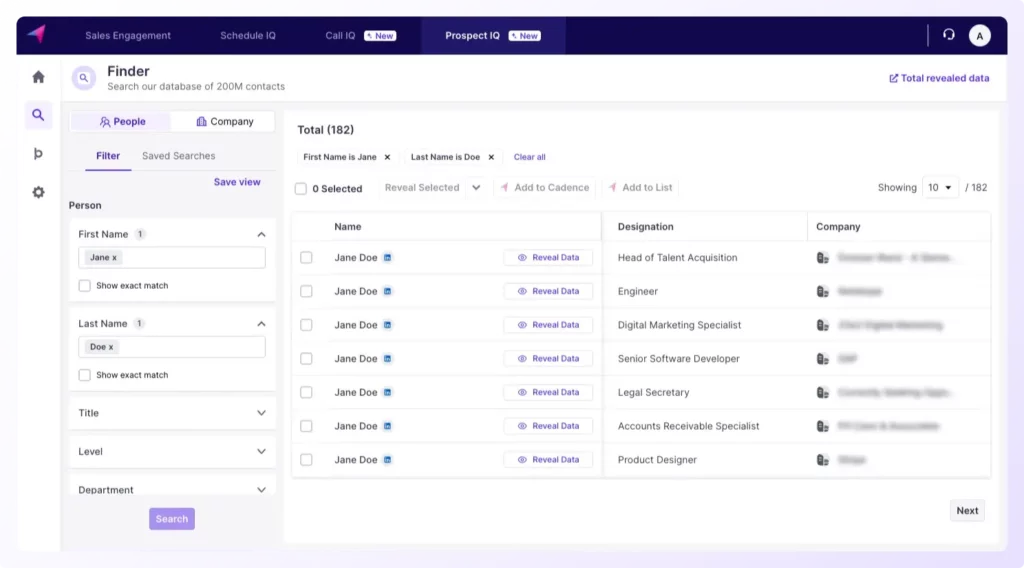
Manual methods are great, but to work efficiently, professional SDRs use specialized tools. These tools automate the process of finding contact information, often integrating directly with LinkedIn.
A. Finding Emails with Prospecting Tools
There are many tools designed to find email addresses. They work by scraping websites, using existing databases, and verifying patterns. As someone just starting out, it's important to know the big names and understand that many offer free trials or credits, which are perfect for learning and even for your initial job search activities.
This video gives a great overview of two popular tools.
Find Anyone's Email Address Within Seconds - Sales Prospecting For Sales and Business Development
In 'Find Anyone's Email Address Within Seconds,' sales trainer Patrick Dang demonstrates two of the most common email-finding tools: Hunter.io and Apollo.io.
Watch the demonstrations of both tools: Hunter.io (02:22 - 04:02): Notice how he uses it both on the website and as a Chrome Extension over a company's site. Apollo.io (04:02 - 07:17): Pay close attention to this one. He highlights its powerful database and LinkedIn integration. Crucially, he points out that Apollo offers a generous free plan, making it an excellent tool to start with.
B. Finding Phone Numbers
Finding accurate phone numbers, especially direct-dial mobile numbers, is generally harder than finding emails. The data is more protected and less public. Specialized tools are often required here.
This video breaks down the different types of tools for finding phone numbers.
How To Scrape High Quality Phone Numbers
The video 'How To Scrape High Quality Phone Numbers' explains the different strategies and tools used to find phone numbers.
Watch these two key segments: Introduction (00:00 - 01:18): He explains the important distinction between finding general business numbers and finding the personal/direct-dial numbers of decision-makers. This is a key concept. Finding Individual Phone Numbers (03:02 - 06:23): He discusses tools like Lead Rocks and SalesQL that are designed to find the direct contact info of executives. You don't need to memorize the tools, but understand the process: they often work by scraping LinkedIn profiles you've identified to find associated phone numbers.
3. The Final Check: Verification and Professionalism
Finding an email or phone number is only half the battle. If the information is wrong, your outreach will fail, and sending emails to bad addresses can damage your sender reputation, making it more likely your future emails go to spam.
Why Verification Matters
Professional tools almost always include a verification step. They check in real-time if an email address can actually receive mail.
How to Find Any Business Email Address (My Personal ...
Let's return to the 'How to Find Any Business Email Address' article for a clear explanation of email verification.
Read the subsection 'What is a good email verification score?' It explains the different statuses ('Valid,' 'Invalid,' 'Risky/Accept-All') and why you should aim for a high confidence score. This is a critical piece of professional knowledge.
Conclusion
You now have a complete workflow for turning a prospect's name into their contact information. This is one of the most critical and tangible skills of an SDR. You've moved from who to contact to how to contact them.
Key Takeaways:
- Follow a Hierarchy: Start with free, manual methods (LinkedIn, Google, educated guesses) before moving to tools. This is efficient and resourceful.
- Tools are Accelerators: Tools like Apollo.io (for email) and SalesQL (for phone) are what professionals use to work at scale. Knowing about them, and especially using Apollo's free tier, shows you're serious.
- The Switchboard is Not Dead: Don't be afraid to pick up the phone and call a company's main line. It's a direct, effective tactic.
- Verification is Non-Negotiable: Never send to an unverified email. Protecting your sender reputation is crucial for long-term success.
In our next lesson, we will address the final piece of the prospecting puzzle before outreach: timing. You'll learn how to identify trigger events (e.g., new funding, key hires) that signal a buying opportunity. This will give you the compelling reason to use the contact information you now know how to find.