Hello! Welcome to the next phase of our journey.
Introduction
In the previous module, we successfully built, evaluated, and interpreted classical machine learning models for software quality tasks. You learned how to explain a model's predictions using SHAP, a crucial skill for building trust with stakeholders. However, all our models relied on manually engineered features like code_churn or cyclomatic_complexity. This process, while powerful, requires significant domain expertise and can be time-consuming.
This lesson marks our transition into the world of deep learning for code analysis. We'll start exploring how models can learn directly from the source code itself, moving beyond hand-crafted features to capture deeper semantic meanings. This directly addresses your interest in building more sophisticated AI-driven tools.
Our learning outcome for today is to: Tokenize source code using a code-aware tokenizer (e.g., from CodeBERT or GraphCodeBERT). This is the fundamental first step for preparing code to be understood by advanced transformer models.
The Challenge: Why is Tokenizing Code Different?
You're familiar with tokenizing natural language from your data analysis and ML projects, where you might split a sentence into words. With source code, this simple approach quickly breaks down.
Consider this Python function:
def calculate_priority(churn_rate, author_count):


    # High churn by few authors is a red flag
    if churn_rate > 0.8 and author_count <= 2:
        return "High"
    return "Normal"
A simple split-by-space tokenizer would produce ['def', 'calculate_priority(churn_rate,', 'author_count):', ...]. This loses critical information:
- Structure:
calculate_priorityis a single identifier, but(and,are attached to it. The colon:is also attached. - Semantics: The variable
churn_ratehas a distinct meaning that is lost if it's jumbled with punctuation. - Vocabulary: The number of unique "words" (variable names, function names) in a large codebase can be enormous, creating a massive vocabulary that is difficult for models to handle.
To truly understand code, a model needs to grasp its underlying structure and the relationships between its components.
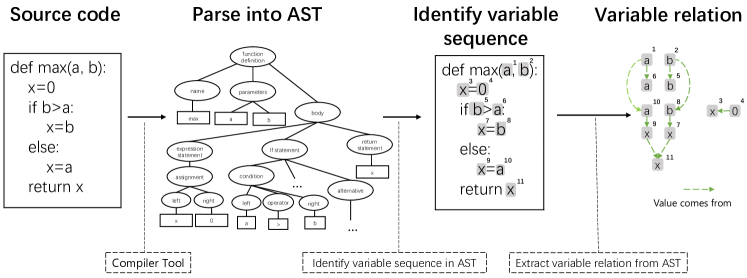
The Modern Solution: Subword Tokenization
Modern NLP models like BERT solve the large vocabulary problem using subword tokenization. Instead of treating each word as a unique token, they break down unknown or rare words into smaller, known sub-units. For example, tokenization might be split into token and ##ization.
This same principle is incredibly effective for code. A variable like calculate_priority can be broken down into calculate, _, and priority. This allows the model to recognize semantic components across different variable names.
To understand the mechanics of tokenization for transformer models, let's review the general process used by BERT.
BERT Implementation: A Step-by-Step Guide - Analytics Vidhya
The article 'BERT Implementation: A Step-by-Step Guide' from Analytics Vidhya explains the core concepts of preparing text for a BERT-style model. This will provide the foundation for understanding how code-specific tokenizers work.
Please read the following sections: Under 'How Does it Work?', find the subsection 'Text Preprocessing'. Focus on the three types of embeddings, especially the 'Token Embeddings' part which mentions the special [CLS] and [SEP] tokens. Find the section titled 'Tokenize & Encode the Sequences'. Read the explanation of WordPiece tokenization and look at the code example using tokenizer.batch_encode_plus() to see the key parameters like max_length, padding, and truncation.
As you read, you'll see that every input to a BERT-like model is formatted with:
- Special Tokens: A
[CLS]token (for "classification") at the beginning and[SEP]tokens to separate distinct parts of the input. - Padding and Truncation: All inputs are forced to a fixed length (e.g., 512 tokens) by either adding
[PAD]tokens or cutting off the end. - Attention Mask: A binary list that tells the model which tokens are real and which are just padding.
Applying Tokenization to Code with GraphCodeBERT
Now, let's get practical. Models like CodeBERT and GraphCodeBERT are transformer models that were pre-trained on massive amounts of source code from GitHub. Their tokenizers are therefore "code-aware"—they are exceptionally good at breaking down code into meaningful sub-tokens.
The Hugging Face transformers library, which you've used before, makes this incredibly simple. Let's see how to use the tokenizer for GraphCodeBERT.
graphcodebert-devign-code-vulnerability-detector at main
This README file on the Hugging Face Hub for a GraphCodeBERT model provides a concise, practical example of how to load the tokenizer and use it on a code snippet.
Please find the section 'How to Get Started with the Model'. Focus on the first half of the Python code block, from loading the tokenizer to the line that starts with inputs = tokenizer(...). We will cover the model inference part in the next lesson.
The key line is:inputs = tokenizer(code_snippet, return_tensors="pt", truncation=True, padding="max_length", max_length=512)
This one function call performs all the steps we discussed:
- Applies code-aware subword tokenization to the
code_snippet. - Adds the special
[CLS]and[SEP]tokens. - Truncates the sequence if it's longer than
max_length(512 tokens). - Pads the sequence with
[PAD]tokens if it's shorter. - Creates the
attention_mask. - Returns the results as PyTorch tensors (
return_tensors="pt"), ready for the model.
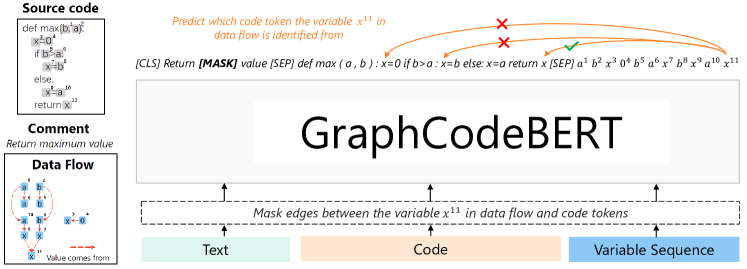
Your Turn: Tokenize a Python Function
Let's put this into practice. The following code snippet uses the transformers library to tokenize the Python function we saw earlier. You can run this in a local environment where you have transformers and torch installed (pip install transformers torch).
from transformers import AutoTokenizer


# 1. Load a code-aware tokenizer
# We use GraphCodeBERT, a model pre-trained on code.
tokenizer = AutoTokenizer.from_pretrained("microsoft/graphcodebert-base")


# 2. Define a Python function as a string
code = """
def calculate_priority(churn_rate, author_count):


    # High churn by few authors is a red flag
    if churn_rate > 0.8 and author_count <= 2:
        return "High"
    return "Normal"
"""


# 3. Tokenize the code
inputs = tokenizer(code, return_tensors="pt", truncation=True, padding="max_length", max_length=64)


# 4. Inspect the output
input_ids = inputs['input_ids'][0]
attention_mask = inputs['attention_mask'][0]
decoded_tokens = tokenizer.convert_ids_to_tokens(input_ids)

print("--- DECODED TOKENS ---")
print(decoded_tokens)
print("\n--- INPUT IDs (Numerical Representation) ---")
print(input_ids)
print("\n--- ATTENTION MASK (1=Real Token, 0=Padding) ---")
print(attention_mask)
What to look for in the output:
- Subword Splitting: Look at how
calculate_priorityis split into['Ġcalculate', 'Ġpriority']. TheĠsymbol represents a space, indicating the start of a new word.churn_ratebecomes['Ġch', 'urn', 'Ġrate']. The tokenizer has learned these common code patterns. - Special Tokens: You will see
<s>at the beginning and</s>at the end. These are the[CLS]and[SEP]tokens for this specific model. You will also see<pad>tokens at the end. input_ids: This is the list of integers that the model will actually see. Each integer maps to a token in the tokenizer's vocabulary.attention_mask: You'll see a list of1s for every real token and0s for every<pad>token.
Running this code and analyzing its output is the core of this lesson. You have successfully converted raw source code into a format that a powerful deep learning model can process.
Conclusion
In this lesson, we made the crucial leap from handcrafted features to learning from raw source code. You've learned that tokenizing code requires specialized, code-aware tokenizers that can handle its unique syntax and structure.
Key Takeaways:
- Simple tokenization methods used for natural language are insufficient for source code.
- Modern models use subword tokenization to handle large and evolving vocabularies, which is particularly effective for code constructs like variable and function names.
- Code-aware models like GraphCodeBERT come with pre-trained tokenizers that know how to split code into meaningful sub-tokens.
- The tokenization process involves adding special tokens (
[CLS],[SEP]), padding/truncating to a fixed length, and creating an attention mask. - Using the Hugging Face
transformerslibrary, this entire process can be accomplished in a single function call.
Preview of the Next Lesson:
You now know how to turn a snippet of code into a sequence of token IDs. But what do we do with these IDs? In the next lesson, "Generate semantic embeddings for code snippets using a pre-trained transformer model," we will take these input_ids and feed them into the GraphCodeBERT model to generate a high-dimensional vector—an embedding—that numerically represents the semantic meaning of the code. This will be our building block for all subsequent deep learning tasks.