Hello and welcome back!
In our last few lessons, we've built a powerful data collection toolkit. We've extracted commit history from Git, computed code complexity with Abstract Syntax Trees (ASTs), and parsed test logs to find flakiness indicators like "outcome flipping."
Today, we'll add the final piece to our data collection puzzle. The learning outcome for this lesson is to identify and map test dependencies by analyzing build configuration files or code imports. Understanding what a test depends on is critical. A change in a dependency can be the root cause of a failure, and complex dependency webs are often a sign of technical debt. This knowledge provides crucial context for any ML model we build.
Let's get started.
1. What are Test Dependencies and Why Do They Matter?
A test is rarely a self-contained unit. It interacts with other parts of your application to verify behavior. These interactions create dependencies. A dependency can be a connection to:
- Application Code: Functions, classes, or modules the test imports and executes.
- Data Files: Configuration files (
.json,.yaml), test data (.csv), or even ML models (.pt,.h5) that the test loads. - External Packages: Libraries like
pandasorrequeststhat are defined in the project's build configuration. - Other Tests: In poorly designed suites, the outcome of one test can depend on another test running first.
Mapping these dependencies gives us a graph-like view of how our test suite interacts with the codebase.
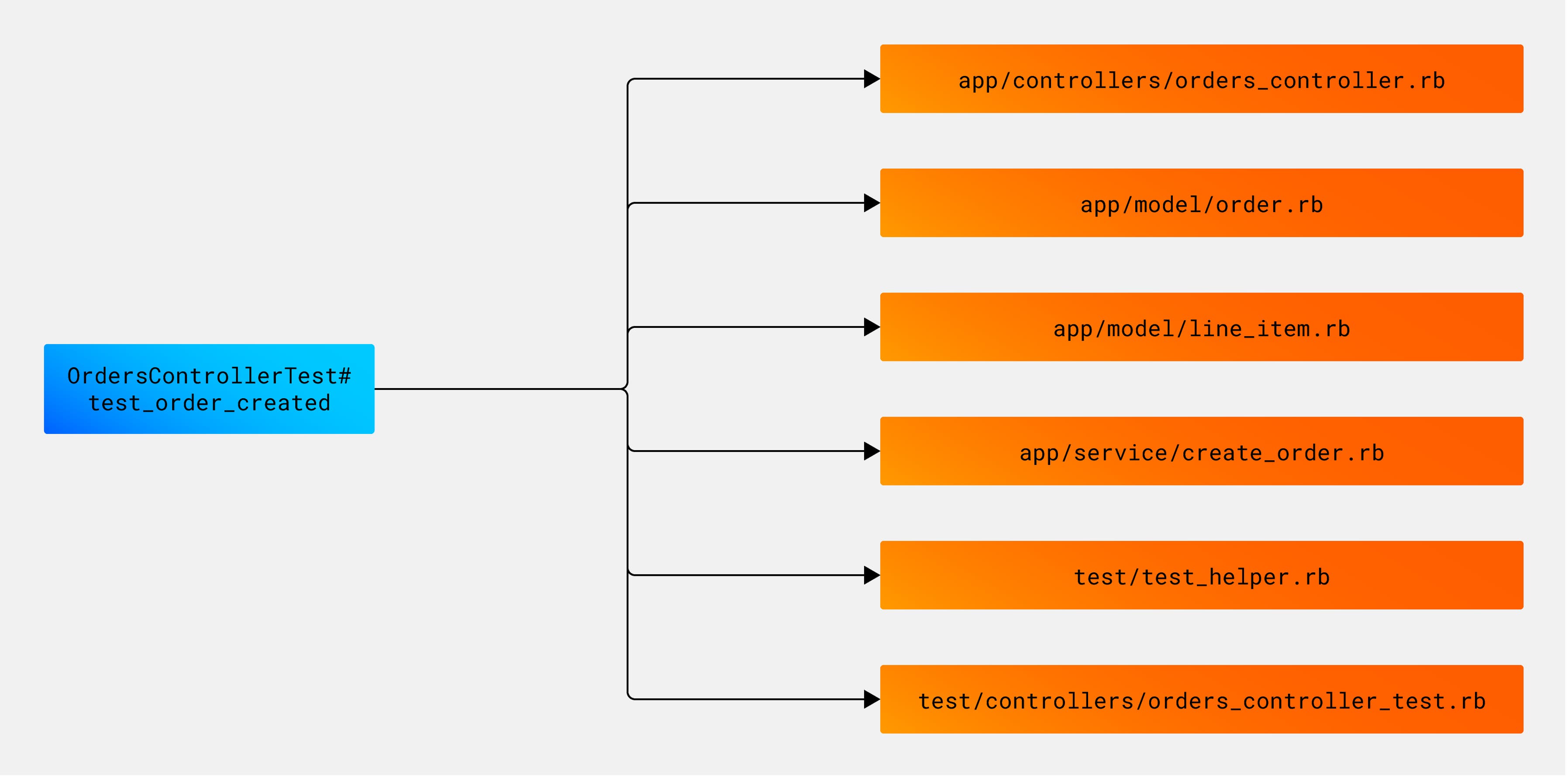
Understanding these connections is invaluable for:
- Test Impact Analysis: After a code change, you only need to run the tests that depend on the changed code.
- Flakiness Investigation: A flaky test might be caused by an unreliable dependency (e.g., a volatile external API).
- Technical Debt Assessment: A test that depends on dozens of files is complex and hard to maintain.
We'll explore two primary methods for discovering these dependencies: static analysis of source code and parsing build configuration files.
2. Finding Dependencies in Code with Static Analysis
Since you've worked with Python's ast module before to calculate code complexity, you're already familiar with the power of static analysis. We can use the exact same tool to find dependencies.
Method 1: Analyzing import Statements
The most explicit dependency is an import statement. We can traverse a Python file's AST to find all ast.Import and ast.ImportFrom nodes, which tell us which other modules the file depends on.

Here is a small Python script that uses a NodeVisitor to extract all imported modules from a source file.
import ast

class ImportVisitor(ast.NodeVisitor):
    """An AST visitor to find all imported modules in a file."""
    def __init__(self):
        self.imports = set()

    def visit_Import(self, node):
        for alias in node.names:
            self.imports.add(alias.name.split('.')[0]) # Add the top-level module
        self.generic_visit(node)

    def visit_ImportFrom(self, node):
        if node.module:
            self.imports.add(node.module.split('.')[0]) # Add the top-level module
        self.generic_visit(node)

def get_imports_from_file(file_path):
    """
    Parses a Python file and returns a set of top-level modules it imports.
    """
    try:
        with open(file_path, 'r', encoding='utf-8') as f:
            tree = ast.parse(f.read(), filename=file_path)

        visitor = ImportVisitor()
        visitor.visit(tree)
        return visitor.imports
    except Exception as e:
        print(f"Could not parse {file_path}: {e}")
        return set()


# --- Example Usage ---
if __name__ == "__main__":


    # Create a dummy test file
    dummy_test_code = """
import pytest
from my_app.services import user_service
from my_app.models.user import User
import pandas as pd

def test_user_creation():
    df = pd.DataFrame({'name': ['testuser']})
    user = user_service.create_user_from_df(df)
    assert user.name == 'testuser'
"""
    with open("dummy_test.py", "w") as f:
        f.write(dummy_test_code)

    imports = get_imports_from_file("dummy_test.py")
    print(f"Dependencies found in dummy_test.py: {imports}")


    # Expected output might include: {'pytest', 'my_app', 'pandas'}
This script gives us a direct list of code modules a test file depends on.
Method 2: Finding Implicit Dependencies
What about dependencies that aren't explicit import statements, like data files or ML models? We can extend our AST analysis to look for specific function calls, such as open(), pd.read_csv(), or custom model-loading functions.
The following article provides an excellent real-world example of this technique in an ML context.
Identifying and Reducing Test Case Combinatorial Explosions with ...
Let's examine a practical application of this concept. This article from CODE Magazine, 'Identifying and Reducing Test Case Combinatorial Explosions...', demonstrates how to map tests to the specific ML models they load by searching for model-loading function calls.
Please read the sections 'Extracting Input Models Using AST Analysis' and 'Mapping Input Models to Test Cases'. Pay close attention to the get_model_loading_calls function, which uses ast.walk to find specific function calls. Then, notice how the author combines this information with test names to create the final dependency map.
The key insight from the article is that you can adapt AST analysis to find any pattern that implies a dependency. By searching for calls to my_model_loading_function('Resnet50.pt'), the author successfully maps tests to the data files they depend on, creating a rich dataset for analysis.
3. Finding Dependencies in Build Configuration Files
Static code analysis reveals dependencies within your own codebase. But projects also depend on external packages (pytest, pandas, tensorflow, etc.). These are typically defined in configuration files.
The modern standard for this in Python is the pyproject.toml file. It often contains specific "dependency groups" for testing, documentation, or other development tasks.
This next resource from the official Python Packaging User Guide explains this concept and provides a reference implementation for parsing it.
Dependency Groups - Python Packaging User Guide
To programmatically find a project's package dependencies for testing, we need to parse its build configuration. The pyproject.toml file is central to this. This guide explains 'Dependency Groups,' a standard way to define sets of dependencies for tasks like testing.
First, read the brief introduction and the 'Examples' to understand the purpose of dependency groups. You'll see how test dependencies are defined. \nThen, skip to the 'Reference Implementation' section at the end. You don't need to digest every line, but observe how it uses Python's built-in tomllib library to parse the file and resolve the dependency list. This shows how you can turn the configuration file into a usable list of strings.
Building on that guide, here's a practical script to extract test dependencies from a pyproject.toml file. This is a common task in building developer tooling.
# For Python 3.11+
import tomllib


# For Python < 3.11, you would need to install tomli: pip install tomli
# import tomli as tomllib

def get_test_deps_from_pyproject(file_path="pyproject.toml"):
    """
    Parses a pyproject.toml file to extract the list of test dependencies.
    """
    try:
        with open(file_path, "rb") as f:
            data = tomllib.load(f)


        # The standard location for optional dependencies like 'test'
        test_deps = data.get("project", {}).get("optional-dependencies", {}).get("test", [])


        # You could also check for the newer `dependency-groups` spec if the above is empty
        # For simplicity, we'll focus on the most common pattern.

        return test_deps

    except FileNotFoundError:
        print(f"Error: File not found at '{file_path}'")
        return []
    except Exception as e:
        print(f"Error parsing {file_path}: {e}")
        return []


# --- Example Usage ---
if __name__ == "__main__":


    # Create a dummy pyproject.toml file
    dummy_toml_content = """
[project]
name = "my-ml-project"
version = "1.0.0"

[project.optional-dependencies]
test = [
    "pytest>=7.0",
    "pytest-cov",
    "flaky",
    "tensorflow"
]
docs = ["sphinx"]
"""
    with open("pyproject.toml", "w") as f:
        f.write(dummy_toml_content)

    dependencies = get_test_deps_from_pyproject()
    if dependencies:
        print("Found test dependencies in pyproject.toml:")
        for dep in dependencies:
            print(f"- {dep}")
    else:
        print("No test dependencies found.")
Running this script will parse the .toml file and print the list of packages required for testing, fulfilling the second part of our learning outcome.
Conclusion
Congratulations on completing the "Data Collection" module! You've now assembled a comprehensive set of techniques for mining software repositories.
In this lesson, we focused on the crucial task of mapping dependencies. Our key takeaways are:
- Test dependencies are the links between a test and the code, data, and packages it needs to run.
- We can map these dependencies using two main approaches:
- Static Code Analysis: Using the
astmodule to findimportstatements (for code dependencies) or specific function calls (for data dependencies). - Configuration File Parsing: Using a library like
tomllibto parse files such aspyproject.tomland extract declared package dependencies.
- Static Code Analysis: Using the
- The resulting dependency map is a vital source of information for understanding test failures, optimizing test runs, and measuring technical debt.
Preview of the Next Module:
You now have a toolbox filled with methods to extract raw data from various sources. But raw data—like lists of files, commit messages, and failure logs—isn't something a machine learning model can directly use.
In our next module, Classical ML: Feature Engineering for Code, we will begin the exciting process of transforming this raw data into meaningful numerical features. We'll learn how to turn commit histories into "change frequency" scores, test logs into "historical failure rates," and dependency maps into metrics of code complexity. This is the bridge between data collection and building predictive models.