Introduction
In our last lesson, you learned one of the most fundamental skills in programming: how to write your own functions. We created a calculate_cv function to avoid repetitive code, making our analysis more modular and reliable. This was a crucial step, but it left us with a question: if you have a data frame with many columns, how do you apply your new function to all of them without writing a separate line of code for each?
This lesson introduces the concept of functional programming using the purrr package. Specifically, you will master purrr::map(), a powerful function that allows you to apply another function to each element of a list or vector. This technique is a cornerstone of efficient R programming and is far more elegant and less error-prone than the traditional method of using for loops. For your goal of performing high-quality analysis on clinical data, purrr will enable you to scale your custom analyses across many variables with ease.
1. From Repetition to Iteration: The purrr Philosophy
Imagine you have a data frame with measurements for several biomarkers and you want to calculate the coefficient of variation (CV) for each one using the calculate_cv function from our previous lesson.
The "brute force" approach would be to call the function on each column individually:
# A data frame with patient data
patient_data <- data.frame(
  patient_id = 1:5,
  biomarker_A = c(12.5, 14.1, 11.9, 13.0, NA),
  biomarker_B = c(25.3, 24.8, 26.1, 25.5, 24.9),
  age = c(45, 62, 55, 48, 71)
)


# Our custom function from the last lesson
calculate_cv <- function(x) {
  if (!is.numeric(x)) {
    stop("Input must be a numeric vector.")
  }
  mean_val <- mean(x, na.rm = TRUE)
  sd_val <- sd(x, na.rm = TRUE)
  cv_val <- sd_val / mean_val
  return(cv_val)
}


# Brute-force approach
cv_A <- calculate_cv(patient_data$biomarker_A)
cv_B <- calculate_cv(patient_data$biomarker_B)
cv_age <- calculate_cv(patient_data$age)
This works, but it's repetitive and doesn't scale. If you had 50 biomarkers, you would have to write 50 lines of code.
A more traditional programming solution is a for loop. You would first create an empty container to hold the results, then loop through each column, perform the calculation, and store the result. The purrr::map() function offers a much cleaner alternative.
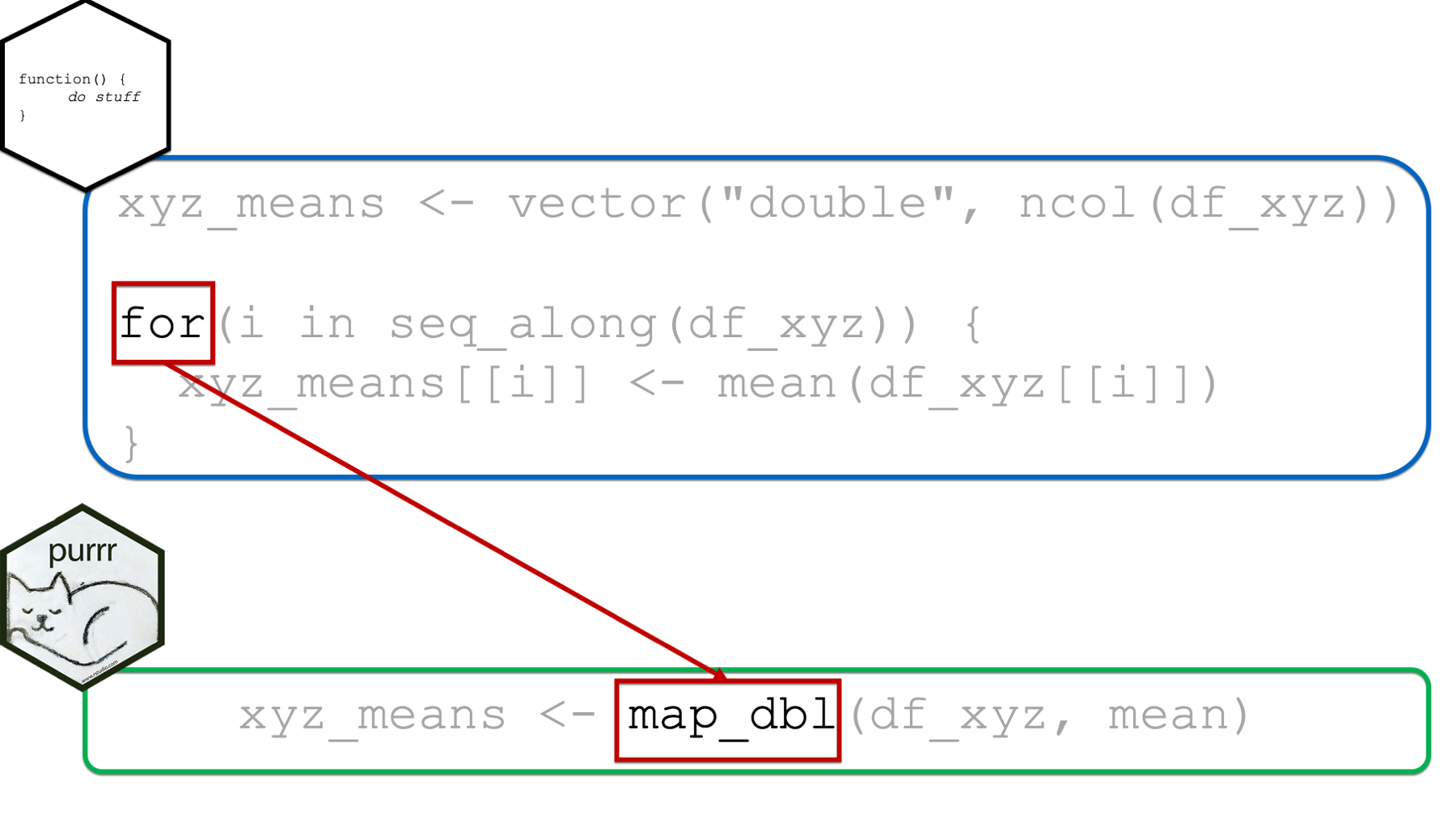
The core idea of purrr is to replace loops with functions that operate on other functions. This makes your code more readable by focusing on what you are doing, not how you are looping.
2. The map() Function and Its Variants
The workhorse of purrr is the map() function. It takes a list or vector as its primary input and applies a function to each of its elements.
It's important to remember that a data frame in R is fundamentally a list of columns (which are vectors). This means we can use map() to iterate over the columns of a data frame.
The basic syntax is map(.x, .f), where:
.x: The list, vector, or data frame to iterate over..f: The function to apply to each element of.x.
Let's see this in action. The following video provides a clear, step-by-step introduction.
Map functions in purrr (R Tidyverse)
This video by Ben Stenhaug introduces the map() function by first showing the tedious manual way of applying a function to list elements, and then demonstrating how map() and its type-specific variants simplify the process.
Watch the introduction, which shows how to manually calculate the mean for each element of a list and then introduces map(my_list, mean) as the one-line solution. Next, watch the segment on type-specific maps. This explains a crucial concept: map() always returns a list, but functions like map_dbl() can return a simpler vector of a specific type (in this case, a numeric or "double" vector).
Controlling the Output Type
As the video explained, map() always returns a list. This is safe and flexible, but often we want a simpler atomic vector (e.g., a numeric vector of results). This is where the type-specific variants of map() are incredibly useful.
map_dbl(): Returns a numeric (double) vector.map_chr(): Returns a character vector.map_lgl(): Returns a logical (TRUE/FALSE) vector.map_int(): Returns an integer vector.map_dfr()/map_dfc(): Returns a data frame by row-binding or column-binding the results.
These functions are "type-safe," meaning they will produce an error if the function you're applying doesn't return the expected type. This helps you catch bugs early.
Let's explore this idea further in the R 4 Epidemiology guide.
37 Using the purrr Package – R 4 Epidemiology
This resource provides a fantastic comparison between for loops and purrr, explains the core arguments of map, and details the benefits of using type-safe variants.
First, read the example that calculates column means using dplyr::across, a for loop, and finally purrr::map_dbl(). This shows you three ways to do the same thing. Next, review the explanation of the arguments .x, .f, and .... Read the section comparing loops and map functions. Pay close attention to the example where a for loop produces an unexpected result (letters instead of numbers), while map_dbl() correctly throws an error. This demonstrates the value of type safety. Finally, familiarize yourself with the list of other map functions and what type of output each one guarantees.
Now, let's apply this to our patient_data. We'll select only the numeric columns to operate on first.
# Select only the columns we want to analyze
numeric_data <- patient_data[c("biomarker_A", "biomarker_B", "age")]


# Use map() to apply the function. The output is a list.
cv_list <- map(numeric_data, calculate_cv)
str(cv_list) // Shows the list structure


# Use map_dbl() for a more useful output: a named numeric vector.
cv_vector <- map_dbl(numeric_data, calculate_cv)
print(cv_vector)
The output of map_dbl() is a named vector, which is exactly what we need for analysis or reporting.
3. On-the-Fly Operations with Anonymous Functions
Sometimes, the operation you want to perform is so simple that creating a separate, named function feels like overkill. For these cases, purrr allows you to define a function "on the fly" using a special shorthand syntax. These are called anonymous functions.
The syntax uses a tilde (~) and a dot (.).
- The
~signals the start of an anonymous function. - The
.(or.x) acts as a placeholder for the element that is currently being processed.
For example, to find the class of each column in the patient_data data frame, you could write:
map_chr(patient_data, ~ class(.x))
This is equivalent to writing map_chr(patient_data, function(x) class(x)), but is much more concise.
The following video demonstrates this powerful feature.
This video from the Equitable Equations channel shows how to use map on data frames and introduces the syntax for creating custom and anonymous functions.
Watch the segment showing how to find the class of each column in a list or data frame using map_chr(). Next, watch the explanation of custom and anonymous functions. Pay close attention to the "wave syntax" (~) for creating a simple function directly inside the map call.
4. Practice: Applying Functions with purrr
Let's consolidate what you've learned with a short exercise. Continue in your R script from the last lesson.
Your Task:
Using the patient_data data frame and the purrr::map family of functions:
- Calculate the number of missing (
NA) values in each column. The output should be a named integer vector. (Hint:sum(is.na(.x))) - Check which columns are of the
numericclass. The output should be a named logical vector. (Hint:is.numeric(.x))
Try to solve this on your own before looking at the solution.
Click here to see the solution
library(purrr)


# A data frame with patient data
patient_data <- data.frame(
  patient_id = 1:5,
  biomarker_A = c(12.5, 14.1, 11.9, 13.0, NA),
  biomarker_B = c(25.3, 24.8, 26.1, 25.5, 24.9),
  age = c(45, 62, 55, 48, 71)
)


# 1. Calculate number of missing values per column
missing_counts <- map_int(patient_data, ~sum(is.na(.x)))
print(missing_counts)


# Expected output:
# patient_id  biomarker_A  biomarker_B          age
#          0            1            0            0


# 2. Check which columns are numeric
is_numeric_check <- map_lgl(patient_data, ~is.numeric(.x))
print(is_numeric_check)


# Expected output:
# patient_id  biomarker_A  biomarker_B          age
#       TRUE         TRUE         TRUE         TRUE
# Note: patient_id is an integer, which is a type of numeric.
Conclusion
In this lesson, you've unlocked a more powerful and expressive way to handle repetitive tasks in R. By replacing for loops with purrr::map(), you can write code that is not only shorter but also clearer about its intent. You learned how to iterate a function over the elements of a list or the columns of a data frame, how to control the output type for more useful results, and how to use anonymous functions for quick, on-the-fly calculations. This is a significant step toward writing professional, scalable analysis code.
Key Takeaways:
- Iteration with
map():purrr::map(.x, .f)applies the function.fto each element of the list or vector.x. - Concise and Readable: This "functional" approach is often more concise and easier to read than a
forloop because it separates the what (the function) from the how (the iteration mechanism). - Type-Safe Outputs:
map()always returns a list. Use variants likemap_dbl(),map_chr(), andmap_lgl()to get a predictable and "safe" atomic vector as output. - Anonymous Functions: For simple operations, use the
~ .xsyntax to define a function directly within yourmap()call, avoiding the need to create a separate named function.
Preview of the Next Lesson:
So far, we've applied map() to an entire data frame or a pre-selected subset of columns. In a real analysis pipeline, you'll often want to perform such an operation as one step among many. In the next lesson, we will combine the power of purrr with dplyr. You will learn how to use map() inside a mutate() call to selectively apply functions to columns, seamlessly integrating functional programming into your data transformation workflows.