Welcome to the next stage of our journey into reproducible project management. In our previous lessons, you've built a solid foundation using workflowr to create version-controlled analysis reports. You now understand how wflow_publish() creates an unbreakable link between your R code and the HTML output it generates, ensuring your results are traceable and your project history is clean.
However, we've only solved part of the reproducibility puzzle. Your code and its output are linked, but what about the tools you used to run that code? R packages are constantly evolving. An analysis that works perfectly today might fail or produce different results a year from now after a few package updates.
This lesson addresses that very problem. We will explore the purpose of package management and why it's an indispensable practice for anyone serious about creating robust, long-term reproducible research—a cornerstone of your goal to produce publication-quality analyses for academic and clinical settings.
The Fragility of a Shared Toolbox
Imagine you're working on two different projects. For Project A, a thesis chapter you finished last year, you used a specific version of the ggplot2 package. Now, for Project B, a new analysis, you update ggplot2 to the latest version to use a new feature. What happens when you go back to re-run your code for Project A? It might break. The new version of ggplot2 could have changed a function name, an argument, or a default setting your old code relied on.
This happens because, by default, R installs all packages into a single, shared "library" on your computer. Every RStudio project on your machine dips into this same toolbox. This setup is simple, but it's also fragile.
To see this problem explained clearly, let's watch a segment from a presentation by Kevin Ushey, the author of the renv package.
Kevin Ushey | renv: Project Environments for R | RStudio (2020)
This video, from a talk at an RStudio conference, clearly lays out the problem that package management solves.
Watch the section from 08:11 to 09:56. The speaker uses excellent diagrams to illustrate how different projects wanting different package versions can lead to chaos when they all share the same library.
As the video demonstrates, when all your projects depend on one set of packages, updating a package for one project can unintentionally break others. This is a significant threat to reproducibility. A reviewer, a collaborator, or your future self should be able to run your code and get the exact same results, which is impossible if the underlying tools have changed.
Why Do Package Versions Matter?
You might wonder if package updates are really so dramatic. Most of the time, they are minor, but even small changes can have a significant impact on reproducibility. A package update can:
- Introduce "breaking changes": A function you used might be renamed, removed, or have its arguments changed, causing your script to fail with an error.
- Alter underlying algorithms: A statistical function might be updated to use a more accurate or faster algorithm. This is generally a good thing, but it could lead to slightly different numerical outputs, which must be accounted for.
- Change default behaviors: A plotting function might change its default colors or theme, altering the appearance of your visualizations.
The Riffomonas Project channel provides an excellent real-world example of how a simple package update broke an existing analysis.
Using renv to track the version of your packages in R (CC229)
In this video, the presenter shares a personal story about how his code stopped working over time due to package updates.
Watch the first couple of minutes, from 00:38 to 02:12. Pay attention to his description of how changes in the vegan and breakaway packages affected his analysis. This illustrates exactly the problem we are discussing.
This issue becomes even more complex when you consider that packages depend on other packages. When you install dplyr, you're also installing a dozen other packages it needs to function. A change in any one of those "downstream" dependencies can have ripple effects that break your code. Manually tracking all these versions for a project is practically impossible.
The Solution: Isolated, Project-Specific Environments
If a single, shared library is the problem, the solution is to give each project its own private, isolated library. This way, Project A can have its own copy of ggplot2 version 3.3.0, while Project B uses version 3.4.0 on the same machine, with no risk of conflict.
This is the core purpose of package management tools. They automate the process of creating and maintaining a self-contained environment for each of your analysis projects.
Let's return to Kevin Ushey's presentation to see how he frames this solution.
Kevin Ushey | renv: Project Environments for R | RStudio (2020)
This short clip presents the solution to the problem discussed earlier.
Watch the segment from 09:56 to 10:21. Here, he introduces the concept of project-local libraries as the solution, which is the foundational idea behind renv.
This approach ensures that your project is a complete, self-contained unit. It includes not only your data and code but also the exact software environment needed to execute it. This concept is so central to modern data analysis that it is a key focus in industries with high regulatory standards, like pharmaceuticals.
The following paper provides a concise summary of why this matters in a professional context.
[PDF] Renv for Version Control and Environment Reproducibility
This paper from a pharmaceutical industry conference highlights the critical need for reproducible environments.
Please read the introduction. It clearly states why managing R environments is "critical" and "paramount," especially in fields where results must be auditable and consistent.
Introducing renv
Now that you understand the why of package management, we can introduce the how. The tool we will use is renv, a modern and widely-adopted R package specifically designed to manage project-specific environments.
renv solves the reproducibility problem by doing two main things:
- It creates a private library for your project, isolating it from your main R library and other projects.
- It creates a "lockfile," which is a definitive record of every package and its exact version used in your project.
This lockfile, usually named renv.lock, acts like a precise recipe. When you share your project with a collaborator (or your future self on a new computer), renv can use this file to reinstall the exact same package versions, perfectly recreating the original computational environment.
With the tools you've learned so far, we can now see the complete picture of a reproducible workflow:
renvlocks down the computational environment (the R packages).- Git tracks the history of your code and other files.
workflowrconnects the code to the results, creating a verifiable, version-stamped analytical report.
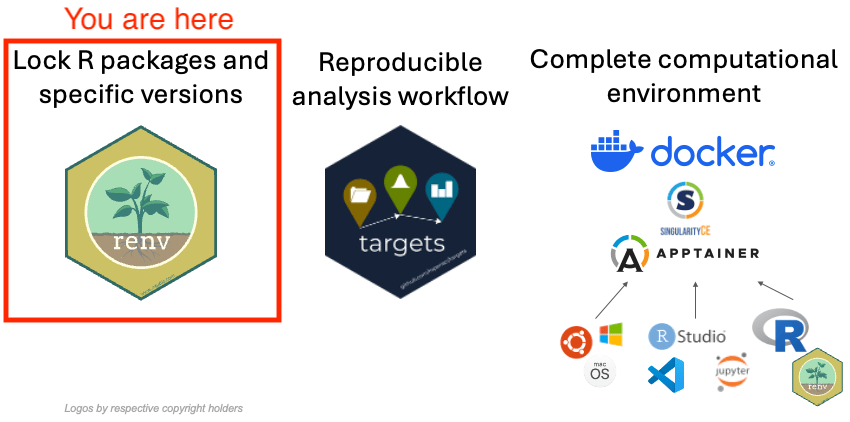
The renv package sits at the foundation, ensuring that the software environment itself is stable and reproducible.
Conclusion
In this lesson, you've learned about a subtle but critical threat to reproducibility: the evolution of the R packages your analysis depends on. You now understand the purpose of package management as a solution to this challenge.
Key Takeaways:
- By default, R uses a shared package library for all projects, which can lead to version conflicts and break old code when packages are updated.
- Changes in package versions can alter function behavior, numerical output, and plot appearance, undermining the reproducibility of your work.
- The solution is to create isolated, project-specific libraries, where the exact package versions for an analysis are stored independently of other projects.
renvis the R package we will use to create and manage these project-specific environments, capturing the state of your packages in a lockfile to ensure long-term reproducibility.
You've now grasped the "why." You understand the problem renv was built to solve. In our next lesson, we will dive into the practical application by using renv::init() to activate renv in a project and create your first project-specific library.