Introduction
In our previous module, you mastered the art of creating polished, reproducible reports with R Markdown. You can now combine narrative, R code, tables, and plots into a single source file and knit it into professional documents like HTML, Word, or PDF. This is a massive step toward creating shareable, high-quality analyses.
However, this raises a new set of questions. What happens when your analysis evolves? When you fix a bug, add a new visualization, or get feedback from a supervisor? How do you manage these changes without your project folder descending into a chaotic mess of files like Analysis_v1.Rmd, Analysis_v2_Johns_comments.Rmd, and Analysis_v3_FINAL_FINAL.Rmd? And more importantly, how can you work on a project with a colleague without overwriting each other's work?
This lesson introduces the solution: version control. Specifically, we will explore the purpose of version control systems for tracking the history of your project and for collaborating effectively with others. We'll focus on understanding the why behind these tools, setting a strong conceptual foundation before we dive into the practical "how-to" in our next lesson.
The Problem: The Chaos of Manual "Versioning"
Before we explore the solution, it's essential to appreciate the problem it solves—a problem you've almost certainly encountered. When a project undergoes multiple revisions, especially with input from others, managing files can quickly become a nightmare.
This experience is so universal in research and analysis that it has become a running joke.
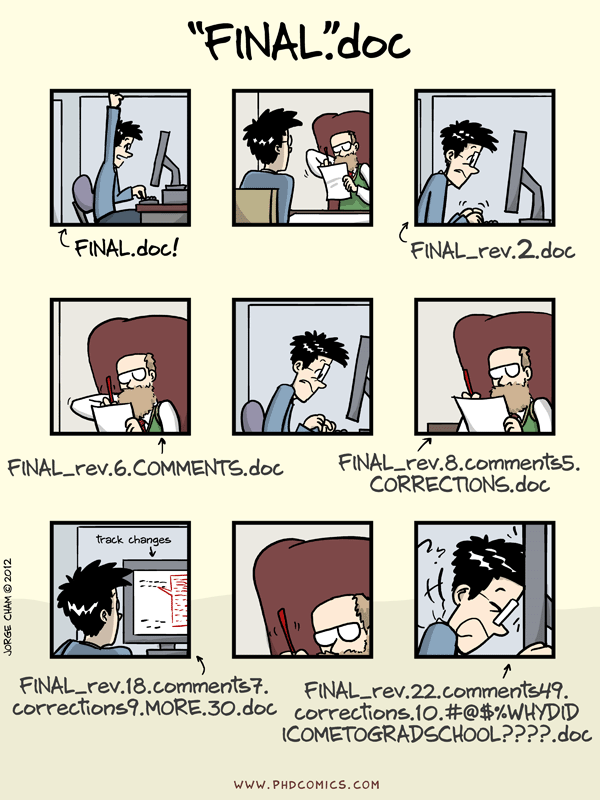
This ad-hoc approach of saving multiple copies creates two fundamental problems:
- It's impossible to track changes meaningfully. If you need to know what, exactly, is different between
FINAL_rev.6.COMMENTS.docandFINAL_rev.8.comments5.CORRECTIONS.doc, your only option is to open both and compare them by eye. It's difficult to remember why a change was made or to confidently revert to an older version without losing subsequent work. - Collaboration is a minefield. If you email your script to a colleague for feedback, you now have two separate versions of the project. Manually merging their changes back into your version is tedious, error-prone, and can easily lead to lost work.
For a quick, animated summary of these challenges, please watch the following clip.
What is Git? Explained in 2 Minutes!
This segment from Programming with Mosh's "What is Git? Explained in 2 Minutes!" perfectly captures the inefficiency and risk of working without a version control system.
Watch the portion of the video from this timestamp. It highlights the issues of storing copies and manually merging changes.
In the world of data analysis, particularly in clinical research where audit trails and reproducibility are paramount, this level of disorganization isn't just inconvenient—it's unacceptable.
The Solution: A Systematic Approach to Tracking History
Version Control is a system that automatically records changes to a file or set of files over time so that you can recall specific versions later. It provides a structured, systematic solution to the chaos of manual file management.
Think of it like the "Track Changes" feature in Microsoft Word, but supercharged. Instead of just tracking changes in one document, a version control system tracks the entire history of every file in your project folder—your R scripts, R Markdown files, data files, and notes.
The most popular version control system in the world is Git. Git works by storing your project in a special folder called a repository (or "repo"). Whenever you reach a logical stopping point in your work, you save a snapshot of your project's state. This snapshot is called a commit. Each commit includes not only the changes you made but also a message describing why you made them. This creates a detailed, chronological history of your entire project.
This allows you to see exactly what has changed, line by line. You no longer have to guess what's different between two files.

Git vs. GitHub: The Tool and The Hub
Beginners often confuse Git and GitHub. It's crucial to understand the distinction:
- Git is the version control software that runs on your computer. It is the engine that tracks your files and manages the history of your project locally.
- GitHub is a web-based hosting service for Git repositories. It provides a central place on the internet to store your projects. Think of it as a cloud-based hub for your work.
So, Git is the tool, and GitHub is the online platform that makes the tool more powerful, especially for backup and collaboration.
The following video from IBM Technology gives a clear and concise explanation of this relationship.
Git vs. GitHub: What's the difference?
This video clearly separates the concepts of Git (the local system) and GitHub (the hosted service) and introduces their core functions.
Please watch the segment from the beginning until this point. It will solidify your understanding of how Git and GitHub relate to each other.
The Purpose in Depth: Tracking Changes and Collaboration
Now, let's explore the two primary purposes of version control, which directly address your goals of producing robust, publication-quality research.
1. Tracking Changes for Reproducibility
Your goal to work on clinical research and academic theses requires an unwavering commitment to reproducibility. Reproducibility is the idea that another researcher should be able to take your data and your code and get the exact same results. Version control is a cornerstone of this practice.
Please read the following section from a paper on reproducible research to understand why this is so important in a scientific context.
Primer on Reproducible Research in R: Enhancing Transparency and Scientific Rigor - PMC
This section explains the critical role of reproducibility in science and highlights its benefits, such as improving work habits, facilitating error detection, and enhancing collaboration.
In the article, please read the subsection 1.1. Reproducible Research. Focus on how emphasizing reproducibility fosters better work habits and makes research more transparent and trustworthy.
A Git repository acts as a detailed lab notebook for your analysis. Every commit is a timestamped entry that documents what you did and why.
- Did you switch from a t-test to a Wilcoxon test? A commit message can explain that you did so because your data violated normality assumptions.
- Did you change how you clean your data? The "diff" will show exactly which lines of code were modified.
- Did you discover a mistake and need to go back to a version from three weeks ago? Git allows you to do that with a single command, without losing any of your project's history.
This creates a transparent and auditable trail of your entire analytical process, moving your work from a collection of scripts to a verifiable scientific product.
2. Facilitating Structured Collaboration
The second major purpose of version control is to enable teams to work together on the same project without conflict. Git was built from the ground up to solve this problem.
The key to collaboration in Git is the concept of branching. Imagine your project's main history is the trunk of a tree. When you want to work on a new feature or analysis, you create a "branch"—a separate, independent copy of the project. You can make changes on your branch without affecting the main "trunk." Meanwhile, a colleague can create their own branch and work on something else.
When you're finished, you can merge your branch back into the main trunk. Git is smart enough to combine the changes automatically. If you and your colleague happened to edit the same line of code, Git will flag a "merge conflict" and provide tools to help you resolve it, ensuring no work is accidentally overwritten.
GitHub builds on this with a feature called a Pull Request. A Pull Request is a formal way of saying, "I've finished my work on this branch, and I'd like to propose merging it into the main project." This creates a dedicated space where your colleagues can review your changes, leave comments, and discuss the work before it's officially integrated. This process of peer review is fundamental to producing high-quality, collaborative research.
The following resource from the Pew Research Center provides an excellent real-world example of how a data analysis team uses these concepts.
How Pew Research Center uses git and GitHub for version control | Pew Research Center
This article explains how a professional research organization adapted tools from software development for their data analysis workflow, focusing on collaboration and quality control.
First, read the introductory section, Version control with git and GitHub, which provides a great, intuitive overview. Then, skip down to the section "How we use git and GitHub". Pay close attention to their metaphors: a commit is an item on a to-do list, a branch is a section of that list for a specific goal, and a pull request is the crucial step for quality control and building consensus.
Conclusion
In this lesson, we've focused entirely on the why of version control. You now understand that the chaos of manual file versioning is not just a personal frustration but a significant barrier to reproducible science and effective collaboration.
Key Takeaways:
- Version Control is a system for tracking the history of changes in a project, solving the problems of manual file copying and disorganization.
- Git is the leading version control software that you run on your computer to manage a project's history through snapshots called commits.
- GitHub is a web platform that hosts Git repositories, providing cloud backup and powerful tools for collaboration.
- The primary purposes of version control are:
- Tracking Changes: To create a transparent, auditable history of your project, which is a cornerstone of reproducible research.
- Collaboration: To allow multiple people to work on the same project simultaneously without conflict, using features like branches and pull requests.
Preview of the Next Lesson:
Now that you have a firm grasp of why Git and GitHub are indispensable tools for modern data analysis, it's time to get your hands dirty. In our next lesson, we will walk through the practical steps to configure Git on your computer, connect it to your RStudio environment, and link it to a personal GitHub account.