Hello! Welcome back to our deep dive into the backend request lifecycle.
In our previous lesson, we traced the request from the public internet to our server's front door (Nginx) and saw how it was handed off to the application server (Gunicorn) via a socket. Gunicorn has now received the raw HTTP request and is ready to invoke your Django application. The request is officially entering the world of Python code.
This lesson addresses a fundamental part of the Django framework: How does Django's middleware pipeline process a request before and after it reaches the view? We'll uncover the elegant "onion" structure that allows Django to globally process every single request and response, enabling powerful features like authentication, sessions, and security protection.
What is Middleware? The "Onion" Analogy
At its core, middleware is a framework of hooks into Django's request/response processing. The official Django documentation defines it as a "light, low-level 'plugin' system for globally altering Django’s input or output."
The best way to visualize this is as an onion. The view function—your actual business logic—is at the very center. Every request must pass through each layer of the onion to get to the center. After the view processes the request and creates a response, that response must travel back out through every layer, in reverse order.
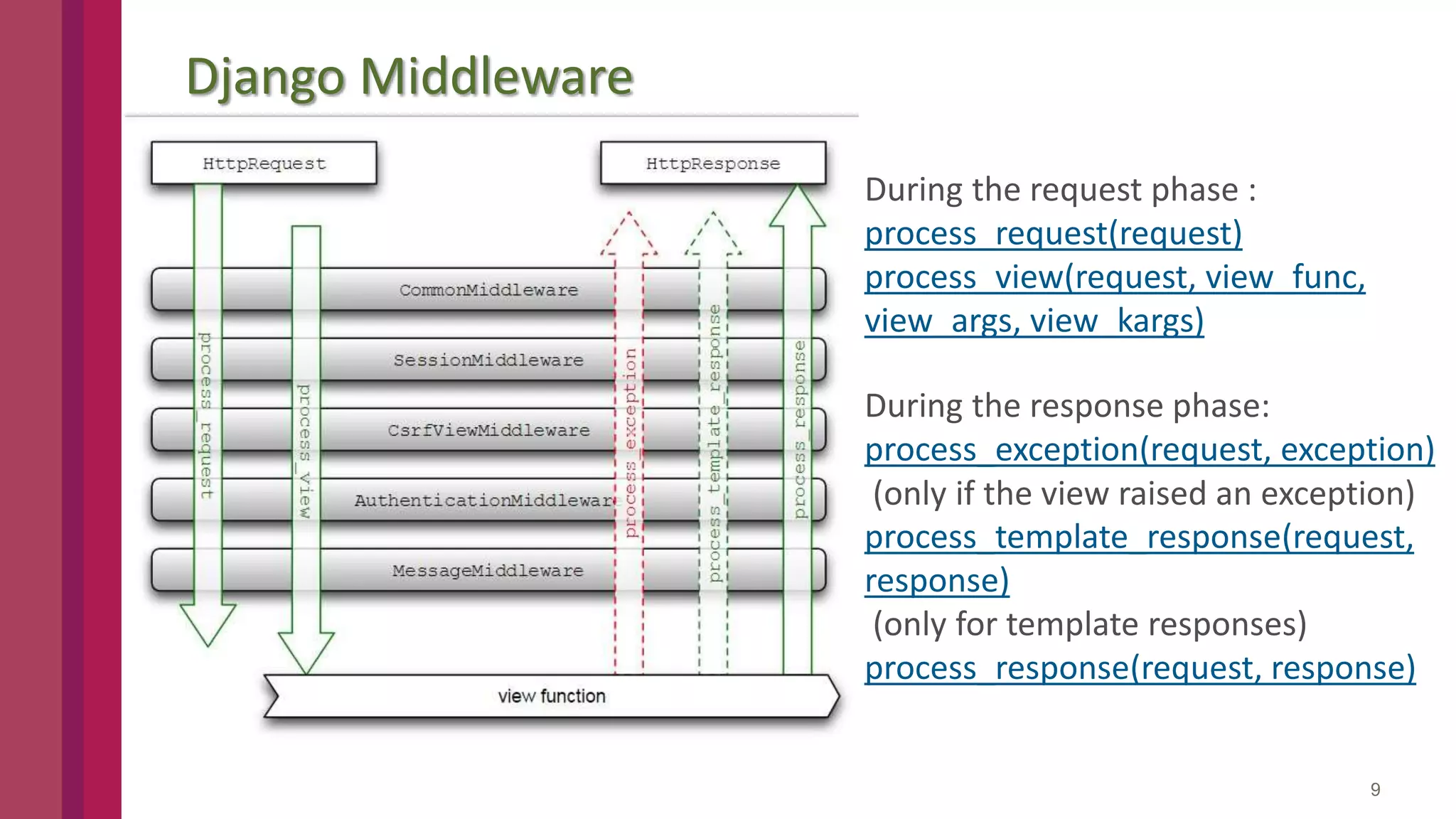
Each layer in this onion is a piece of middleware. This structure provides multiple opportunities to process the request, handle exceptions, or modify the response.
The Middleware Chain in settings.py
This "onion" is not just a concept; it's explicitly defined in your project's settings.py file in the MIDDLEWARE list.
# settings.py
MIDDLEWARE = [
    'django.middleware.security.SecurityMiddleware',
    'django.contrib.sessions.middleware.SessionMiddleware',
    'django.middleware.common.CommonMiddleware',
    'django.middleware.csrf.CsrfViewMiddleware',
    'django.contrib.auth.middleware.AuthenticationMiddleware',
    'django.contrib.messages.middleware.MessageMiddleware',
    'django.middleware.clickjacking.XFrameOptionsMiddleware',
]
The order in this list is critical because it defines the order of the layers:
- Request phase: Django applies middleware in top-to-bottom order. The request passes through
SecurityMiddleware, thenSessionMiddleware, and so on. - Response phase: Django applies middleware in bottom-to-top order. The response from the view will first pass through
XFrameOptionsMiddleware, thenMessageMiddleware, and so on, back up the chain.
Many of Django's core features are implemented as middleware. For example, SessionMiddleware is responsible for handling session data, and AuthenticationMiddleware is responsible for associating a user with the request (by using the session data). This is why AuthenticationMiddleware must come after SessionMiddleware in the list.
To see this flow in action, the following video provides a simple but effective demonstration.
Django Middleware Workflow | Django Project | SQL Inspection Middleware | 10
The video 'Django Middleware Workflow' provides a clear, conceptual walkthrough of the request/response flow and shows how to create a simple middleware to observe it.
Watch the following segments: Request/Response Flow (01:53 - 02:34): This visualizes the request passing through middleware to the view, and the response passing back through. The 'Circular' Process (03:46 - 04:26): This part clearly explains the request-in and response-out flow through the middleware stack. Simple Middleware Example (05:20 - 07:59): Pay attention to how a simple middleware function is structured with code that runs before the view is called and code that runs after. Activation and Output (07:59 - 09:52): Watch how adding the middleware to settings.py makes it active and how the 'before' and 'after' print statements appear in the console, proving the execution order.
Dissecting a Class-Based Middleware
While you can write middleware as functions, the modern and more flexible approach is to use classes. Let's break down the structure of a typical class-based middleware.
Middleware - Django documentation
The official Django documentation provides the definitive boilerplate for writing your own middleware. It's the best place to understand the fundamental structure.
Read the section titled 'Writing your own middleware'. Focus on the class-based example. Understand the roles of the __init__ and __call__ methods and the get_response callable.
As you just read, a class-based middleware looks like this:
class MyMiddleware:
    def __init__(self, get_response):
        self.get_response = get_response


        # One-time configuration and initialization.

    def __call__(self, request):


        # Code to be executed for each request before
        # the view (and later middleware) are called.
        print("Before the view")

        response = self.get_response(request)


        # Code to be executed for each request/response after
        # the view is called.
        print("After the view")

        return response
Let's dissect this:
-
__init__(self, get_response): This method is called only once when the web server starts. Its job is to perform one-time initialization. Django passes itget_response, which is a callable representing the next middleware in the chain (or the view itself, if this is the last middleware). The middleware stores this callable to use later. -
__call__(self, request): This method is called once per request.- The code before
self.get_response(request)is executed during the request phase. Here, you can modify the incomingrequestobject. response = self.get_response(request)passes the request to the next layer of the onion. This call is what continues the chain.- The code after this line is executed during the response phase. Here, you have access to the
responseobject created by the view (or a lower middleware) and can modify it before it's sent to the client.
- The code before
How Django Builds the Chain (Under the Hood)
Since you're interested in the deepest technical details, let's look at how Django actually constructs this chain of callables. It's a clever bit of function wrapping.
Django Web Framework | Augment Code
The 'Augment Code' analysis of Django's source provides an excellent, concise explanation of how the middleware chain is constructed when the application handler is initialized.
Read the section 'Middleware Chain Architecture'. Pay close attention to the code block showing that middleware is loaded in reverse order from the settings. This is the key insight into how the nested 'onion' is built.
As you saw, Django's handler iterates through the MIDDLEWARE list in reverse. It starts with the final handler (which calls the view) and wraps it with the last middleware in the list. Then, it wraps that result with the second-to-last middleware, and so on. This process of nested wrapping creates the chain of callables that forms the onion, ready to process requests.
Advanced Hooks: More Control Points
The basic __call__ method gives you control before and after the view. However, Django provides additional, optional methods in class-based middleware for more granular control at specific points in the request-handling process.
The 'Django Middleware' video by Very Academy has excellent, short demonstrations of these specific hooks. Watching them will make their purpose very clear.
Watch these three distinct segments to see how each hook works: process_view (17:07 - 20:01): See how this hook allows you to access the view function before it's executed. process_exception (21:26 - 24:00): Understand how this hook can catch exceptions raised by a view. process_template_response (24:49 - 27:00): Learn how this hook can modify the context of a template after the view has run but before the template is rendered.
Here is a summary of those special methods:
-
process_view(self, request, view_func, view_args, view_kwargs)- When it's called: Just before Django calls the view, after the URL has been resolved.
- What it does: It receives the view function (
view_func) and its arguments. This allows you to run logic that depends on which view is about to be executed. - Key Feature: If
process_viewreturns anHttpResponseobject, Django will skip calling the actual view and immediately start the response phase. This is a form of short-circuiting.
-
process_exception(self, request, exception)- When it's called: When a view raises an uncaught exception.
- What it does: It allows you to implement custom, global exception handling, such as logging the error to a third-party service or returning a custom error page. It is executed during the response phase (in reverse order).
-
process_template_response(self, request, response)- When it's called: If the response from the view is a
TemplateResponse(meaning it hasn't been rendered into HTML yet). - What it does: It allows you to modify the template or the context data before the response is rendered. For example, you could inject extra data into the context of every template on your site.
- When it's called: If the response from the view is a
The Power of Middleware: Short-Circuiting
One of the most powerful features of the middleware pipeline is the ability to "short-circuit" the request. Any middleware can decide to stop the request from proceeding further down the chain and immediately return a response.
For example, a middleware can check the request.user object. If the user is not authenticated, it can return an HttpResponseRedirect to the login page without ever executing the view the user was trying to access. This is exactly how Django's authentication and permission systems work. AuthenticationMiddleware adds the user object to the request, and a view or another middleware can check that user and decide to short-circuit if they lack permission.
Conclusion
You have now traced the request as it enters the Django application and navigates the sophisticated middleware pipeline. This is the first and last checkpoint for every request and response in your application.
Key Takeaways:
- Middleware forms a series of processing layers around your views, often described as an onion.
- The
MIDDLEWARElist insettings.pydefines these layers. The order is crucial: top-down for requests, bottom-up for responses. - A middleware's
__call__method contains code that runs before the view (processing the request) and after the view (processing the response). - Middleware can short-circuit the process by returning an
HttpResponseearly, preventing deeper layers (including the view) from running. - Special methods like
process_view,process_exception, andprocess_template_responseoffer more granular control points. - Many of Django's essential features, including sessions, authentication, and CSRF protection, are implemented as middleware.
Preview of the Next Lesson
The request has successfully passed through all the middleware layers. It is now authenticated, has session data attached, and is deemed safe. But Django still needs to know which specific piece of your code should handle it. How does a URL like /api/products/42/ get mapped to a particular function?
In the next lesson, we will explore exactly that: How does URL routing resolve an incoming path to a specific view function or class?