Hello! Welcome back to our journey tracing the complete request lifecycle.
In the last lesson, we saw how an incoming request travels from the internet to your infrastructure's front door, the load balancer. We learned how the load balancer, whether operating at Layer 4 or Layer 7, selects a healthy web server and forwards the request to it. That request has now arrived at a machine running a web server like Nginx.
Today, we'll open the door and step inside. Our learning outcome is to explain how Nginx receives a request and forwards it to Gunicorn via a Unix socket or TCP. We will bridge the crucial gap between the generic, language-agnostic web server and the specific Python application server that runs your code.
How Nginx Handles the Connection
When the request arrives from the load balancer, it's Nginx's turn to act. Nginx is renowned for its ability to handle immense traffic with high efficiency. This isn't by accident; it's due to its fundamental architecture, which is very different from older web servers that would spawn a new process or thread for every single connection.
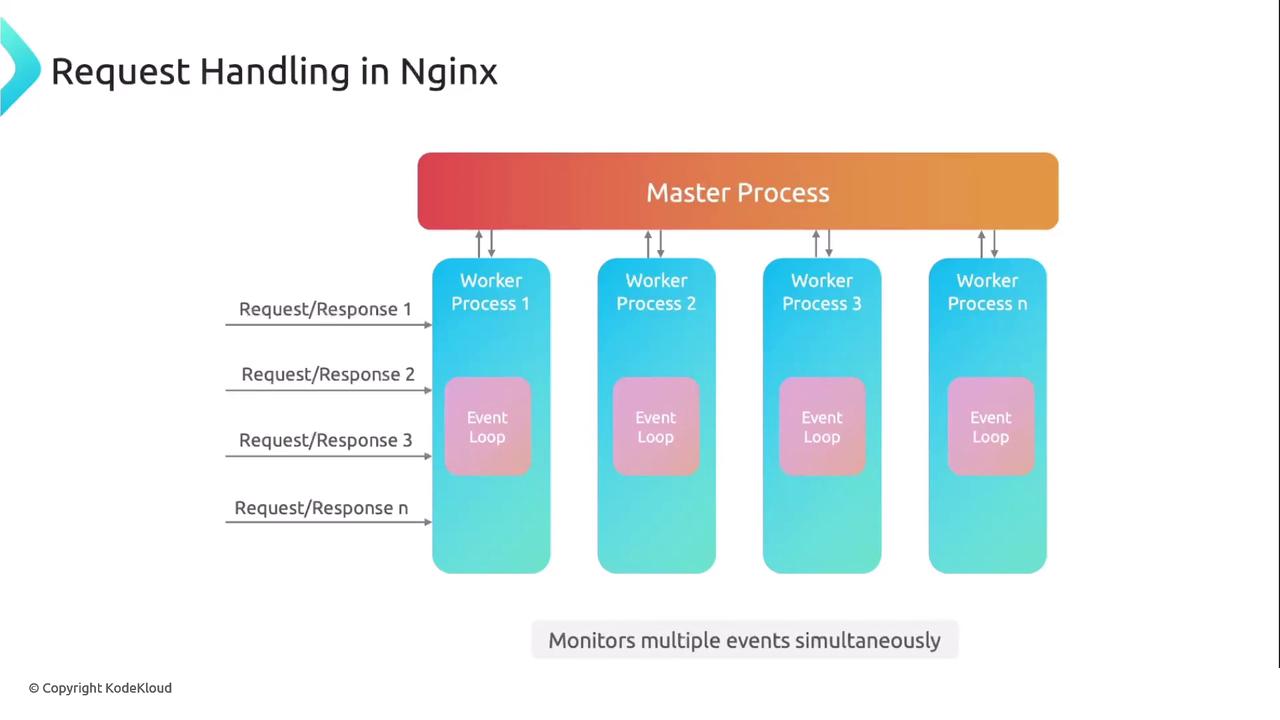
Nginx uses a non-blocking, event-driven architecture. Let's break down what this means.
-
Master and Worker Processes: Nginx runs a single
masterprocess that performs privileged operations like reading the configuration and binding to network ports (like port 80 for HTTP). The master process then spawns severalworkerprocesses. These workers are unprivileged and do the actual work of handling connections. Typically, you configure one worker per CPU core to take full advantage of the hardware. -
The Event Loop: Each worker process runs a single-threaded event loop. Instead of blocking and waiting for a specific connection to send data or for a file to be read from the disk, the worker tells the operating system kernel what it's interested in (e.g., "let me know when there's new data on any of these 10,000 connections").
-
Efficient System Calls: The worker uses highly efficient system calls like
epoll(on Linux) orkqueue(on macOS/BSD) to monitor many sockets at once. The kernel notifies the worker only when an event occurs (like new data arriving). The worker can then process that event quickly and return to the event loop to wait for the next one. This prevents the worker from wasting CPU cycles on idle connections.
How NGINX Handles MILLIONS of Requests With Just 1 Process 🔥
To see this in action, watch this segment from the ByteMonk video, 'How NGINX Handles MILLIONS of Requests With Just 1 Process'. It provides an excellent visual explanation of the master/worker model and how the event loop uses epoll to achieve non-blocking I/O.
Watch the following segments: Master/Worker Model (01:56 - 02:35): Understand the roles of the master and worker processes. Handling Connections (02:35 - 04:32): Pay attention to how incoming connections are queued on a 'listen socket' and then accepted by a worker without blocking. The epoll Mechanism (06:32 - 09:18): This is the core technical detail. Focus on how the event loop uses epoll to be notified by the kernel about ready sockets, allowing a single worker to efficiently manage thousands of connections.
This architecture makes Nginx incredibly lightweight and scalable. It's a perfect reverse proxy: a server that sits in front of your application, handling the raw network traffic and deciding where to send it next. But Nginx doesn't know how to run a Python application. For that, we need an application server.
The Role of Gunicorn
Enter Gunicorn (Green Unicorn). Gunicorn is a WSGI (Web Server Gateway Interface) HTTP Server.
- Web Server: Like Nginx, it's a server that speaks HTTP.
- Gateway Interface: Its primary job is to be a "gateway" that translates requests from the format used by web servers (plain HTTP) into a standardized format that Python web frameworks like Django or Flask can understand. This standard is called WSGI.
Gunicorn runs your Django application, manages a pool of worker processes to handle concurrent requests, and exposes an interface for Nginx to connect to.
Powering Django: A Deep Dive into CPU Cores, Threads, Gunicorn ...
The article 'Powering Django: A Deep Dive...' provides a concise explanation of what Gunicorn is and how its workers function.
Read the section titled 'What Are Gunicorn Workers?'. This will clarify Gunicorn's role as an application server that spawns processes to execute your Django code.
So, we have two servers:
- Nginx: The web server / reverse proxy. It faces the outside world, excels at handling many concurrent connections, terminating SSL, and serving static files.
- Gunicorn: The application server. It runs the Python code, translating requests for the application.
Now, how do they talk to each other?
Bridging the Gap: TCP Sockets vs. Unix Sockets
Nginx forwards the request to Gunicorn using a socket. A socket is an endpoint for sending and receiving data across a network or between processes on the same machine. There are two common types of sockets used for this purpose.

1. TCP Sockets
A TCP socket communicates over the network stack. Even when Nginx and Gunicorn are on the same machine, the communication goes through the machine's networking layer, typically using the loopback interface (127.0.0.1 or localhost).
- How it works:
- Gunicorn is configured to listen on a specific IP and port (e.g.,
gunicorn --bind 127.0.0.1:8000 myapp.wsgi). - Nginx is configured to forward requests to that same address (
proxy_pass http://127.0.0.1:8000;).
- Gunicorn is configured to listen on a specific IP and port (e.g.,
- Pros: Flexible. Nginx and Gunicorn could be on different machines.
- Cons: Slightly less performant. The communication incurs the overhead of the TCP/IP stack (e.g., creating TCP packets, calculating checksums), even though it never leaves the machine.
2. Unix Sockets
A Unix socket is a form of Inter-Process Communication (IPC) that uses a special file on the filesystem as its address.
- How it works:
- Gunicorn is configured to bind to a file path (e.g.,
gunicorn --bind unix:/tmp/gunicorn.sock myapp.wsgi). This creates agunicorn.sockfile. - Nginx is configured to forward requests to that file (
proxy_pass http://unix:/tmp/gunicorn.sock;).
- Gunicorn is configured to bind to a file path (e.g.,
- Pros:
- Faster: Bypasses the network stack entirely. The kernel passes data directly between the processes, which is more efficient.
- More Secure: You can use standard filesystem permissions to control which processes (i.e., which users) can access the socket file.
- Cons: Less flexible. Both Nginx and Gunicorn must be running on the same machine.
For a typical setup where Nginx and Gunicorn are on the same server, a Unix socket is the preferred method due to its performance and security benefits.
A Practical Example
Let's look at how this is configured in practice. The following video walks through setting up a Flask application, but the Nginx and Gunicorn principles are identical for Django.
How to Deploy Flask with Gunicorn and Nginx (on Ubuntu)
The video 'How to Deploy Flask with Gunicorn and Nginx' by Tony Teaches Tech provides a clear, step-by-step demonstration of this entire process. We'll focus on the configuration parts.
Watch these segments to see the configuration in action: Gunicorn Service with a Unix Socket (07:25 - 08:50): Observe the systemd service file. Notice the --bind unix:/path/to/peak.sock command. This tells Gunicorn to listen on a Unix socket, not a TCP port. Nginx Proxy Configuration (09:48 - 11:15): Look at the Nginx config file. The key line is proxy_pass http://unix:/path/to/peak.sock;. This tells Nginx where to forward requests. Debugging a Common Issue (12:25 - 13:10): This is a very valuable part showing a real-world problem: a 502 Bad Gateway error caused by file permissions on the socket. It highlights why Unix sockets, while secure, require correct permissions.
Let's review the key configuration snippets.
Gunicorn (systemd service file):
[Service]


# ... other settings
ExecStart=/path/to/gunicorn \
          --workers 3 \
          --bind unix:/home/tony/hike/peak.sock \
          wsgi:app
Here, --bind unix:... creates the Unix socket.
Nginx (server configuration file):
server {
    listen 80;
    server_name example.com;

    location / {
        proxy_pass http://unix:/home/tony/hike/peak.sock;
        proxy_set_header Host $host;
        proxy_set_header X-Real-IP $remote_addr;
    }
}
Here, proxy_pass http://unix:... tells Nginx to forward any request for the root location / to Gunicorn via the specified socket file. The proxy_set_header directives ensure that information about the original request (like the domain name) is passed along to the application.
Conclusion
We have now successfully followed the request from the web server to the application server. This is a critical handover point in the request lifecycle.
Key Takeaways:
- Nginx acts as a highly efficient reverse proxy, using an event-driven, non-blocking architecture to handle thousands of concurrent network connections.
- Gunicorn acts as a WSGI application server, running the actual Python code and translating HTTP requests into a format Django can understand.
- Nginx forwards requests to Gunicorn using a socket.
- Unix sockets are generally preferred over TCP sockets for this communication when both processes are on the same machine, as they are faster and can be secured with file permissions.
- The
proxy_passdirective in Nginx and the--bindargument in Gunicorn are the key configurations that create this link.
Preview of the Next Lesson
The request has been received by Nginx, forwarded to Gunicorn, and is now about to enter your Django application's code. What's the very first thing that happens? In the next lesson, we will explore this by answering: How does Django's middleware pipeline process a request before and after it reaches the view?