Hello! Welcome to the first lesson in our module on Tracing the Complete Request Lifecycle.
In previous modules, we've taken a deep dive into the foundational components of a backend system: networking protocols, operating system concepts, and the inner workings of databases. You've learned how data travels across the internet, how processes and threads manage concurrency, and how databases store and retrieve data efficiently. Now, it's time to connect these pieces.
Our goal in this module is to follow a single user request from its origin all the way to your application code and back again. We'll start at the very edge of your infrastructure.
This lesson's learning outcome is to trace the path of an incoming request through a typical server infrastructure, from a load balancer to the web server. We'll explore why any scalable application can't rely on a single server and how a critical component called a load balancer acts as the front door to your entire system.
Why a Single Server Isn't Enough
Imagine your application is running on a single, powerful server. What happens if that server's power supply fails? Or if its network card dies? Your application goes down. This is called a single point of failure (SPOF).
What if your application becomes incredibly popular, and the server is overwhelmed with traffic? It becomes slow and unresponsive for everyone. This is a scalability bottleneck.
The solution to both problems is horizontal scaling: running your application on multiple identical servers. But this introduces a new question: if a user wants to connect to yourapp.com, which of the many servers should they be sent to? This is where a load balancer comes in.
Networking Essentials for System Design Interviews w/ Ex Meta Senior Manager
To begin, let's watch a segment from 'Networking Essentials for System Design Interviews' from the Hello Interview channel. It provides an excellent overview of why we need horizontal scaling and introduces the two fundamental purposes of a load balancer: spreading the load and ensuring high availability.
Watch from 38:20 to 41:22. Focus on the distinction between vertical and horizontal scaling and the two key roles a load balancer serves. Also, note the initial mention of client-side vs. dedicated load balancers; we will be focusing on the latter.
As the video explains, a load balancer is a dedicated piece of software or hardware that acts as a "traffic cop." It receives all incoming traffic and distributes it across a pool of backend servers, ensuring no single server is overworked and that traffic can be rerouted away from any servers that have failed.
A Tale of Two Layers: L4 vs. L7 Load Balancing
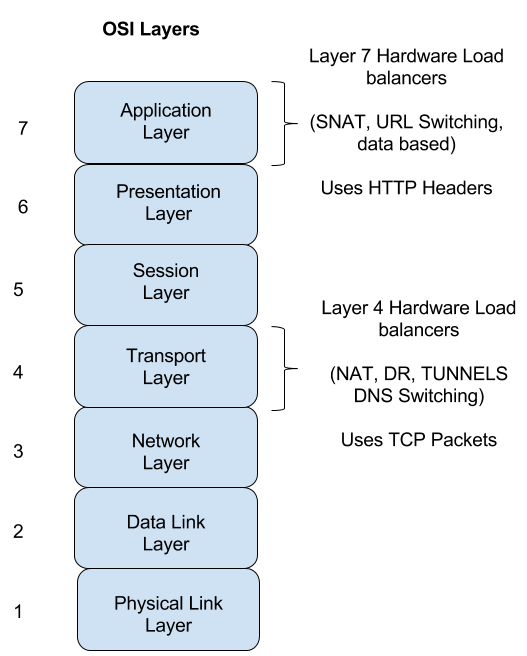
To understand how a load balancer works, we need to recall the OSI model from our first module. Load balancers primarily operate at two different layers, and their capabilities differ significantly depending on which layer they use.
A Deep Dive into L4 vs. L7 Load Balancing
This article, 'A Deep Dive into L4 vs. L7 Load Balancing' by Codeshbhai, provides excellent analogies for understanding this distinction.
Please read the introduction and the sections 'Layer 4: The Speed Demon' and 'Layer 7: The Smart Assistant'. This will give you a strong conceptual model for the two types of load balancers before we dive into the technical mechanics.
Let's break down these two types.
Layer 4 Load Balancer: The Network Courier
A Layer 4 (L4) load balancer works at the Transport Layer. It understands TCP and UDP protocols but has no visibility into the actual application data (like an HTTP request) being sent.
- How it works: It inspects the IP addresses and port numbers in the TCP/UDP packet headers. It makes a routing decision based on this limited information and uses Network Address Translation (NAT) to change the destination IP address of the packet to one of the backend servers. From the client's perspective, it's a single, unbroken TCP connection that is simply being routed through the load balancer.
- Analogy: A courier who only reads the shipping address on a package and forwards it accordingly. They don't open the box to see what's inside.
Layer 7 Load Balancer: The Executive Assistant
A Layer 7 (L7) load balancer works at the Application Layer. Because it operates at this higher level, it can understand application-specific protocols like HTTP.
- How it works: It terminates the TCP connection from the client. It can then read the full HTTP request—including headers, the URL path, and cookies. Based on this rich information, it can make very intelligent routing decisions. It then establishes a new TCP connection to the chosen backend server and forwards the HTTP request.
- Analogy: An executive assistant who opens the mail, reads the content, and routes it to the correct person or department based on what the letter is about.
Diving Deeper into L4 and L7 Mechanics
Now that we have the high-level concepts, let's explore the technical details, pros, and cons of each approach.
Load balancing in Layer 4 vs Layer 7 with HAPROXY Examples
The video 'Load balancing in Layer 4 vs Layer 7' by Hussein Nasser provides a fantastic deep dive. It clearly explains the mechanics, the pros and cons, and includes a practical demo using HAProxy, a popular open-source load balancer.
Please watch the following segments: L4 Operation (05:25 - 09:15): Focus on how it uses NAT to forward packets and maintains a single TCP connection. L4 Pros & Cons (09:15 - 16:11): Pay attention to why it's simpler and faster, but also why it lacks 'smart' routing capabilities. L7 Operation (22:33 - 27:10): Note the key difference: it establishes two separate TCP connections and can inspect the HTTP content. L7 Pros & Cons (27:10 - 30:20): Understand the trade-offs between intelligent routing and increased complexity/cost.
Tracing the Request Path
Let's solidify this by tracing the exact path a request takes from the client to the web server (e.g., Nginx) in both scenarios.
Path via an L4 Load Balancer
- A user's browser resolves
yourapp.comvia DNS to the public IP address of your L4 load balancer. - The browser initiates a TCP connection to the load balancer's IP on port 443 (for HTTPS).
- The load balancer receives the initial TCP packet (SYN). It consults its list of healthy backend web servers and, using an algorithm like Round Robin, selects
WebServer-A. - The load balancer performs NAT, changing the packet's destination IP address from its own to
WebServer-A's private IP address. It then forwards the packet. WebServer-Aresponds, and the TCP three-way handshake completes. Crucially, it appears to the client as a single connection, but the packets are being routed and translated by the load balancer.- The client sends the encrypted HTTPS request. The load balancer, unable to read the encrypted content, simply forwards these TCP packets to
WebServer-A. - The HTTPS request arrives at the Nginx process running on
WebServer-A.
Path via an L7 Load Balancer
- A user's browser resolves
yourapp.comto the public IP address of your L7 load balancer. - The browser initiates a TCP connection and performs a TLS handshake directly with the load balancer. This is Connection 1. The load balancer holds the TLS certificate for
yourapp.com. - The client sends its HTTP request (e.g.,
GET /api/products/123) over the encrypted Connection 1. - The load balancer decrypts the request and inspects its content. It sees the path
/api/products/123. - The load balancer has a rule: "requests to
/api/*should go to theapi-backendserver pool." It selectsWebServer-Bfrom this pool. - The load balancer initiates a new TCP connection to
WebServer-B's private IP on port 80 (or another internal port). This is Connection 2. This connection might be unencrypted, as it's within your trusted internal network. - The load balancer sends the original HTTP request over Connection 2.
- The HTTP request arrives at the Nginx process running on
WebServer-B.
Health Checks and Distribution Algorithms
Two final pieces are essential for a load balancer to function correctly:
- Health Checks: The load balancer constantly pings the backend servers to ensure they are alive and ready to accept traffic. If a server fails its health check (e.g., doesn't respond or returns an error), the load balancer removes it from the pool of available servers, preventing users from being sent to a dead machine. This is the core of high availability.
- Load Balancing Algorithms: The load balancer needs a strategy for choosing the next server. Common algorithms include:
- Round Robin: Simply cycles through the list of servers in order.
- Least Connections: Sends the next request to the server that currently has the fewest active connections. This is useful if some requests take much longer than others.
- IP Hash: Uses a hash of the client's IP address to determine which server to send the request to. This ensures that a specific user is always sent to the same server, which can be useful for stateful applications (though it's often better to make your application stateless).
Conclusion
In this lesson, we've traced the very first leg of a request's journey into a modern, scalable backend infrastructure. You've learned that before a request ever reaches a web server like Nginx, it is first intercepted by a load balancer.
Key Takeaways:
- Load balancers are essential for high availability (fault tolerance) and horizontal scalability.
- Layer 4 (L4) load balancers operate at the transport layer (TCP/UDP). They are fast and simple, forwarding packets based on IP and port using NAT.
- Layer 7 (L7) load balancers operate at the application layer (HTTP). They are more intelligent, terminating connections and making routing decisions based on HTTP content like URLs and headers.
- The choice between L4 and L7 involves a trade-off between performance, simplicity, and routing intelligence. Most modern web applications benefit from the features of an L7 load balancer, such as path-based routing for microservices and SSL termination.
Preview of the Next Lesson
We have successfully delivered our request from the internet, through a load balancer, and to the doorstep of a web server. In the next lesson, we will knock on that door and see what happens inside. We'll explore how a web server like Nginx receives the request and forwards it to an application server like Gunicorn, bridging the gap between the network and your Python code.