Hello! Welcome to the next step in our journey through the backend request lifecycle.
In our last lesson, we saw how an incoming request navigates the middleware pipeline—Django's "onion" of security, session handling, and authentication. After successfully passing through these layers, the request object is fully prepared, but a crucial question remains: which specific piece of your code should handle this request? How does Django translate a URL path like /api/articles/42/ into a call to a particular function?
This lesson answers that question directly. We will explore how Django's URL routing mechanism—its internal "GPS"—resolves an incoming URL path to a specific view function or class. This is the critical handoff from the general framework machinery to your application's specific business logic.
The URLconf: Django's Routing Map
When a request arrives (after middleware processing), Django needs to consult a map to find the correct destination. This map is a Python module known as a URLconf (URL configuration), which you've already seen as the urls.py files in your projects.
The core of the URLconf is a simple Python list called urlpatterns. This list contains mappings between URL patterns and the views that should handle them.
To understand how this works, let's look at the precise algorithm Django follows. This is the "root level" process you're keen to understand.
URL dispatcher - Django documentation
The official Django documentation provides a clear, step-by-step explanation of how it processes a request to find the correct view. This is the definitive source for understanding the routing algorithm.
Read the section titled 'How Django processes a request'. Focus on the 5-step algorithm it describes. This is the heart of Django's URL routing.
To summarize the key points from the documentation:
- Find the Root URLconf: Django first identifies the root
URLconfmodule, specified by theROOT_URLCONFsetting in yoursettings.py. - Load
urlpatterns: It loads this module and looks for theurlpatternslist. - Iterate and Match: Django runs through each URL pattern in
urlpatternsin order, from top to bottom. - First Match Wins: It stops at the first pattern that matches the requested URL path. The order of your
urlpatternslist matters! - Call the View: Once a match is found, Django calls the associated view, passing it the
HttpRequestobject and any values captured from the URL. - No Match? 404: If Django gets to the end of the
urlpatternslist without finding a match, it raises aHttp404exception, resulting in a "Not Found" error page.
Static and Dynamic URL Patterns
URL patterns come in two main flavors: static and dynamic.
-
Static paths are fixed strings that match exactly, like
/contact/or/about/.from django.urls import path from . import views urlpatterns = [ path('admin/', admin.site.urls), path('contact/', views.contact_page), # Static path ] -
Dynamic paths contain variable segments. For example, in
/articles/42/, the number42is a variable that identifies a specific article. Django uses a clean syntax with path converters to handle this.
A path converter is enclosed in angle brackets, like <int:article_id>. It consists of two parts:
- The converter type (e.g.,
int,slug,str). This tells Django what kind of data to match. - The parameter name (e.g.,
article_id). This will be the keyword argument name passed to your view function.
URL dispatcher - Django documentation
The Django documentation again provides the best reference for this. It details the syntax for path converters and lists the ones available by default.
First, read the 'Example' section to see how path converters are used in a sample URLconf. Then, review the 'Path converters' section to see the list of built-in converters (str, int, slug, uuid, path) and what they match.
Let's see this in action. The following video provides a great hands-on demonstration of converting a static URL into a dynamic one and connecting it to a view.
19 - Dynamic URL Routing - Python & Django 3.2 Tutorial Series
The video 'Dynamic URL Routing' from CodingEntrepreneurs walks through the practical steps of creating a dynamic URL, capturing a value, and using it in a view.
Watch these sections to see the full implementation flow: Defining a Dynamic Path (01:28 - 03:16): Pay attention to how a hardcoded URL like articles/4/ is changed to a dynamic one using <int:id>. Handling the Argument in the View (04:44 - 07:13): This is crucial. Notice the error that occurs when the view function doesn't accept the id argument, and see how it's fixed by adding id to the function's signature. Connecting the URL to the View (10:29 - 11:09): This part shows how the newly defined dynamic URL pattern is correctly linked to the corresponding view function in urls.py.
As the video demonstrates, if your URL pattern is path('articles/<int:article_id>/', ...) your view function must be defined to accept that parameter:
# articles/views.py
def article_detail(request, article_id):


    # The 'article_id' parameter now holds the integer value from the URL.
    # You can use it to fetch the specific article from the database.
    article = Article.objects.get(pk=article_id)


    # ... rest of the view logic
This tight coupling between the URL pattern's named parameter and the view function's argument is fundamental to how Django passes data from the URL to your code.
Organizing URLs with include()
As a project grows, putting all URL patterns into a single urls.py file becomes unmanageable. Django's solution is the include() function, which allows you to delegate URL routing to other URLconf modules.
This promotes a clean, two-tiered structure:
- A project-level
urls.pythat maps URL prefixes to specific applications. - An app-level
urls.pywithin each application that handles the URLs for that app.
09 - Django Request Response Cycle | Official Django Polls Companion Videos
This video segment clearly illustrates the project-level vs. app-level urls.py structure and explains how Django processes them.
Watch the segment from 04:00 to 05:56. The narrator breaks down how a request to /polls/ first matches a pattern in the project's urls.py, which then passes the request to the polls app's urls.py for final resolution.
Here is what this looks like in code:
Project mysite/urls.py:
from django.urls import path, include

urlpatterns = [
    path('admin/', admin.site.urls),
    path('polls/', include('polls.urls')), # Delegate to the 'polls' app
    path('blog/', include('blog.urls')),   # Delegate to the 'blog' app
]
When Django encounters include('polls.urls'), it "chops off" the part of the URL that matched so far (polls/) and sends the remaining string to the polls.urls module for further processing.
App polls/urls.py:
from django.urls import path
from . import views

urlpatterns = [
    path('', views.index), # Matches the remainder: an empty string
    path('<int:question_id>/', views.detail), # Matches e.g., '34/'
]
A request to /polls/34/ would:
- Match
polls/in the projecturls.py. - The remaining path,
34/, is passed topolls.urls. - It matches
<int:question_id>/in the app'surls.py. - Django calls
views.detail(request, question_id=34).
Under the Hood: Routing Efficiency
Since you're interested in the deepest levels, it's worth asking: is a linear scan of a Python list the most efficient way to route URLs?
For most Django applications, yes. The number of patterns in any single urlpatterns list is typically small, and Python's string matching is extremely fast. The time spent on URL resolution is usually a tiny fraction of the total request time.

However, in the world of high-performance routing, other data structures are often used. One of the most common is a Trie, or prefix tree. While Django doesn't use a Trie for its default path() router, understanding it gives you context on how other advanced routing systems (like those in different frameworks or some third-party Django packages) can achieve very high-speed lookups.
A Trie organizes strings by their prefixes. For URL routing, each node could represent a path segment (e.g., 'api', 'widgets').
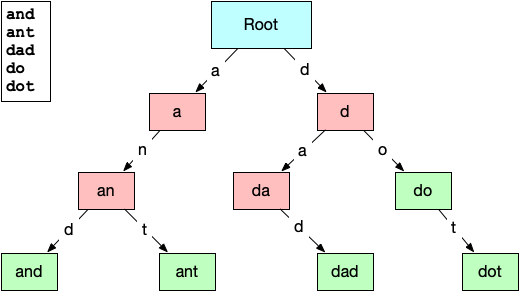
By traversing the Trie, a router can find a matching URL in a time proportional to the number of segments in the path, rather than the total number of routes. This is a classic computer science approach to the problem that you might find interesting given your background.
Conclusion
You've now seen how Django bridges the gap between a raw URL path and a specific view. This routing layer is a powerful and flexible system that gives you complete control over your site's URL design.
Key Takeaways:
- Django's routing is managed by a URLconf (
urls.py), which contains anurlpatternslist. - The routing algorithm processes
urlpatternsin order and uses the first match it finds. - Dynamic URLs are created using
path()with path converters (e.g.,<int:pk>), which capture parts of the URL and pass them as typed arguments to views. - The
include()function is used to create a modular, two-tiered routing structure, separating project-level and app-level concerns. - While Django's linear scan is very fast for most use cases, other data structures like Tries are used in some high-performance routing systems.
Preview of the Next Lesson
The request has successfully passed through middleware and has been routed to the correct view. The view function is now executing. Its job is to perform the business logic, but to do that, it needs to access the data sent by the client. How does it get the query parameters, read the JSON body of a POST request, or check the request headers?
In our next lesson, we will dive into the view itself and examine the next logical step: Describe how a framework parses request data (query params, body, headers) and serializes a response.