Hello! Welcome to the next lesson in our journey through the internals of backend systems.
In our last lesson, we investigated context switching, the OS mechanism that enables concurrency by pausing one task and resuming another. We saw that a key piece of a task's "context" is the Stack Pointer (SP), a CPU register that tracks the state of its function calls. But what is this "stack" it's pointing to? And where does all the other data a program uses actually live?
Today, we will answer those questions by exploring the memory layout of a running program.
Today's Goal: The learning outcome for this lesson is to describe stack vs. heap memory and how a running program uses each. This is fundamental to understanding program performance, memory-related bugs, and even why languages like Python manage memory differently from languages like C++.
1. A Program's Private Universe: Virtual Memory
When you run a program, the operating system gives it a powerful illusion: that it has the entire computer's memory all to itself. This private, pristine address space is called virtual memory. As we touched on in the last lesson, a hardware component called the Memory Management Unit (MMU) translates these virtual addresses into physical addresses in RAM, ensuring processes are isolated from each other.
This vast virtual address space isn't just an unorganized sea of bytes. The OS and compiler partition it into several distinct regions, each with a specific purpose.
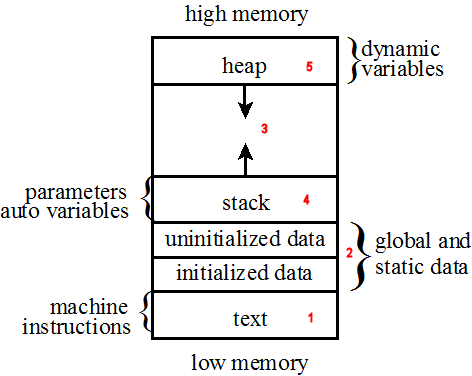
Let's dive into the first of these two regions: the stack.
2. The Stack: Speed, Order, and Discipline
The stack is a region of memory that manages data related to function calls. Its defining characteristic is its operational principle: Last-In, First-Out (LIFO). Think of it like a stack of plates: you can only add a new plate to the top, and you can only remove the topmost plate.
Stack Frames and Function Calls
Every time a function is called, a block of memory called a stack frame is "pushed" onto the top of the stack. This frame contains all the data needed for that function call to execute, including:
- Function arguments.
- Local variables declared inside the function.
- A return address, which tells the CPU where to resume execution after the function completes.
The Stack Pointer (SP) is the CPU register that always holds the address of the current top of the stack.
Let's trace what happens.
The article 'Memory: The Stack & The Heap' provides an excellent, detailed walkthrough of how stack frames are used during function calls. The visualizations are particularly helpful for understanding the LIFO principle in action.
Read the section titled 'Stack', starting from 'Function Calls and Stack Frames'. Pay close attention to the diagrams showing the stack's state as main calls add and then as add returns. This will solidify your understanding of how the Stack Pointer moves and how frames are created and destroyed.
The Stack's Superpower: Speed
Allocating and deallocating memory on the stack is incredibly fast.
- Allocation: To "allocate" space for a new stack frame, the CPU simply subtracts a value from the Stack Pointer register (
SUB SP, 16to allocate 16 bytes). This is a single, lightning-fast CPU instruction. - Deallocation: When a function returns, its frame is "popped" by simply adding the same value back to the Stack Pointer (
ADD SP, 16).
This video, while using C++, brilliantly visualizes the difference in complexity between stack and heap allocations at a low level.
The video 'Stack vs Heap Memory in C++' by The Cherno demonstrates the raw speed difference between stack and heap allocations. Watching him step through the generated assembly code makes the concept tangible.
Watch two key segments: Stack Allocation (04:48 - 07:45): See how local variables are placed contiguously in memory and how allocation is just about moving a pointer. Assembly Comparison (13:39 - 15:20): This is the crucial part. Observe how a stack allocation compiles down to a single move instruction, while a heap allocation involves a complex call to a much larger function. This directly shows why the stack is so much faster.
The Limitations of the Stack
This speed and simplicity come with strict rules:
- Fixed Lifetime: Data on the stack exists only for the duration of its function's execution. Once the function returns, its stack frame is gone. This is why returning a pointer to a local variable is a classic and dangerous bug—the pointer becomes a "dangling pointer" that refers to invalid memory.
- Fixed Size: The total size of the stack is determined when a thread starts and is relatively small (typically 1-8 MB). If you have deeply nested function calls or try to create a very large local variable (e.g., a huge array), you will exhaust this space, causing a stack overflow crash.
- Compile-Time Sizing: The compiler must know the exact size of all local variables at compile time to calculate how much to move the stack pointer. You cannot create a variable on the stack whose size is determined at runtime (e.g., by user input).
So, if the stack is so limited, where do we put large, long-lived, or dynamically-sized data? For that, we turn to the heap.
3. The Heap: Flexibility, Freedom, and Responsibility
The heap is a large, general-purpose pool of memory available to your program. Unlike the stack's rigid LIFO structure, the heap is an unordered region where you can request blocks of memory of any size, at any time. This is called dynamic memory allocation.
The Allocation Process
When your code needs memory from the heap, it's a multi-step process managed by a component called the memory allocator.
- Request: Your program calls a function (like
mallocin C,newin C++, or what Python does under the hood when you create an object) to request a certain number of bytes. - Search: The allocator searches its internal data structures (often called a "free list") to find a block of free memory that is large enough to satisfy the request.
- Bookkeeping: Once a suitable block is found, the allocator marks it as "in use" and updates its records.
- Return Pointer: The allocator returns a pointer—the memory address of the start of the newly allocated block—to your program.
Crucially, this pointer is often stored in a local variable... on the stack! This is how the two regions work together: the stack holds a "ticket" (the address) to access the much larger block of data living on the heap.
The Cost of Flexibility
This dynamic process is powerful, but it's much slower than stack allocation. The allocator has to perform complex work, and if it runs out of memory, it must make a very slow system call to the OS to request more.
Furthermore, this flexibility places a huge burden on the programmer in languages with manual memory management like C/C++. Since the heap's lifetime is not tied to function scope, you are responsible for telling the allocator when you are done with the memory by calling free. Failure to do so leads to critical bugs.
The Stack, The Heap, and Dynamic Memory Allocation - CS 3410
The Cornell CS course notes on 'The Heap' clearly define the core rules, or 'Laws', of manual heap management. Understanding these laws helps you appreciate why memory-safe languages were invented.
Read the sections 'The Heap' and 'The Heap Laws'. Focus on the four main types of memory errors: use-after-free, double-free, memory leaks, and out-of-bounds access. These are the classic problems that automated memory management, like Python's garbage collector, solves for you.
4. Stack vs. Heap in Python
As a Python developer, you don't call malloc and free. Python's garbage collector handles that for you. However, the stack and heap model is still exactly how your program works under the hood. Understanding it clarifies Python's behavior.
In Python:
- Almost every piece of data is an object, and all objects live on the heap.
- Variable names (like
x,my_list) live on the stack (within a function's stack frame) and act as references (pointers) to the objects on the heap.
Let's look at a simple example:
def process_data():


    # 'items' is a local name in the stack frame of process_data().
    # The list object [10, 20, 30] is created on the HEAP.
    # 'items' holds the memory address of this list object.
    items = [10, 20, 30]


    # 'user_id' is another local name on the stack.
    # The integer object 42 is on the HEAP.
    # 'user_id' holds its address.
    user_id = 42


# When process_data() returns, its stack frame is destroyed.
# The names 'items' and 'user_id' disappear.
# The Python garbage collector will eventually see that the list object
# and integer object are no longer referenced and will free that heap memory.
This model explains why passing mutable objects can have "surprising" effects:
def add_item(my_list):


    # 'my_list' is a new name on this function's stack frame.
    # It receives a COPY of the address from the caller.
    # It points to the SAME list object on the heap.
    my_list.append(4)

data = [1, 2, 3]
add_item(data)
print(data)  # Output: [1, 2, 3, 4]
You are not passing the list; you are passing the address of the list. The add_item function modifies the original object on the heap because both the data name and the my_list name point to it.
5. Performance Deep Dive: CPU Caches
There's one more critical performance difference that fits your goal of going to the "deepest level." As we saw in the last lesson, CPUs rely on small, fast caches to avoid slow trips to main memory (RAM). How data is laid out in memory dramatically affects cache performance.
-
The Stack is Cache-Friendly: A function's local variables are all stored together in a contiguous stack frame. When the CPU fetches one variable, the entire surrounding block of memory (a "cache line") is loaded into the cache. Accessing the next local variable is then an extremely fast cache hit. This is called spatial locality.
-
The Heap can be Cache-Hostile: Complex data structures built from multiple dynamic allocations (like a linked list or a tree) can have their nodes scattered all over the heap. Traversing such a structure involves jumping from one memory address to another, a process known as pointer chasing. Each jump is likely to cause a cache miss, forcing a slow trip to RAM and leaving the CPU waiting.
This final reading from 'Memory: The Stack & The Heap' connects our discussion to the hardware level. It explains the memory hierarchy and why the stack's layout is inherently more performant for the CPU to process.
Read the section 'Memory Access Patterns and Performance'. Focus on understanding the concepts of the memory hierarchy, cache hits/misses, and why a contiguous array is faster to iterate over than a scattered linked list.
Conclusion
You now have a solid mental model of how a program organizes its memory. This isn't just academic; it informs decisions about data structures and helps diagnose performance bottlenecks and understand the guarantees your programming language provides.
Key Takeaways:
| Feature | Stack | Heap |
|---|---|---|
| Purpose | Function calls, local variables | Dynamically created objects, shared data |
| Lifetime | Tied to function scope (automatic) | Arbitrary (manual or garbage collected) |
| Size | Small, fixed (e.g., ~8 MB) | Large, can grow (e.g., GBs) |
| Allocation Speed | Extremely fast (one CPU instruction) | Slower (function call, search, bookkeeping) |
| Management | Automatic by the compiler (moving SP) | Manual (malloc/free) or via a Garbage Collector |
| Cache Performance | Generally high (good spatial locality) | Can be low (pointer chasing, fragmentation) |
Preview of the Next Lesson:
We've seen how a process manages its internal memory. But how does it interact with the outside world—files, network connections, and other processes? The OS provides another core abstraction for this: file descriptors. In the next lesson, we will explain what file descriptors are and how the OS uses them to represent open files, sockets, and pipes.