Hello! Let's dive into our next lesson.
In our last session, we established that concurrency allows a server to handle many tasks (like user requests) at once, creating the illusion of parallelism even on a single CPU core. We learned this is achieved by the operating system rapidly switching between different threads or processes.
This switching mechanism is not magic, and it's not free. It's a fundamental OS operation with profound performance implications for any server application you build.
Today's Goal: We will explore this mechanism in detail. The learning outcome for this lesson is to explain what context switching is and its performance implications for servers. Understanding this process is key to appreciating why different server models (like multi-threaded vs. event-driven) exist and how they trade off performance for simplicity.
1. What is a "Context" and What Does it Mean to Switch It?
Before a switch can happen, the OS must first save the "context" of the currently running task. The context is the complete state of a task at a specific moment in time—everything needed to pause it and resume it later as if nothing happened.
Think of it like pausing a video game. To resume perfectly, the system needs to save not just your location in the world, but the position of all enemies, your health points, your inventory, and the current frame of every animation. In an OS, this context includes:
- CPU Registers: These are small, extremely fast memory locations inside the CPU. The most critical ones are:
- Program Counter (PC): Holds the memory address of the next instruction to be executed. This is the most crucial piece of information for knowing where the program left off.
- Stack Pointer (SP): Points to the top of the current thread's stack, which manages function calls and local variables.
- General-Purpose Registers: Hold temporary data that the current function is actively working on.
- Process State: Information about whether the process is currently running, waiting for I/O, or ready to run.
- Memory Management Information: Pointers to the process's page tables, which map its virtual address space to physical RAM.
A context switch is the procedure performed by the OS to save the context of the currently running process/thread into its Process Control Block (PCB) and then load the context of the next scheduled process/thread from its PCB into the CPU registers.
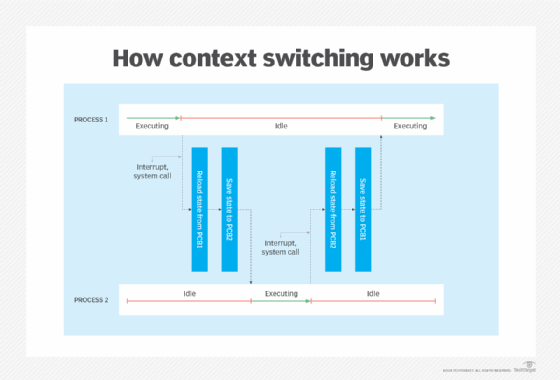
To go deeper into the mechanics, let's look at this at the machine-code level.
OS Context Switching - Computerphile
The video 'OS Context Switching' from Computerphile provides an excellent low-level explanation. It demonstrates why saving the CPU registers is the key to context switching and how the OS manages this process.
Watch from 01:47 to 12:33. The video uses ARM assembly, but the concepts are universal. Focus on: The Role of Registers (01:47 - 05:55): Understand that an instruction's behavior depends only on the current values in the registers, not how they got there. This is the fundamental principle that makes context switching possible. Saving the Context (05:55 - 10:16): See how the OS copies the values from all the CPU registers into a memory structure (the PCB). Restoring the Context (10:16 - 12:33): Observe the reverse process: loading the saved values from the next process's PCB back into the CPU registers, including the Program Counter, to resume its execution.
2. When Do Context Switches Happen?
Context switches are happening constantly in a modern operating system. They are generally triggered in two ways:
-
Voluntary (Cooperative) Switching: The task gives up the CPU on its own accord. This is the most common scenario for I/O-bound applications like your Django server.
- Blocking I/O: When your code tries to read from a network socket or a file on disk, the data isn't available immediately. The thread makes a system call to the OS and enters a "waiting" or "blocked" state. Since it cannot proceed, the OS performs a context switch to run another, "ready" thread. When the I/O operation completes, the OS moves the original thread back to the "ready" state, and it will eventually be scheduled to run again.
- Explicit Yield/Sleep: A thread can voluntarily give up the CPU by calling a function like
sleep()oryield().
-
Involuntary (Preemptive) Switching: The operating system forces the task to give up the CPU. This is essential for ensuring fairness and responsiveness.
- Timer Interrupt: A hardware timer in the computer sends an interrupt to the CPU at a regular, high frequency (e.g., every 1-10 milliseconds). The OS's interrupt handler runs and may decide that the current process has used up its allotted "time slice." If so, the scheduler is invoked to select a new process, forcing a context switch. This prevents a single CPU-bound process from monopolizing the processor.
- Higher-Priority Task: If a high-priority task becomes ready to run (for example, its I/O operation just completed), the OS might preempt a lower-priority task to run the more important one immediately.
This article provides a concise summary of the step-by-step process and distinguishes a context switch from a simpler mode switch.
A Deep Dive into Processes in Operating Systems
The article 'A Deep Dive into Processes in Operating Systems' explains the context switch mechanism clearly and provides a simplified kernel code example. It helps to solidify the step-by-step logic.
Read the sections titled '6. Context Switching' and its subsections (6.1, 6.2, 6.3, and 6.6). Focus on the step-by-step breakdown and the distinction between a context switch and a user-to-kernel mode transition.
3. The Hidden Cost: Why Context Switching Impacts Performance
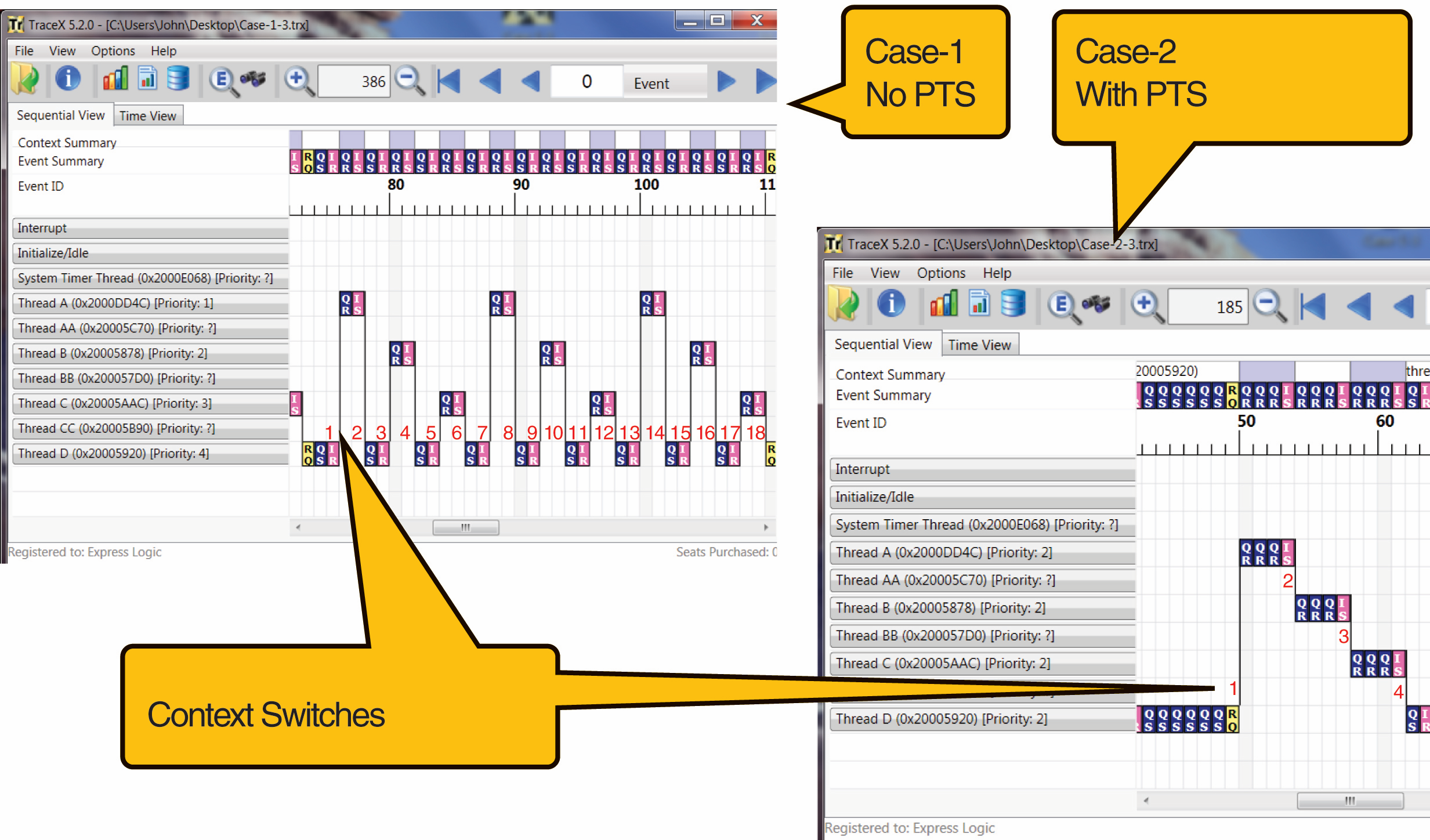
Context switching is pure overhead. While the CPU is busy saving and restoring registers, it's not executing your application code. This overhead has both direct and, more importantly, indirect costs.
Direct Costs
This is the CPU time spent executing the OS scheduler and the code that saves and loads the registers and other context data. This is typically measured in microseconds, which seems small, but on a busy server handling thousands of requests per second, this can add up to a significant percentage of CPU time.
Indirect Costs
These are often much more significant than the direct costs and stem from how modern CPUs use caches.
-
Cache Pollution: CPU caches (L1, L2, L3) are small, fast memory banks that store frequently accessed data to avoid the slow trip to main memory (RAM). When a process runs, its data and instructions populate these caches. When a context switch occurs, the new process needs its own data. This will likely not be in the cache, resulting in a series of cache misses. The CPU must then fetch this data from main memory, which is orders of magnitude slower. This process evicts the previous process's data from the cache. When the system eventually switches back to the original process, it will also suffer cache misses because its data is no longer there. This phenomenon is often called cache thrashing.
-
TLB Flushes: The Translation Lookaside Buffer (TLB) is a special cache that stores recent translations of virtual memory addresses to physical memory addresses. When switching between processes (which have separate address spaces), the entire TLB may need to be flushed. This means the new process will have to perform slow lookups in the main-memory page tables for every memory access until the TLB is repopulated.
- Note: A switch between threads within the same process is "cheaper" because they share the same address space. The TLB does not need to be flushed, although the problem of CPU cache pollution still exists.
Let's explore the performance factors in more detail.
Day 06: Context Switching - Exploring Operating Systems
The article 'Day 06: Context Switching' has an excellent section dedicated to performance, which breaks down the factors contributing to overhead.
Read section '5. Performance Considerations'. This provides a structured list of factors (CPU architecture, memory system, OS) that affect the cost of a context switch.
4. The Role of Hardware in Context Switching
You might wonder: if an interrupt immediately overwrites the Program Counter, how can the OS save its old value? It seems like a chicken-and-egg problem. You're right—this is impossible to solve purely in software. Modern CPUs provide crucial hardware support to make this possible.
This final video gives a fantastic, deep technical dive into exactly how the hardware assists the operating system.
How Hardware Assist Software When Multitasking
The 'How Hardware Assist Software When Multitasking' video by Core Dumped is perfect for our goal of going to the deepest level. It explains why pure software context switching is impossible and details the hardware mechanisms that solve the problem.
This video is quite technical, so take your time with it. The Problem (01:08 - 05:03): First, understand why you can't save the Program Counter in software after an interrupt has already occurred. Hardware Solution 1 (10:03 - 11:29): Learn about the common approach where the CPU hardware automatically pushes critical registers (like the Program Counter and Stack Pointer) onto a special, protected kernel stack before jumping to the OS interrupt handler. Hardware Solution 2 (11:29 - 12:27): Briefly see the even more automated approach used in some architectures (like the Task State Segment on x86), where the hardware can handle saving almost the entire register state automatically.
This hardware-level assistance is what makes preemptive multitasking efficient and even possible on modern systems.
Conclusion
Today, we pulled back the curtain on one of the OS's most fundamental and frequent operations. You now understand not just what a context switch is, but the intricate dance between hardware and software that makes it happen, and why it represents a critical performance trade-off in server design.
Key Takeaways:
- Context switching is the OS mechanism of saving the state of one task (CPU registers, etc.) and restoring another's to enable concurrency.
- It is triggered voluntarily by blocking I/O calls or involuntarily by hardware timer interrupts (preemption).
- The performance cost is not trivial. It includes direct costs (CPU cycles for saving/restoring) and significant indirect costs like CPU cache pollution and TLB flushes, which slow down memory access.
- A thread switch is cheaper than a process switch because threads share an address space, avoiding the TLB flush penalty.
- The entire process relies on hardware support to atomically save critical state like the Program Counter during an interrupt.
Preview of the Next Lesson:
We've repeatedly mentioned the stack, stack pointer, and that threads share memory like the heap. But what exactly are the stack and the heap? How does a running program organize its memory? In the next lesson, we will describe stack vs. heap memory and how a running program uses each. This will complete our picture of a process's memory layout.