Hello! Let's continue our deep dive into the operating system concepts that power backend services.
In our last lesson, we explored the memory layout of a process, focusing on the stack and heap. This gave us a clear picture of how a program manages its internal data and state during execution. Now, we'll shift our focus to how a process interacts with the outside world—the files on disk, the network connections it makes, and even other programs running on the same machine.
Today's Goal: The learning outcome for this lesson is to explain file descriptors and how the OS represents open files, sockets, and pipes. At the heart of this is a powerful and elegant design philosophy from Unix-like operating systems: "Everything is a file." Understanding this abstraction is fundamental to grasping how servers handle I/O, from reading a config file to accepting a user's request over the network.
1. What is a File Descriptor?
When your program wants to read from a file or write to a network connection, it first asks the operating system to open that resource. Instead of giving you back a complex object or the resource's name, the OS gives you a simple, non-negative integer. This integer is a file descriptor (often abbreviated as fd).
Think of it as a ticket or a handle. From that point on, your program uses this simple integer to tell the OS which open resource it wants to interact with. For example, instead of saying "write 'hello' to /home/user/log.txt," you'll say "write 'hello' to file descriptor 4."
Why this extra step?
- Efficiency: Passing a small, fixed-size integer in system calls is much faster and simpler than passing long, variable-length file paths that the OS would have to parse every single time.
- Abstraction: As we'll see, this integer can represent more than just files, providing a uniform way to handle different types of I/O.
Every process in a Unix-like system starts with three standard file descriptors by default:
0: Standard Input (stdin), typically connected to the keyboard.1: Standard Output (stdout), typically connected to the terminal screen.2: Standard Error (stderr), also typically connected to the terminal screen.
You can explore these for your current shell process using the /proc filesystem on Linux:
ls -l /proc/$$/fd/
The $$ is a shell variable for the current process ID. You'll see that 0, 1, and 2 are symbolic links to your terminal device (e.g., /dev/pts/0).
2. The Kernel's Bookkeeping: The Three-Table Structure
So, what happens inside the operating system when you get this integer "ticket"? The kernel uses a three-tiered data structure to connect your process's file descriptor to an actual resource.
This is a central concept, and the following video provides a clear, step-by-step explanation of these structures.
What's behind a file descriptor in Linux? Also, i/o redirection with dup2.
The video 'What's behind a file descriptor in Linux?' provides an excellent walkthrough of the three core data structures the OS uses to manage open files.
Watch the first five minutes of the video (00:00 - 05:22). Focus on understanding the distinct role of each of the three tables introduced: The (per-process) File Descriptor Table The (global) Open File Table The (global) V-node Table
Let's summarize and solidify what the video explains.
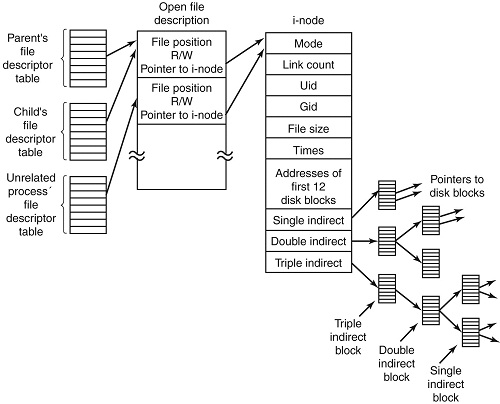
-
Per-Process File Descriptor Table:
- Scope: Each process has its own private one.
- Function: It's a simple array where the file descriptor is the index.
fd[0],fd[1], etc. - Content: Each entry in this array is a pointer to an entry in the system-wide Open File Table.
-
System-Wide Open File Table:
- Scope: There is only one of these, and it is shared by all processes on the system.
- Function: An entry is created in this table each time a resource is opened (e.g., via the
open()system call). This table represents an "instance" of an open file. - Content: Each entry contains crucial state information about a specific open session:
- File Position: The current read/write offset (the cursor). This is why if two FDs point to the same open file table entry, reading from one advances the cursor for the other.
- Access Mode: Whether the file was opened for reading (
O_RDONLY), writing (O_WRONLY), or both. - Reference Count: How many process file descriptors point to this entry. The entry is removed only when this count drops to zero.
- Pointer to Inode: A pointer to the next table.
-
Inode Table (or V-node Table):
- Scope: Also a single, system-wide table.
- Function: An entry in this table represents the actual file on disk (or another resource like a socket).
- Content: This stores the metadata about the file that persists even when it's not open:
- File type (regular file, directory, etc.).
- Permissions (owner, group).
- File size.
- Pointers to the data blocks on the disk where the content is actually stored.
This structure elegantly handles multiple scenarios. For example, when you fork() a process, the child gets a copy of the parent's file descriptor table. Both tables will point to the same open file table entries, meaning the parent and child share the file position.
3. Beyond Files: Sockets and Pipes
This is where the "Everything is a file" philosophy truly shines for backend development. The file descriptor mechanism is not limited to disk files.
The article 'UNIX File System' provides a concise summary of these data structures and explicitly mentions how sockets and pipes fit into this model.
First, read the section 'System-Wide Open File Table (SWOFT)'. Note that it explicitly lists 'network sockets' as something that can be in this table. Then, read the section 'Socket File Descriptor', which explains how the socket() system call returns a file descriptor that the kernel manages just like one for a file.
Let's break down how this applies to the two most common non-file resources you'll encounter.
Sockets
When your backend server wants to listen for incoming network connections, it calls the socket() system call. The kernel:
- Creates an in-memory data structure to represent the communication endpoint (the socket).
- Creates an entry in the system-wide open file table.
- Instead of pointing to an inode, this open file table entry points to the new socket data structure.
- Adds a pointer to this open file table entry in your process's file descriptor table.
- Returns the index—the file descriptor—to your program.
From your program's perspective, you now have an integer (e.g., fd = 3). You can use standard system calls like read() and write() on this FD to receive data from and send data to a client, just as you would with a file.
Pipes
Pipes are a mechanism for inter-process communication (IPC), allowing the output of one process to be fed directly as the input to another. When a program calls pipe(), the kernel:
- Creates an in-memory buffer to act as the communication channel.
- Creates two entries in the open file table, both pointing to this same kernel buffer. One is for reading, the other for writing.
- Adds two pointers to your process's file descriptor table, one for each open file table entry.
- Returns two file descriptors to your program:
fd[0]for the read end andfd[1]for the write end.
This ability to treat wildly different things—a file on an SSD, a TCP connection to a browser in another country, and an in-memory channel to another process—through the same uniform interface is what makes the file descriptor model so powerful.
The following video brilliantly demonstrates this unified approach in practice.
Sockets and Pipes Look Like Files (Unix/fdopen)
The video 'Sockets and Pipes Look Like Files' by Jacob Sorber shows a C program that processes data from a file, a pipe (stdin), and a network socket using the exact same code, demonstrating the power of the 'everything is a file' abstraction.
Watch the following segments: Introduction (00:51 - 01:27): This sets up the core idea of the 'everything looks like a file' philosophy. Handling the Socket (07:38 - 09:29): This is the key part. Notice how the socket() call returns an integer file descriptor. The crucial step is using fdopen() to wrap this integer in a higher-level FILE* structure, making it behave identically to a file opened with fopen(). Conclusion (12:08 - 12:34): A quick summary of how this design enables flexible and concise code.
4. Practical Application: I/O Redirection and Piping
You use this mechanism every day on the command line. The shell uses file descriptors to implement I/O redirection (>) and piping (|). The key system call is dup2().
dup2(oldfd, newfd) tells the kernel: "Make newfd a copy of oldfd." It atomically closes newfd if it's already open and makes the entry for newfd in the process's file descriptor table point to the same open file table entry that oldfd points to.
Let's see how a shell runs the command ls > output.txt:
- The shell process
forksto create a new child process. - The child process, which will run
ls, does the following before executing thelsprogram:
a. Callsopen("output.txt", O_WRONLY)to open the file for writing. Let's say the kernel returns a new file descriptor,3.
b. Callsdup2(3, 1). Now, file descriptor1(stdout) in the child process points to the same open file table entry as3. Anything written to stdout will now go tooutput.txt.
c. Callsclose(3), as it's no longer needed. - The child process then calls
execve()to replace its code with thelsprogram.lsknows nothing about this; it just writes its output to its standard stdout (fd 1), which now transparently goes to the file.
The same logic applies to pipes (|), where the shell connects the stdout of one process to the stdin of another.
Conclusion
Today we've peeled back another layer of the operating system, revealing the elegant mechanism of file descriptors. This is not just a theoretical curiosity; it is the fundamental way that nearly all I/O is managed in the systems you build on.
Key Takeaways:
- A file descriptor is a small integer handle that a process uses to refer to an I/O resource opened by the kernel.
- The OS uses a three-tiered structure to manage this: a per-process File Descriptor Table, a global Open File Table (tracking open instances), and a global Inode Table (tracking the actual resources).
- The "Everything is a file" philosophy means that resources like disk files, network sockets, and pipes are all abstracted as file descriptors, allowing them to be handled with a uniform set of system calls (
read,write,close). - Common shell features like I/O redirection (
>) and piping (|) are implemented by manipulating file descriptors using thedup2()system call.
Preview of the Next Lesson:
We now know what a file descriptor is and how the OS represents different I/O channels. But how should our server use them? What happens if we read() from a network socket but the client hasn't sent any data yet? Does our whole program freeze? This leads directly to our next topic, where we will compare blocking, non-blocking, and asynchronous I/O models, which are critical patterns for building high-performance, concurrent servers.