Hello! Welcome back.
In our last lesson, we established why and when to use asynchronous tasks. We saw that offloading work from the main request-response cycle is a critical pattern for building web applications that are responsive, reliable, and scalable. We identified use cases like sending emails, generating reports, and buffering traffic spikes, and we briefly introduced the idea of a producer, a queue, and a worker.
Today, we're going to dissect that architecture. Our goal is to describe the architecture of a task queue system, defining the roles of the producer, broker, worker, and result backend. By the end of this lesson, you'll have a clear mental model of how these components collaborate to execute tasks in the background.
The Four Pillars of a Task Queue System
At its core, a task queue system is a form of the classic producer-consumer design pattern. This architecture is composed of four key components that work in concert.

Let's break down the role of each component in this diagram.
Demystifying Python Celery: key components and result storage
The article 'Demystifying Python Celery' provides an excellent introduction to these components, framing them within the Producer/Consumer problem.
Read the sections 'Understanding the Architecture of Async Task Queues' and 'Harmonizing Web and Worker Nodes in Celery'. Focus on the definitions of producers (web nodes), the broker (queue), and workers (task executors).
Now, let's explore each of these four pillars in detail.
1. The Producer (Client Application)
The producer is the component that initiates a task. In a web application context, this is almost always your main application code—for instance, your Django project.
- Role: Its job is not to perform the slow task, but to request that it be performed.
- Action: When an event occurs that should trigger a background task (e.g., a user API call to
POST /reports), the producer's code creates a message. This message contains all the information needed to run the task, such as the name of the function to execute and the arguments to pass to it. - Example: In Python's popular Celery framework, this looks like calling a function with
.delay()or.apply_async():# Instead of calling the function directly: # generate_report(user_id=123, start_date="2024-01-01") # The producer sends a task message to the broker: generate_report.delay(user_id=123, start_date="2024-01-01") - Decoupling: The producer then sends this message to the broker and moves on, typically returning an HTTP response to the user immediately. It doesn't know or care which worker will execute the task or when it will be executed.
This video demonstrates the producer's role in a live coding example.
Python Celery Distributed Task Queue | End to End Application with Celery
In this clip from 'Python Celery Distributed Task Queue', you'll see how a 'client' program acts as the producer. Notice the distinction between calling a function directly versus using .delay() to offload it.
Watch from 06:03 to 09:23. Observe how calling task_q.delay() doesn't execute the function in the client but instead sends it to the broker for a worker to pick up.
2. The Broker (Message Queue)
The broker is the central message transport system. It's the "queue" in "task queue" and acts as the intermediary between producers and workers.
- Role: To receive messages from producers and hold them reliably until a worker is available to process them.
- Analogy: Think of it as a post office. The producer drops off a letter (a task message). The post office (broker) holds it in a specific mailbox (a queue) until the recipient (a worker) comes to pick it up. The post office guarantees the letter won't get lost in the meantime.
- Technology: This role requires specialized software designed for high-performance, reliable messaging. Simple solutions like a text file or a SQL database table are generally poor choices because they struggle with concurrent access and performance at scale. The standard choices are dedicated message brokers like RabbitMQ or in-memory data stores like Redis.
Demystifying Python Celery: key components and result storage
Let's return to the 'Demystifying Python Celery' article, which has a great section on the broker.
Read the section 'Choosing The Ideal Celery Broker'. Pay attention to why simple implementations fall short and why specialized tools like RabbitMQ and Redis are preferred.
3. The Worker (Consumer)
The worker is the engine of the system. It's a separate, long-running process whose sole purpose is to execute tasks.
- Role: To consume messages from the broker and perform the work described in them.
- Action:
- The worker connects to the broker and subscribes to one or more queues.
- It waits for a message to appear in the queue.
- When a message is available, the worker fetches it. The broker ensures that a single message is delivered to only one worker.
- The worker deserializes the message to determine the function and arguments.
- It imports and executes the actual Python function (e.g.,
generate_report(...)).
- Concurrency: A single worker process can often execute multiple tasks in parallel using a pool of threads or subprocesses. Since you have a background in Computer Engineering, you can see how this leverages the multiple cores of a modern CPU to process a high volume of tasks efficiently.
This video provides an excellent visualization of how Celery workers achieve parallelism.
Python Celery Distributed Task Queue | End to End Application with Celery
The 'Python Celery Distributed Task Queue' video demonstrates how Celery automatically starts multiple processes based on the number of CPU cores, enabling true parallel processing.
Watch from 12:29 to 14:50. The presenter uses htop to show that starting one Celery worker actually spawns multiple processes, one for each core, to consume tasks in parallel.
4. The Result Backend
What happens after a task is finished? Sometimes, you just want the task to run and don't care about the outcome (a "fire and forget" task, like logging). But often, the producer needs to know the task's status or retrieve its return value. This is where the result backend comes in.
- Role: An optional datastore used to save the state and result of a task.
- Action:
- After a worker executes a task, it can store the result (e.g., the return value
13from anadd(6, 7)task, or an exception if it failed) in the result backend. - This result is stored against the task's unique ID, which the producer received when it first called
.delay().
- After a worker executes a task, it can store the result (e.g., the return value
- Technology: The result backend is essentially a key-value store. Redis is a very common choice, often serving as both the broker and the result backend. A relational database can also be used.
This video clearly shows the result backend in action.
Getting Started With Celery: Asynchronous Tasks in Python
This clip from 'Getting Started With Celery' is a perfect demonstration. It shows how to configure a result backend and then use the task ID to retrieve a task's result after it has completed.
Watch from 07:17 to 10:43. Notice how after configuring the backend URL, the application can use the task ID to get the status and return value from Redis.
The Complete Data Flow
Now let's trace a task's entire lifecycle, connecting all four components. The key thing to understand, especially given your interest in deep technical details, is that data is serialized (converted to a transmittable format like JSON or pickle) every time it crosses a process or network boundary.
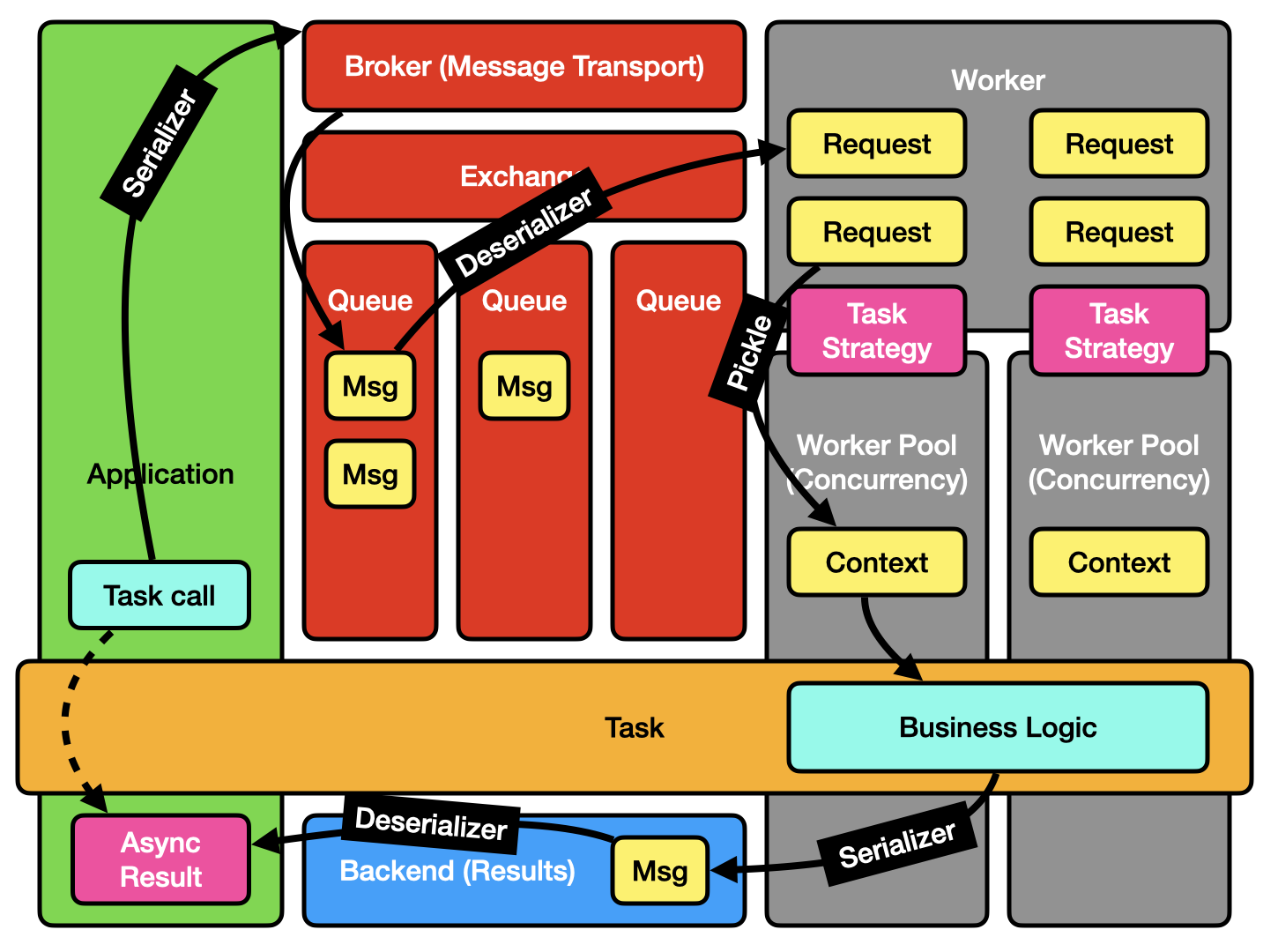
Let's walk through this flow:
- Producer to Broker: Your web application (the producer) calls
add.delay(1, 2). It serializes the task name ('my_app.add') and arguments ((1, 2)) into a message and sends it to the broker. - Broker to Worker: A worker, listening to the queue, fetches the serialized message.
- Inside the Worker: The worker deserializes the message, understands it needs to run the
addfunction with1and2, and executes it. The function returns3. - Worker to Result Backend: The worker serializes the result (
3) along with the task's status (SUCCESS) and sends it to the result backend, storing it under the task's unique ID. - Result Backend to Producer: Your web application, holding the task ID, can now query the result backend. It fetches the serialized result, deserializes it, and gets the final value
3.
For a deeper look at this flow, the article 'Celery architecture breakdown' provides a detailed explanation.
Read the sections from 'High Level Architecture' through 'Dataflow', including 'Request Serialization' and 'Result Serialization'. This will give you a firm grasp on the roles of each component and the importance of serialization in the process.
Conclusion
You now have a complete architectural view of a task queue system. This isn't just theory; it's the fundamental model behind powerful libraries like Celery that drive countless production applications.
Key Takeaways:
- A task queue system is built on four components: Producer, Broker, Worker, and Result Backend.
- The Producer (your web app) creates and sends a task message.
- The Broker (e.g., RabbitMQ, Redis) is a message transport that reliably queues messages, decoupling the producer from the worker.
- The Worker is a separate process that consumes messages from the broker and executes the actual task code, often in parallel.
- The Result Backend (e.g., Redis, PostgreSQL) is an optional key-value store for persisting task status and return values.
- Serialization is the critical mechanism that allows task information and results to be passed between these distinct, often distributed, components.
Preview of the Next Lesson
We've mentioned RabbitMQ and Redis as the two most common choices for a broker. But are they interchangeable? Not quite. They are built on different principles and offer different guarantees. In our next lesson, we will describe a message broker's core responsibilities and compare RabbitMQ (which uses the AMQP protocol) with Redis to understand their respective strengths, weaknesses, and ideal use cases.