Hello! Welcome to the first lesson in our module on asynchronous processing.
In our previous lesson, we explored a caching strategy called "stale-while-revalidate," which involved triggering a cache refresh in the background to avoid making a user wait. This idea of offloading work from the immediate user request is a cornerstone of modern backend engineering.
Today, we'll expand on that concept. Our goal is to identify the common use cases for asynchronous tasks in a web application. We'll explore why performing every operation synchronously within a web request is often impractical or impossible, and we'll build a mental catalog of situations where moving work to the background is the right architectural choice.
The Synchronous Trap: Why "Do It Now" Fails
In a standard web application, the flow is synchronous:
- A user's browser sends an HTTP request.
- The server receives it, processes it, and performs all necessary work (database queries, calculations, etc.).
- The server sends back an HTTP response.
- The user sees the result.
The user is blocked, waiting, for the entire duration of step 2. This works fine for quick operations, but it breaks down when a task is slow. Users expect web pages to load in a couple of seconds, and servers or load balancers will often terminate requests that run for too long (e.g., over 30-60 seconds).
Imagine a user signs up. Your application needs to:
- Validate their input.
- Create a user record in the database.
- Send them a welcome email.
Steps 1 and 2 are usually fast. Step 3, however, involves connecting to an external email server (an SMTP server), which can be slow and unpredictable. If it takes 5 seconds to send the email, the user is staring at a loading spinner for 5 extra seconds just to be told their account was created.
This is the "synchronous trap." To see this problem illustrated, let's watch a short video.
Every Senior Developer Needs To Know This!
The video 'Every Senior Developer Needs To Know This!' from Web Dev Simplified gives a perfect visual breakdown of why long-running tasks within a request are harmful to user experience.
Watch from 00:43 to 02:46. Pay attention to how the request timeline shrinks dramatically when the 'send email' task is moved out of the main request flow.
As the video demonstrates, the core idea of asynchronous processing is to do only the absolute minimum work required to acknowledge the user's request and then handle the rest "in the background."
The Solution: Asynchronous Task Processing
To escape the synchronous trap, we introduce a new architecture. Instead of our web application doing the slow work itself, it simply adds a "job" or "task" to a queue and immediately sends a response to the user. A separate process, called a worker, monitors this queue, picks up jobs, and executes them independently.
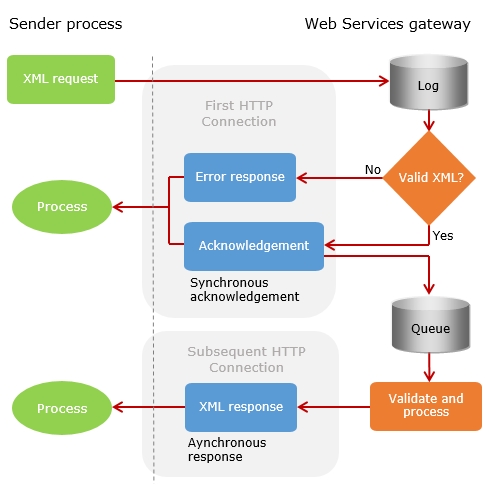
The key components are:
- Producer: The application that creates a job and adds it to the queue (e.g., your Django app).
- Queue (Broker): A message broker (like Redis or RabbitMQ) that stores the list of jobs waiting to be processed.
- Consumer (Worker): A separate program that pulls jobs from the queue and executes them.
This decoupling is the foundation for building responsive and resilient systems. Let's get a clearer picture of these components.
Every Senior Developer Needs To Know This!
Let's return to the 'Web Dev Simplified' video, which now explains the relationship between the program, the queue, and the worker.
Watch from 02:46 to 04:17. Notice how this architecture allows for retries if a job fails, a crucial benefit we'll explore.
Now that we understand the basic "why" and "what," let's dive into the "when" by cataloging the most common use cases for asynchronous tasks.
A Catalog of Asynchronous Use Cases
We can group the reasons for offloading work into a few key categories. The following article provides an excellent, detailed breakdown of the most common patterns.
Background Jobs: Processing Work Asynchronously
The article 'Background Jobs: Processing Work Asynchronously' provides a fantastic overview of why synchronous processing fails and then details several classic use cases for background jobs.
First, read the section 'The Constraint: Why Synchronous Processing Fails' for another great example (a large CSV import). Then, carefully read the entire 'Common Job Patterns' section. This is the core of our lesson. For each pattern (Email, Data Import, etc.), focus on understanding why it's a good candidate for a background job.
Let's summarize and expand upon the patterns from that article and others.
1. Improving User Experience (Latency-Sensitive Tasks)
This is the most common driver. Any task that is not strictly required to render the next page for the user, and that takes more than a few hundred milliseconds, is a candidate.
- Email & Notification Dispatch: As we've discussed, sending emails, push notifications, or SMS messages involves network I/O to external services and can be slow. The user doesn't need to wait for the email to be sent to know their account was created.
- Long-Running, User-Initiated Jobs:
- Report Generation: A user requests a PDF or Excel export of their yearly sales data. This could take minutes. The application should immediately respond with "Your report is being generated and will be emailed to you," while a worker churns through the data in the background.
- Media Processing: A user uploads a video. The server immediately saves the raw file and responds, while background workers handle transcoding it into different resolutions, generating thumbnails, etc.
2. Ensuring Reliability and Resilience
Some tasks are important but shouldn't cause the primary user action to fail. Decoupling them makes your system more robust.
- Webhook Processing: Services like Stripe or GitHub send you webhooks to notify you of events (e.g., a payment succeeded). They expect you to respond with
200 OKvery quickly. If your processing logic is complex, you should immediately store the webhook payload, respond200 OK, and then process it asynchronously. This prevents timeouts and retries from the sending service. - External API Syncs: Your application needs to update a record in a third-party CRM (like Salesforce) when a user updates their profile. If the CRM's API is down, you don't want the user's profile update to fail. By putting the sync task in a queue, the user's action succeeds immediately, and the worker can retry the API call later when the service is back online.
This video provides another perspective on these use cases, framing them in the context of system design.
Why Every (great) System Design Uses Queues
The video 'Why Every (great) System Design Uses Queues' by Arjay McCandless covers how queues enable asynchronous processing for reliability and better UX.
Watch from 01:59 to 03:03. This section reinforces the use cases of video uploads, sending emails, and generating PDFs, tying them to the goal of improving user experience and system reliability.
3. Managing Load and Scaling (Throttling & Decoupling)
Task queues act as a crucial buffer between your application and your resources (like databases or APIs), allowing you to handle spikes in traffic gracefully.
- Buffering Traffic Spikes: Imagine your site is featured on a major news outlet, and you suddenly get 1000 new signups per second. Your database might only be ableto handle 200 writes per second. Instead of dropping requests or crashing the database, your web servers can quickly add 1000 "create user" jobs to the queue. The workers can then process these jobs at a sustainable pace that the database can handle. The queue absorbs the spike.
Why Every (great) System Design Uses Queues
The same video from Arjay McCandless also has a great section explaining this buffering capability.
Watch from 00:49 to 01:59. This animation clearly shows how a queue can absorb a traffic surge, preventing the database from being overloaded.
- Fan-Out for Microservices: In an event-driven architecture, one event might need to trigger several independent actions in different services. For example, a
UserSignedUpevent might trigger:- The email service to send a welcome email.
- The analytics service to record the new user.
- The recommendation service to prepare initial recommendations.
By publishing a single event to a topic, each service can have its own queue to consume the event and react independently and at its own pace.
4. Scheduled and Periodic Execution
Finally, some tasks aren't triggered by a user action at all. They need to run on a schedule. Task queue systems are perfect for this.
- Nightly Cleanup: A job that runs at 3 AM to delete temporary files or archive old records.
- Daily Digests: A job that runs every morning to gather news updates and email them to users.
- Proactive Caching: As we discussed in the last module, a periodic job could run every 5 minutes to refresh popular but expensive data, ensuring the cache is always warm.
Conclusion
You have now built a solid mental framework for identifying when and why to use asynchronous tasks. Moving work out of the synchronous request-response cycle is not just an optimization; it is a fundamental architectural pattern for building applications that are responsive, reliable, and scalable.
Key Takeaways:
- The Problem: Synchronous processing traps the user, leading to poor perceived performance for any task that isn't instantaneous. It also makes the system brittle, as a failure in a secondary task (like sending an email) can fail the primary one (like creating a user).
- The Solution: Decouple work using a task queue. The web application (producer) adds a job to a queue, and a separate worker process (consumer) executes it in the background.
- Common Use Cases:
- Slow Operations: Sending emails, generating reports, processing media.
- Improving Reliability: Handling webhooks and syncing with unreliable external APIs.
- Managing Load: Buffering traffic spikes to protect your database.
- Scheduled Tasks: Running nightly jobs, sending daily digests, or proactively warming a cache.
Preview of the Next Lesson
We've established the why and when. In the next lesson, we will dissect the what. We'll take a closer look at the architecture of a typical task queue system, defining the specific roles of the producer, broker, worker, and result backend. Understanding these components is the next logical step toward implementing your own asynchronous tasks.