Hello! Welcome to the final lesson in our course on backend engineering.
In our last session, we implemented liveness and readiness probes. You learned that when a liveness probe fails, an orchestrator like Kubernetes assumes the application is in an unrecoverable state and terminates the container. This termination isn't an instant kill; it's a polite request. The orchestrator sends a signal and gives your application a chance to clean up before it's forcefully shut down.
Today, we will focus on how to handle that request. This lesson covers graceful shutdown, a critical practice for building reliable, production-grade services. You will learn how to intercept termination signals from the operating system to ensure your application can finish in-flight requests, release resources cleanly, and shut down without causing data corruption or disrupting users.
1. Why Graceful Shutdown is Essential
What happens if an application is terminated abruptly while it's in the middle of processing a request? The client who made that request will likely see an error, and any data being written could be left in an inconsistent state. In a distributed system where pods are created and destroyed frequently during deployments, scaling events, or node maintenance, this can lead to a poor user experience and data integrity issues.
Graceful shutdown solves this by allowing the application to control its own exit process.
Stop Losing Requests! Learn Graceful Shutdown Techniques
To see the problem in action, let's watch the beginning of this video from the DevOps & AI Toolkit channel. It clearly demonstrates what happens to a user's request when a server is terminated without a graceful shutdown procedure.
Watch from the beginning to 01:59. Notice how deleting the pod causes the user's request to fail immediately with a '502 Bad Gateway' error. This is the exact scenario we want to prevent.
As the video shows, abrupt termination leads to lost requests. Graceful shutdown is the mechanism that ensures the application can say, "Hold on, I'm almost done," before it exits.
2. The Language of the OS: Signals
To understand how termination works, we need to go down to the operating system level. In Unix-like systems (including Linux, which powers most containers), the primary way to communicate with a running process is through signals. A signal is a software interrupt delivered to a process to notify it of an event.

There are many types of signals, but for process termination, three are most important:
SIGINT(Signal Interrupt): This is the signal sent when you pressCtrl+Cin your terminal. It's a request to interrupt the process. By default, it causes the process to terminate. In Python, this signal is translated into aKeyboardInterruptexception.SIGTERM(Signal Terminate): This is the standard, generic signal for requesting a process to terminate. UnlikeSIGINT, it's not tied to a keyboard action. This is the signal that orchestrators like Kubernetes, container runtimes like Docker (docker stop), and process managers likesystemduse to ask a service to shut down cleanly. It's the "polite" request.SIGKILL(Signal Kill): This signal causes the immediate termination of the process. It's special because it cannot be caught, blocked, or ignored by the process. The OS kernel handles it directly. This is the forceful last resort, used when a process doesn't respond toSIGTERM.
The general strategy used by orchestrators is to first send SIGTERM, wait for a grace period, and if the process hasn't exited by then, send SIGKILL.
For a deeper look into how signals work under the hood, this answer on Stack Exchange provides a great summary of the kernel's involvement.
Read the first answer by 'derobert'. You don't need to dive into the kernel source code, but focus on the high-level steps: a signal is generated, the kernel checks privileges, and then the kernel determines the action (ignore, default, or run a custom handler). This gives you the 'root level' view of the mechanism.
3. The Challenge of Handling Signals in Python
Since SIGINT raises a KeyboardInterrupt, you might assume SIGTERM does something similar. However, this is a common and dangerous misconception. By default, SIGTERM simply terminates the Python process without raising an exception, meaning your try...finally blocks and with statement cleanup code will not run.
This introduces a significant challenge. Even if you want to handle signals, doing so can be fraught with peril. A signal can arrive at any time, potentially interrupting your code in a sensitive section and corrupting its state.
Control-C handling in Python and Trio
This excellent blog post by Nathaniel J. Smith on handling Control-C (SIGINT) in Python and the Trio library provides a deep dive into why signal handling is so difficult. While it focuses on KeyboardInterrupt, the principles apply to any asynchronous interruption.
Read the sections 'The precedent: control-C in regular Python' and 'How does the Python interpreter pull it off?'. Focus on these key ideas: The Danger of KeyboardInterrupt: Understand the example of how an interruption between lock.acquire() and the try block can lead to a deadlock. This illustrates the core problem of non-atomic operations. The Interpreter's Trick: Learn why the C-level signal handler can't just run Python code directly. It must set a flag that the main evaluation loop checks at safe points, illustrating the concept of a 'chain of custody' for the signal.
This deep dive shows that even Python's default KeyboardInterrupt handling is a best-effort approach. For SIGTERM, where we need guaranteed cleanup, relying on default behavior is not an option. We must take explicit control.
4. Implementing a Graceful Shutdown Handler
To handle SIGTERM correctly in Python, we need to use the built-in signal module to register our own custom handler. A signal handler is simply a Python function that the interpreter will execute when the corresponding signal is received.
Inside this handler, we can initiate the shutdown sequence. A robust pattern is to raise a custom exception that inherits from SystemExit. This allows the exception to propagate up and trigger try...finally blocks for cleanup, while not being caught by a generic except Exception:.
Let's watch a practical demonstration of this.
"graceful exit" SIGTERM doesn't run finally / destructors ? (intermediate) anthony explains #341
The anthonywritescode channel has a fantastic video that first demonstrates the problem—finally blocks not running on SIGTERM—and then provides a clean, practical solution using the signal module.
Watch the segments from 02:43 to 08:40. Pay close attention to: The Problem (02:43 - 04:12): See how kill -term terminates the script without executing the finally block. The Solution (04:12 - 07:28): Observe how registering a signal handler that raises a custom exception forces the cleanup code to run. Signal Escalation (07:28 - 08:40): Understand the common pattern of escalating from SIGINT to SIGTERM to SIGKILL.
Here's the core pattern from the video implemented in a simple Python script:
import signal
import time
import sys


# A custom exception for our signal handler
class GracefulShutdown(SystemExit):
    pass


# The signal handler function
def handle_sigterm(signum, frame):
    print("Received SIGTERM, initiating graceful shutdown...")
    raise GracefulShutdown()


# Register the handler for SIGTERM
signal.signal(signal.SIGTERM, handle_sigterm)


# Main application logic
try:
    print("Application started. PID:", os.getpid())


    # This loop simulates the server running and doing work
    while True:
        print("Working...")
        time.sleep(2)
except GracefulShutdown:
    print("Shutdown exception caught. Exiting.")
except KeyboardInterrupt:
    print("Ctrl+C pressed. Exiting.")
finally:


    # This is where your cleanup code goes
    print("Cleaning up resources (e.g., closing database connections)...")


    # Simulate cleanup time
    time.sleep(1)
    print("Cleanup complete. Goodbye.")


    # The SystemExit exception will cause the process to exit here
5. Graceful Shutdown in a Real-World Backend
While the above pattern is fundamental, in a typical Python backend using a server like Gunicorn, you often get graceful shutdown for web requests for free.
Gunicorn's Graceful Shutdown:
When Gunicorn receives SIGTERM, it performs the following steps:
- The master process stops accepting new connections.
- It allows the existing worker processes to finish handling their current requests.
- It waits for a specific duration, defined by the
--graceful-timeoutsetting (default is 30 seconds). - After the timeout, if any workers are still running, Gunicorn sends them
SIGKILL.
This process is what happens inside a Docker container when you run docker stop.
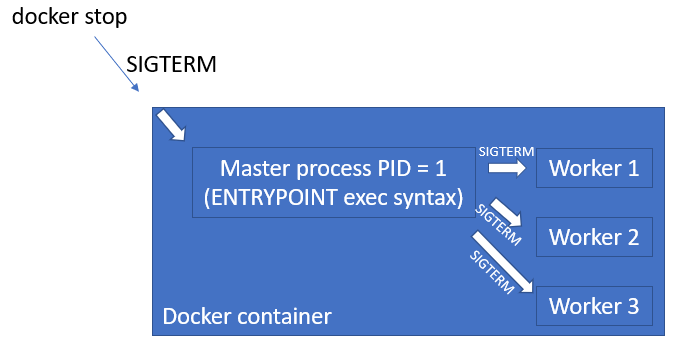
This flow is also exactly what happens in Kubernetes.
Stop Losing Requests! Learn Graceful Shutdown Techniques
Let's revisit the 'Stop Losing Requests!' video to see how this signal-based mechanism works within Docker and Kubernetes.
Watch from 07:18 to 13:16. The video walks through the entire termination flow, first in Docker and then in Kubernetes, showing how SIGTERM is the universal language for initiating a graceful exit.
So, for a standard Django application served by Gunicorn, you don't need to write your own signal.signal(signal.SIGTERM, ...) code for the web request lifecycle. Gunicorn handles it. However, if your application manages its own background threads, long-lived connections, or other state outside the request-response cycle, you would still need to implement custom signal handlers to clean up those specific resources.
Conclusion
In this lesson, you've learned how to make your application a well-behaved citizen in a modern, orchestrated environment. By handling termination signals, you can ensure your service shuts down gracefully, preserving data integrity and providing a seamless experience for your users.
Key Takeaways:
- Graceful shutdown prevents lost requests and data corruption when an application instance is terminated.
- Operating systems use signals to communicate with processes.
SIGTERMis the standard signal for requesting a graceful exit. - By default, Python does not execute cleanup code (like
finallyblocks) upon receivingSIGTERM. - You must use the
signalmodule to register a custom handler forSIGTERMto trigger cleanup logic. A good pattern is to raise aSystemExit-based exception. - Application servers like Gunicorn have built-in graceful shutdown logic for handling the web request lifecycle, managed via
SIGTERM.
Course Wrap-Up
Congratulations on completing the course! You have journeyed from the absolute fundamentals of backend engineering to the advanced practices required to run a scalable, reliable, and observable service in production.
Let's retrace our steps:
- Networking Fundamentals: You started at the lowest level, understanding how data travels across the internet with TCP/IP and how a URL is resolved to an IP address with DNS.
- The HTTP Protocol: You deconstructed HTTP requests and responses, learning the language of the web, and saw how HTTPS secures it.
- Operating System Concepts: You went under the hood of the server itself, exploring processes, threads, memory management, and the powerful asynchronous I/O models that make modern servers efficient.
- Web Servers and Application Runtimes: You bridged the OS to your application, learning the roles of Nginx, Gunicorn, and the WSGI/ASGI specifications that connect them.
- Database Internals & Optimization: You dove deep into the database, understanding how data is stored in B-Trees, what ACID guarantees, and how to analyze and optimize queries with
EXPLAIN. - Advanced Database Patterns: You built on that foundation, exploring replication, sharding, and the trade-offs between normalization and denormalization.
- Tracing the Request Lifecycle: You put all the pieces together, tracing a request from the browser, through the load balancer, Nginx, Gunicorn, Django middleware, the ORM, and finally to the database and back.
- Authentication and Authorization: You secured your application with robust patterns like JWTs and OAuth 2.0.
- Caching and Asynchronous Tasks: You learned to scale your application by reducing database load with Redis and offloading long-running work with Celery.
- System Design & Scaling: You zoomed out to the architectural level, comparing monolithic vs. microservices, and learning the principles of horizontal scaling, load balancing, and the CAP theorem.
- Deployment, Containerization, and Observability: Finally, you packaged and deployed your application using Docker, learned to monitor its health with probes and metrics, and ensured its resilience with graceful shutdown.
Your initial goal was to go to the deepest level possible and understand every flow. This course has equipped you with a comprehensive mental model of how all these layers interact. The journey of a backend engineer is one of continuous learning, but you now have a powerful and solid foundation to build upon. Well done