Hello! Welcome back to our module on Web Servers and Application Runtimes.
In our last lesson, we built a minimal TCP server from scratch using Python's socket module. It was a great exercise to understand the "root level" of network communication, but we quickly saw its limitations. It could only handle one client at a time, and it knew nothing about the HTTP protocol that powers the web.
Today, we'll address those limitations head-on. Trying to build a production-grade server that can handle thousands of concurrent users, parse HTTP, manage secure connections (HTTPS), and serve files efficiently, all within a single Python script, would be an enormous and error-prone task.
Instead, modern backend development relies on a powerful principle: separation of concerns. We use specialized tools for specialized jobs. This brings us to today's learning outcome: to explain the roles of a web server (e.g., Nginx) and an application server (e.g., Gunicorn).
You'll learn why we don't just expose our Django application directly to the internet and how these two components work in concert to create a robust, scalable, and secure backend system.
The Problem with a Single, Monolithic Server
Let's imagine trying to upgrade our simple socket server from the last lesson. We'd immediately face several challenges:
- Handling Concurrent Users: Our server blocks on
accept()and then gets stuck in a loop with one client. To handle multiple users, we'd need to manage multiple threads or processes, or implement a complex asynchronous event loop. This is a difficult OS-level programming challenge. - Speaking HTTP: We'd have to write code to parse raw HTTP requests—methods (GET, POST), headers, paths, and bodies. This is complex and needs to be perfect to avoid security holes.
- Serving Static Files: If a user requests an image, our Python script would have to open the file, read it into memory, and send it over the socket. This is an I/O-bound operation that would block the entire application, preventing it from serving other users.
- Resilience and Security: If our Django code has a bug and crashes, the entire server process dies. Furthermore, a simple server is vulnerable to network attacks, like a "low and slow" attack where a malicious client sends a request very slowly, tying up your server's resources.
Solving these problems correctly is the job of dedicated server software.
The Solution: A Two-Tier Architecture
To solve these challenges, we divide the work between two specialized servers. This is the standard architecture for deploying Python web applications.
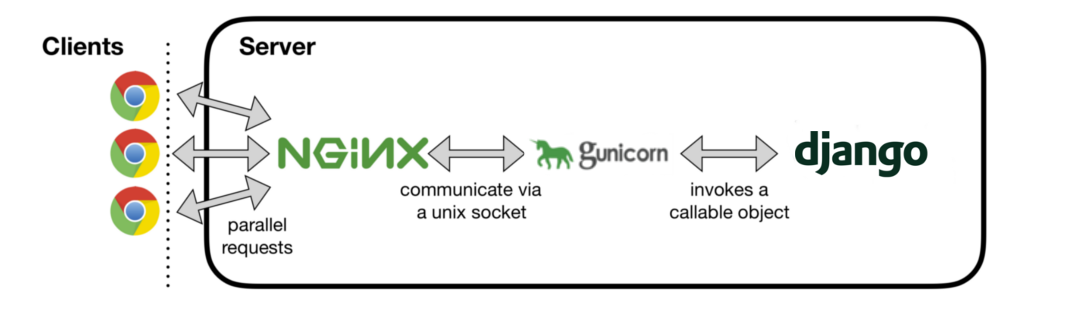
Let's break down the role of each component.
1. The Web Server (e.g., Nginx): The Public-Facing Workhorse
Think of the web server as the bouncer and front-desk manager for your application. It sits at the edge, facing the public internet, and is an expert at handling the chaos of network traffic. Its primary job is to efficiently manage connections and route requests.
Nginx is the most popular choice for this role due to its high performance and low resource usage. Here are its key responsibilities in our stack:
A. Handling Massive Concurrency
Nginx was designed to solve the C10K problem—handling 10,000 concurrent connections on a single server. Unlike traditional servers that might create a new process or thread for every connection (which consumes a lot of memory and CPU), Nginx uses a much more efficient event-driven, non-blocking architecture.
It runs a small, fixed number of worker processes (usually one per CPU core). Each worker uses an event loop to handle thousands of connections simultaneously. When a request needs to wait for I/O (like waiting for data from the client), Nginx doesn't block; it puts that connection aside and works on another one that's ready.
To understand how this architecture makes Nginx so powerful, watch this video.
How NGINX Handles MILLIONS of Requests With Just 1 Process 🔥
The video 'How NGINX Handles MILLIONS of Requests' provides an excellent explanation of Nginx's internal architecture, contrasting its event-driven model with the less scalable thread-per-request model.
Please watch from the beginning until 04:32. Pay close attention to: The explanation of the traditional 'thread-per-request' model and its limitations. The description of Nginx's master/worker process architecture. How a single worker process uses an event loop and non-blocking I/O to manage thousands of connections without waiting.
B. Serving Static Files
Your web application has two types of content: dynamic (e.g., an API response generated from a database) and static (e.g., CSS, JavaScript, images). Nginx is incredibly fast at serving static files directly from the filesystem. By configuring Nginx to handle requests for /static/ or /media/, you offload this work from your Python application, freeing it up to focus on business logic.
C. Acting as a Reverse Proxy
Nginx doesn't know how to run your Python code. Instead, it acts as a reverse proxy. When it receives a request for dynamic content, it forwards (proxies) that request to the application server (Gunicorn), which is listening on an internal network port or a Unix socket. It then waits for the response from Gunicorn and sends it back to the client. This hides your application server from the public internet.
D. Providing a Security Buffer
This proxying role is also a critical security feature. Application servers like Gunicorn are not designed to be as robust against network attacks. Nginx acts as a hardened buffer. For instance, it can fully receive an HTTP request before passing it to the application server, a mechanism that protects against "low and slow" attacks.
This article explains this specific benefit very clearly.
How not to deploy web applications
The article 'How not to deploy web applications' by Artem Golubin demonstrates a practical security risk of exposing an application server directly to the internet.
Read the first two main sections, starting from the introduction down to and including 'How Nginx helps with slow and low attacks'. This will show you exactly how Nginx's request buffering protects your application.
Other key roles for Nginx, which we will explore in later lessons, include load balancing (distributing traffic across multiple application servers) and SSL/TLS termination (handling HTTPS encryption).
2. The Application Server (e.g., Gunicorn): The Python Process Manager
If Nginx is the front desk, Gunicorn is the engine room. It doesn't talk to the outside world. Its sole purpose is to run and manage your Python application code.
Gunicorn ('Green Unicorn') is a popular choice for this role. Here are its responsibilities:
A. Running and Managing Your Application
Gunicorn is responsible for loading your Django or Flask application and running it in one or more OS processes. It typically uses a pre-fork worker model: the main Gunicorn process starts, and then it "forks" itself to create several child worker processes. Each worker process is an independent copy of your application. This allows your app to handle multiple requests in parallel—one for each worker.
B. Implementing the WSGI Standard
This is the most critical function of an application server. Nginx communicates using HTTP, but Python frameworks like Django don't directly speak HTTP. So how do they communicate?
They use a standard interface called the Web Server Gateway Interface (WSGI). WSGI (often pronounced "whiskey") is a specification (PEP 3333) that defines a simple and universal interface between web servers and Python web applications.
- The application server (Gunicorn) takes the HTTP request from Nginx.
- It translates the request into a Python-friendly format: an
environdictionary containing all the request details (headers, path, etc.) and astart_responsecallable function. - It then calls the WSGI application object (which your Django or Flask framework provides) with these two arguments.
- The application (your code) does its work and returns a response.
- Gunicorn takes this response, translates it back into a proper HTTP response, and sends it back to Nginx.
This WSGI standard is what allows you to swap out components. You could replace Gunicorn with another WSGI server like uWSGI without changing your Django code. You could replace Django with Flask, and Gunicorn wouldn't care.
The following video brilliantly explains the need for WSGI and clarifies the roles of Nginx, Gunicorn, and Django within this context.
WSGI for Web Developers (Ryan Wilson-Perkin)
The talk 'WSGI for Web Developers' demystifies the entire stack. It explains the history leading to WSGI and clearly defines what each component does.
Watch the segment from 07:58 to 12:52. The first part (until 10:29) provides historical context about CGI, which helps you understand why WSGI was created. The second part (from 10:29 onwards) is the most important, as it explicitly defines the roles: Nginx as the front-facing server (a reverse proxy). Gunicorn as the web server in the WSGI context (the server side of the WSGI interface). Django as the WSGI application (the application side of the WSGI interface).
Conclusion
You've now seen how a modern Python web application is served not by one, but by a team of specialized components. This separation of concerns is fundamental to building scalable and secure systems.
Key Takeaways:
- Web Server (Nginx): The internet-facing component. It's an expert at I/O and connection management. Its main jobs are handling high concurrency, serving static files, providing security buffering, and acting as a reverse proxy.
- Application Server (Gunicorn): The Python process manager. It runs multiple worker processes of your application code and acts as the bridge between the web server and your application using the WSGI standard.
- Separation of Concerns: This architecture lets Nginx handle the messy reality of the internet, while Gunicorn and your Django/Flask app can focus purely on executing business logic.
Preview of the Next Lesson:
We briefly mentioned that Nginx uses an "event-driven" model and Gunicorn uses a "pre-fork" model to handle concurrency. In our next lesson, we will dive deeper into these concepts. You will learn to describe different web server worker models (pre-fork, threaded, event-driven) and their trade-offs, giving you a much richer understanding of server performance and architecture.