Introduction
Welcome back! In the last lesson, you accomplished a major milestone: you launched your first paid product on your digital storefront. You now have a complete sales funnel, from a live product page back to the lead magnet you created to attract an audience.
Today, we'll focus on the critical first message your audience receives: the welcome email. This isn't just a transactional "here's your download" email; it's arguably the most important email you'll ever send. Welcome emails have the highest open rates, giving you a powerful opportunity to make a great first impression.
Our goal is to write a welcome email that delivers your lead magnet and sets audience expectations. By the end of this lesson, you will have drafted and automated an email that fulfills your promise to new subscribers, introduces your brand, and encourages them to look forward to your future content.
The Dual Purpose of a Welcome Email
A welcome email has two fundamental jobs:
- Transactional: It must immediately deliver the value you promised. If someone signed up for a wallpaper pack, they should get that wallpaper pack without any friction. This builds immediate trust.
- Relational: It serves as a "digital handshake," as the Icegram article LINK puts it. This is your first, best chance to introduce your brand's personality, show you understand the subscriber's goals, and begin building a connection that turns a casual subscriber into a loyal follower.
While this lesson focuses on the first email, keep in mind it's the gateway to a welcome sequence—a series of automated emails designed to nurture new subscribers. The first email's job is to get them excited for the second.
Anatomy of an Effective Welcome Email
A high-performing welcome email is built from several key components. We'll use a systematic framework to construct it, moving from the first thing a subscriber sees to the final sign-off.
The video below offers an excellent, comprehensive breakdown of each element. We'll structure our lesson around the key principles it covers.
How to Write a Welcome Email (FREE Copywriting Template)
This video by Brandon Storey is a masterclass in writing effective welcome emails. It breaks down the entire process, from the subject line to the postscript, using a clear, practical example.
Watch the entire video (about 28 minutes). As you watch, pay close attention to the following structure, which we will replicate: The Subject Line & Preview Text: How they function as your email's headline and sub-headline. Personal Introduction: Why the email should come from a person, not a faceless business. Lead Magnet Delivery: The importance of providing the promised link immediately. Body Content: How to discuss the subscriber's problem, your brand's mission, and your credibility. Setting Expectations: Telling subscribers what content they'll receive and how often. The Call to Action (CTA): Guiding the subscriber on what to do next. The P.S. & The 'Open Loop': A powerful technique to build anticipation for your next email.
Now, let's solidify those concepts with a structured approach you can apply directly.
1. Subject Line & Preview Text
As the video explains, this is your email's headline and sub-headline. Your goal is to be clear and get the open.
- Subject: Combine a welcome with a clear statement of what's inside.
- Examples: "Welcome to [Your Brand]! Here's Your [Lead Magnet Name]" or "You're in! Your free icon pack is inside."
- Preview Text: Use this to add a benefit or reinforce your brand's promise.
- Example: "The first step to a more minimal and productive workspace."
2. Greeting & Introduction
Personalization is key.
- Use their name: Start with "Hi [First Name]," if your email tool collects it.
- Introduce yourself: Don't hide behind a brand logo. Let them know who you are. This builds rapport instantly.
- Example: "I'm [Your Name], the creator behind [Your Brand Name]. I'm so excited you're here."
3. Instant Value Delivery
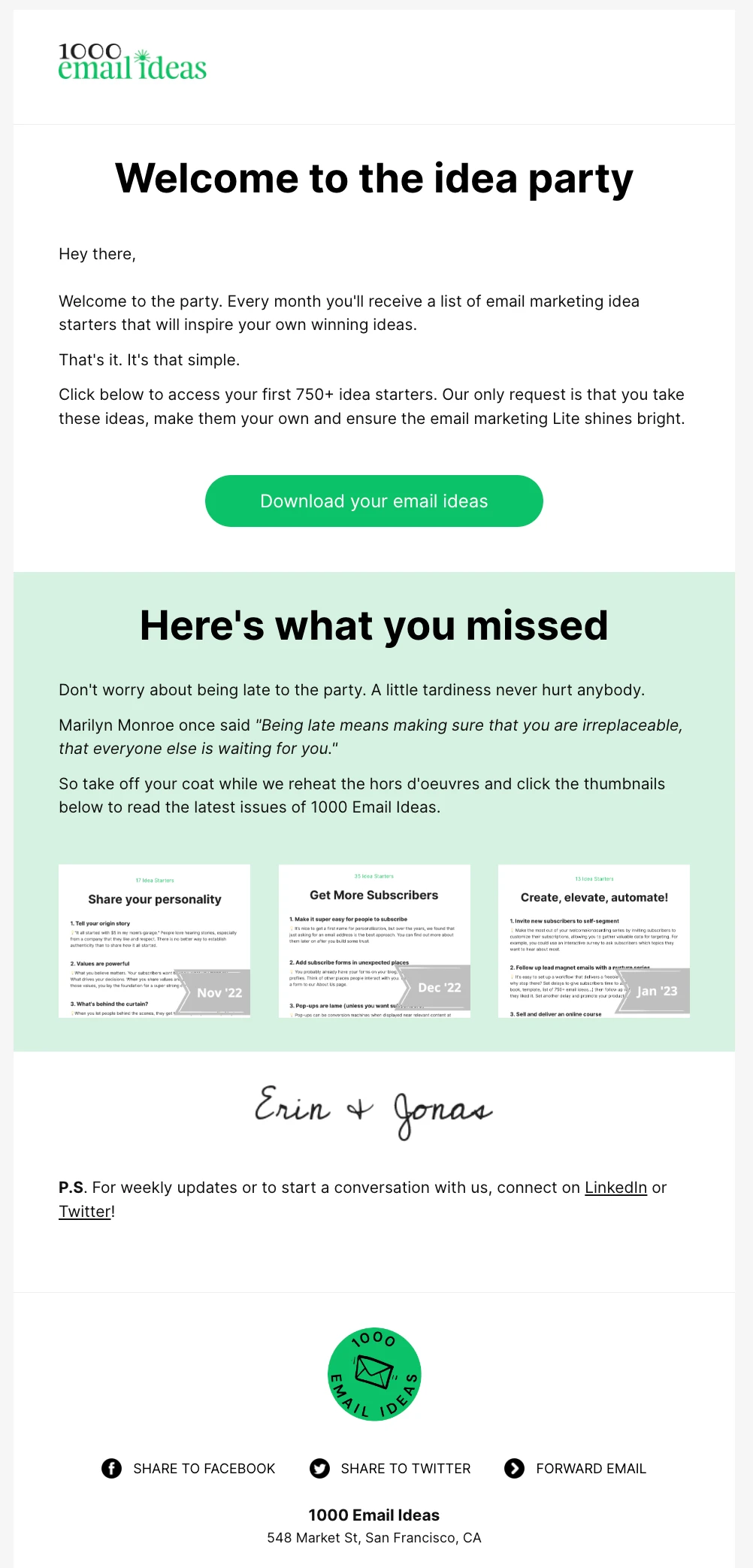
This is non-negotiable. The subscriber signed up for something; give it to them immediately and without any hassle.
- Place the link "above the fold": The download link should be one of the first things they see, before they have to scroll.
- Use a clear CTA: A button or a bold, unmistakable link works best.
4. The Body: Setting Expectations
After delivering the lead magnet, you can transition to building the relationship.
- Reinforce their goal: Briefly mention the value they seek. "You're probably here because you're looking to create a more aesthetic and focused digital setup."
- State your mission: What is your brand about? Connect this to your brand story from Module 3. "At [Your Brand Name], my goal is to provide tools and resources that help you do just that."
- Set expectations: Tell them what to expect from your future emails. This is crucial for keeping them subscribed and engaged.
- Example: "About once a week, I'll send you an email with design tips, behind-the-scenes content, or early access to new products."
5. The Sign-off and "The Open Loop"
End the email personally and give them a reason to anticipate the next one.
- Personal Sign-off: Use "Cheers," "All the best," or something similar, followed by your name.
- The P.S. (Postscript): As highlighted in the video (LINK, 23:50), the P.S. is one of the most-read parts of an email. Use it to create an "open loop" by teasing the value in your next email.
- Example: "P.S. Be on the lookout for my next email in a couple of days. I'll be sharing the #1 mistake people make when choosing a color palette for their desktop."
Your Task: Write and Automate Your Welcome Email (30 minutes)
It's time to put theory into practice. You'll draft your welcome email using a template and then set it up in Gumroad or Payhip to be sent automatically to new subscribers.
First, let's look at a fantastic template that incorporates all the elements we've discussed.
Mastering Your Welcome Email Series: Templates and Resources
The article 'Mastering Your Welcome Email Series' from Deadline Funnel provides a perfect, plug-and-play template for the first email in a sequence. We will use this as the foundation for your draft.
Review the sections 'Crafting effective welcome emails' and 'Email 1: The welcome & deliver (day 0)'. Pay close attention to the template structure provided. This is the blueprint you will use for your own email.
Now, follow these steps:
-
Draft Your Email: Open a text editor (like Notes, or a Google Doc) and use the template from the Deadline Funnel article as your guide. Customize it with your own details:
- Your brand name and your name.
- The name of your lead magnet.
- A link to your lead magnet (you can get this from your Gumroad/Payhip product page for the lead magnet).
- Your brand mission.
- The frequency and type of content you plan to send.
- A compelling P.S. that teases your next email.
-
Set Up the Automation:
- Log in to Gumroad or Payhip.
- Navigate to the Emails (Payhip) or Workflows (Gumroad) section. This is where you set up automated emails for your audience.
- Create a new email/workflow that is triggered when someone "purchases" your free lead magnet.
- Choose a "Welcome" or "New Subscriber" template if one is available, or start from a blank email.
- Copy and paste your drafted subject line and email body into the editor.
- Use the editor's tools to format your text: create a button for your download link, use bold text for emphasis, etc.
- Save and activate the workflow.
Your system is now live! Anyone who signs up for your lead magnet will automatically receive your carefully crafted welcome email.
Conclusion
You have successfully created the first and most important touchpoint in your relationship with a new subscriber. This single email accomplishes the critical tasks of building trust through instant delivery and setting the stage for future engagement.
Key Takeaways:
- A welcome email serves a dual purpose: It's both transactional (delivering the goods) and relational (starting a conversation).
- Structure is key: A successful welcome email has a clear anatomy: a strong subject line, personal greeting, immediate value delivery, brand introduction, expectation setting, and a forward-looking P.S.
- The P.S. is your secret weapon: Use the postscript to create an "open loop," making subscribers curious and eager for your next email.
- Automation is your friend: By setting this up in Gumroad or Payhip, you've built a system that works for you 24/7 to onboard new audience members.
Preview of the Next Lesson
You've welcomed your subscriber and teased your next email. What do you send them? In the next lesson, we'll write a value-focused email that educates your audience without a direct sales pitch. This is where you'll deliver on the promise made in your P.S., further establishing your expertise and building the trust necessary before you can effectively pitch your paid product.