Introduction
Welcome to your next lesson in Module 10: Business Operations & Legal Foundations.
In the last lesson, we established the default business structure you'll likely operate under: the sole proprietorship. You learned that as a sole proprietor, you are responsible for paying income tax and self-employment tax on your business profits, which you report on a Schedule C form with your personal tax return.
That covers the tax on your income. But what about the tax on the sale itself? This is called sales tax, and it's a completely different category. When a customer in a particular state or country buys your product, a sales tax may apply to that transaction. Who is responsible for collecting this tax and sending it to the government?
Fortunately, you don't have to become a global tax expert overnight. Digital marketplaces have systems in place to manage this complexity. This lesson will focus on determining exactly how marketplaces like Gumroad and Payhip handle sales tax collection for digital products, a crucial piece of knowledge for choosing your platform and operating legally.
1. The Basics of Sales Tax: What is "Nexus"?
Before we look at the platforms, you need to understand the core principle that determines sales tax responsibility: nexus. Nexus is a legal term for having a connection to a state that obligates you to collect and pay taxes there. For online sellers, there are two main types.
To get a clear and professional explanation of this concept, let's watch a video from the e-commerce accounting experts at LedgerGurus.
Online Sales Tax: The COMPLETE GUIDE for ecommerce sellers
This video, 'Online Sales Tax: The COMPLETE GUIDE for ecommerce sellers', provides an excellent breakdown of the two types of nexus that every online seller should know about.
Watch the segments from 00:37 to 06:48. As you watch, focus on understanding the difference between: Physical Nexus (0:52): Based on your physical presence (where you live, where employees are, where inventory is stored). Economic Nexus (2:32): Based on sales revenue or transaction volume in a state (e.g., $100,000 in sales or 200 transactions). Pay attention to the advice for new businesses (5:32): initially, you only need to worry about your physical nexus.
To recap the key points:
- Physical Nexus: As a new creator working from home, you automatically have physical nexus in your home state.
- Economic Nexus: This is triggered only when you reach a high volume of sales in another specific state. The thresholds are typically high (e.g., $100,000 or 200 transactions per year), so it's not an immediate concern for most new sellers.
Without any help, you would be responsible for tracking your nexus in all 50 states, registering in each one where you have it, and collecting and remitting the correct sales tax. This sounds like a nightmare, right? This is where marketplace platforms become so valuable.
2. The Power of Marketplace Facilitators
The complexity of economic nexus led many states to pass Marketplace Facilitator laws. These laws shift the responsibility for sales tax from the individual seller (you) to the marketplace platform (e.g., Amazon, Etsy, Gumroad, Payhip).
The marketplace, as the "facilitator" of the sale, is legally required to collect and remit the sales tax on your behalf. This is a game-changer for small creators.
Let's see what the experts at LedgerGurus have to say about this.
Online Sales Tax: The COMPLETE GUIDE for ecommerce sellers
Returning to the same video, the next segment directly addresses this solution to the sales tax problem.
Watch the section from 06:59 to 10:32. The video uses Amazon and Etsy as examples, but the principle applies directly to the platforms you're considering. The key takeaway is simple: if you sell through a marketplace facilitator, they handle sales tax for you.
Now, let's see how this principle applies specifically to Gumroad and Payhip.
3. Gumroad's Approach: The Merchant of Record
Gumroad takes the marketplace facilitator role to its furthest extent by acting as a "Merchant of Record" (MoR). This means they become the legal seller of the product for the purpose of the transaction. You are essentially selling your product to Gumroad, and Gumroad is selling it to the end customer.
This has massive implications for your tax responsibilities.
Gumroad's pricing page explains their Merchant of Record status very clearly.
Read the section titled 'We're a Merchant of Record' and the FAQ item 'What's changing with taxes?'. Note the language they use: Gumroad handles 'ALL' your tax obligations, and you don't need to do 'Nothing!' to prepare.
The conclusion for Gumroad is as simple as it gets:
- Gumroad collects and remits all sales tax, VAT, and other transaction taxes worldwide.
- As a seller, you have zero responsibility for managing sales tax. It is handled entirely by the platform. Any tax settings in your dashboard are disabled because they are no longer needed.
This makes Gumroad an extremely simple, "set it and forget it" option from a tax compliance perspective.
4. Payhip's Approach: A Hybrid Model
Payhip also acts as a marketplace facilitator, but its approach is more of a hybrid model. It automates taxes for some regions but requires you, the seller, to take an active role in others.
Taxes for Digital Products - Help Center - Payhip
Payhip's Help Center provides a detailed article on how they handle taxes for digital products. This will highlight the key differences from Gumroad.
Read through the article, paying close attention to these points: The first paragraph states that Payhip handles digital EU VAT automatically, but for other countries, 'we don’t remit this tax on your behalf'. The 'Set up custom taxes' section shows that you must manually add tax rates for countries and US states. The sections on US and Canadian tax show that while Payhip provides suggested rates, they advise you to check with a tax expert. The final section notes that you are responsible for checking with an accountant to understand your obligations.
To see what this looks like in practice, here are screenshots of the Payhip settings interface.
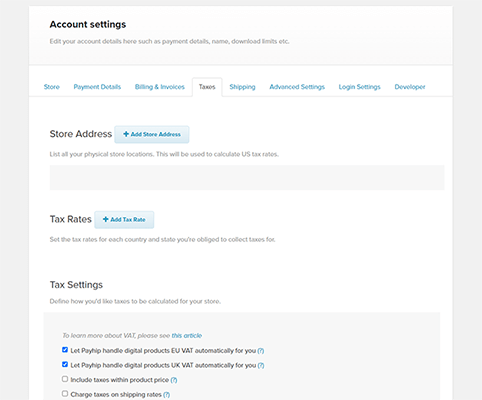

The key takeaway for Payhip is that it's a two-part system:
- Automated (EU & UK VAT): Like Gumroad, Payhip automatically handles the collection and remittance of Value Added Tax (VAT) for digital products sold to customers in the European Union and the United Kingdom.
- Seller-Managed (Rest of World, including US Sales Tax): For all other regions, you are responsible. This means you must:
- Determine where you have nexus (physical or economic).
- Use Payhip's tools to set up the correct tax rates for those specific states or countries.
- While Payhip will collect this tax from the customer at checkout, it is your responsibility to file tax returns and remit (pay) that collected tax to the proper government authorities. Payhip provides you with reports to help you do this.
If you're unsure of what this looks like, the following video provides a quick walkthrough of the tax settings page.
Complete Payhip Tutorial 2025 - Start Selling Today!
In this 'Complete Payhip Tutorial', the creator walks through the account settings, including the tax section.
Watch the brief segment from 07:31 to 08:30. This will give you a dynamic look at the interface described in the help article you just read.
5. Summary: Gumroad vs. Payhip on Sales Tax
Your choice of platform has significant implications for your administrative workload. Here is a direct comparison based on what you've just learned.
| Feature | Gumroad | Payhip |
|---|---|---|
| Model | Merchant of Record (MoR) | Marketplace Facilitator |
| EU & UK VAT | Automatically collected and remitted. | Automatically collected and remitted. |
| US Sales Tax | Automatically collected and remitted in all required states. | Seller must determine nexus, set up tax rates for each state, and remit the collected tax to the state authorities. |
| Other International Tax | Automatically collected and remitted worldwide. | Seller must determine obligations, set up tax rates for each country, and remit the collected tax to the relevant authorities. |
| Seller's Responsibility | None. Focus entirely on creating and selling. | Significant. Must track nexus, configure settings, and handle tax filing and remittance for all non-EU/UK sales. |
| Best For | Creators who want maximum simplicity and zero tax administration. | Creators who need more granular control over tax settings and are willing to handle the administrative work of filing and remittance. |
Conclusion
You now have a clear understanding of how sales tax for digital products is managed by the two major platforms you're considering. This is a critical factor that goes beyond transaction fees and storefront design.
Key Takeaways:
- An online seller's sales tax obligation is determined by nexus—a connection to a state through physical presence or economic activity.
- Marketplace Facilitator laws shift the burden of collecting and remitting sales tax from the individual seller to the platform.
- Gumroad acts as a Merchant of Record, completely absolving you of all sales tax management duties worldwide.
- Payhip automates EU/UK VAT but requires you to actively manage, collect, and remit sales tax for all other regions where you have nexus, including US states.
This knowledge empowers you to make an informed decision that aligns with your goal of starting a business with minimal friction. For someone who prefers systematic frameworks and wants to focus on creation, the simplicity of a Merchant of Record model can be highly attractive.
Preview of the Next Lesson
Now that you understand your obligations for both income tax (from the previous lesson) and sales tax, the next logical step is to set up a system to track your money. Accurate financial records are the foundation of tax compliance and smart business decisions.
In the next lesson, we will compare expense tracking tools like Actual Budget, Monarch Money, and Copilot Money, evaluating them based on features, cost, and suitability for your specific situation as a student starting a digital product business.